Attention: Here be dragons
This is the latest
(unstable) version of this documentation, which may document features
not available in or compatible with released stable versions of Godot.
Checking the stable version of the documentation...
Localization using gettext (PO files)
In addition to importing translations in
CSV format, Godot also
supports loading translation files written in the GNU gettext format
(text-based .po and compiled .mo).
Nota
Para una introducción a gettext, mira en A Quick Gettext Tutorial. Está escrito con proyectos C en mente, pero muchos de los consejos también se aplican a Godot (con la excepción de xgettext).
For the complete documentation, see GNU Gettext.
Ventajas
gettext is a standard format, which can be edited using any text editor or GUI editors such as Poedit. This can be significant as it provides a lot of tools for translators, such as marking outdated strings, finding strings that haven't been translated, etc.
Gettext es compatible con plataformas de traducción como Transifex y Weblate, lo que facilita la colaboración de las personas en la localización.
Compared to CSV, gettext files work better with version control systems like Git, as each locale has its own messages file.
Multiline strings are more convenient to edit in gettext PO files compared to CSV files.
Desventajas
gettext PO files have a more complex format than CSV and can be harder to grasp for people new to software localization.
Las personas que mantienen archivos de localización deberán instalar las herramientas de gettext en su sistema. Sin embargo, como Godot admite el uso de archivos de mensajes en formato de texto (
.po), los traductores pueden probar su trabajo sin tener que instalar las herramientas de gettext.gettext PO files usually use English as the base language. Translators will use this base language to translate to other languages. You could still user other languages as the base language, but this is not common.
Instalar las herramientas gettext
Las herramientas de gettext de la línea de comando son necesarias para realizar operaciones de mantenimiento, como la actualización de los archivos de mensajes. Por lo tanto, se recomienda encarecidamente instalarlas.
Windows: Descargue un instalador de "esta página" <https://mlocati.github.io/articles/gettext-iconv-windows.html>`_. Cualquier arquitectura y tipo binario (compartido o estático) funciona; si tienes dudas, elige el instalador estático de 64 bits.
** macOS: ** Instale gettext usando Homebrew con el comando
brew install gettext, o usando MacPorts con el comandosudo port install gettext.Linux: En la mayoría de las distribuciones, instala el paquete
gettextdel gestor de paquetes de tu distribución.
For a GUI tool you can get Poedit from its Official website. The basic version is open source and available under the MIT license.
Creating the PO template
Automatic generation using the editor
The editor can generate a PO template automatically from
specified scene and GDScript files. This POT generation also supports translation
contexts and pluralization if used in a script, with the optional second
argument of tr() and the tr_n() method.
Open , then use the button to specify the path to your project's scenes and scripts that contain localizable strings:
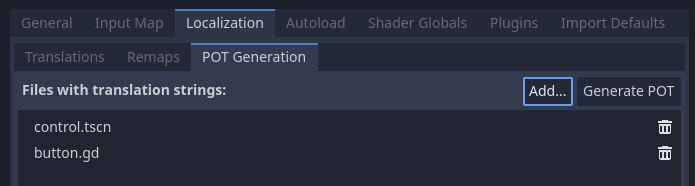
Creating a PO template in the tab of the Project Settings
After adding at least one scene or script, click in the
top-right corner, then specify the path to the output file with a pot file extension. This file can be
placed anywhere in the project directory, but it's recommended to keep it in a
subdirectory such as locale, as each locale will be defined in its own file.
See below for how to add comments for translators or exclude some strings from being added to the PO template for GDScript files.
You can then move over to creating a messages file from a PO template.
Nota
Remember to regenerate the PO template after making any changes to localizable strings, or after adding new scenes or scripts. Otherwise, newly added strings will not be localizable and translators won't be able to update translations for outdated strings.
Creación manual
If the automatic generation approach doesn't work out for your needs, you can create a PO template by hand in a text editor. This file can be placed anywhere in the project directory, but it's recommended to keep it in a subdirectory, as each locale will be defined in its own file.
Create a directory named locale in the project directory. In this directory,
save a file named messages.pot with the following content:
# Don't remove the two lines below, they're required for gettext to work correctly.
msgid ""
msgstr ""

# Example of a regular string.
msgid "Hello world!"
msgstr ""

# Example of a string with pluralization.
msgid "There is %d apple."
msgid_plural "There are %d apples."
msgstr[0] ""
msgstr[1] ""

# Example of a string with a translation context.
msgctxt "Actions"
msgid "Close"
msgstr ""
Los mensajes en gettext están hechos de pares de msgid y msgstr. msgid es la string fuente (usualmente en inglés), msgstr será la string traducida.
Advertencia
El valor msgstr en los archivos de plantillas PO (.pot) debe siempre estar vacío. La localización se hará en los archivos generados .po en su lugar.
Creación de un archivo de mensajes a partir de una plantilla de PO
El comando msginit se usa para convertir una plantilla de PO en un archivo de mensajes. Por ejemplo, para crear un archivo de localización francés, usa el siguiente comando mientras estés en el directorio locale:
msginit --no-translator --input=messages.pot --locale=fr
El comando anterior creará un archivo llamado fr.po en el mismo directorio que la plantilla PO.
Alternativamente, puedes hacerlo gráficamente usando Poedit, o subiendo el archivo POT a la plataforma web de tu elección.
Cargar un archivo de mensajes en Godot
To register a messages file as a translation in a project, open the
Project Settings, then go to ,
click then choose the .po or .mo file
in the file dialog. The locale will be inferred from the
"Language: <code>\n" property in the messages file.
Nota
Véase Internacionalizar los juegos para más información sobre la importación y prueba de traducciones en Godot.
Actualizar archivos de mensajes para seguir la plantilla de PO
Después de actualizar la plantilla de PO, tendrá que actualizar los archivos de mensajes para que contengan nuevas strings, al tiempo que elimina las strings que ya no están presentes en la plantilla de PO eliminadas en la plantilla de PO. Esto se puede hacer automáticamente usando la herramienta msgmerge:
# The order matters: specify the message file *then* the PO template!
msgmerge --update --backup=none fr.po messages.pot
Si quieres mantener una copia de seguridad del archivo de mensajes original (que se guardaría como fr.po~ en este ejemplo), elimina el argumento -backup=none.
Nota
Después de ejecutar msgmerge, las strings que fueron modificadas en el idioma fuente tendrán un comentario fuzzy agregado antes de ellas en el archivo .po. Este comentario indica que la traducción debe actualizarse para que coincida con la nueva cadena fuente, ya que es probable que la traducción sea inexacta hasta que se actualice.
Las strings con comentarios "fuzzy" no serán leídas por Godot hasta que la traducción se actualice y se elimine el comentario "fuzzy".
Comprobación de la validez de un archivo PO o plantilla
Es posible comprobar si la sintaxis de un archivo gettext es válida.
If you open with Poeditor, it will display the appropriate warnings if there's some syntax errors. You can also verify by running the gettext command below:
msgfmt fr.po --check
Si hay errores de sintaxis o advertencias, se mostrarán en la consola. De lo contrario, msgfmt no emitirá nada.
Usar archivos binarios MO (útiles solo para proyectos grandes)
Para proyectos grandes con miles de strings para traducir o más, puede valer la pena utilizar archivos binarios MO (compilados) en lugar de archivos PO en formato de texto. Los archivos binarios MO son más pequeños y más rápidos de leer que los archivos PO equivalentes.
You can generate an MO file with the command below:
msgfmt fr.po --no-hash -o fr.mo
If the PO file is valid, this command will create an fr.mo file besides
the PO file. This MO file can then be loaded in Godot as described above.
The original PO file should be kept in version control so you can update your translation in the future. In case you lose the original PO file and wish to decompile an MO file into a text-based PO file, you can do so with:
msgunfmt fr.mo > fr.po
El archivo descompilado no incluirá comentarios ni strings "fuzzy", ya que estos nunca se compilan en el archivo MO en primer lugar.
Extracting localizable strings from GDScript files
The built-in editor plugin recognizes a variety of patterns in source code to extract localizable strings from GDScript files, including but not limited to the following:
tr(),tr_n(),atr(), andatr_n()calls;assigning properties
text,placeholder_text, andtooltip_text;add_tab(),add_item(),set_tab_title(), and other calls;FileDialogfilters like"*.png ; PNG Images".
Nota
The argument or right operand must be a constant string, otherwise the plugin will not be able to evaluate the expression and will ignore it.
If the plugin extracts unnecessary strings, you can ignore them with the NO_TRANSLATE comment.
You can also provide additional information for translators using the TRANSLATORS: comment.
These comments must be placed either on the same line as the recognized pattern or precede it.
$CharacterName.text = "???" # NO_TRANSLATE

# NO_TRANSLATE: Language name.
$TabContainer.set_tab_title(0, "Python")

item.text = "Tool" # TRANSLATORS: Up to 10 characters.

# TRANSLATORS: This is a reference to Lewis Carroll's poem "Jabberwocky",
# make sure to keep this as it is important to the plot.
say(tr("He took his vorpal sword in hand. The end?"))
Usar contexto
The context parameter can be used to differentiate the situation where a translation
is used, or to differentiate polysemic words (words with multiple meanings).
Por ejemplo:
tr("Start", "Main Menu")
tr("End", "Main Menu")
tr("Shop", "Main Menu")
tr("Shop", "In Game")
In a gettext PO file, a string with a context can be defined as follows:
# Example of a string with a translation context.
msgctxt "Main Menu"
msgid "Shop"
msgstr ""

# A different source string that is identical, but with a different context.
msgctxt "In Game"
msgid "Shop"
msgstr ""
Actualizar archivos PO
Some time or later, you'll add new content to our game, and there will be new strings that need to be translated. When this happens, you'll need to update the existing PO files to include the new strings.
First, generate a new POT file containing all the existing strings plus the newly added strings. After that, merge the existing PO files with the new POT file. There are two ways to do this:
Use a gettext editor, and it should have an option to update a PO file from a POT file.
Use the gettext
msgmergetool:
# The order matters: specify the message file *then* the PO template!
msgmerge --update --backup=none fr.po messages.pot
Si quieres mantener una copia de seguridad del archivo de mensajes original (que se guardaría como fr.po~ en este ejemplo), elimina el argumento -backup=none.
POT generation custom plugin
If you have any extra file format to deal with, you could write a custom plugin to parse and and extract the strings from the custom file. This custom plugin will extract the strings and write into the POT file when you hit Generate POT. To learn more about how to create the translation parser plugin, see EditorTranslationParserPlugin.