Attention: Here be dragons
This is the latest
(unstable) version of this documentation, which may document features
not available in or compatible with released stable versions of Godot.
Checking the stable version of the documentation...
在 macOS 上編譯
備註
本頁說明如何從原始碼編譯 macOS 編輯器與匯出樣板二進位檔。如果你想將專案匯出到 macOS,請參閱 為 macOS 匯出。
系統需求
在 macOS 下編譯時,需符合以下需求:
SCons 4.4+ build system.
Xcode (或更輕量的 Xcode 命令列工具)。
適用於 MoltenVK 的 Vulkan SDK (macOS 預設不支援 Vulkan)。可在 Godot 原始碼資料夾中執行
misc/scripts/install_vulkan_sdk_macos.sh以快速安裝最新版 Vulkan SDK。
編譯
開啟終端機,切換至引擎原始碼的根目錄。
若要為 Intel (x86-64) 架構的 Mac 編譯,請輸入:
scons platform=macos arch=x86_64
若要為 Apple Silicon(ARM64 架構)的 Mac 編譯,請輸入:
scons platform=macos arch=arm64
小訣竅
若你自行編譯 Godot 以進行修改或貢獻開發,建議在 SCons 加上 dev_build=yes 或 dev_mode=yes 選項。詳情請參閱 開發與發行別名。
若一切順利,產生的二進位執行檔會放在 bin/ 子資料夾中。此執行檔包含完整引擎,無須任何相依套件即可執行。啟動後會顯示專案管理員。
備註
不建議直接使用獨立執行檔,應將其包裝為 .app 應用程式,以避免使用者介面啟動上的問題。
備註
若希望自編譯 Godot 和官方版本使用不同編輯器設定,可在 bin/ 資料夾內建立 ._sc_ 或 _sc_ 檔案,以啟用 自包含模式。
Compiling with AccessKit support
AccessKit provides support for screen readers.
Compiling with AccessKit requires additional dependencies to be installed.
If you wish to skip this step, you can use the accesskit=no SCons option.
You can install the required dependencies by running
python misc/scripts/install_accesskit.py
in the Godot source repository. After running this script, compile Godot as usual.
備註
You can optionally build the godot-accesskit-static libraries yourself with the following steps:
Clone the godot-accesskit-c-static directory and navigate to it.
執行下列指令:
cd accesskit-c
cmake -S . -B build -DCMAKE_BUILD_TYPE=Release
cmake --build build
cmake --install build
The AccessKit static library should be built using the same compiler you are using for building Godot.
To compile Godot with a custom build of AccessKit, add accesskit_sdk_path={path} to
tell SCons where to look for the AccessKit libraries:
scons platform=macos accesskit_sdk_path=<...>
編譯支援 ANGLE
ANGLE provides a translation layer from OpenGL ES 3.x to Metal and can be used to improve support for the Compatibility renderer on some older GPUs with outdated OpenGL drivers.
Compiling with ANGLE requires additional dependencies to be installed.
If you wish to skip this step, you can use the angle=no SCons option.
You can install the required dependencies by running
python misc/scripts/install_angle.py
in the Godot source repository. After running this script, compile Godot as usual.
備註
你也可以依下列步驟自行編譯 godot-angle-static 靜態函式庫:
複製 godot-angle-static 專案並切換到該資料夾。
執行下列指令:
git submodule update --init
./update_angle.sh
scons
You can also specify the build architecture using arch={architecture}.
The ANGLE static library should be built using the same compiler you are using for building Godot.
To compile Godot with a custom build of ANGLE, add angle_libs={path} to
tell SCons where to look for the ANGLE libraries:
scons platform=macos angle_libs=<...>
自動建立 .app 應用程式包
若要像官方版本一樣自動建立 .app 應用程式包, 請在 最後 一次建構編輯器時於 SCons 指令加上 generate_bundle=yes 選項:
scons platform=macos arch=x86_64
scons platform=macos arch=arm64 generate_bundle=yes
手動建立 .app 應用程式包
若要用單一「Universal 2」二進位檔同時支援兩種架構,請先執行上述兩個指令,再用 lipo 將執行檔合併:
lipo -create bin/godot.macos.editor.x86_64 bin/godot.macos.editor.arm64 -output bin/godot.macos.editor.universal
若要建立 .app 應用程式包,需使用 misc/dist/macos_tools.app 樣板。一般來說,若以 dev_build=yes 建構最佳化編輯器,請執行:
cp -r misc/dist/macos_tools.app ./bin/Godot.app
mkdir -p bin/Godot.app/Contents/MacOS
cp bin/godot.macos.editor.universal bin/Godot.app/Contents/MacOS/Godot
chmod +x bin/Godot.app/Contents/MacOS/Godot
codesign --force --timestamp --options=runtime --entitlements misc/dist/macos/editor.entitlements -s - bin/Godot.app
備註
如果你是建構 master 分支,也需包含對 MoltenVK Vulkan 可攜性函式庫的支援。預設會從已安裝的 macOS Vulkan SDK 進行靜態連結,也可選擇加上 use_volk=yes,並將動態函式庫放入 .app 套件,以改用動態連結:
mkdir -p <Godot bundle name>.app/Contents/Frameworks
cp <Vulkan SDK path>/macOS/lib/libMoltenVK.dylib <Godot bundle name>.app/Contents/Frameworks/libMoltenVK.dylib
執行無介面/伺服器版本
若要以 無頭 模式執行,提供自動化專案匯出的編輯器功能,請照常建置:
scons platform=macos target=editor
接著使用 --headless 指令列參數:
./bin/godot.macos.editor.x86_64 --headless
若要編譯可搭配 遠端偵錯工具 使用的 伺服器 除錯版本,請輸入:
scons platform=macos target=template_debug
若要編譯專為遊戲伺服器最佳化的發行版 伺服器,請輸入:
scons platform=macos target=template_release production=yes
建構匯出樣板
要建構 macOS 匯出樣板,需以無編輯器目標進行編譯:target=template_release``(發行樣板)及 ``target=template_debug。
官方樣板為 Universal 2 二進位檔,可同時支援 ARM64 及 Intel x86_64 架構。
若需同時支援 ARM64(Apple Silicon)及 Intel x86_64:
scons platform=macos target=template_debug arch=arm64
scons platform=macos target=template_release arch=arm64
scons platform=macos target=template_debug arch=x86_64
scons platform=macos target=template_release arch=x86_64 generate_bundle=yes
若僅需支援 ARM64(Apple Silicon)(檔案較小,但不相容舊硬體):
scons platform=macos target=template_debug arch=arm64
scons platform=macos target=template_release arch=arm64 generate_bundle=yes
To create a .app bundle like in the official builds, you need to use the
template located in misc/dist/macos_template.app. This process can be automated by using
the generate_bundle=yes option on the last SCons command used to build export templates
(so that all binaries can be included). This will create a godot_macos.zip file in bin/
and additionally takes care of calling lipo to create a Universal 2 binary from two separate
ARM64 and x86_64 binaries (if both were compiled beforehand).
備註
也需包含對 MoltenVK Vulkan 可攜性函式庫的支援。預設會從你的 macOS Vulkan SDK 安裝進行靜態連結,你也可選擇加上 use_volk=yes,並將動態函式庫放入 .app 套件,以改用動態連結:
mkdir -p macos_template.app/Contents/Frameworks
cp <Vulkan SDK path>/macOS/libs/libMoltenVK.dylib macos_template.app/Contents/Frameworks/libMoltenVK.dylib
大多數情況下建議使用靜態連結,方便發佈。動態連結的好處是日後可更新 MoltenVK 而無需重新編譯匯出樣板。
If you created the .app manually, you can zip the macos_template.app folder
to reproduce the macos.zip template from the official Godot distribution:
zip -r9 macos.zip macos_template.app
To use your custom export templates, you can select the godot_macos.zip file in
the advanced options of your export presets:
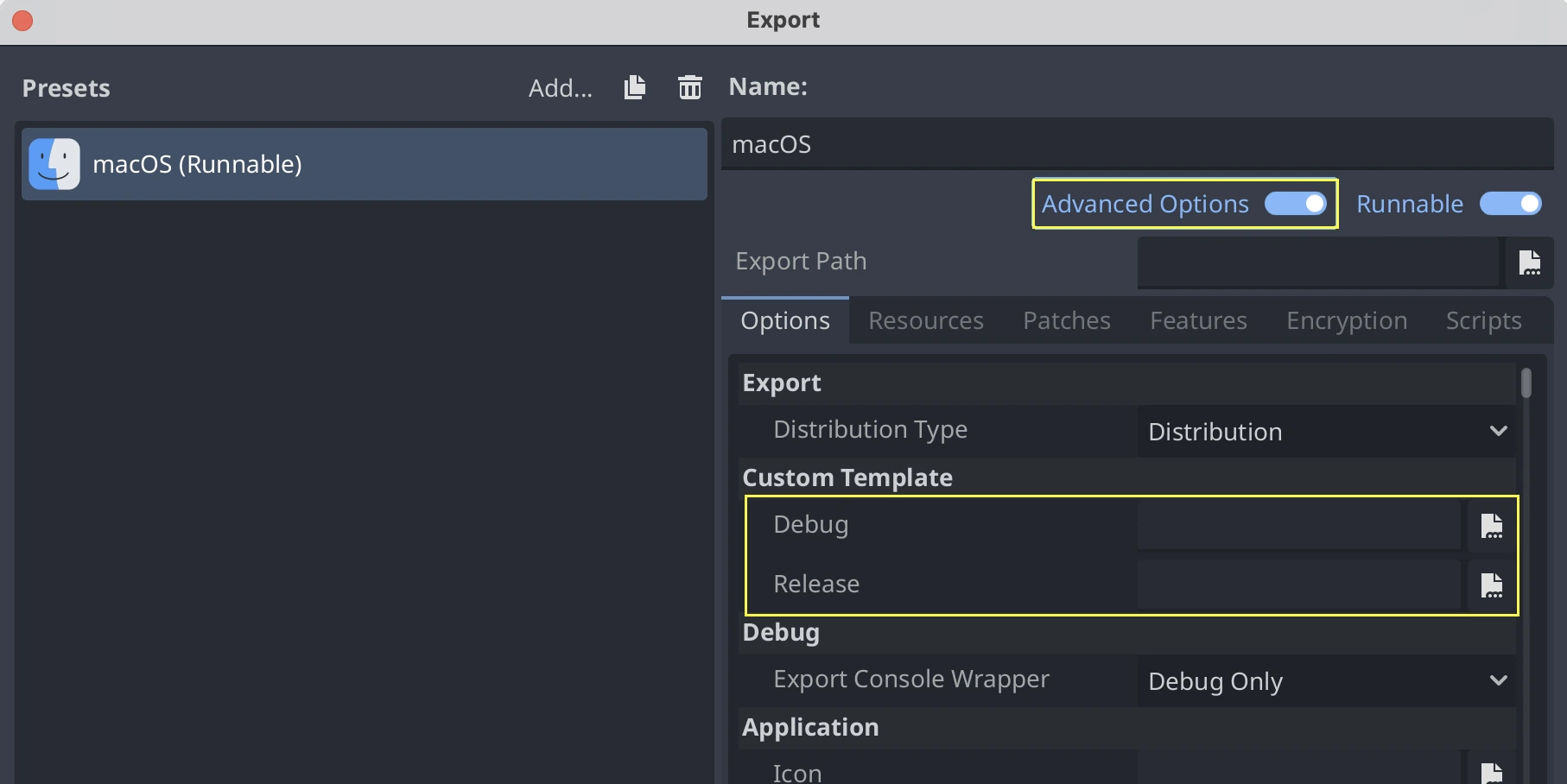
Alternatively, if you want all your presets to use your custom export template, you
can rename the godot_macos.zip file to macos.zip and move it to the default
location for export templates:
- ::
~/Library/Application Support/Godot/export_templates/<GODOT_VERSION>/macos.zip
於 Linux 上為 macOS 進行交叉編譯
你可以在 Linux 環境下編譯 macOS 執行檔(也可在 Windows 的子系統 Linux 上嘗試)。需安裝 OSXCross,以將 macOS 設為目標平台。請先依下列說明安裝:
將 OSXCross 儲存庫 複製(clone)到電腦上(或下載 ZIP 並解壓),例如:
git clone --depth=1 https://github.com/tpoechtrager/osxcross.git "$HOME/osxcross"
請依官方說明包裝 SDK:https://github.com/tpoechtrager/osxcross#packaging-the-sdk
請依官方說明安裝 OSXCross:https://github.com/tpoechtrager/osxcross#installation
接著需將 OSXCROSS_ROOT 設定為 OSXCross 的安裝路徑(即你 clone 儲存庫或解壓縮的資料夾),例如:
export OSXCROSS_ROOT="$HOME/osxcross"
現在可以像平常一樣用 SCons 編譯:
scons platform=macos
若 OSXCross SDK 版本與 SCons 建構系統預期的不同,可用 osxcross_sdk 參數指定:
scons platform=macos osxcross_sdk=darwin15
疑難排解
致命錯誤:找不到 'cstdint' 檔案
如果在一開始就遇到這類編譯錯誤,通常是因為在更新 macOS 或 Xcode 後,Xcode 命令列工具需要修復:
./core/typedefs.h:45:10: fatal error: 'cstdint' file not found
45 | #include <cstdint>
   |          ^~~~~~~~~
執行以下兩個指令以重新安裝 Xcode 命令列工具(需要時輸入系統管理員密碼):
sudo rm -rf /Library/Developer/CommandLineTools
sudo xcode-select --install
若仍無法解決,請從 Mac App Store 更新 Xcode 後再試一次。