Attention: Here be dragons
This is the latest
(unstable) version of this documentation, which may document features
not available in or compatible with released stable versions of Godot.
Checking the stable version of the documentation...
3D 算繪的局限性
前言
出於對性能的要求, 即時算繪引擎有很多局限性.Godot的算繪器也不例外. 為了更有效地工作, 你需要瞭解這些局限性.
紋理尺寸限制
在桌上型電腦和筆記型電腦上,舊裝置可能不支援大於 8192×8192 的紋理。你可以在 GPUinfo.org 上檢查你的目標 GPU 的限制。
移動端GPU通常僅支援小於4096×4096的紋理. 此外, 一些移動端GPU不支援對非二的冪次大小的紋理進行重複(repeat)操作. 因此, 如果你想讓你的紋理在所有平臺上正確顯示, 你應該避免使用比4096×4096大的紋理, 如果紋理需要重複, 應該使用兩倍的大小.
若要限制可能太大而無法算繪的特定紋理的大小,您可以將 Process > Size Limit 匯入選項設定為大於「0」的值。這將減少匯入時紋理的尺寸(保留縱橫比),而不影響原始檔。
帶狀顏色
When using the Forward+ or Mobile rendering methods, Godot's 3D engine renders internally in HDR. However, the rendering output will typically be written to a lower precision buffer. This can result in visible banding, especially when using untextured materials. For performance reasons, color precision is also lower when using the Mobile rendering method compared to Forward+.
When using the Compatibility rendering method, internal HDR rendering is not used and the color precision is the lowest of all rendering methods. This also applies to 2D rendering, where banding may be visible when using smooth gradient textures.
有兩種主要的方法可以減輕色帶:
如果你使用 Forward+ 或 Forward Mobile 算繪方法,請在 專案設定 > 算繪 > 抗鋸齒 中啟用 Use Debanding。這會套用一個全螢幕去色帶著色器作為後處理效果,效能開銷極低。
或者,在你的紋理中烘焙一些雜訊。這主要在2D中是有效的,例如用於虛化效果。在3D中,你也可以使用一個 自訂去噪著色器 來應用於你的 材質 。即使你的專案是用LDR算繪的,這種技術也是有效的,這意味著它在使用GLES2算繪器時也能發揮作用。
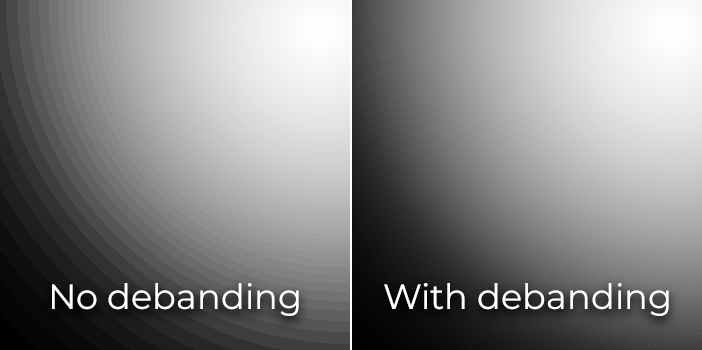
色帶比較(增加對比度以提高可視性)
也參考
參見 Banding in Games: A Noisy Rant 獲取更多有關條帶效應的細節和解決方案.
深度緩衝精度
To sort objects in 3D space, rendering engines rely on a depth buffer (also called Z-buffer). This buffer has a finite precision: 32-bit on desktop platforms, 24-bit on mobile platforms (for performance reasons). If two different objects end up on the same buffer value, then Z-fighting will occur. This will materialize as textures flickering back and forth as the camera moves or rotates.
為了使深度緩衝在算繪區域上更精確,你應該*增加*相機節點的 Near 屬性。但是要小心,如果你設定得太高,玩家就會看穿附近的幾何體。同時,還應該*減少*相機節點的 Far 屬性到你用例允許的最低值,儘管它不會像 Near 屬性那樣影響精度。
如果你只需要當玩家能夠看到很遠的地方時才提供高精度, 你可以根據遊戲條件動態改變它. 例如, 如果玩家進入飛機, Near 屬性可以暫時增加, 以避免遠處的z衝突現象(z-fighting). 當玩家離開飛機時, 它便會被減少.
根據場景和玩家視野條件, 你還可以在玩家不會看出差異的情況下將產生z衝突的物件移得更遠.
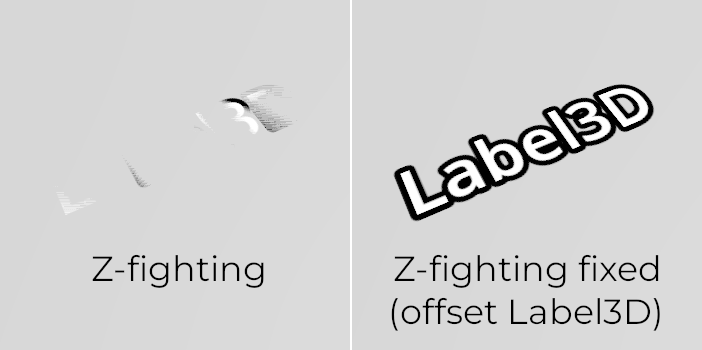
Z-fighting 比較(透過將 Label3D 偏離地板來調整場景前後)
透明度排序
在 Godot 中,透明材質會在不透明材質之後繪製。透明物件會根據 Node3D 的位置(不是世界空間的頂點位置)進行遠近排序再繪製,因此重疊物件常會出現排序錯誤。可嘗試調整材質的 Render Priority 屬性,或節點的 Sorting Offset 屬性,強制某些材質排在前後,或將物件排序偏移。不過,即使如此,這也不一定總能解決所有排序問題。
Transparent objects are not rendered to the normal-roughness buffer, as they are drawn after opaque geometry. As a result, features that rely on the normal-roughness buffer will not affect transparent materials.
一些算繪引擎會使用*順序無關的透明*技術來緩解這個問題,但這類技術對於 GPU 而言開銷很大。Godot 目前沒有提供這個功能,但仍然有幾種方法可以避免這個問題:
只有在你真正需要的時候才讓材質透明。如果一種材質只有一個很小的透明部分,考慮將它分割成一個單獨的材質。這將允許不透明部分投射陰影,也可能提高性能。
如果你的紋理大多都是全不透明或全透明區域,可以用 alpha 測試替代 alpha 混合。這種透明模式計算更快且不會有排序問題。只需在 StandardMaterial3D 中將 Transparency > Transparency 設為 Alpha Scissor,必要時再調整 Transparency > Alpha Scissor Threshold。注意,MSAA 不會對紋理邊緣做抗鋸齒,除非材質屬性也啟用 alpha 抗鋸齒。不過 FXAA、TAA 及超級取樣都可處理紋理邊緣抗鋸齒,不管材質有沒有啟用 alpha 抗鋸齒。
如果你的紋理有半透明區域,alpha 裁剪就不適用了。可以將 StandardMaterial3D 的 Transparency > Transparency 設為 Depth Pre-Pass**(深度前置通道),有時會有幫助(但會影響效能)。你也可以嘗試 **Alpha Hash 模式。
如果你想讓材質隨著距離逐漸消失,請將 StandardMaterial3D 的距離淡出模式設為 Pixel Dither 或 Object Dither,而非 Pixel Alpha。這會讓材質保持不透明,同時也能提升算繪效能。
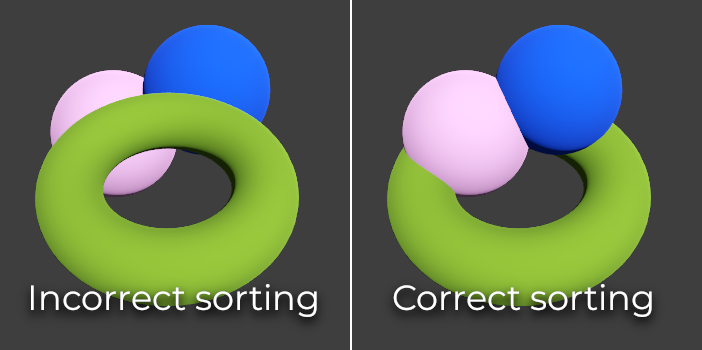
透明度排序比較(左邊是alpha混合材質,右邊是alpha剪刀材質)