Attention: Here be dragons
This is the latest
(unstable) version of this documentation, which may document features
not available in or compatible with released stable versions of Godot.
Checking the stable version of the documentation...
Godot Android 函式庫
Godot 引擎在 Android 平臺上被設計成可作為 Android 函式庫 使用。這種架構在 Android 平臺上實現了幾項關鍵功能:
可以在 Godot 編輯器內整合 Gradle 建構系統,進而運用更多 Android 生態系的函式庫與工具
讓引擎具備可攜性與可嵌入性:
這是讓 Godot 編輯器能移植到 Android 與行動 XR 裝置的關鍵
也是將 Godot 功能整合並重複利用於現有程式碼庫的關鍵
以下說明這種架構能實現的部分應用情境與案例。
使用 Godot Android 函式庫
Godot Android 函式庫以 AAR 封裝格式發佈,托管於 MavenCentral,同時提供 API 文件。
它讓你可在 Android 平臺上存取 Godot API 與功能,應用情境包括但不限於。
Godot Android 外掛
Android 外掛是能擴充 Godot 引擎在 Android 平臺功能的強大工具,可利用 Android 生態系提供的各種功能。
Android 外掛本質上是依賴 Godot Android 函式庫的 Android 函式庫,可整合進 Godot 引擎的生命週期並存取 Godot API,進而實現強大功能,例如 GDExtension 支援,讓你可依需求動態擴充或修改引擎行為。
詳情請參見 Godot Android 外掛。
將 Godot 嵌入現有 Android 專案
Godot 引擎可嵌入現有的 Android 應用程式或函式庫,讓開發者能善用既有穩定的程式碼與函式庫,提升專案效率。
主程式負責透過 Godot 的 Android API 管理引擎生命週期。這些 API 也可用來實現主程式與嵌入的 Godot 實例之間的雙向通訊,讓你更細緻地掌控整體體驗。
以下將以範例 Android App 說明如何將 Godot 引擎嵌入 Android 檢視元件並用於渲染 3D glTF 模型。
GLTF Viewer 範例 App 採用 Android 的 RecyclerView 元件,顯示來自 Kenney's Food Kit 資源包的 glTF 項目清單。當某項目被選取時,App 會呼叫嵌入的 Godot 引擎渲染該 3D 模型。
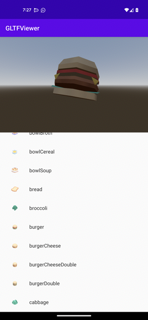
範例 App 原始碼可於 GitHub 取得,請依 README 說明進行建置與安裝。
以下拆解 GLTF Viewer app 的製作步驟。
警告
目前每個行程僅支援一個 Godot 引擎實例。你可使用 android:process 屬性 設定 Activity 所屬行程。
警告
目前不支援自動調整大小/方向等設定事件,否則可能導致當機。你可停用相關事件:
可透過 android:screenOrientation 屬性 鎖定特定畫面方向。
或於 AndroidManifest.xml 宣告 Activity 將處理這些設定事件(使用 android:configChanges 屬性)。
1. 建立 Android 應用程式
備註
本範例 App 是透過 Android Studio 製作,並使用 Gradle 當作建置系統。
Android 生態系提供多種工具、IDE 與建置系統可用於開發 App,請依你習慣的工具調整下列步驟(也歡迎回饋本文件!)。
建立一個 Android 專案,可為全新或既有專案
加入 Godot Android 函式庫的 Maven 相依性
若使用
gradle,請將以下內容加入 app gradle 設定檔的dependency區段,並將<version>換成 Godot Android 函式庫的最新版:
implementation("org.godotengine:godot:<version>")
若使用
gradle,請在 app gradle 設定檔的android > defaultConfig區段加入下列aaptOptions設定,可讓 gradle 在建置應用程式時包含 Godot 的隱藏目錄。如果你的建置系統無法納入隱藏目錄,可在 Godot 專案設定取消勾選 Application > Config > Use Hidden Project Data Directory,避免使用隱藏專案資料夾。
android {

  defaultConfig {
      // The default ignore pattern for the 'assets' directory includes hidden files and
      // directories which are used by Godot projects, so we override it with the following.
      aaptOptions {
          ignoreAssetsPattern "!.svn:!.git:!.gitignore:!.ds_store:!*.scc:<dir>_*:!CVS:!thumbs.db:!picasa.ini:!*~"
      }
    ...
建立或更新託管 Godot 引擎實例的 Activity。以範例 App 而言,對應檔案為 MainActivity
主 Activity 應實作 GodotHost 介面
範例 App 以 Fragments 組織 UI,並採用 Godot Android 函式庫內建的 GodotFragment 元件自動託管與管理 Godot 引擎實例。
private var godotFragment: GodotFragment? = null

override fun onCreate(savedInstanceState: Bundle?) {
    super.onCreate(savedInstanceState)

    setContentView(R.layout.activity_main)

    val currentGodotFragment = supportFragmentManager.findFragmentById(R.id.godot_fragment_container)
    if (currentGodotFragment is GodotFragment) {
        godotFragment = currentGodotFragment
    } else {
        godotFragment = GodotFragment()
        supportFragmentManager.beginTransaction()
            .replace(R.id.godot_fragment_container, godotFragment!!)
            .commitNowAllowingStateLoss()
    }

    ...
備註
Godot Android 函式庫同時提供 GodotActivity,可直接繼承該 Activity,自動託管與管理 Godot 引擎實例。
你也可以選擇直接建立 Godot 實例,自行託管與管理。
範例 App 透過 GodotHost#getHostPlugins(...) 建立一個 執行時 GodotPlugin 實例 ,用於向 GDScript 邏輯發送 signals
執行時的
GodotPlugin也可讓 GDScript 邏輯呼叫 JVM 方法。詳情請見 Godot Android 外掛。
新增應用程式所需的其他邏輯
以範例 App 為例,需加入 ItemsSelectionFragment 及相關類別,用來建立與顯示 glTF 項目清單
開啟
AndroidManifest.xml檔案,依需要使用 android:screenOrientation 屬性 設定畫面方向如需停用自動調整大小/方向等設定變更,請使用 android:configChanges 屬性
<activity android:name=".MainActivity"
    android:screenOrientation="fullUser"
    android:configChanges="orientation|screenSize|smallestScreenSize|screenLayout"
    android:exported="true">

    ...
</activity>
2. 建立 Godot 專案
備註
在 Android 平臺,Godot 專案檔案會匯出到產生的 apk 檔案中的 assets 目錄下。
我們可以利用這個架構,直接在 Android 專案的 assets 目錄下建立 Godot 專案,將兩者整合。
你也可以選擇將 Godot 專案建在獨立目錄,並匯出成 PCK 或 ZIP 檔,再放到 Android App 的 assets 目錄。這種方式需透過 GodotHost#getCommandLine() 傳入 --main-pack <檔案路徑> 參數給 Godot 引擎。
範例:
@Override
public List<String> getCommandLine(){
    List<String> results = new ArrayList<>();
    results.addAll(super.getCommandLine());
    results.add("--main-pack");
    results.add("res://foo.pck");
    return results;
}
以下教學與範例 App 都採用第一種方式:直接將 Godot 專案建在 Android App 的 assets 目錄下。
如上方 備註 ,請直接在 Android 專案的
assets目錄(不需子資料夾)建立 Godot 專案可參考範例 App 的 Godot 專案
依需求設定 Godot 專案
請確保 Godot 專案中 orientation (螢幕方向)設定與 Android App 的 manifest 設定一致
針對 Android,請將 textures/vram_compression/import_etc2_astc 設為 true
依需求更新 Godot 專案腳本邏輯
範例 App 中,main.gd 腳本會查詢執行時的
GodotPlugin實例,註冊接收 App 邏輯發送的 signal每當清單中有項目被選取時,App 邏輯會發送一個 signal,內容包含該 glTF 模型的檔案路徑,GDScript 會根據路徑渲染對應模型。
extends Node3D

# Reference to the gltf model that's currently being shown.
var current_gltf_node: Node3D = null

func _ready():
  # Default asset to load when the app starts
  _load_gltf("res://gltfs/food_kit/turkey.glb")

  var appPlugin = Engine.get_singleton("AppPlugin")
  if appPlugin:
    print("App plugin is available")

    # Signal fired from the app logic to update the gltf model being shown
    appPlugin.connect("show_gltf", _load_gltf)
  else:
    print("App plugin is not available")


# Load the gltf model specified by the given path
func _load_gltf(gltf_path: String):
  if current_gltf_node != null:
    remove_child(current_gltf_node)

  current_gltf_node = load(gltf_path).instantiate()

  add_child(current_gltf_node)
3. 建置並執行應用程式
完成 Godot 專案設定後,建置並執行 Android 應用程式。若設定無誤,主 Activity 啟動時會初始化嵌入的 Godot 引擎,Godot 會自動從 assets 目錄載入專案(除非有指定 main pack),然後執行專案。
App 執行期間,可透過 Android logcat 檢查錯誤或當機資訊。
可參考 GLTF Viewer 範例的 建置與安裝說明。