Attention: Here be dragons
This is the latest
(unstable) version of this documentation, which may document features
not available in or compatible with released stable versions of Godot.
Checking the stable version of the documentation...
支援不同角色型別
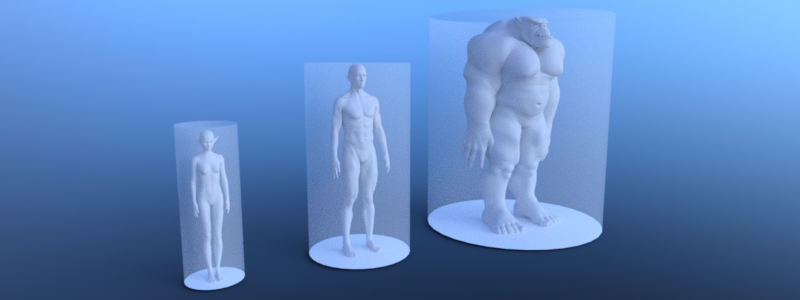
若要支援不同角色型別(例如尺寸不同),每種型別都需要專屬的導覽地圖與導覽網格,並以適合的代理半徑和高度進行烘焙。這種方式也可用來區分陸行、游泳或飛行等不同移動類型的代理。
備註
代理角色在烘焙導覽網格、尋路和避障時,只能以半徑和高度來定義。不支援更複雜的形狀。
# Create a navigation mesh resource for each actor size.
var navigation_mesh_standard_size: NavigationMesh = NavigationMesh.new()
var navigation_mesh_small_size: NavigationMesh = NavigationMesh.new()
var navigation_mesh_huge_size: NavigationMesh = NavigationMesh.new()

# Set appropriated agent parameters.
navigation_mesh_standard_size.agent_radius = 0.5
navigation_mesh_standard_size.agent_height = 1.8
navigation_mesh_small_size.agent_radius = 0.25
navigation_mesh_small_size.agent_height = 0.7
navigation_mesh_huge_size.agent_radius = 1.5
navigation_mesh_huge_size.agent_height = 2.5

# Get the root node to parse geometry for the baking.
var root_node: Node3D = get_node("NavigationMeshBakingRootNode")

# Create the source geometry resource that will hold the parsed geometry data.
var source_geometry_data: NavigationMeshSourceGeometryData3D = NavigationMeshSourceGeometryData3D.new()

# Parse the source geometry from the scene tree on the main thread.
# The navigation mesh is only required for the parse settings so any of the three will do.
NavigationServer3D.parse_source_geometry_data(navigation_mesh_standard_size, source_geometry_data, root_node)

# Bake the navigation geometry for each agent size from the same source geometry.
# If required for performance this baking step could also be done on background threads.
NavigationServer3D.bake_from_source_geometry_data(navigation_mesh_standard_size, source_geometry_data)
NavigationServer3D.bake_from_source_geometry_data(navigation_mesh_small_size, source_geometry_data)
NavigationServer3D.bake_from_source_geometry_data(navigation_mesh_huge_size, source_geometry_data)

# Create different navigation maps on the NavigationServer.
var navigation_map_standard: RID = NavigationServer3D.map_create()
var navigation_map_small: RID = NavigationServer3D.map_create()
var navigation_map_huge: RID = NavigationServer3D.map_create()

# Set the new navigation maps as active.
NavigationServer3D.map_set_active(navigation_map_standard, true)
NavigationServer3D.map_set_active(navigation_map_small, true)
NavigationServer3D.map_set_active(navigation_map_huge, true)

# Create a region for each map.
var navigation_region_standard: RID = NavigationServer3D.region_create()
var navigation_region_small: RID = NavigationServer3D.region_create()
var navigation_region_huge: RID = NavigationServer3D.region_create()

# Add the regions to the maps.
NavigationServer3D.region_set_map(navigation_region_standard, navigation_map_standard)
NavigationServer3D.region_set_map(navigation_region_small, navigation_map_small)
NavigationServer3D.region_set_map(navigation_region_huge, navigation_map_huge)

# Set navigation mesh for each region.
NavigationServer3D.region_set_navigation_mesh(navigation_region_standard, navigation_mesh_standard_size)
NavigationServer3D.region_set_navigation_mesh(navigation_region_small, navigation_mesh_small_size)
NavigationServer3D.region_set_navigation_mesh(navigation_region_huge, navigation_mesh_huge_size)

# Create start and end position for the navigation path query.
var start_pos: Vector3 = Vector3(0.0, 0.0, 0.0)
var end_pos: Vector3 = Vector3(2.0, 0.0, 0.0)
var use_corridorfunnel: bool = true

# Query paths for each agent size.
var path_standard_agent = NavigationServer3D.map_get_path(navigation_map_standard, start_pos, end_pos, use_corridorfunnel)
var path_small_agent = NavigationServer3D.map_get_path(navigation_map_small, start_pos, end_pos, use_corridorfunnel)
var path_huge_agent = NavigationServer3D.map_get_path(navigation_map_huge, start_pos, end_pos, use_corridorfunnel)
// Create a navigation mesh resource for each actor size.
NavigationMesh navigationMeshStandardSize = new NavigationMesh();
NavigationMesh navigationMeshSmallSize = new NavigationMesh();
NavigationMesh navigationMeshHugeSize = new NavigationMesh();

// Set appropriated agent parameters.
navigationMeshStandardSize.AgentRadius = 0.5f;
navigationMeshStandardSize.AgentHeight = 1.8f;
navigationMeshSmallSize.AgentRadius = 0.25f;
navigationMeshSmallSize.AgentHeight = 0.7f;
navigationMeshHugeSize.AgentRadius = 1.5f;
navigationMeshHugeSize.AgentHeight = 2.5f;

// Get the root node to parse geometry for the baking.
Node3D rootNode = GetNode<Node3D>("NavigationMeshBakingRootNode");

// Create the source geometry resource that will hold the parsed geometry data.
NavigationMeshSourceGeometryData3D sourceGeometryData = new NavigationMeshSourceGeometryData3D();

// Parse the source geometry from the scene tree on the main thread.
// The navigation mesh is only required for the parse settings so any of the three will do.
NavigationServer3D.ParseSourceGeometryData(navigationMeshStandardSize, sourceGeometryData, rootNode);

// Bake the navigation geometry for each agent size from the same source geometry.
// If required for performance this baking step could also be done on background threads.
NavigationServer3D.BakeFromSourceGeometryData(navigationMeshStandardSize, sourceGeometryData);
NavigationServer3D.BakeFromSourceGeometryData(navigationMeshSmallSize, sourceGeometryData);
NavigationServer3D.BakeFromSourceGeometryData(navigationMeshHugeSize, sourceGeometryData);

// Create different navigation maps on the NavigationServer.
Rid navigationMapStandard = NavigationServer3D.MapCreate();
Rid navigationMapSmall = NavigationServer3D.MapCreate();
Rid navigationMapHuge = NavigationServer3D.MapCreate();

// Set the new navigation maps as active.
NavigationServer3D.MapSetActive(navigationMapStandard, true);
NavigationServer3D.MapSetActive(navigationMapSmall, true);
NavigationServer3D.MapSetActive(navigationMapHuge, true);

// Create a region for each map.
Rid navigationRegionStandard = NavigationServer3D.RegionCreate();
Rid navigationRegionSmall = NavigationServer3D.RegionCreate();
Rid navigationRegionHuge = NavigationServer3D.RegionCreate();

// Add the regions to the maps.
NavigationServer3D.RegionSetMap(navigationRegionStandard, navigationMapStandard);
NavigationServer3D.RegionSetMap(navigationRegionSmall, navigationMapSmall);
NavigationServer3D.RegionSetMap(navigationRegionHuge, navigationMapHuge);

// Set navigation mesh for each region.
NavigationServer3D.RegionSetNavigationMesh(navigationRegionStandard, navigationMeshStandardSize);
NavigationServer3D.RegionSetNavigationMesh(navigationRegionSmall, navigationMeshSmallSize);
NavigationServer3D.RegionSetNavigationMesh(navigationRegionHuge, navigationMeshHugeSize);

// Create start and end position for the navigation path query.
Vector3 startPos = new Vector3(0.0f, 0.0f, 0.0f);
Vector3 endPos = new Vector3(2.0f, 0.0f, 0.0f);
bool useCorridorFunnel = true;

// Query paths for each agent size.
var pathStandardAgent = NavigationServer3D.MapGetPath(navigationMapStandard, startPos, endPos, useCorridorFunnel);
var pathSmallAgent = NavigationServer3D.MapGetPath(navigationMapSmall, startPos, endPos, useCorridorFunnel);
var pathHugeAgent = NavigationServer3D.MapGetPath(navigationMapHuge, startPos, endPos, useCorridorFunnel);