Attention: Here be dragons
This is the latest
(unstable) version of this documentation, which may document features
not available in or compatible with released stable versions of Godot.
Checking the stable version of the documentation...
匯出套件、修正檔與 Mod
使用例
常見情境是遊戲部署後仍想加入新功能。
這樣的例子包含...
DLC:可在遊戲中新增功能與內容。
修正檔:用來修正存在於已出貨產品中的 Bug。
Mod:讓其他人能夠為遊戲建立內容。
這些工具可以協助開發人員在初始版本後的開發。
PCK/ZIP 檔概覽
Godot 透過稱為 資源包 的功能實現此需求 (PCK 檔, 副檔名 .pck, 或 ZIP 檔)。
優點:
漸進更新/修補
提供 DLC
提供 Mod 支援
Mod 不需要公開原始碼
專案架構更加模組化
使用者不需要換掉整個遊戲
使用流程的第一步是先將專案匯出並交付給玩家。其後若要新增功能或內容,只需以 PCK/ZIP 檔提供更新給使用者。
PCK/ZIP 檔通常包含(但不限於):
腳本
場景
著色器
模型
紋理
音效
音樂
其他適合匯入到遊戲內的素材
PCK/ZIP 甚至可以是一個完全不同的 Godot 專案,供原本的遊戲在執行時載入。
可以同時載入 PCK 與 ZIP 作為附加資源包。兩者差異請參見 PCK v.s. ZIP 打包檔案格式。
也參考
若想在執行期載入散檔(非由 Godot 打包成 PCK 或 ZIP),可考慮使用 執行時檔案載入與儲存。這對載入非 Godot 製作的使用者產生內容很有用,且不需要求使用者將模組打包成特定格式。
此作法的缺點是對遊戲邏輯較不透明,因為無法享有如 PCK/ZIP 般的一致資源管理。
Security concerns
It is important to note that loading PCK files for patches, mods, or extra content like expansions, will require you to code a system to automatically load files based on their location, and possibly name. This is a security vulnerability in three scenarios. One, a user downloads a mod with malicious code. Two, a malicious program already exists on an end user's PC and has replaced the PCK file with a malicious copy. Three, you are distributing patch PCK files through a game launcher and the system has become compromised.
Take this into consideration when determining how to use PCK files in a project. For situations where you have a patching system via a launcher, consider using asymmetric cryptography. You could store the public key in the main PCK, and sign patch or expansion PCK files with the private key. See the Crypto class for more information.
Copyright concerns
If you want to use PCK files to distribute extra paid content, such as expansions, keep in mind that Godot provides no out-of-the-box way to prevent someone from copying the PCK file, and putting it on another person's computer. Any kind of DRM system is your responsibility to implement if that's what you want.
產生 PCK 檔
In order to pack all resources of a project into a PCK file, open the project and go to , select an export preset, and click on .
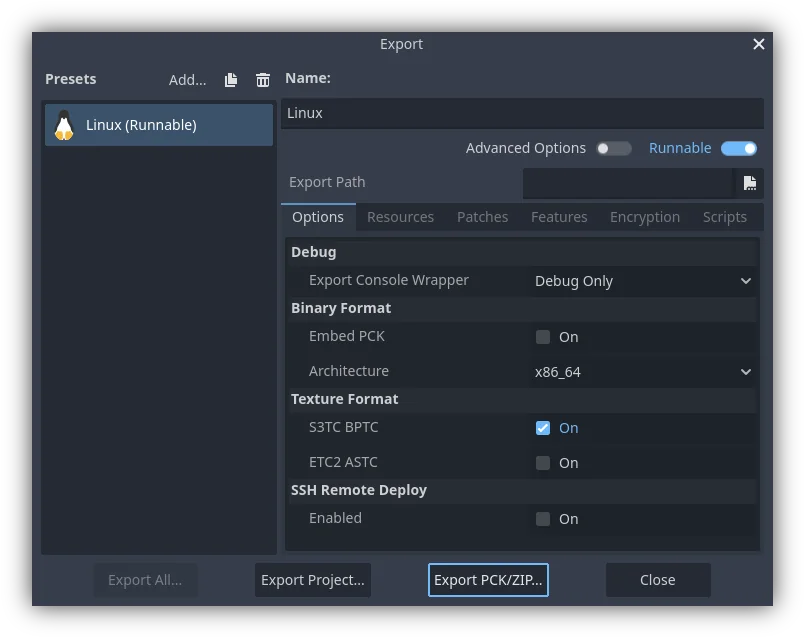
另一種方式是使用命令列以 --export-pack 進行匯出。輸出檔案的副檔名必須是 .pck 或 .zip。匯出流程會為所選平台建立該類型的檔案。
Patch PCK files
Generating Patch PCK files
To create a PCK file that only contains resources not present in the original release of a project, you would create a patch PCK file. This could be used for patches, mods, or expansions. For this to work you'll first need to have a PCK file for your project at the point of its initial release.
To generate a patch PCK file, within the export menu, and with your desired preset selected, click on the tab. At the bottom is the Base Packs section. Click on the button, then navigate to the PCK file you exported that contains everything in your project for its initial release.
Now, when you go to export a PCK file of your project again, if you have the button selected, only resources that have changed will be exported in the PCK file.
You can also add any patches you export to your base packs for future use. For
example, adding patch.pck will ensure that patch2.pck will not include any
resources from that first patch.
Delta encoding
Patch PCK files can be made smaller through the use of delta encoding. This makes it so that only the parts of a file that have been changed are updated. This does have a drawback of longer load times for the resources that are updated, and each patch for a resource cumulatively increases its load time.
There are two settings for delta encoding in addition to the filters:
Delta Encoding Compression Level: Controls how much compression is applied to the files. We do not recommend any more than the default of 19. Beyond that more memory is needed for export and import for significantly fewer gains. Any positive values will have the same decompression speed, however export will take longer the higher the number is. Negative values enable fast mode, which means larger files, but the decompression speed is higher.
Delta Encoding Minimum Size Reduction: Controls how much size has to be saved at minimum for compression to be used on an individual file. For example, at a level of 10%, if the file size can only be reduced by 5%, then the file won't use delta encoding.
The default compression level, 19, is the highest recommended level.
For the smallest patch size possible we recommend turning off compression for any resources you want to patch. Even if your base PCK files were compressed that shouldn't cause an issue.
There are several places compression can be disabled for different resources:
Import settings related to compression on individually imported resources, such as translation or 3D model files
Compress Binary Resources in the editor settings
GDScript Export Mode in the tab of an export preset
備註
After disabling Compress Binary Resources you must delete the contents of
your projects .godot/imported/ folder, then closing and open the project
again to re-generate it.
It's important to note that when you export a delta encoded patch on top of previous patches, the packs you list under Base Packs in the tab must be the exact same files that are loaded by the game at runtime, in the exact order they are loaded in. Re-exporting previous versions may end up being slightly different, due to non-determinism in Godot's export process, which can cause the patching to fail. This only applies to delta encoded patches, regular ones don't have this issue.
在執行期開啟 PCK 或 ZIP 檔
要載入 PCK 或 ZIP 檔,請使用 ProjectSettings 單例。以下範例假設遊戲執行檔所在資料夾有一個 mod.pck,且該 PCK/ZIP 的根目錄包含測試場景 mod_scene.tscn。
func _your_function():
    # This could fail if, for example, mod.pck cannot be found.
    var success = ProjectSettings.load_resource_pack(OS.get_executable_path().get_base_dir().path_join("mod.pck"))

    if success:
        # Now one can use the assets as if they had them in the project from the start.
        var imported_scene = load("res://mod_scene.tscn")
private void YourFunction()
{
    // This could fail if, for example, mod.pck cannot be found.
    var success = ProjectSettings.LoadResourcePack(OS.GetExecutablePath().GetBaseDir().PathJoin("mod.pck"));

    if (success)
    {
        // Now one can use the assets as if they had them in the project from the start.
        var importedScene = (PackedScene)ResourceLoader.Load("res://mod_scene.tscn");
    }
}
警告
預設情況下,若匯入的檔案與專案內既有檔案的路徑/名稱相同,新的檔案會取代舊檔。製作 DLC 或模組時須特別注意。你可以使用工具將模組隔離在特定的 mods 子資料夾以解決此問題。
不過,這同時也可用於為自己的遊戲建立修補檔。此類 PCK/ZIP 能覆蓋先前載入的 PCK/ZIP 內容(因此載入順序很重要)。
若要取消此一行為,請向 ProjectSettings.load_resource_pack() 傳入第二個參數為 false 。
備註
C# 專案,則需要先建置 DLL 並放在專案資料夾中。接著,在載入資源包前必須先這樣載入 DLL: Assembly.LoadFile("mod.dll")
疑難排解
若載入資源包後沒有看到變化,可能是載入時機太晚。特別是選單場景可能使用 preload() 預先載入其他場景,此時在選單中才載入的資源包不會影響已被預載的場景。
為避免此情況,請盡可能提早載入資源包。作法是建立新的 autoload 腳本,並在其 _init() 中呼叫 ProjectSettings.load_resource_pack(),而非在 _enter_tree() 或 _ready()。
Modding considerations
If one wishes to support mods for their game, they will need their users to create similarly exported files. Assuming the original game expects a certain structure for the PCK's resources, and/or a certain interface for its scripts, then one of two things has to be done.
- The developer must document these expected structures/
interfaces, expect modders to install Godot Engine, and then also expect those modders to conform to the documentation's defined API when building mod content for the game (so that it will work). Users would then use Godot's built in exporting tools to create a PCK file, as detailed above.
- The developer uses Godot to build a GUI tool for adding their exact API
content to a project. This Godot tool must either run on a tools-enabled build of the engine or have access to one (distributed alongside or perhaps in the original game's files). The tool can then use the Godot executable to export a PCK file from the command line with OS.execute(). The game itself shouldn't use a tool-build of the engine (for security), so it's best to keep the modding tool and game separate.