Attention: Here be dragons
This is the latest
(unstable) version of this documentation, which may document features
not available in or compatible with released stable versions of Godot.
Checking the stable version of the documentation...
RichTextLabel 中的 BBCode
前言
Label 節點非常適合顯示基本文字,但有其限制。若你想改變文字顏色或對齊方式,只能套用在整個標籤上,不能只改變部分文字顏色,也不能只讓部分文字置中。為了突破這些限制,你可以使用 RichTextLabel。
RichTextLabel 允許利用標記語法或內建 API 進行複雜的文字格式化。它使用 BBCode 標籤語法,這是一套用來標示部分文字格式規則的標籤系統。如果你曾用過論壇(又稱 bulletin board,所以 BBCode 的 BB 來自這裡),你可能會很熟悉這種標記法。
與 Label 不同,RichTextLabel 內建自己的垂直捲軸。當文字超出控制元件大小時,捲軸會自動顯示。你也可以在 RichTextLabel 的屬性面板中取消勾選 Scroll Active 屬性來關閉捲軸。
注意,BBCode 標籤在其他情境下也可部分使用:
BBCode 可用於 格式化類別參考文件 XML 原始碼中的註解。
BBCode 也可以用在 GDScript 的說明註解。
BBCode 可用於 將富文字輸出到下方的「輸出」面板。
也參考
你可以透過 Rich Text Label with BBCode 範例專案,實際體驗 RichTextLabel 的 BBCode 功能。
使用 BBCode
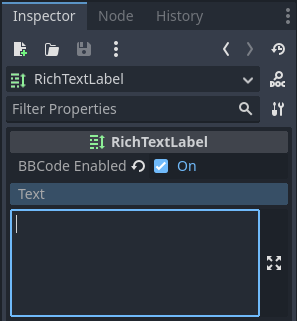
By default, RichTextLabel functions like a normal Label. It has the text property, which you can edit to have uniformly formatted text. To be able to use BBCode for rich text formatting, you need to turn on the BBCode mode by setting bbcode_enabled. After that, you can edit the text property using available tags. Both properties are located at the top of the inspector after selecting a RichTextLabel node.
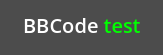
例如,輸入 BBCode [color=green]test[/color],會將「test」這個字用綠色顯示。
大多數 BBCode 標籤由三個部分組成:起始標籤、內容與結束標籤。起始標籤標記格式化區段的開始,也可帶一些設定選項。有些標籤(像上例的 color)需要指定值,其他起始標籤也可能接受多個選項(用空格分隔)。結束標籤標記格式化區段的結尾。有時候內容或結束標籤可以省略。
與 HTML 的 BBCode 實作不同,RichTextLabel 在顯示時不會移除前置或尾端空白。重複空白也會原樣顯示在畫面上。因此,在 RichTextLabel 顯示程式碼區塊時,無需特別預先格式化標記。
[tag]content[/tag]
[tag=value]content[/tag]
[tag option1=value1 option2=value2]content[/tag]
[tag][/tag]
[tag]
備註
RichTextLabel 不支援交錯(嵌套錯誤)的 BBCode 標籤。舉例來說,不要寫成:
[b]bold[i]bold italic[/b]italic[/i]
請改用:
[b]bold[i]bold italic[/i][/b][i]italic[/i]
安全處理使用者輸入
在玩家可自由輸入訊息的場合(例如多人遊戲聊天室),必須防止使用者隨意輸入將被 RichTextLabel 解析的 BBCode 標籤。這是為了避免不當格式使用,尤其是 [url] 標籤,否則玩家可能建立可點擊的釣魚或惡意連結。
你可以用 RichTextLabel 的 [lb] 及/或 [rb] 標籤取代 BBCode 標籤的中括號,讓訊息中的 BBCode 只會顯示成文字,而不被解析成標籤。

未經轉義的使用者輸入會造成 BBCode 注入(第二行),而經過轉義的輸入(第三行)就能避開這個問題
以上範例圖是用下列腳本產生:
extends RichTextLabel

func _ready():
    append_chat_line("Player 1", "Hello world!")
    append_chat_line("Player 2", "Hello [color=red]BBCode injection[/color] (no escaping)!")
    append_chat_line_escaped("Player 2", "Hello [color=red]BBCode injection[/color] (with escaping)!")


# Returns escaped BBCode that won't be parsed by RichTextLabel as tags.
func escape_bbcode(bbcode_text):
    # We only need to replace opening brackets to prevent tags from being parsed.
    return bbcode_text.replace("[", "[lb]")


# Appends the user's message as-is, without escaping. This is dangerous!
func append_chat_line(username, message):
    append_text("%s: [color=green]%s[/color]\n" % [username, message])


# Appends the user's message with escaping.
# Remember to escape both the player name and message contents.
func append_chat_line_escaped(username, message):
    append_text("%s: [color=green]%s[/color]\n" % [escape_bbcode(username), escape_bbcode(message)])
效能
大多數情況下,直接用 BBCode 格式化文字不會有太大負擔。但如果 RichTextLabel 內容非常龐大(例如含有上千行的主控台日誌),更新文字時可能會造成遊戲卡頓。
你可以採取以下方法改善:
改用
append_text()方法,而不是直接加在text屬性後面。這樣只會解析新加上的 BBCode,而不會重新解析整段文字。也可以直接用
push_[標籤]()和pop()方法加上格式標籤,而不用寫 BBCode。啟用 RichTextLabel 的 Threading > Threaded 屬性。這雖然不會加快處理速度,但能避免主執行緒被卡住,也就不會影響遊戲流暢度。只有實際需要才建議啟用,因為多執行緒有額外開銷。
以 push_[標籤]() 和 pop() 方法取代 BBCode
如果因為效能考量不想用 BBCode,也可以使用 RichTextLabel 提供的函式來直接加上格式標籤。
每個 BBCode 標籤(包含特效)都有對應的 push_[標籤]() 方法([標籤] 是名稱)。有些還有方便的組合方法,例如 push_bold_italics() 就是同時加上粗體與斜體。完整清單請參見 RichTextLabel 類別參考。
pop() 用來結束任何標籤。BBCode 標籤是堆疊式的,因此 pop() 會優先結束最近 push 的標籤。
以下腳本執行結果等同於直接用 BBCode [color=green]test [i]example[/i][/color] 標籤:
extends RichTextLabel

func _ready():
    append_text("BBCode ")  # Trailing space separates words from each other.
    push_color(Color.GREEN)
    append_text("test ")  # Trailing space separates words from each other.
    push_italics()
    append_text("example")
    pop()  # Ends the tag opened by `push_italics()`.
    pop()  # Ends the tag opened by `push_color()`.
警告
注意: 若你已使用格式化方法,請勿再直接設 text 屬性,否則會清除先前用 append_text() 、 push_[標籤]() 、 pop() 加上的格式。
參考
也參考
部份 BBCode 標籤也可用於 @export 腳本變數的工具提示,以及類別參考文件的 XML 原始碼。有關詳情,請見 類別參考 BBCode。
標籤 |
範例 |
b
讓
{text} 以 RichTextLabel 的粗體(或粗斜體)字型顯示。 |
|
i
讓
{text} 以 RichTextLabel 的斜體(或粗斜體)字型顯示。 |
|
u
讓
{text} 顯示底線。 |
|
s
讓
{text} 顯示刪除線。 |
|
code
讓
{text} 使用 RichTextLabel 的等寬字型。 |
|
char
插入具有十六進位 UTF-32
{codepoint} 的 Unicode 字元。 |
|
p
新增一個帶有
{text} 的新段落。支援設定選項,詳見 段落選項。 |
[p]{text}[/p][p {options}]{text}[/p] |
br
在文字中加入換行,而不新增新段落。若用於清單中,不會建立新的清單項目,而是在目前項目內換行。
|
|
hr
新增一條水平分隔線以區隔內容。支援設定選項,見 水平分隔線選項。
|
[hr][hr {options}] |
center
讓
{text} 水平置中。等同於
[p align=center]。 |
|
left
讓
{text} 水平靠左對齊。等同於
[p align=left]。 |
|
right
讓
{text} 水平靠右對齊。等同於
[p align=right]。 |
|
fill
讓
{text} 填滿整個 RichTextLabel 的寬度。等同於
[p align=fill]。 |
|
indent
將
{text} 往內縮排一次,縮排寬度與 [ul] 或 [ol] 相同,但不顯示符號。 |
|
url
Creates a hyperlink (underlined and clickable text). Can contain optional
{text} or display {link} as is. Supports configuration options,
see URL options.必須在「meta_clicked」訊號中處理才會有作用, 詳見 處理 [url] 標籤點擊 。
|
[url]{link}[/url][url={link}]{text}[/url][url {options}]{text}[/url] |
霧:
建立滑鼠游標懸停文字時顯示的工具提示。雖非必須,但建議以雙引號或單引號包住提示文字。注意無法使用
\" 或 \' 來逸出引號。若提示字串中需要使用單引號作為撇號,則必須以雙引號包住整個字串。 |
[hint="{tooltip text displayed on hover}"]{text}[/hint] |
img
由
{path} 插入圖片(可為任意有效的 Texture2D 資源)。若指定
{width},圖片會嘗試符合該寬度並維持比例。若同時指定
{width} 與 {height},圖片會縮放到該尺寸。在
{width} 或 {height} 後加 %,即可將其指定為控制元件寬度的百分比,而非像素。Add
em to the end of {width} or {height} value to specify it as a ratio of the current font size. For example, height=1em will make the image as tall as the surrounding text.若提供
{valign} 設定,圖片會嘗試與周圍文字對齊,詳見 圖片與表格的垂直對齊。支援更多設定選項,詳見 圖片選項。
|
[img]{path}[/img][img={width}]{path}[/img][img={width}x{height}]{path}[/img][img={valign}]{path}[/img][img {options}]{path}[/img] |
[font={path}]{text}[/font][font {options}]{text}[/font] |
|
font_size
設定
{text} 的自訂字型大小。 |
|
dropcap
設定
{text} 為不同字型大小與顏色,若內容夠大時可跨多行顯示。首字下沉 通常是一個大寫字母,但
[dropcap] 也支援包含多個字元。margins 的值以逗號分隔,可為正、零或負。各值之間 不得 以空白分隔;否則將無法正確解析。負的上、下邊界對於讓段落其餘部分顯示在首字下沉的下方特別有用。 |
|
功能:
為
{text} 啟用自訂 OpenType 字型功能。功能必須以逗號分隔的 {list} 指定。各值之間 不得 以空白分隔;否則清單將無法正確解析。 |
[opentype_features={list}]{text}[/opentype_features] |
lang
覆寫 RichTextLabel 中 BiDi > Language 屬性對
{text} 設定的語言。 {code} 必須為 ISO 語言代碼。這可用來強制某段文字使用特定語系腳本,而不需另起段落。有些字型檔可能包含特定語系的替代字形,若有則會自動套用。 |
|
|
|
編輯器:
在
{text} 背後繪製顏色,可用於強調文字。接受與 color 標籤相同的值。預設會加入些許內距,內距由 RichTextLabel 節點中的 text_highlight_h_padding 與 text_highlight_v_padding 主題項目控制。若相鄰的行/欄也有背景色,為避免可能的重疊問題,請將內距設為 0。 |
|
編輯器:
在
{text} 前方繪製顏色,可使用不透明的前景色來「遮蔽」文字。接受與 color 標籤相同的值。預設會加入些許內距,內距由 RichTextLabel 節點中的 text_highlight_h_padding 與 text_highlight_v_padding 主題項目控制。若相鄰的行/欄也有前景色,為避免可能的重疊問題,請將內距設為 0。 |
|
outline_size
設定
{text} 的字型外框寬度。 |
[outline_size={size}]{text}[/outline_size] |
編輯器:
設定
{text} 的字型外框顏色。接受與 color 標籤相同的值。 |
[outline_color={code/name}]{text}[/outline_color] |
table
建立一個含
{number} 欄的表格,使用 cell 標籤定義儲存格。若指定
{valign},表格會嘗試與周圍文字對齊,詳見 圖片與表格的垂直對齊。若使用 baseline 對齊,表格會對齊到第
{alignment_row} 行的基線(由 0 起算)。{name} is a table name for assistive apps (screen reader). |
[table={number}]{cells}[/table][table={number},{valign}]{cells}[/table][table={number},{valign},{alignment_row}]{cells}[/table][table={number},{valign},{alignment_row} name={name}]{cells}[/table] |
[cell]{text}[/cell][cell={ratio}]{text}[/cell][cell {options}]{text}[/cell] |
|
[ul]{items}[/ul][ul bullet={bullet}]{items}[/ul] |
|
ol
新增一個有序(編號)列表,型別為
{type} (見 有序列表型別 ),每行一個條目。 |
|
磅,rb
分別插入
[ 與 ],可用於 BBCode 轉義。這些是自結束標籤,不需要結束標籤(沒有
[/lb] 或 [/rb])。 |
[lb]b[rb]text[lb]/b[rb] 會顯示成 [b]text[/b]。 |
可以使用自己的自結束標記來新增多個 Unicode 控製字元。
與貼上這些相比,這可以使維護更容易
直接在文字中控製字元。
|
[lrm] (從左到右標記), [rlm] (從右到左標記), [lre] (從左到右嵌入),[rle] (從右到左嵌入), [lro] (從左到右覆蓋), [rlo] (從右到左覆蓋),[pdf] (流行定向格式), [alm] (阿拉伯字母標記), [lri] (從左到右隔離),[rli] (從右到左隔離), [fsi] (第一個強隔離), [pdi] (流行定向隔離),[zwj] (零寬度連接符), [zwnj] (零寬度非連接符), [wj] (單字連接符),[shy] (軟連字符) |
備註
如果在 RichTextLabelNode 的主題覆蓋中設定了適當的自訂字形,則粗體 ([b]) 和斜體 ([i]) 格式的標籤效果最佳。如果沒有定義自訂粗體或斜體字形,則 Godot 將產生「仿粗體和斜體字形 <https://fonts.google.com/knowledge/glossary/faux_fake_pseudo_synthesized>」。與手工製作的粗體/斜體字形變體相比,這些字形很少看起來很好。
等寬([code])標籤**僅**在 RichTextLabel 節點的主題覆蓋中設定自訂字形時才有效。否則,等寬文字將使用常規字形。
目前還沒有用於控制文字垂直居中的BBCode標籤.
可以跳過所有標籤的選項。
段落選項
align
可用值
left(orl),center(orc),right(orr),fill(orf)預設值
length()文字水平對齊。
bidi_override、st
可用值
default(ofd),uri(oru),file(orf),email(ore),list(orl),none(orn),custom(orc)預設值
預設
結構化文字覆寫。
justification_flags, jst
可用值
以下值的逗號分隔清單 (每個逗號後不加空白):
kashida(或k),word(或w),trim(或tr),after_last_tab(或lt),skip_last(或sl),skip_last_with_chars(或sv),do_not_skip_single(或ns)。預設值
word,kashida,skip_last,do_not_skip_single對齊(填滿)選項。詳見 TextServer。
direction、dir
可用值
ltr(orl),rtl(orr),auto(ora)預設值
繼承
基礎雙向文字(BiDi)方向。
language、lang
可用值
ISO 語言代碼,詳見 本地坐標
預設值
繼承
地區設定覆寫。有些字型可能包含特定語言腳本的字形,若有則會自動套用。
tab_stops
可用值
浮點數列表,例如``10.0,30.0``
預設值
字型中空白字元的寬度
覆寫每個定位字元(Tab)的水平偏移量。當清單結束時會循環。例如
tab_stops設為10.0,30.0,第一個定位點在 10 像素,第二個在 10+30=40 像素,第三個在 10+30+10=50 像素,皆以 RichTextLabel 左上角為原點。
處理 [url] 標籤點擊
預設情況下,點擊 [url] 標籤不會有動作。這讓你能彈性運用 [url] 標籤,而不只拿來開啟網頁連結。
若要處理 [url] 被點擊的事件,請把 RichTextLabel 節點的 meta_clicked 訊號連接到腳本函式。
例如,以下方法可連接到 meta_clicked,用來開啟被點擊的 URL(用使用者的預設瀏覽器):
# This assumes RichTextLabel's `meta_clicked` signal was connected to
# the function below using the signal connection dialog.
func _richtextlabel_on_meta_clicked(meta):
    # `meta` is not guaranteed to be a String, so convert it to a String
    # to avoid script errors at runtime.
    OS.shell_open(str(meta))
進階用法:你也可以把 JSON 放在 [url] 標籤的參數裡,再於 meta_clicked 處理函式中解析。例如:
[url={"example": "value"}]JSON[/url]
水平分隔線選項
color
可用值
顏色名稱或 HEX 格式
預設值
Color(1, 1, 1, 1)分隔線的色彩調整(調變)。
height
可用值
整數
預設值
2以像素為單位設定分隔線目標高度;若在數值後加上
%,則會改以控制項寬度的百分比指定。width
可用值
整數
預設值
90%以像素為單位設定分隔線目標寬度;若在數值後加上
%,則會改以控制項寬度的百分比指定。align
可用值
left(或l),center(或c),right(或r)預設值
length()水平對齊。
URL options
underline
可用值
always,never,hover預設值
alwaysURL underlining mode.
tooltip
可用值
String.
預設值
URL tooltip.
href
可用值
String.
預設值
URL target address.
圖片選項
color
可用值
顏色名稱或 HEX 格式
預設值
繼承
圖片的色彩調整(調變)。
height
可用值
Floating-point number
預設值
繼承
Target height of the image in pixels.
Alternative units to pixels can be specified:
Add
%to the end of the value to specify it as a percentage of the control width instead of pixels. For example,height=50%will make the image half as tall as the control is wide.Add
emto the end of the value to specify it as a ratio of the surrounding font size instead of pixels. For example,height=1emwill make the image as tall as the surrounding text.
width
可用值
Floating-point number
預設值
繼承
Target width of the image in pixels.
Alternative units to pixels can be specified:
Add
%to the end of the value to specify it as a percentage of the control width instead of pixels. For example,width=50%will make the image take up half of the control width.Add
emto the end of the value to specify it as a ratio of the surrounding font size instead of pixels. For example,width=1emwill make the image as wide as the surrounding text is tall.
region
可用值
x, y, 寬度, 高度(像素)
預設值
繼承
圖片的區域矩形。可用來從貼圖集(spritesheet)擷取單張圖片顯示。
pad
可用值
false、true預設值
false若設為
true,且圖片小於指定的width和height,則會加上邊距填滿,而不是放大圖片。tooltip
可用值
字串
預設值
圖片的工具提示。
align
可用值
see 圖片與表格的垂直對齊
預設值
center,centerImage alignment to the surrounding text.
alt
可用值
字串
預設值
Image description for assistive apps (screen reader).
圖片與表格的垂直對齊
當 [img] 或 [table] 標籤有垂直對齊值時,圖片/表格會嘗試與周圍文字對齊。對齊會比對圖片與文字的垂直基準點。圖片有三個可用點(top、center、bottom),文字/表格有四個(top、center、baseline、bottom),可任意組合。
若要同時指定兩個對齊點,請在標籤中用完整或縮寫名稱設值:
text [img=top,bottom]...[/img] text
text [img=center,center]...[/img] text
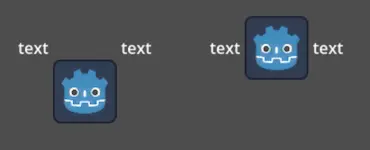
text [table=3,center]...[/table] text  # Center to center.
text [table=3,top,bottom]...[/table] text # Top of the table to the bottom of text.
text [table=3,baseline,baseline,1]...[/table] text # Baseline of the second row (rows use zero-based indexing) to the baseline of text.
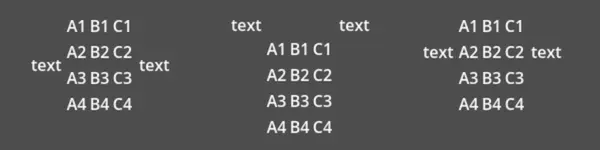
你也可以只填一個值(top、center 或 bottom),則會自動用預設組合(分別是 top-top、center-center、bottom-bottom)。
縮寫為 t (top), c (center), l (baseline), and b (bottom).
字型選項
name、n
可用值
有效的字型資源路徑。
預設值
繼承
字型資源路徑。
size、s
可用值
像素數值。
預設值
繼承
自訂字型大小。
glyph_spacing、gl
可用值
像素數值。
預設值
繼承
每個字元的額外間距。
space_spacing、sp
可用值
像素數值。
預設值
繼承
空白字元的額外間距。
top_spacing、top
可用值
像素數值。
預設值
繼承
行頂端的額外間距。
bottom_spacing、bt
可用值
像素數值。
預設值
繼承
行底端的額外間距。
embolden、emb
可用值
浮點數。
預設值
0.0字型加粗強度,非零時會加粗字型外框,負值則減少外框寬度。
face_index、fi
可用值
整數。
預設值
0TrueType / OpenType 字型集合的作用中字型索引。
slant、sln
可用值
浮點數。
預設值
0.0字型斜體傾斜強度,正值向右,負值向左。
opentype_variation、otv
可用值
以逗號分隔的 OpenType 變化標籤清單(每個逗號後不得有空白)。
預設值
字型 OpenType 變異座標。詳見 OpenType variation tags。
注意:值需加上
",才能在其中使用=:
[font otv="wght=200,wdth=400"] # Sets variable font weight and width.
opentype_features、otf
可用值
以逗號分隔的 OpenType 功能標籤清單(每個逗號後不得有空白)。
預設值
字型 OpenType 功能。詳見 OpenType features tags。
注意:值需加上
",才能在其中使用=:
[font otf="calt=0,zero=1"] # Disable contextual alternates, enable slashed zero.
命名顏色
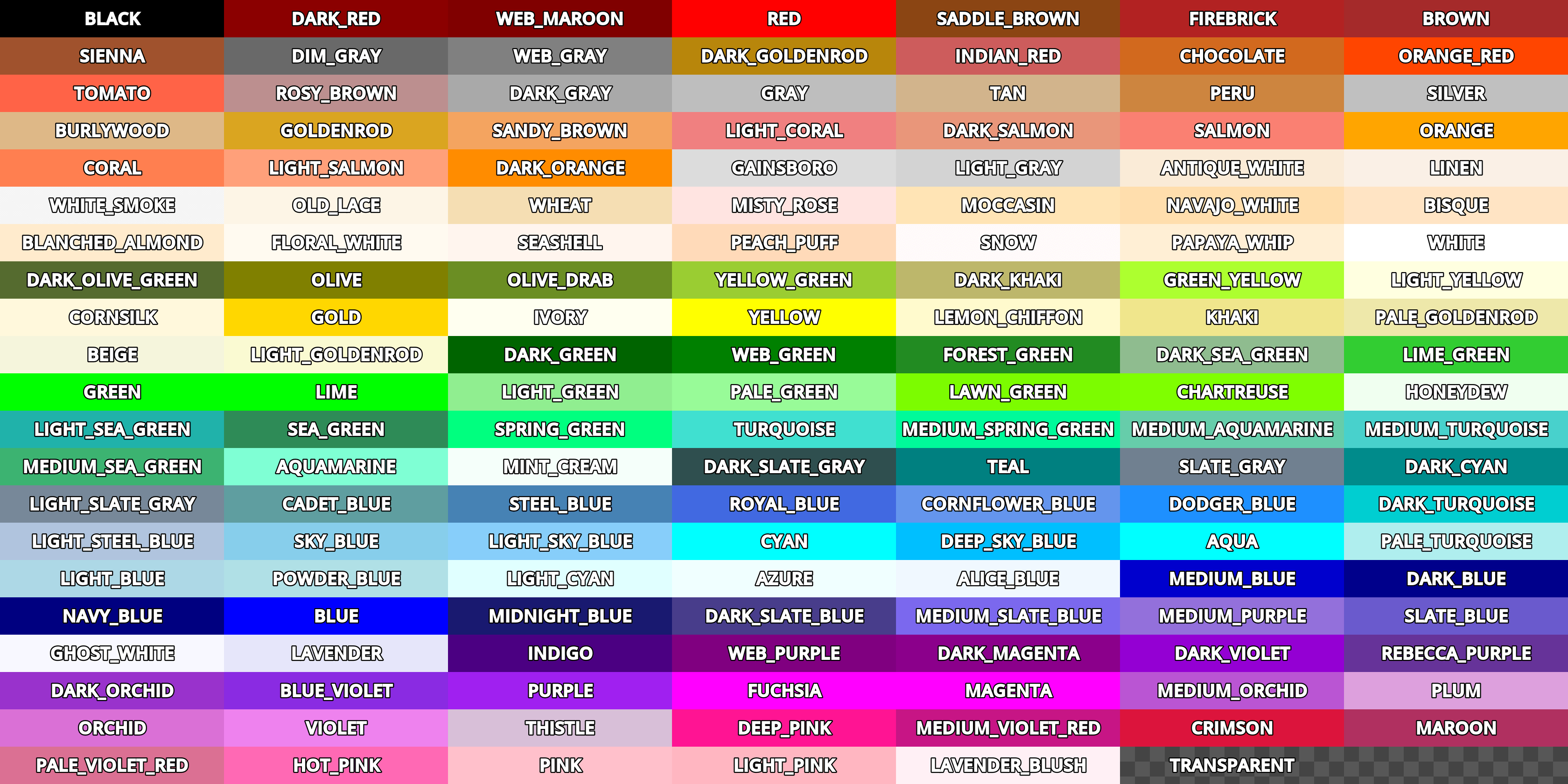
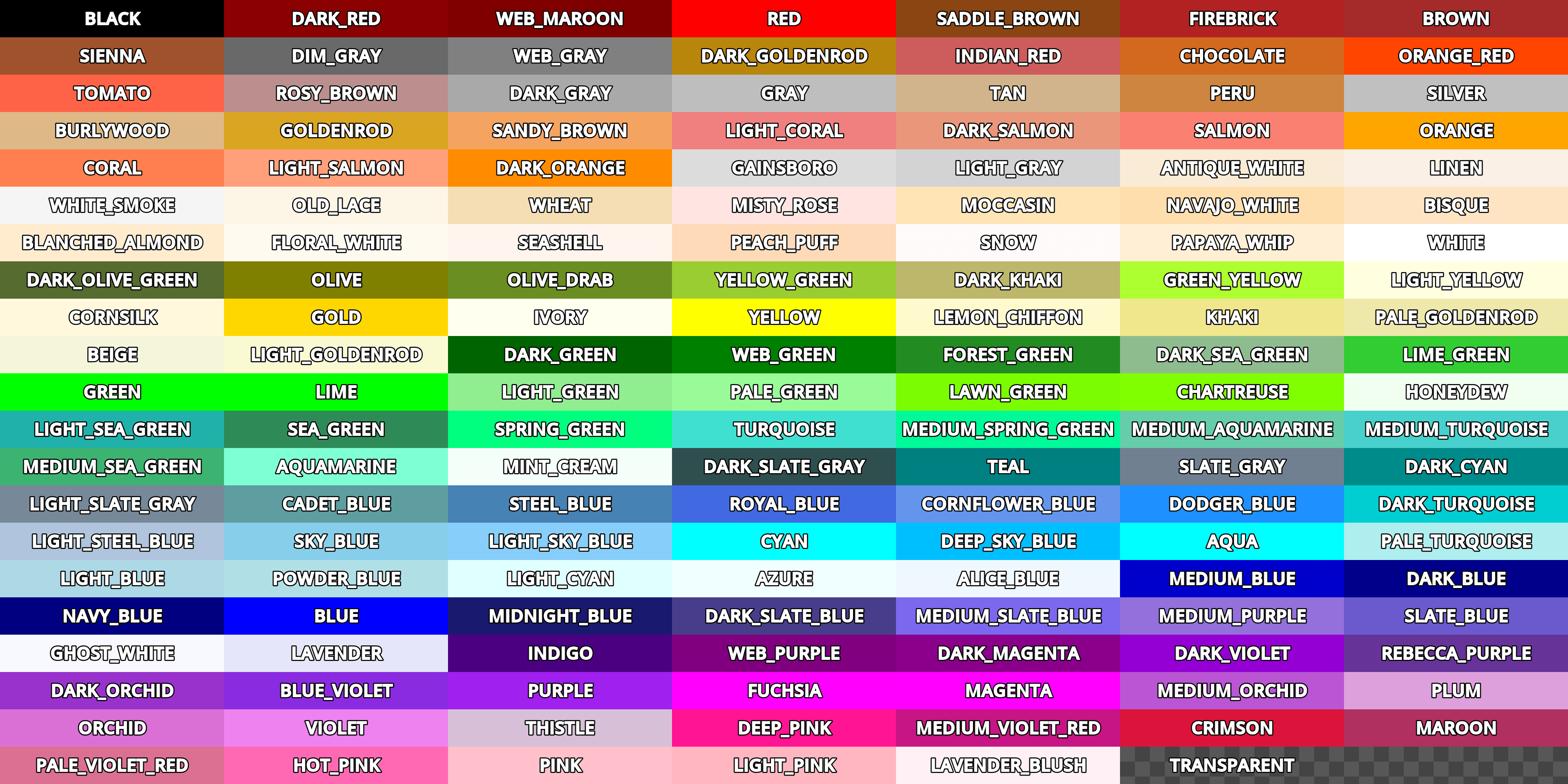
支援顏色名稱的標籤可以使用內建 Color 類別的常數名稱。名稱可用多種形式、不分大小寫,例如 DARK_RED、DarkRed、darkred 都等價。
完整顏色常數請參考下圖:
十六進位顏色代碼
不透明的 RGB 色碼支援任何有效的 6 位十六進位,例如 [color=#ffffff]white[/color]。也可用縮寫色碼,例如 #6f2``(等同於 ``#66ff22)。
透明的 RGB 顏色可用 8 位十六進位碼,例如 [color=#ffffff88]半透明白[/color]。注意 alpha 通道在色碼的**最後**,不是最前面。也支援短碼,例如 #6f28``(等於 ``#66ff2288)。
儲存格選項
shrink
可用值
false、true預設值
trueIf
true, cell can shrink to its contents.expand
可用值
整數
預設值
1
儲存格擴展比例。設定會依比例自動分配寬度。
border
可用值
顏色名稱或 HEX 格式
預設值
繼承
儲存格邊框顏色。
bg
可用值
顏色名稱或 HEX 格式
預設值
繼承
儲存格背景顏色。如要指定奇數/偶數行不同顏色,可用
bg=奇色,偶色。padding
可用值
4 個以逗號分隔的浮點數(每個逗號後不得有空白)
預設值
0,0,0,0儲存格內邊距(左、上、右、下)。
無序列表符號
預設情況下,[ul] 標籤會使用 U+2022 的「Bullet」Unicode 字形作為項目符號,行為與網頁瀏覽器類似。可以使用 [ul bullet={bullet}] 來自訂符號。若提供此 {bullet} 參數,必須是不加引號的字串(例如 [bullet=*])。你可以在符號後面加上空白,來增加符號與清單項目文字之間的間距。
常見符號可參考維基百科:Bullet (typography),直接貼到 bullet 參數即可。
有序列表型別
有序列表可自動用數字或字母遞增標記條目。支援下列型別:
1- 數字,若可則依語言調整數字格式。a、A- 小寫或大寫拉丁字母。i、I- 小寫或大寫羅馬數字。
文字特效
BBCode can also be used to create different text effects that can optionally be animated. Several customizable effects are provided out of the box, and you can easily create your own. By default, animated effects will pause when the SceneTree is paused. You can change this behavior by adjusting the RichTextLabel's Process > Mode property.
以下範例都會列出標籤格式的預設選項值。
備註
會移動字元位置的文字特效可能導致字元被 RichTextLabel 節點的邊界裁切。
可在屬性檢視器將 RichTextLabel 的 Control > Layout > Clip Contents 關閉,或在特效文字上下行加空行,避免被裁切。
脈衝
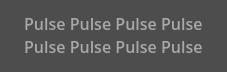
脈衝產生動畫閃爍效果,會周期性調整每個字的透明度和顏色,適合強調重點。標籤格式:[pulse freq=1.0 color=#ffffff40 ease=-2.0]{text}[/pulse]。
freq 控制半波脈衝的頻率(越高越快),完整週期為 2 * (1.0 / freq) 秒。color 是閃爍時的目標色彩倍增值。預設會讓文字大多淡出但不完全消失。ease 為緩動指數,負值為 in-out 緩動,因此預設為 -2.0。
波浪
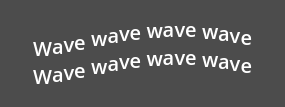
波浪讓文字上下起伏。標籤格式:[wave amp=50.0 freq=5.0 connected=1]{text}[/wave]。
amp 控制波幅,freq 控制上下擺動速度。freq 為 0 或負值都不會顯示波動。connected 設為 1``(預設)時,連字會一起移動;為 ``0 時即使有連字也各自獨立,這可解決某些字型連字的顯示問題。
龍捲風
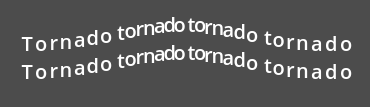
龍捲風讓文字繞圓移動。標籤格式:[tornado radius=10.0 freq=1.0 connected=1]{text}[/tornado]。
radius 控制圓的半徑(偏移量),freq 是環繞速度。freq 為 0 會暫停動畫,負值則反向播放。connected 同上,設為 1 連字一起動,設為 0 各自動。
抖動
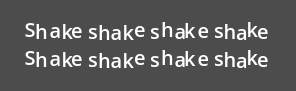
抖動讓文字晃動。標籤格式:[shake rate=20.0 level=5 connected=1]{text}[/shake]。
rate 控制抖動速度,level 控制偏移幅度。connected 同上,設為 1 連字一起動,0 則各自動,可避免連字顯示問題。
漸隱
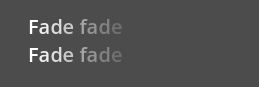
漸隱產生靜態淡出效果,會調整每個字的透明度。標籤格式:[fade start=4 length=14]{text}[/fade]。
start 控制從哪個字元開始淡出,length 控制淡出影響的字元數。
彩虹
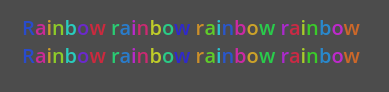
彩虹讓文字呈現隨時間變化的彩虹色。標籤格式:[rainbow freq=1.0 sat=0.8 val=0.8 speed=1.0]{text}[/rainbow]。
freq 控制彩虹色變化週期內包含的字數,sat 是飽和度,val 是明度,speed 是每秒循環次數。正值正向動畫,0 停止,負值則反向。
字型外框**不受**彩虹特效影響(維持原色),現有字型顏色會被覆蓋。但 CanvasItem 的 Modulate 和 Self Modulate 屬性會影響最終彩虹色,因為調變會套在最後顏色上。
自訂 BBCode 標籤與文字特效
你可以擴充 RichTextEffect 資源類型來建立自訂 BBCode 標籤。建立一個繼承 RichTextEffect 的腳本,並設定 class_name 以便在屬性檢視器選用。若想在編輯器中執行這些特效,請在 GDScript 標頭加 @tool。RichTextLabel 本身不需掛腳本,也不必進入 tool 模式。新效果可於屬性檢視器的 Markup > Custom Effects 陣列新增,或用 install_effect() 方法程式註冊:
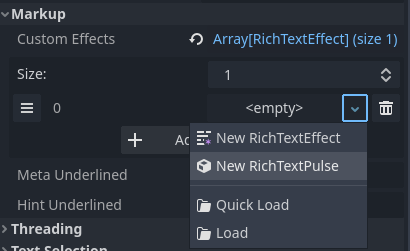
儲存有 class_name 的 RichTextEffect 腳本後,可於屬性檢視器選擇自訂特效
警告
若自訂效果未在 RichTextLabel 的 Markup > Custom Effects 屬性註冊,則不會顯示特效,原標籤會原樣顯示。
你只需實作一個函式:_process_custom_fx(char_fx)。也可以額外設定 bbcode 成員,自訂 BBCode 名稱。Godot 會自動讀取這個屬性,否則就用檔案名稱當作標籤名。
_process_custom_fx
這是每個特效的運作邏輯所在,於文字算繪的繪製階段,每個字元(glyph)都會呼叫一次。該函式會收到一個 CharFXTransform 物件,內含多個變數可用來控制字元的顯示方式:
outline若為true,代表目前在繪製文字外框時呼叫特效。range會告知你在自訂特效區塊內的索引位置。elapsed_time是特效運作到目前為止的總秒數。visible表示該字元是否顯示,也可用來隱藏部分文字。offset是相對於原本字元顯示位置的偏移量。color是當前字元的顏色。glyph_index及font分別是目前要繪製的字元索引及使用的字型資源。最後,
env是一個 Dictionary,包含該自訂特效標籤的所有參數。你可以用 get() <class_Dictionary_method_get>`(可指定預設值)取得每個參數。例如 ``[custom_fx spread=0.5 color=#FFFF00]test[/custom_fx]`,則env會有 float 型別的spread及 Color 型別的color。詳見下方更多用法範例。
最後注意:這個函式必須回傳布林值 true,表示特效處理成功。若回傳 false,Godot 會停止渲染自訂特效,直到你修正造成錯誤的邏輯。
以下是自訂特效的範例:
幽靈
@tool
extends RichTextEffect
class_name RichTextGhost

# Syntax: [ghost freq=5.0 span=10.0][/ghost]

# Define the tag name.
var bbcode = "ghost"

func _process_custom_fx(char_fx):
    # Get parameters, or use the provided default value if missing.
    var speed = char_fx.env.get("freq", 5.0)
    var span = char_fx.env.get("span", 10.0)

    var alpha = sin(char_fx.elapsed_time * speed + (char_fx.range.x / span)) * 0.5 + 0.5
    char_fx.color.a = alpha
    return true
數字雨(Matrix)
@tool
extends RichTextEffect
class_name RichTextMatrix

# Syntax: [matrix clean=2.0 dirty=1.0 span=50][/matrix]

# Define the tag name.
var bbcode = "matrix"

# Gets TextServer for retrieving font information.
func get_text_server():
    return TextServerManager.get_primary_interface()

func _process_custom_fx(char_fx):
    # Get parameters, or use the provided default value if missing.
    var clear_time = char_fx.env.get("clean", 2.0)
    var dirty_time = char_fx.env.get("dirty", 1.0)
    var text_span = char_fx.env.get("span", 50)

    var value = get_text_server().font_get_char_from_glyph_index(char_fx.font, 1, char_fx.glyph_index)

    var matrix_time = fmod(char_fx.elapsed_time + (char_fx.range.x / float(text_span)), \
                           clear_time + dirty_time)

    matrix_time = 0.0 if matrix_time < clear_time else \
                  (matrix_time - clear_time) / dirty_time

    if matrix_time > 0.0:
        value = int(1 * matrix_time * (126 - 65))
        value %= (126 - 65)
        value += 65
    char_fx.glyph_index = get_text_server().font_get_glyph_index(char_fx.font, 1, value, 0)
    return true
這樣會新增幾個 BBCode 指令,可這樣使用:
[center][ghost]This is a custom [matrix]effect[/matrix][/ghost] made in
[pulse freq=5.0 height=2.0][pulse color=#00FFAA freq=2.0]GDScript[/pulse][/pulse].[/center]