Attention: Here be dragons
This is the latest
(unstable) version of this documentation, which may document features
not available in or compatible with released stable versions of Godot.
Checking the stable version of the documentation...
使用 PCK 加密金鑰編譯
在釋出專案時,匯出對話框提供以 256 位元 AES 金鑰加密 PCK 檔案的選項。這能保護你的場景、腳本與其他資源不會以純文字儲存,也不易被有心人士輕易取得。
當然,金鑰需要儲存在二進位檔案內,但經過編譯、最佳化並去除符號後,要找到金鑰會相對困難。
要啟用這項功能,必須使用相同的金鑰從原始碼編譯匯出樣板。
警告
若你使用官方預編譯的匯出樣板,此功能**無法**運作。要使用 PCK 加密,必須**自行編譯**匯出樣板。
步驟說明
產生 256 位元十六進位格式的 AES 金鑰。你可以使用 此服務 的 AES-256-CBC 變體。
或者,你也可以使用 OpenSSL 指令列工具自行產生:
openssl rand -hex 32 > godot.gdkey
godot.gdkey的內容應會類似:# NOTE: Do not use the key below! Generate your own key instead. aeb1bc56aaf580cc31784e9c41551e9ed976ecba10d315db591e749f3f64890f你可以不將輸出導向檔案來產生金鑰,這麼做可以降低金鑰外洩的風險。
在你用來編譯 Godot 的主控台上,將此金鑰設為環境變數,例如:
export SCRIPT_AES256_ENCRYPTION_KEY="your_generated_key"
set SCRIPT_AES256_ENCRYPTION_KEY=your_generated_key
$env:SCRIPT_AES256_ENCRYPTION_KEY="your_generated_key"Note that the commands suggested above do not persist the variables across terminal sessions.
Compile Godot export templates and set them as custom export templates in the export preset options. If the environment variable is set correctly, the following message is printed at the beginning of compilation:
*** IMPORTANT: Compiling Godot with custom `SCRIPT_AES256_ENCRYPTION_KEY` set as environment variable.
*** Make sure to use templates compiled with this key when exporting a project with encryption.
在匯出預設設定的 加密 分頁中設定加密金鑰:
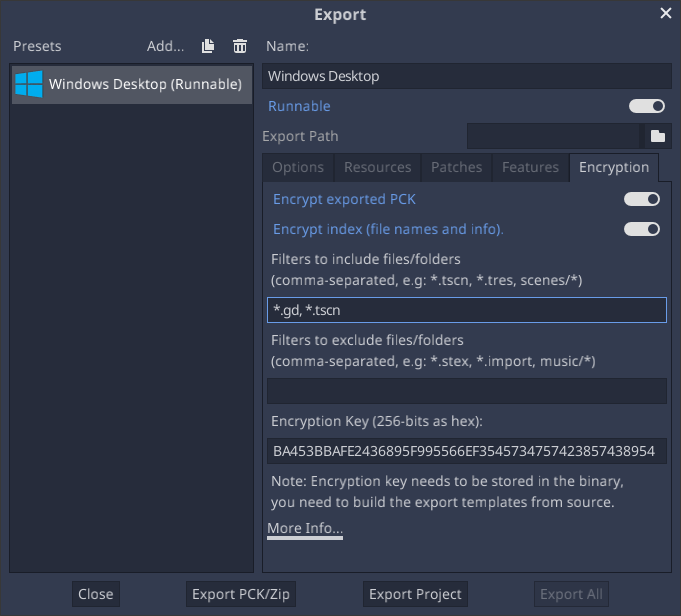
新增要加密的檔案或資料夾篩選器。預設情況下,包含篩選器為空,不會加密任何內容。
匯出專案。此時專案應會以加密過的檔案執行。
疑難排解
如果遇到如下錯誤,代表金鑰沒有正確包含在 Godot 編譯結果內。Godot 雖然在匯出時加密了 PCK 檔案,但在執行時無法讀取該檔案。
ERROR: open_and_parse: Condition "String::md5(md5.digest) != String::md5(md5d)" is true. Returning: ERR_FILE_CORRUPT
   At: core/io/file_access_encrypted.cpp:103