Attention: Here be dragons
This is the latest
(unstable) version of this documentation, which may document features
not available in or compatible with released stable versions of Godot.
Checking the stable version of the documentation...
建立 iOS 外掛程式
本頁將說明 iOS 外掛程式能為你做什麼、如何使用現有外掛,以及如何自行開發新的外掛。
iOS 外掛程式可讓你整合第三方函式庫,並支援 iOS 特有功能,例如:應用程式內購(In-App Purchases)、GameCenter 連動、ARKit 支援等。
載入並使用現有外掛程式
一個 iOS 外掛程式需要一個 .gdip 設定檔,以及一個二進位檔案(可以是 .a 靜態函式庫,或包含 .a 的 .xcframework),以及可能的其他依賴檔案。要使用外掛程式,你需要:
將外掛程式檔案複製到 Godot 專案的
res://ios/plugins目錄中。你也可以將檔案集中於子目錄,例如res://ios/plugins/my_plugin。Godot 編輯器會自動偵測並匯入
res://ios/plugins及其子目錄內的.gdip檔案。你可以到「專案」>「匯出...」>「iOS」,於「選項」分頁往下滾動到「外掛程式」區塊,即可看到並啟用已偵測到的外掛程式。
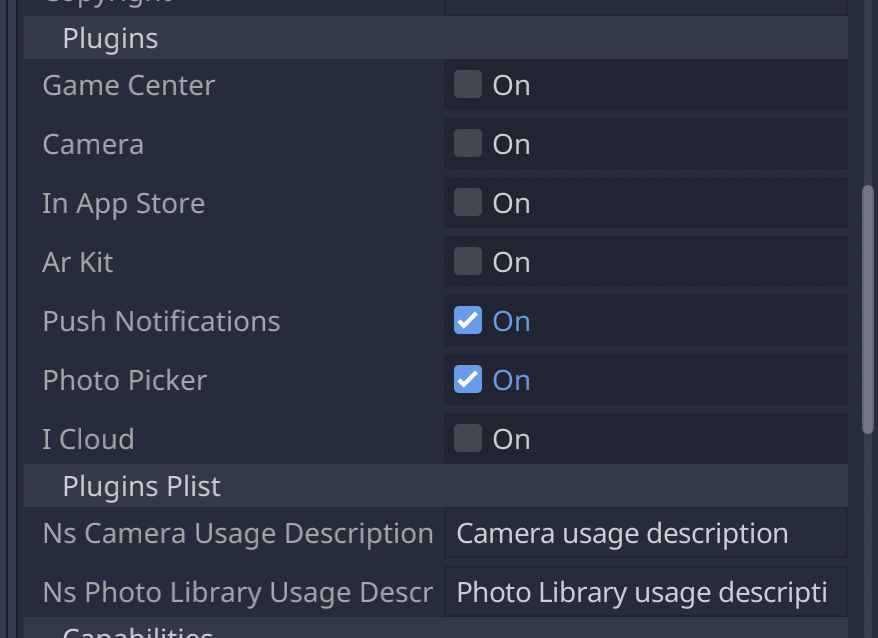
當外掛啟用時,你可以透過 Engine.get_singleton() 在程式中存取它:
if Engine.has_singleton("MyPlugin"):
    var singleton = Engine.get_singleton("MyPlugin")
    print(singleton.foo())
備註
外掛程式的檔案必須放在 res://ios/plugins/ 目錄或其子目錄下,否則 Godot 編輯器將無法自動偵測。
建立 iOS 外掛程式
本質上,一個 Godot iOS 外掛程式是一個 iOS 函式庫(.a 檔或包含靜態函式庫的 .xcframework),並需符合以下要求:
該函式庫必須依賴 Godot 引擎標頭檔。
該函式庫必須附有一個
.gdip設定檔。
iOS 外掛程式可具備與 Godot 模組相同的功能,但更具彈性,且不需重新編譯整個引擎。
以下為開始開發外掛程式的流程。我們建議以 Xcode 作為主要開發環境。
建立 iOS 外掛程式:
在 Xcode 中為你的外掛建立一個 Objective-C 靜態函式庫。
在 Xcode「Build Settings」分頁的
HEADER_SEARCH_PATHS中,新增 Godot 引擎標頭檔案作為外掛函式庫的依賴:從 Godot GitHub 頁面 下載 Godot 引擎原始碼。
執行 SCons 來產生標頭檔。詳見 為 iOS 編譯。標頭檔會在引擎開始編譯前產生,因此無需等全部編譯完成即可繼續後續步驟。
iOS 外掛程式與 iOS 匯出範本應共用相同的標頭檔。
於「Build Settings」分頁的
OTHER_CFLAGS內指定靜態函式庫的編譯選項。最重要的標記為-fcxx-modules、-fmodules,如需除錯還要加-DDEBUG。其他旗標應與你編譯 Godot 時相同。例如:
-DPTRCALL_ENABLED -DDEBUG_ENABLED -DDEBUG_MEMORY_ALLOC -DDISABLE_FORCED_INLINE -DTYPED_METHOD_BIND
實作所需的外掛邏輯並建構函式庫產生
.a檔案。通常你會需要建立debug與release目標的.a檔案。若兩者皆需,請分別命名為[PluginName].release.a與[PluginName].debug.a。也可改用 SCons 設定來建置靜態函式庫。iOS 外掛系統亦支援
.xcframework檔案。你可以用下列指令產生:
xcodebuild -create-xcframework -library [DeviceLibrary].a -library [SimulatorLibrary].a -output [PluginName].xcframework
建立 Godot iOS 外掛程式的設定檔,讓系統可偵測並載入你的外掛:
設定檔副檔名必須為
gdip``(例如:``MyPlugin.gdip)。設定檔格式如下:
[config]
name="MyPlugin"
binary="MyPlugin.a"

initialization="init_my_plugin"
deinitialization="deinit_my_plugin"

[dependencies]
linked=[]
embedded=[]
system=["Foundation.framework"]

capabilities=["arkit", "metal"]

files=["data.json"]

linker_flags=["-ObjC"]

[plist]
PlistKeyWithDefaultType="Some Info.plist key you might need"
StringPlistKey:string="String value"
IntegerPlistKey:integer=42
BooleanPlistKey:boolean=true
RawPlistKey:raw="
<array>
    <string>UIInterfaceOrientationPortrait</string>
</array>
"
StringPlistKeyToInput:string_input="Type something"
The config section and fields are required and defined as follow:
name: name of the plugin
binary: this should be the filepath of the plugin library (
aorxcframework) file.
The filepath can be relative (e.g.:
MyPlugin.a,MyPlugin.xcframework) in which case it's relative to the directory where thegdipfile is located.The filepath can be absolute:
res://some_path/MyPlugin.aorres://some_path/MyPlugin.xcframework.In case you need multitarget library usage, the filename should be
MyPlugin.aand.afiles should be named asMyPlugin.release.aandMyPlugin.debug.a.In case you use multitarget
xcframeworklibraries, their filename in the configuration should beMyPlugin.xcframework. The.xcframeworkfiles should be named asMyPlugin.release.xcframeworkandMyPlugin.debug.xcframework.
The dependencies and plist sections are optional and defined as follow:
dependencies:
linked: contains a list of iOS frameworks that the iOS application should be linked with.
embedded: contains a list of iOS frameworks or libraries that should be both linked and embedded into the resulting iOS application.
system: contains a list of iOS system frameworks that are required for plugin.
capabilities: contains a list of iOS capabilities that is required for plugin. A list of available capabilities can be found at Apple UIRequiredDeviceCapabilities documentation page.
files: contains a list of files that should be copied on export. This is useful for data files or images.
linker_flags: contains a list of linker flags to add to the Xcode project when exporting the plugin.
plist: should have keys and values that should be present in
Info.plistfile.
Each line should follow pattern:
KeyName:KeyType=KeyValueSupported values for
KeyTypearestring,integer,boolean,raw,string_inputIf no type is used (e.g.:
KeyName="KeyValue")stringtype will be used.If
rawtype is used value for corresponding key will be stored inInfo.plistas is.If
string_inputtype is used you will be able to modify value in Export window.