Attention: Here be dragons
This is the latest
(unstable) version of this documentation, which may document features
not available in or compatible with released stable versions of Godot.
Checking the stable version of the documentation...
從 Godot 4.4 升級到 Godot 4.5
對於大多數以 4.4 製作的遊戲和應用程式來說,升級到 4.5 應該相對安全。本頁將說明專案升級時需要注意的所有事項。
做出更改
如果你要從 4.4 升級到 4.5,這裡列出的不相容變更可能會影響到你的專案。變更內容依領域/系統分類整理。
警告
為了支援 新的 Google Play 規範,現在在將 C# 專案匯出到 Android 時必須以 .NET 9 為目標;其他平台仍以 .NET 8 作為最低需求版本,但亦支援並鼓勵使用更新版本。
若你的專案使用 C# 且要匯出到 Android,你需要將專案升級到 .NET 9(請參見 升級到新的 .NET 版本 取得操作說明)。
這篇文章指出了每項破壞性改動是否會影響 GDScript,以及 C# 的破壞性改動是 二進位相容 還是 原始程式碼相容:
二進位相容 - 現有二進位檔可在無需重新編譯的情況下成功載入與執行,且執行時行為不會改變。
** 原始程式碼相容** —— 在升級 Godot 時,原始程式碼可成功編譯,無需更改。
核心
改動 |
GDScript 格式化字串 |
C# 二進位相容 |
C# 原始程式碼相容 |
簡介 |
|---|---|---|---|---|
JSONRPC |
||||
Method |
❌ |
|||
節點 |
||||
方法 |
❌ |
✔️ |
✔️ |
|
方法 |
✔️ |
✔️ |
✔️ |
算繪
改動 |
GDScript 格式化字串 |
C# 二進位相容 |
C# 原始程式碼相容 |
簡介 |
|---|---|---|---|---|
DisplayServer |
||||
方法 |
✔️ |
✔️ |
✔️ |
|
方法 |
✔️ |
✔️ |
✔️ |
|
算繪 |
||||
方法 |
✔️ |
✔️ |
✔️ |
|
RenderingServer |
||||
方法 |
❌ |
✔️ |
✔️ |
|
方法 |
❌ |
✔️ |
✔️ |
備註
In C#, the enum RenderingDevice.Features breaks compatibility because of the way the bindings generator
detects the enum prefix. New members were added to the enum in GH-103941 that caused the enum member
Address to be renamed to BufferDeviceAddress.
GLTF
改動 |
GDScript 格式化字串 |
C# 二進位相容 |
C# 原始程式碼相容 |
簡介 |
|---|---|---|---|---|
GLTFAccessor |
||||
屬性 |
✔️ |
❌ |
❌ |
|
屬性 |
✔️ |
❌ |
❌ |
|
屬性 |
✔️ |
❌ |
❌ |
|
屬性 |
✔️ |
❌ |
❌ |
|
屬性 |
✔️ |
❌ |
❌ |
|
屬性 |
✔️ |
❌ |
❌ |
|
屬性 |
✔️ |
❌ |
❌ |
|
GLTFBufferView |
||||
屬性 |
✔️ |
❌ |
❌ |
|
屬性 |
✔️ |
❌ |
❌ |
|
屬性 |
✔️ |
❌ |
❌ |
備註
由於型別中繼資料的變更,C# 繫結的型別也從 int (32 位元)改為 long (64 位元)。
文字
改動 |
GDScript 格式化字串 |
C# 二進位相容 |
C# 原始程式碼相容 |
簡介 |
|---|---|---|---|---|
CanvasItem |
||||
方法 |
✔️ |
✔️ |
✔️ |
|
方法 |
✔️ |
✔️ |
✔️ |
|
方法 |
✔️ |
✔️ |
✔️ |
|
方法 |
✔️ |
✔️ |
✔️ |
|
方法 |
✔️ |
✔️ |
✔️ |
|
方法 |
✔️ |
✔️ |
✔️ |
|
字型 |
||||
方法 |
✔️ |
✔️ |
✔️ |
|
方法 |
✔️ |
✔️ |
✔️ |
|
方法 |
✔️ |
✔️ |
✔️ |
|
方法 |
✔️ |
✔️ |
✔️ |
|
方法 |
✔️ |
✔️ |
✔️ |
|
方法 |
✔️ |
✔️ |
✔️ |
|
RichTextLabel |
||||
方法 |
✔️ |
✔️ |
✔️ |
|
方法 |
✔️ |
✔️ |
✔️ |
|
方法 |
✔️ |
✔️ |
✔️ |
|
方法 |
✔️ |
✔️ |
✔️ |
|
方法 |
✔️ |
✔️ |
✔️ |
|
方法 |
✔️ |
✔️ |
✔️ |
|
TextLine |
||||
方法 |
✔️ |
✔️ |
✔️ |
|
方法 |
✔️ |
✔️ |
✔️ |
|
TextParagraph |
||||
方法 |
✔️ |
✔️ |
✔️ |
|
方法 |
✔️ |
✔️ |
✔️ |
|
方法 |
✔️ |
✔️ |
✔️ |
|
方法 |
✔️ |
✔️ |
✔️ |
|
方法 |
✔️ |
✔️ |
✔️ |
|
方法 |
✔️ |
✔️ |
✔️ |
|
TextServer |
||||
方法 |
✔️ |
✔️ |
✔️ |
|
方法 |
✔️ |
✔️ |
✔️ |
|
方法 |
✔️ |
✔️ |
✔️ |
|
方法 |
✔️ |
✔️ |
✔️ |
|
TreeItem |
||||
方法 |
✔️ |
✔️ |
✔️ |
|
TextServerExtension |
||||
方法 |
❌ |
❌ |
❌ |
|
方法 |
❌ |
❌ |
❌ |
|
方法 |
❌ |
❌ |
❌ |
|
方法 |
❌ |
❌ |
❌ |
XR
改動 |
GDScript 格式化字串 |
C# 二進位相容 |
C# 原始程式碼相容 |
簡介 |
|---|---|---|---|---|
OpenXRAPIExtension |
||||
方法 |
✔️ |
✔️ |
✔️ |
|
方法 |
✔️ |
✔️ |
✔️ |
|
方法 |
✔️ |
✔️ |
✔️ |
|
方法 |
✔️ |
✔️ |
✔️ |
|
OpenXRBindingModifierEditor |
||||
型別 |
❌ |
❌ |
❌ |
|
OpenXRInteractionProfileEditor |
||||
型別 |
❌ |
❌ |
❌ |
|
OpenXRInteractionProfileEditorBase |
||||
型別 |
❌ |
❌ |
❌ |
備註
類別 OpenXRBindingModifierEditor、OpenXRInteractionProfileEditor 與 OpenXRInteractionProfileEditorBase 只在編輯器中可用。在編輯器外使用會導致編譯錯誤。
在 C# 中,這代表這些型別已從 GodotSharp 程式集移至 GodotSharpEditor 程式集。請確保將使用這些型別的程式碼包在 #if TOOLS 區塊中,以避免被包含進匯出的遊戲。
此變更也已回溯至 4.4.1。
編輯器外掛程式
改動 |
GDScript 格式化字串 |
C# 二進位相容 |
C# 原始程式碼相容 |
簡介 |
|---|---|---|---|---|
EditorExportPlatform |
||||
方法 |
✔️ |
✔️ |
✔️ |
|
EditorUndoRedoManager |
||||
方法 |
✔️ |
✔️ |
✔️ |
|
EditorExportPlatformExtension |
||||
方法 |
✔️ |
❌ |
❌ |
做出更改
In 4.5, some behavior changes have been introduced, which might require you to adjust your project.
TileMapLayer
相較於 4.4 版本,4.5 版本的 TileMapLayer.get_coords_for_body_rid() 將回傳不同值,由於 TileMapLayer 物理分塊預設是啟用的。較新版本的 TileMapLayer.physics_quadrant_size 將使這個函式沒那麼精確。要在 4.4 或更早之前的版本中獲得精確的呼叫座標需要設定 TileMapLayer.physics_quadrant_size 為 ``1``同時將停用物理分塊。
3D 模型匯入
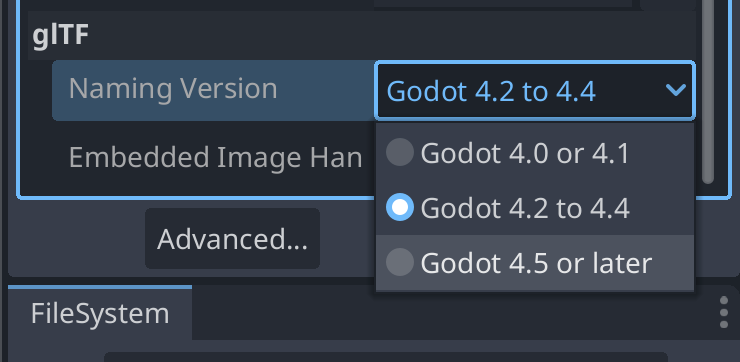
已修正 3D 模型匯入器,能正確處理骨架階層中的非關節節點(GH-104184)。為了維持相容性,預設會以既有行為匯入既有檔案(GH-107352)。新的 .gltf、.glb、.blend 與 .fbx 檔(沒有對應的 .import 檔)將以新行為匯入。不過對既有檔案而言,若你想使用新行為,必須在「匯入」面板底部變更「Naming Version」選項:
核心
備註
Resource.duplicate(true) (執行深度複製)現在只複製被呼叫時資源文件內部的資源。在 4.4 版本中,它反而會複製所有内容,包括外部资源。如果你正在深度複製一個包含引用著其他外部資源的資源,這些外部資源將不再被複製。你必須呼叫 Resource.duplicate_deep(DEEP_DUPLICATE_ALL) 維持舊的行為。
備註
當字典參數鍵缺少或無效時,現在 ProjectSettings.add_property_info() 會發出警告。最重要的是,它會在傳遞 usage 鍵時發出警告,因為該鍵未被使用。在 4.5 之前也是如此,但它被默默忽略了。作為提醒,要正確設定屬性使用訊息,必須使用 ProjectSettings.set_as_basic(), ProjectSettings.set_restart_if_changed() ,或 ProjectSettings.set_as_internal() 。
備註
在 C# 中,StringExtensions.PathJoin 現在會在原始字串為空或附加的路徑以分隔符開頭時,避免多加一個路徑分隔符(GH-105281)。
備註
在 C# 中,當原始字串不含副檔名時,StringExtensions.GetExtension 現在會回傳空字串而非原始字串(GH-108041)。
備註
在 C# 中,Quaternion(Vector3, Vector3) 建構式現在能正確建立代表兩輸入向量間最短弧的四元數。先前在某些輸入下會回傳錯誤的值(GH-107618)。
物理
備註
當 3D 物理引擎設定為 Jolt Physics 時,預設情況下現在會永遠回報 Area3D 與靜態物體之間的重疊,因為已移除專案設定 physics/jolt_physics_3d/simulation/areas_detect_static_bodies ( GH-105746 )。若你仍想忽略這類重疊,請改為調整 Area3D 或該靜態物體的碰撞遮罩或圖層。
文字
備註
在 GDScript 中,呼叫 RichTextLabel::add_image 與 RichTextLabel::update_image 仍可運作,但 size_in_percent 參數現在會用作 width_in_percent 的值,且 height_in_percent 預設為 false (GH-107347 )。若要恢復先前行為,你可以將 height_in_percent 明確設為與原先傳入的 size_in_percent 相同的值。