Attention: Here be dragons
This is the latest
(unstable) version of this documentation, which may document features
not available in or compatible with released stable versions of Godot.
Checking the stable version of the documentation...
Camera3D
被繼承: XRCamera3D
相機節點,會從某個角度進行顯示。
說明
Camera3D 是一個特殊節點,用於顯示從其目前位置可見的內容。相機在最近的 Viewport 節點中註冊自己(當樹上行)。每個視口中只能有一個啟動的相機。如果在樹上沒有可用的視口,相機將在全域視口中註冊。換句話說,相機只是用來為 Viewport 提供 3D 顯示能力的,如果沒有,則在該 Viewport(或更高層視口)中註冊的場景無法顯示。
教學
屬性
|
||
|
||
|
||
|
||
|
||
|
||
|
||
|
||
|
||
|
||
|
||
|
方法
void |
clear_current(enable_next: bool = true) |
get_camera_projection() const |
|
get_camera_rid() const |
|
get_camera_transform() const |
|
get_cull_mask_value(layer_number: int) const |
|
get_frustum() const |
|
is_position_behind(world_point: Vector3) const |
|
is_position_in_frustum(world_point: Vector3) const |
|
void |
|
project_local_ray_normal(screen_point: Vector2) const |
|
project_position(screen_point: Vector2, z_depth: float) const |
|
project_ray_normal(screen_point: Vector2) const |
|
project_ray_origin(screen_point: Vector2) const |
|
void |
set_cull_mask_value(layer_number: int, value: bool) |
void |
set_frustum(size: float, offset: Vector2, z_near: float, z_far: float) |
void |
set_orthogonal(size: float, z_near: float, z_far: float) |
void |
set_perspective(fov: float, z_near: float, z_far: float) |
unproject_position(world_point: Vector3) const |
列舉
enum ProjectionType: 🔗
ProjectionType PROJECTION_PERSPECTIVE = 0
透視投影。物體距離相機螢幕越遠顯示就越小。
ProjectionType PROJECTION_ORTHOGONAL = 1
正交投影,又稱正交投影。物體無論距離多遠,在螢幕上都保持相同的大小。
ProjectionType PROJECTION_FRUSTUM = 2
視錐投影。通過該模式可以調整 frustum_offset 來建立“傾斜的視錐”效果。
enum KeepAspect: 🔗
KeepAspect KEEP_WIDTH = 0
保留水平長寬比,也稱為 Vert- 縮放。這通常是在縱向模式下運作的專案的最佳選擇,因為較高的縱橫比將從更寬的垂直視場中受益。
KeepAspect KEEP_HEIGHT = 1
保留垂直長寬比,也稱為 Hor+ 縮放。這通常是在橫向模式下運作的專案的最佳選擇,因為較寬的縱橫比會自動從較寬的水平視場中受益。
enum DopplerTracking: 🔗
DopplerTracking DOPPLER_TRACKING_DISABLED = 0
禁用多普勒效應模擬(預設)。
DopplerTracking DOPPLER_TRACKING_IDLE_STEP = 1
通過追蹤在 _process 中改變的物體位置來類比多普勒效應。與這些物體相比,該相機的相對速度的變化會影響音訊的感知方式(改變音訊的 AudioStreamPlayer3D.pitch_scale)。
DopplerTracking DOPPLER_TRACKING_PHYSICS_STEP = 2
通過追蹤在 _process 中改變的物體位置來類比多普勒效應。與這些物體相比,該相機的相對速度的變化會影響音訊的感知方式(改變音訊的 AudioStreamPlayer3D.pitch_scale)。
屬性說明
CameraAttributes attributes 🔗
void set_attributes(value: CameraAttributes)
CameraAttributes get_attributes()
該相機所使用的 CameraAttributes。
Compositor compositor 🔗
void set_compositor(value: Compositor)
Compositor get_compositor()
The Compositor to use for this camera.
剔除遮罩,描述該相機算繪了哪些 VisualInstance3D.layers。預設情況下,20 個使用者可見層全都被算繪。
注意:由於 cull_mask 允許總共儲存 32 個層,因此另外 12 個層僅供引擎內部使用,不會在編輯器中公開。使用腳本設定 cull_mask 允許你切換那些保留層,這對編輯器外掛程式很有用。
要使用腳本更輕鬆地調整 cull_mask,請使用 get_cull_mask_value() 和 set_cull_mask_value()。
注意:VoxelGI、SDFGI 和 LightmapGI 將始終考慮所有層以確定對全域光照有貢獻的內容。如果這是一個問題,請將網格的 GeometryInstance3D.gi_mode 設定為 GeometryInstance3D.GI_MODE_DISABLED,並將燈光的 Light3D.light_bake_mode 設定為 Light3D.BAKE_DISABLED,以將它們從全域光照中排除。
如果為 true,則祖級 Viewport 正在使用這個相機。
如果場景中有多個相機,總會有一個被設為目前相機。例如,假設場景中存在兩個 Camera3D 節點並且只有一個為目前相機,那麼如果把某一個相機的 current 設為 false 就會導致另一個相機被設為目前相機。
DopplerTracking doppler_tracking = 0 🔗
void set_doppler_tracking(value: DopplerTracking)
DopplerTracking get_doppler_tracking()
If not DOPPLER_TRACKING_DISABLED, this camera will simulate the Doppler effect for objects changed in particular _process methods.
Note: The Doppler effect will only be heard on AudioStreamPlayer3Ds if AudioStreamPlayer3D.doppler_tracking is not set to AudioStreamPlayer3D.DOPPLER_TRACKING_DISABLED.
Environment environment 🔗
void set_environment(value: Environment)
Environment get_environment()
此相機要使用的 Environment。
該相機相對於其局部 Z 軸到遠剔除邊界的距離。較高的值允許相機看得更遠,而減少 far 如果會導致物件被部分或完全剔除,則可以提高性能。
The camera's field of view angle (in degrees). Only applicable in perspective mode. Since keep_aspect locks one axis, fov sets the other axis' field of view angle.
For reference, the default vertical field of view value (75.0) is equivalent to a horizontal FOV of:
~91.31 degrees in a 4:3 viewport
~101.67 degrees in a 16:10 viewport
~107.51 degrees in a 16:9 viewport
~121.63 degrees in a 21:9 viewport
Vector2 frustum_offset = Vector2(0, 0) 🔗
相機的視錐偏移。可以更改預設值,以建立如 Y-shearing 一樣的“傾斜的視錐”效果。
注意:僅在 projection 為 PROJECTION_FRUSTUM 時有效。
相機視口的水平(X)偏移量。
KeepAspect keep_aspect = 1 🔗
void set_keep_aspect_mode(value: KeepAspect)
KeepAspect get_keep_aspect_mode()
在 fov/size 調整時要鎖定的軸。可以是 KEEP_WIDTH 或 KEEP_HEIGHT。
該相機相對於其局部 Z 軸到近剔除邊界的距離。較低的值允許相機看到更靠近其原點的物件,但代價是整個範圍內的精度較低。低於預設值的值會導致 Z 衝突增加。
ProjectionType projection = 0 🔗
void set_projection(value: ProjectionType)
ProjectionType get_projection()
相機的投影模式。在 PROJECTION_PERSPECTIVE 模式下,物體與相機局部空間的Z距離會影響其感知的大小。
該相機的大小,單位為米,描述的是完整的寬度或者高度,取決於 keep_aspect。僅適用於正交和視錐模式。
相機視口的垂直(Y)偏移量。
方法說明
void clear_current(enable_next: bool = true) 🔗
如果這是目前相機,則將其從目前相機中移除。如果 enable_next 為 true,則請求使下一個相機(如果有)成為目前相機。
Projection get_camera_projection() const 🔗
返回該相機用於算繪至關聯視口的投影矩陣。相機必須是場景樹的一部分才能正常工作。
從 RenderingServer 返回該相機的 RID。
Transform3D get_camera_transform() const 🔗
返回該相機的變換,該變換會加上垂直(v_offset)和水平(h_offset)偏移;以及 XRCamera3D 等子類別相機對相機位置和方向所做的任何其他調整。
bool get_cull_mask_value(layer_number: int) const 🔗
返回是否啟用了 cull_mask 的指定層,該層由一個介於 1 和 20 之間的給定 layer_number 指定。
Array[Plane] get_frustum() const 🔗
以世界空間單位將相機的視錐平面作為 Plane 陣列按以下順序返回:near、far、left、top、right、bottom。不要與 frustum_offset 混淆。
返回包含該相機視錐的錐體形狀的 RID,忽略相機的近處平面。錐體的尖端代表該相機的位置。
bool is_position_behind(world_point: Vector3) const 🔗
如果給定位置在相機後面(連結圖的藍色部分),則返回 true。查看此圖以瞭解位置查詢方法的概述。
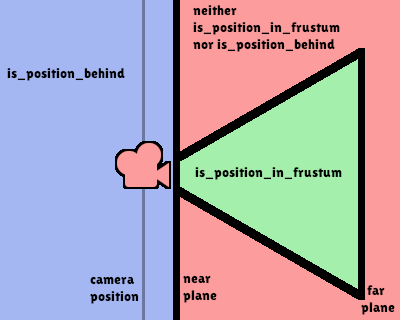
注意:返回 false 的位置可能仍然在相機的視野之外。
bool is_position_in_frustum(world_point: Vector3) const 🔗
如果給定位置在相機的視錐內(位於連結圖中的綠色部分),則返回 true。查看此圖以瞭解位置查詢方法的概述。
void make_current() 🔗
使此相機成為 Viewport 的目前相機(見類的說明)。如果相機節點在場景樹之外,一旦新增,它將嘗試成為目前相機。
Vector3 project_local_ray_normal(screen_point: Vector2) const 🔗
返回從螢幕點位置沿相機方向的法向量。正交相機會被正規化。透視相機考慮到透視、螢幕寬度/高度等因素。
Vector3 project_position(screen_point: Vector2, z_depth: float) const 🔗
返回世界空間中的 3D 點,該點對應到平面上 Viewport 矩形中的給定 2D 座標,該平面是距相機到場景的給定 z_depth 距離。
Vector3 project_ray_normal(screen_point: Vector2) const 🔗
返回世界空間中的法線向量,即通過逆相機投影將點投影到 Viewport 矩形上的結果。這對於以(原點,法線)的形式投射光線,以進行物件相交或拾取很有用。
Vector3 project_ray_origin(screen_point: Vector2) const 🔗
返回世界空間中的 3D 位置,即通過逆相機投影將點投影到 Viewport 矩形上的結果。這對於以(原點,法線)的形式投射光線,以進行物件相交或拾取很有用。
void set_cull_mask_value(layer_number: int, value: bool) 🔗
基於 value,啟用或禁用 cull_mask 中的指定層,該層由一個介於 1 和 20 之間的給定 layer_number 指定。
void set_frustum(size: float, offset: Vector2, z_near: float, z_far: float) 🔗
Sets the camera projection to frustum mode (see PROJECTION_FRUSTUM), by specifying a size, an offset, and the z_near and z_far clip planes in world space units. The size parameter represents the size of the near plane, either its width or height depending on the value of keep_aspect. See also frustum_offset.
void set_orthogonal(size: float, z_near: float, z_far: float) 🔗
Sets the camera projection to orthogonal mode (see PROJECTION_ORTHOGONAL), by specifying a size, and the z_near and z_far clip planes in world space units.
As a hint, 3D games that look 2D often use this projection, with size specified in pixels.
void set_perspective(fov: float, z_near: float, z_far: float) 🔗
通過指定的以度為單位的 fov(視野)角度,以及以世界空間單位為單位的 z_near 和 z_far 裁剪平面,將相機投影設定為透視模式(參見 PROJECTION_PERSPECTIVE)。
Vector2 unproject_position(world_point: Vector3) const 🔗
返回對應到世界空間中給定 3D 點的 Viewport 矩形中的 2D 座標。
注意:當使用它在 3D 視口上定位 GUI 元素時,如果 3D 點在相機後面,請使用 is_position_behind() 來防止它們出現:
# 該程式碼塊是從 Node3D 繼承的腳本的一部分。
# `control` 是對從 Control 繼承的節點的引用。
control.visible = not get_viewport().get_camera_3d().is_position_behind(global_transform.origin)
control.position = get_viewport().get_camera_3d().unproject_position(global_transform.origin)