Attention: Here be dragons
This is the latest
(unstable) version of this documentation, which may document features
not available in or compatible with released stable versions of Godot.
Checking the stable version of the documentation...
Vector2
A 2D vector using floating-point coordinates.
說明
包含兩個元素的結構體,可用於代表 2D 座標或任何數值的二元組。
使用浮點數座標。預設情況下,這些浮點值為 32 位精度,與始終為 64 位的 float 並不相同。如果需要雙精度,請在編譯引擎時使用 precision=double 選項。
對應的整數版本見 Vector2i。
注意:在布林語境中,如果 Vector2 等於 Vector2(0, 0) 則求值結果為 false。否則 Vector2 的求值結果始終為 true。
教學
屬性
|
||
|
建構子
Vector2() |
|
方法
abs() const |
|
angle() const |
|
angle_to_point(to: Vector2) const |
|
aspect() const |
|
bezier_derivative(control_1: Vector2, control_2: Vector2, end: Vector2, t: float) const |
|
bezier_interpolate(control_1: Vector2, control_2: Vector2, end: Vector2, t: float) const |
|
ceil() const |
|
cubic_interpolate(b: Vector2, pre_a: Vector2, post_b: Vector2, weight: float) const |
|
cubic_interpolate_in_time(b: Vector2, pre_a: Vector2, post_b: Vector2, weight: float, b_t: float, pre_a_t: float, post_b_t: float) const |
|
direction_to(to: Vector2) const |
|
distance_squared_to(to: Vector2) const |
|
distance_to(to: Vector2) const |
|
floor() const |
|
from_angle(angle: float) static |
|
is_equal_approx(to: Vector2) const |
|
is_finite() const |
|
is_normalized() const |
|
is_zero_approx() const |
|
length() const |
|
length_squared() const |
|
limit_length(length: float = 1.0) const |
|
max_axis_index() const |
|
min_axis_index() const |
|
move_toward(to: Vector2, delta: float) const |
|
normalized() const |
|
orthogonal() const |
|
round() const |
|
sign() const |
|
運算子
operator !=(right: Vector2) |
|
operator *(right: Transform2D) |
|
operator *(right: Vector2) |
|
operator *(right: float) |
|
operator *(right: int) |
|
operator +(right: Vector2) |
|
operator -(right: Vector2) |
|
operator /(right: Vector2) |
|
operator /(right: float) |
|
operator /(right: int) |
|
operator <(right: Vector2) |
|
operator <=(right: Vector2) |
|
operator ==(right: Vector2) |
|
operator >(right: Vector2) |
|
operator >=(right: Vector2) |
|
operator [](index: int) |
|
列舉
enum Axis: 🔗
Axis AXIS_X = 0
X 軸的列舉值。由 max_axis_index() 和 min_axis_index() 返回。
Axis AXIS_Y = 1
Y 軸的列舉值。由 max_axis_index() 和 min_axis_index() 返回。
常數
ZERO = Vector2(0, 0) 🔗
零向量,所有分量都設定為 0 的向量。
ONE = Vector2(1, 1) 🔗
一向量,所有分量都設定為 1 的向量。
INF = Vector2(inf, inf) 🔗
無窮大向量,所有分量都設定為 @GDScript.INF 的向量。
LEFT = Vector2(-1, 0) 🔗
左單位向量。代表左的方向。
RIGHT = Vector2(1, 0) 🔗
右單位向量。代表右的方向。
UP = Vector2(0, -1) 🔗
上單位向量。在 2D 中 Y 是向下的,所以這個向量指向 -Y。
DOWN = Vector2(0, 1) 🔗
下單位向量。在 2D 中 Y 是向下的,所以這個向量指向 +Y。
屬性說明
向量的 X 分量。也可以通過使用索引位置 [0] 存取。
向量的 Y 分量。也可以通過使用索引位置 [1] 存取。
建構子說明
建構預設初始化的 Vector2,所有分量均為 0。
Vector2 Vector2(from: Vector2)
建構給定 Vector2 的副本。
Vector2 Vector2(from: Vector2i)
從 Vector2i 建構新的 Vector2。
Vector2 Vector2(x: float, y: float)
從給定的 x 和 y 建構新的 Vector2。
方法說明
返回一個新向量,其所有分量都是絕對值,即正值。
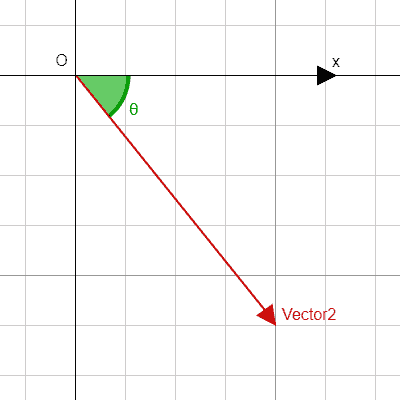
Returns this vector's angle with respect to the positive X axis, or (1, 0) vector, in radians.
For example, Vector2.RIGHT.angle() will return zero, Vector2.DOWN.angle() will return PI / 2 (a quarter turn, or 90 degrees), and Vector2(1, -1).angle() will return -PI / 4 (a negative eighth turn, or -45 degrees).
This is equivalent to calling @GlobalScope.atan2() with y and x.
Illustration of the returned angle.
float angle_to(to: Vector2) const 🔗
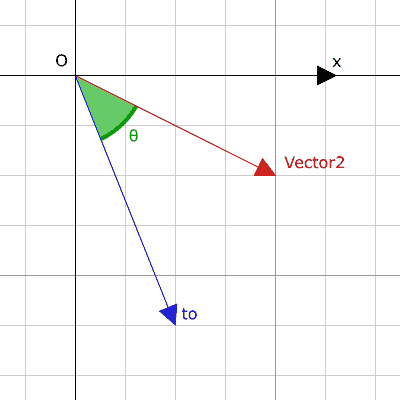
Returns the signed angle to the given vector, in radians. The result ranges from -PI to PI (inclusive).
Illustration of the returned angle.
float angle_to_point(to: Vector2) const 🔗
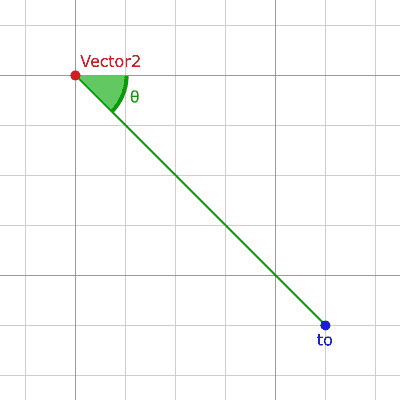
Returns the signed angle between the X axis and the line from this vector to point to, in radians. The result ranges from -PI to PI (inclusive).
a.angle_to_point(b) is equivalent to (b - a).angle(). See also angle().
Illustration of the returned angle.
Returns this vector's aspect ratio, which is x divided by y.
Vector2 bezier_derivative(control_1: Vector2, control_2: Vector2, end: Vector2, t: float) const 🔗
返回貝賽爾曲線上 t 處的導數,該曲線由此向量和控制點 control_1、control_2、終點 end 定義。
Vector2 bezier_interpolate(control_1: Vector2, control_2: Vector2, end: Vector2, t: float) const 🔗
返回貝賽爾曲線上 t 處的點,該曲線由此向量和控制點 control_1、control_2、終點 end 定義。
Vector2 bounce(n: Vector2) const 🔗
Returns the vector "bounced off" from a line defined by the given normal n perpendicular to the line.
Note: bounce() performs the operation that most engines and frameworks call reflect().
返回一個新向量,所有的分量都是向上四捨五入(正無窮大方向)。
Vector2 clamp(min: Vector2, max: Vector2) const 🔗
返回一個新向量,每個分量都使用 @GlobalScope.clamp() 限制在 min 和 max 之間。
Vector2 clampf(min: float, max: float) const 🔗
Returns a new vector with all components clamped between min and max, by running @GlobalScope.clamp() on each component.
float cross(with: Vector2) const 🔗
Returns the 2D analog of the cross product for this vector and with.
This is the signed area of the parallelogram formed by the two vectors. If the second vector is clockwise from the first vector, then the cross product is the positive area. If counter-clockwise, the cross product is the negative area. If the two vectors are parallel this returns zero, making it useful for testing if two vectors are parallel.
Note: Cross product is not defined in 2D mathematically. This method embeds the 2D vectors in the XY plane of 3D space and uses their cross product's Z component as the analog.
Vector2 cubic_interpolate(b: Vector2, pre_a: Vector2, post_b: Vector2, weight: float) const 🔗
返回該向量和 b 之間進行三次插值 weight 處的結果,使用 pre_a 和 post_b 作為控制柄。weight 在 0.0 到 1.0 的範圍內,代表插值的量。
Vector2 cubic_interpolate_in_time(b: Vector2, pre_a: Vector2, post_b: Vector2, weight: float, b_t: float, pre_a_t: float, post_b_t: float) const 🔗
Performs a cubic interpolation between this vector and b using pre_a and post_b as handles, and returns the result at position weight. weight is on the range of 0.0 to 1.0, representing the amount of interpolation.
It can perform smoother interpolation than cubic_interpolate() by the time values.
Vector2 direction_to(to: Vector2) const 🔗
Returns the normalized vector pointing from this vector to to.
a.direction_to(b) is equivalent to (b - a).normalized(). See also normalized().
float distance_squared_to(to: Vector2) const 🔗
Returns the squared Euclidean distance between this vector and to.
This method runs faster than distance_to(), so prefer it if you need to compare vectors or need the squared distance for some formula.
float distance_to(to: Vector2) const 🔗
Returns the Euclidean distance between this vector and to.
float dot(with: Vector2) const 🔗
Returns the dot product of this vector and with. This can be used to compare the angle between two vectors. For example, this can be used to determine whether an enemy is facing the player.
The dot product will be 0 for a right angle (90 degrees), greater than 0 for angles narrower than 90 degrees and lower than 0 for angles wider than 90 degrees.
When using unit (normalized) vectors, the result will always be between -1.0 (180 degree angle) when the vectors are facing opposite directions, and 1.0 (0 degree angle) when the vectors are aligned.
Note: a.dot(b) is equivalent to b.dot(a).
返回一個新的向量,所有的向量都被四捨五入,向負無窮大。
Vector2 from_angle(angle: float) static 🔗
Creates a Vector2 rotated to the given angle in radians. This is equivalent to doing Vector2(cos(angle), sin(angle)) or Vector2.RIGHT.rotated(angle).
print(Vector2.from_angle(0)) # Prints (1.0, 0.0)
print(Vector2(1, 0).angle()) # Prints 0.0, which is the angle used above.
print(Vector2.from_angle(PI / 2)) # Prints (0.0, 1.0)
Note: The length of the returned Vector2 is approximately 1.0, but is is not guaranteed to be exactly 1.0 due to floating-point precision issues. Call normalized() on the returned Vector2 if you require a unit vector.
bool is_equal_approx(to: Vector2) const 🔗
如果這個向量與 to 大致相等,則返回 true,判斷方法是對每個分量執行 @GlobalScope.is_equal_approx()。
如果該向量無窮,則返回 true,判斷方法是對每個分量呼叫 @GlobalScope.is_finite()。
如果該向量是正規化的,即長度約等於 1,則返回 true。
如果該向量的值大約為零,則返回 true,判斷方法是對每個分量運作 @GlobalScope.is_zero_approx()。
該方法比使用 is_equal_approx() 和零向量比較要快。
返回這個向量的長度,即大小。
float length_squared() const 🔗
返回這個向量的平方長度,即平方大小。
這個方法比 length() 運作得更快,所以如果你需要比較向量或需要一些公式的平方距離時,更喜歡用它。
Vector2 lerp(to: Vector2, weight: float) const 🔗
返回此向量和 to 之間,按數量 weight 線性插值結果。weight 在 0.0 到 1.0 的範圍內,代表插值的量。
Vector2 limit_length(length: float = 1.0) const 🔗
Returns the vector with a maximum length by limiting its length to length. If the vector is non-finite, the result is undefined.
Vector2 max(with: Vector2) const 🔗
Returns the component-wise maximum of this and with, equivalent to Vector2(maxf(x, with.x), maxf(y, with.y)).
返回該向量中最大值的軸。見 AXIS_* 常數。如果所有分量相等,則該方法返回 AXIS_X。
Vector2 maxf(with: float) const 🔗
Returns the component-wise maximum of this and with, equivalent to Vector2(maxf(x, with), maxf(y, with)).
Vector2 min(with: Vector2) const 🔗
Returns the component-wise minimum of this and with, equivalent to Vector2(minf(x, with.x), minf(y, with.y)).
返回該向量中最小值的軸。見 AXIS_* 常數。如果所有分量相等,則該方法返回 AXIS_Y。
Vector2 minf(with: float) const 🔗
Returns the component-wise minimum of this and with, equivalent to Vector2(minf(x, with), minf(y, with)).
Vector2 move_toward(to: Vector2, delta: float) const 🔗
返回一個新向量,該向量朝 to 移動了固定的量 delta。不會超過最終值。
Returns the result of scaling the vector to unit length. Equivalent to v / v.length(). Returns (0, 0) if v.length() == 0. See also is_normalized().
Note: This function may return incorrect values if the input vector length is near zero.
返回一個與原來相比逆時針旋轉 90 度的垂直向量,長度不變。
Vector2 posmod(mod: float) const 🔗
返回由該向量的分量與 mod 執行 @GlobalScope.fposmod() 運算後組成的向量。
Vector2 posmodv(modv: Vector2) const 🔗
返回由該向量的分量與 modv 的分量執行 @GlobalScope.fposmod() 運算後組成的向量。
Vector2 project(b: Vector2) const 🔗
Returns a new vector resulting from projecting this vector onto the given vector b. The resulting new vector is parallel to b. See also slide().
Note: If the vector b is a zero vector, the components of the resulting new vector will be @GDScript.NAN.
Vector2 reflect(line: Vector2) const 🔗
Returns the result of reflecting the vector from a line defined by the given direction vector line.
Note: reflect() differs from what other engines and frameworks call reflect(). In other engines, reflect() takes a normal direction which is a direction perpendicular to the line. In Godot, you specify the direction of the line directly. See also bounce() which does what most engines call reflect().
Vector2 rotated(angle: float) const 🔗
返回將這個向量旋轉 angle 的結果(單位為弧度)。另見 @GlobalScope.deg_to_rad()。
返回所有分量都被四捨五入為最接近的整數的向量,中間情況向遠離零的方向四捨五入。
返回新的向量,分量如果為正則設為 1.0,如果為負則設為 -1.0,如果為零則設為 0.0。結果與對每個分量呼叫 @GlobalScope.sign() 一致。
Vector2 slerp(to: Vector2, weight: float) const 🔗
返回在這個向量和 to 之間進行 weight 的球面線性插值的結果。weight 在 0.0 和 1.0 的範圍內,代表插值的量。
如果輸入向量的長度不同,這個函式也會對長度進行插值處理。對於輸入向量中存在長度為零的向量的特殊情況,這個方法的行為與 lerp() 一致。
Vector2 slide(n: Vector2) const 🔗
Returns a new vector resulting from sliding this vector along a line with normal n. The resulting new vector is perpendicular to n, and is equivalent to this vector minus its projection on n. See also project().
Note: The vector n must be normalized. See also normalized().
Vector2 snapped(step: Vector2) const 🔗
返回新的向量,每個分量都吸附到了與 step 中對應分量最接近的倍數。也可以用於將分量四捨五入至小數點後的任意位置。
Vector2 snappedf(step: float) const 🔗
Returns a new vector with each component snapped to the nearest multiple of step. This can also be used to round the components to an arbitrary number of decimals.
運算子說明
bool operator !=(right: Vector2) 🔗
如果向量不相等,則返回 true。
注意:由於浮點數精度誤差,請考慮改用 is_equal_approx(),會更可靠。
注意:包含 @GDScript.NAN 元素的向量的行為與其他向量不同。因此,如果包含 NaN,則這個方法的結果可能不準確。
Vector2 operator *(right: Transform2D) 🔗
Inversely transforms (multiplies) the Vector2 by the given Transform2D transformation matrix, under the assumption that the transformation basis is orthonormal (i.e. rotation/reflection is fine, scaling/skew is not).
vector * transform is equivalent to transform.inverse() * vector. See Transform2D.inverse().
For transforming by inverse of an affine transformation (e.g. with scaling) transform.affine_inverse() * vector can be used instead. See Transform2D.affine_inverse().
Vector2 operator *(right: Vector2) 🔗
Multiplies each component of the Vector2 by the components of the given Vector2.
print(Vector2(10, 20) * Vector2(3, 4)) # Prints (30.0, 80.0)
Vector2 operator *(right: float) 🔗
將該 Vector2 的每個分量乘以給定的 float。
Vector2 operator *(right: int) 🔗
將該 Vector2 的每個分量乘以給定的 int。
Vector2 operator +(right: Vector2) 🔗
Adds each component of the Vector2 by the components of the given Vector2.
print(Vector2(10, 20) + Vector2(3, 4)) # Prints (13.0, 24.0)
Vector2 operator -(right: Vector2) 🔗
Subtracts each component of the Vector2 by the components of the given Vector2.
print(Vector2(10, 20) - Vector2(3, 4)) # Prints (7.0, 16.0)
Vector2 operator /(right: Vector2) 🔗
Divides each component of the Vector2 by the components of the given Vector2.
print(Vector2(10, 20) / Vector2(2, 5)) # Prints (5.0, 4.0)
Vector2 operator /(right: float) 🔗
將該 Vector2 的每個分量除以給定的 float。
Vector2 operator /(right: int) 🔗
將該 Vector2 的每個分量除以給定的 int。
bool operator <(right: Vector2) 🔗
比較兩個 Vector2 向量,首先檢查左向量的 X 值是否小於 right 向量的 X 值。如果 X 值完全相等,則用相同的方法檢查兩個向量的 Y 值。該運算子可用於向量排序。
注意:包含 @GDScript.NAN 元素的向量的行為與其他向量不同。因此,如果包含 NaN,則這個方法的結果可能不準確。
bool operator <=(right: Vector2) 🔗
比較兩個 Vector2 向量,首先檢查左向量的 X 值是否小於等於 right 向量的 X 值。如果 X 值完全相等,則用相同的方法檢查兩個向量的 Y 值。該運算子可用於向量排序。
注意:包含 @GDScript.NAN 元素的向量的行為與其他向量不同。因此,如果包含 NaN,則這個方法的結果可能不準確。
bool operator ==(right: Vector2) 🔗
如果向量完全相等,則返回 true。
注意:由於浮點數精度誤差,請考慮改用 is_equal_approx(),會更可靠。
注意:包含 @GDScript.NAN 元素的向量的行為與其他向量不同。因此,如果包含 NaN,則這個方法的結果可能不準確。
bool operator >(right: Vector2) 🔗
比較兩個 Vector2 向量,首先檢查左向量的 X 值是否大於 right 向量的 X 值。如果 X 值完全相等,則用相同的方法檢查兩個向量的 Y 值。該運算子可用於向量排序。
注意:包含 @GDScript.NAN 元素的向量的行為與其他向量不同。因此,如果包含 NaN,則這個方法的結果可能不準確。
bool operator >=(right: Vector2) 🔗
比較兩個 Vector2 向量,首先檢查左向量的 X 值是否大於等於 right 向量的 X 值。如果 X 值完全相等,則用相同的方法檢查兩個向量的 Y 值。該運算子可用於向量排序。
注意:包含 @GDScript.NAN 元素的向量的行為與其他向量不同。因此,如果包含 NaN,則這個方法的結果可能不準確。
float operator [](index: int) 🔗
使用向量分量的 index 來存取向量分量。v[0] 等價於 v.x、v[1] 等價於 v.y。
返回與 + 不存在時相同的值。單目 + 沒有作用,但有時可以使你的程式碼更具可讀性。
返回該 Vector2 的負值。和寫 Vector2(-v.x, -v.y) 是一樣的。該操作在保持相同幅度的同時,翻轉向量的方向。對於浮點數,零也有正負兩種。