Attention: Here be dragons
This is the latest
(unstable) version of this documentation, which may document features
not available in or compatible with released stable versions of Godot.
Checking the stable version of the documentation...
Color
以 RGBA 格式表示的顏色。
說明
A color represented in RGBA format by a red (r), green (g), blue (b), and alpha (a) component. Each component is a 32-bit floating-point value, usually ranging from 0.0 to 1.0. Some properties (such as CanvasItem.modulate) may support values greater than 1.0, for overbright or HDR (High Dynamic Range) colors.
Colors can be created in a number of ways: By the various Color constructors, by static methods such as from_hsv(), and by using a name from the set of standardized colors based on X11 color names with the addition of TRANSPARENT.
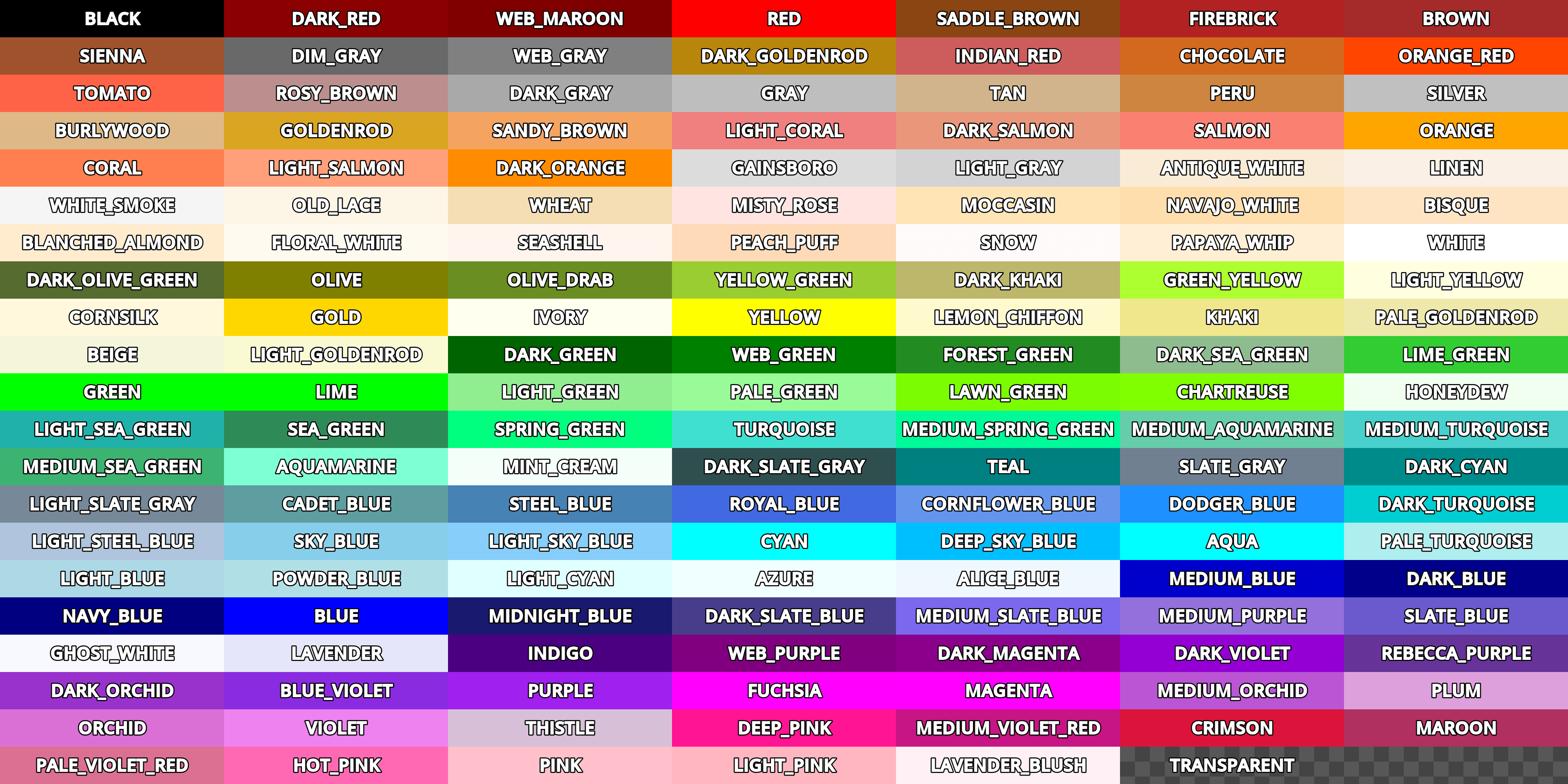
Although Color may be used to store values of any encoding, the red (r), green (g), and blue (b) properties of Color are expected by Godot to be encoded using the nonlinear sRGB transfer function unless otherwise stated. This color encoding is used by many traditional art and web tools, making it easy to match colors between Godot and these tools. Godot uses Rec. ITU-R BT.709 color primaries, which are used by the sRGB standard.
All physical simulation, such as lighting calculations, and colorimetry transformations, such as get_luminance(), must be performed on linearly encoded values to produce correct results. When performing these calculations, convert Color to and from linear encoding using srgb_to_linear() and linear_to_srgb().
Note: In a boolean context, a Color will evaluate to false if it is equal to Color(0, 0, 0, 1) (opaque black). Otherwise, a Color will always evaluate to true.
Note: In C#, color constants are defined in the Colors static class instead of Color. Additionally, named colors use PascalCase syntax instead of UPPER_SNAKE_CASE. For example, Color.ALICE_BLUE in GDScript is Colors.AliceBlue in C#.
備註
使用 C# 操作此 API 時有顯著差異,詳見 C# API 與 GDScript 的不同。
教學
屬性
|
||
|
||
|
||
|
||
|
||
|
||
|
||
|
||
|
||
|
||
|
||
|
||
|
||
|
建構子
Color() |
|
方法
clamp(min: Color = Color(0, 0, 0, 0), max: Color = Color(1, 1, 1, 1)) const |
|
from_hsv(h: float, s: float, v: float, alpha: float = 1.0) static |
|
from_ok_hsl(h: float, s: float, l: float, alpha: float = 1.0) static |
|
from_rgba8(r8: int, g8: int, b8: int, a8: int = 255) static |
|
from_rgbe9995(rgbe: int) static |
|
from_string(str: String, default: Color) static |
|
get_luminance() const |
|
html_is_valid(color: String) static |
|
inverted() const |
|
is_equal_approx(to: Color) const |
|
linear_to_srgb() const |
|
srgb_to_linear() const |
|
to_abgr32() const |
|
to_abgr64() const |
|
to_argb32() const |
|
to_argb64() const |
|
to_rgba32() const |
|
to_rgba64() const |
運算子
operator !=(right: Color) |
|
operator *(right: Color) |
|
operator *(right: float) |
|
operator *(right: int) |
|
operator +(right: Color) |
|
operator -(right: Color) |
|
operator /(right: Color) |
|
operator /(right: float) |
|
operator /(right: int) |
|
operator ==(right: Color) |
|
operator [](index: int) |
|
常數
ALICE_BLUE = Color(0.9411765, 0.972549, 1, 1) 🔗
愛麗絲藍。
ANTIQUE_WHITE = Color(0.98039216, 0.92156863, 0.84313726, 1) 🔗
古董白。
AQUA = Color(0, 1, 1, 1) 🔗
水色。
AQUAMARINE = Color(0.49803922, 1, 0.83137256, 1) 🔗
海藍色。
AZURE = Color(0.9411765, 1, 1, 1) 🔗
天藍色。
BEIGE = Color(0.9607843, 0.9607843, 0.8627451, 1) 🔗
米黃色。
BISQUE = Color(1, 0.89411765, 0.76862746, 1) 🔗
橘黃色。
BLACK = Color(0, 0, 0, 1) 🔗
黑色。在 GDScript 中,這是所有顏色的預設值。
BLANCHED_ALMOND = Color(1, 0.92156863, 0.8039216, 1) 🔗
杏仁白色。
BLUE = Color(0, 0, 1, 1) 🔗
藍色。
BLUE_VIOLET = Color(0.5411765, 0.16862746, 0.8862745, 1) 🔗
藍紫色的顏色。
BROWN = Color(0.64705884, 0.16470589, 0.16470589, 1) 🔗
棕色。
BURLYWOOD = Color(0.87058824, 0.72156864, 0.5294118, 1) 🔗
硬木色。
CADET_BLUE = Color(0.37254903, 0.61960787, 0.627451, 1) 🔗
軍服藍。
CHARTREUSE = Color(0.49803922, 1, 0, 1) 🔗
黃褐色。
CHOCOLATE = Color(0.8235294, 0.4117647, 0.11764706, 1) 🔗
巧克力色。
CORAL = Color(1, 0.49803922, 0.3137255, 1) 🔗
珊瑚色。
CORNFLOWER_BLUE = Color(0.39215687, 0.58431375, 0.92941177, 1) 🔗
矢車菊藍色。
CORNSILK = Color(1, 0.972549, 0.8627451, 1) 🔗
玉米須色。
CRIMSON = Color(0.8627451, 0.078431375, 0.23529412, 1) 🔗
緋紅的顏色。
CYAN = Color(0, 1, 1, 1) 🔗
青色。
DARK_BLUE = Color(0, 0, 0.54509807, 1) 🔗
深藍色。
DARK_CYAN = Color(0, 0.54509807, 0.54509807, 1) 🔗
深青色。
DARK_GOLDENROD = Color(0.72156864, 0.5254902, 0.043137256, 1) 🔗
深色菊科植物的顏色。
DARK_GRAY = Color(0.6627451, 0.6627451, 0.6627451, 1) 🔗
深灰色。
DARK_GREEN = Color(0, 0.39215687, 0, 1) 🔗
深綠色。
DARK_KHAKI = Color(0.7411765, 0.7176471, 0.41960785, 1) 🔗
深卡其色。
DARK_MAGENTA = Color(0.54509807, 0, 0.54509807, 1) 🔗
深洋紅色。
DARK_OLIVE_GREEN = Color(0.33333334, 0.41960785, 0.18431373, 1) 🔗
深橄欖綠色。
DARK_ORANGE = Color(1, 0.54901963, 0, 1) 🔗
深橙色。
DARK_ORCHID = Color(0.6, 0.19607843, 0.8, 1) 🔗
深色的蘭花色。
DARK_RED = Color(0.54509807, 0, 0, 1) 🔗
深紅色。
DARK_SALMON = Color(0.9137255, 0.5882353, 0.47843137, 1) 🔗
深鮭魚色。
DARK_SEA_GREEN = Color(0.56078434, 0.7372549, 0.56078434, 1) 🔗
深海綠色。
DARK_SLATE_BLUE = Color(0.28235295, 0.23921569, 0.54509807, 1) 🔗
深板藍的顏色。
DARK_SLATE_GRAY = Color(0.18431373, 0.30980393, 0.30980393, 1) 🔗
暗石板灰色。
DARK_TURQUOISE = Color(0, 0.80784315, 0.81960785, 1) 🔗
深綠松石色。
DARK_VIOLET = Color(0.5803922, 0, 0.827451, 1) 🔗
深紫羅蘭色。
DEEP_PINK = Color(1, 0.078431375, 0.5764706, 1) 🔗
深粉色。
DEEP_SKY_BLUE = Color(0, 0.7490196, 1, 1) 🔗
深邃的天藍色。
DIM_GRAY = Color(0.4117647, 0.4117647, 0.4117647, 1) 🔗
暗灰色。
DODGER_BLUE = Color(0.11764706, 0.5647059, 1, 1) 🔗
道奇藍色。
FIREBRICK = Color(0.69803923, 0.13333334, 0.13333334, 1) 🔗
耐火磚紅色。
FLORAL_WHITE = Color(1, 0.98039216, 0.9411765, 1) 🔗
花白色。
FOREST_GREEN = Color(0.13333334, 0.54509807, 0.13333334, 1) 🔗
森林綠色。
FUCHSIA = Color(1, 0, 1, 1) 🔗
洋紅色。
GAINSBORO = Color(0.8627451, 0.8627451, 0.8627451, 1) 🔗
庚斯伯勒灰色。
GHOST_WHITE = Color(0.972549, 0.972549, 1, 1) 🔗
幽靈白顏色。
GOLD = Color(1, 0.84313726, 0, 1) 🔗
金色。
GOLDENROD = Color(0.85490197, 0.64705884, 0.1254902, 1) 🔗
金菊色。
GRAY = Color(0.74509805, 0.74509805, 0.74509805, 1) 🔗
灰色。
GREEN = Color(0, 1, 0, 1) 🔗
綠色。
GREEN_YELLOW = Color(0.6784314, 1, 0.18431373, 1) 🔗
綠黃色。
HONEYDEW = Color(0.9411765, 1, 0.9411765, 1) 🔗
蜜露色。
HOT_PINK = Color(1, 0.4117647, 0.7058824, 1) 🔗
亮粉色。
INDIAN_RED = Color(0.8039216, 0.36078432, 0.36078432, 1) 🔗
印度紅色。
INDIGO = Color(0.29411766, 0, 0.50980395, 1) 🔗
靛青色。
IVORY = Color(1, 1, 0.9411765, 1) 🔗
象牙色。
KHAKI = Color(0.9411765, 0.9019608, 0.54901963, 1) 🔗
卡其色。
LAVENDER = Color(0.9019608, 0.9019608, 0.98039216, 1) 🔗
薰衣草色。
LAVENDER_BLUSH = Color(1, 0.9411765, 0.9607843, 1) 🔗
薰衣草紫紅色。
LAWN_GREEN = Color(0.4862745, 0.9882353, 0, 1) 🔗
草坪綠色。
LEMON_CHIFFON = Color(1, 0.98039216, 0.8039216, 1) 🔗
檸檬雪紡色。
LIGHT_BLUE = Color(0.6784314, 0.84705883, 0.9019608, 1) 🔗
淺藍色。
LIGHT_CORAL = Color(0.9411765, 0.5019608, 0.5019608, 1) 🔗
淺珊瑚色。
LIGHT_CYAN = Color(0.8784314, 1, 1, 1) 🔗
淡青色。
LIGHT_GOLDENROD = Color(0.98039216, 0.98039216, 0.8235294, 1) 🔗
亮金菊黃色。
LIGHT_GRAY = Color(0.827451, 0.827451, 0.827451, 1) 🔗
淺灰色。
LIGHT_GREEN = Color(0.5647059, 0.93333334, 0.5647059, 1) 🔗
淺綠色。
LIGHT_PINK = Color(1, 0.7137255, 0.75686276, 1) 🔗
淺粉色。
LIGHT_SALMON = Color(1, 0.627451, 0.47843137, 1) 🔗
淺鮭魚色。
LIGHT_SEA_GREEN = Color(0.1254902, 0.69803923, 0.6666667, 1) 🔗
淺海綠色。
LIGHT_SKY_BLUE = Color(0.5294118, 0.80784315, 0.98039216, 1) 🔗
淺天藍色。
LIGHT_SLATE_GRAY = Color(0.46666667, 0.53333336, 0.6, 1) 🔗
淺板岩灰色。
LIGHT_STEEL_BLUE = Color(0.6901961, 0.76862746, 0.87058824, 1) 🔗
淺鋼藍色。
LIGHT_YELLOW = Color(1, 1, 0.8784314, 1) 🔗
淺黃色。
LIME = Color(0, 1, 0, 1) 🔗
青檸色。
LIME_GREEN = Color(0.19607843, 0.8039216, 0.19607843, 1) 🔗
石灰綠色。
LINEN = Color(0.98039216, 0.9411765, 0.9019608, 1) 🔗
亞麻色。
MAGENTA = Color(1, 0, 1, 1) 🔗
洋紅色。
MAROON = Color(0.6901961, 0.1882353, 0.3764706, 1) 🔗
栗色。
MEDIUM_AQUAMARINE = Color(0.4, 0.8039216, 0.6666667, 1) 🔗
中等海藍寶石色。
MEDIUM_BLUE = Color(0, 0, 0.8039216, 1) 🔗
中藍色。
MEDIUM_ORCHID = Color(0.7294118, 0.33333334, 0.827451, 1) 🔗
中等蘭色。
MEDIUM_PURPLE = Color(0.5764706, 0.4392157, 0.85882354, 1) 🔗
中等紫色。
MEDIUM_SEA_GREEN = Color(0.23529412, 0.7019608, 0.44313726, 1) 🔗
中海綠色。
MEDIUM_SLATE_BLUE = Color(0.48235294, 0.40784314, 0.93333334, 1) 🔗
中等板岩藍色。
MEDIUM_SPRING_GREEN = Color(0, 0.98039216, 0.6039216, 1) 🔗
中等春天綠色。
MEDIUM_TURQUOISE = Color(0.28235295, 0.81960785, 0.8, 1) 🔗
中等綠松石色。
MEDIUM_VIOLET_RED = Color(0.78039217, 0.08235294, 0.52156866, 1) 🔗
中等紫紅色。
MIDNIGHT_BLUE = Color(0.09803922, 0.09803922, 0.4392157, 1) 🔗
午夜藍色。
MINT_CREAM = Color(0.9607843, 1, 0.98039216, 1) 🔗
薄荷奶油色。
MISTY_ROSE = Color(1, 0.89411765, 0.88235295, 1) 🔗
朦朧的玫瑰色。
MOCCASIN = Color(1, 0.89411765, 0.70980394, 1) 🔗
鹿皮鞋顏色。
納瓦白。
藏青色。
OLD_LACE = Color(0.99215686, 0.9607843, 0.9019608, 1) 🔗
舊蕾絲色。
OLIVE = Color(0.5019608, 0.5019608, 0, 1) 🔗
橄欖色。
OLIVE_DRAB = Color(0.41960785, 0.5568628, 0.13725491, 1) 🔗
暗淡橄欖色。
ORANGE = Color(1, 0.64705884, 0, 1) 🔗
橙色。
ORANGE_RED = Color(1, 0.27058825, 0, 1) 🔗
橘紅色。
ORCHID = Color(0.85490197, 0.4392157, 0.8392157, 1) 🔗
蘭花色。
PALE_GOLDENROD = Color(0.93333334, 0.9098039, 0.6666667, 1) 🔗
淡金色。
PALE_GREEN = Color(0.59607846, 0.9843137, 0.59607846, 1) 🔗
淡綠色。
PALE_TURQUOISE = Color(0.6862745, 0.93333334, 0.93333334, 1) 🔗
淡綠松石色。
PALE_VIOLET_RED = Color(0.85882354, 0.4392157, 0.5764706, 1) 🔗
淡紫紅色。
PAPAYA_WHIP = Color(1, 0.9372549, 0.8352941, 1) 🔗
木瓜鞭色。
PEACH_PUFF = Color(1, 0.85490197, 0.7254902, 1) 🔗
桃花粉。
PERU = Color(0.8039216, 0.52156866, 0.24705882, 1) 🔗
秘魯色。
PINK = Color(1, 0.7529412, 0.79607844, 1) 🔗
粉紅色。
PLUM = Color(0.8666667, 0.627451, 0.8666667, 1) 🔗
梅花色。
POWDER_BLUE = Color(0.6901961, 0.8784314, 0.9019608, 1) 🔗
淺藍色。
PURPLE = Color(0.627451, 0.1254902, 0.9411765, 1) 🔗
紫色。
REBECCA_PURPLE = Color(0.4, 0.2, 0.6, 1) 🔗
麗蓓嘉紫色。
RED = Color(1, 0, 0, 1) 🔗
紅色。
ROSY_BROWN = Color(0.7372549, 0.56078434, 0.56078434, 1) 🔗
玫瑰棕。
ROYAL_BLUE = Color(0.25490198, 0.4117647, 0.88235295, 1) 🔗
寶藍色。
SADDLE_BROWN = Color(0.54509807, 0.27058825, 0.07450981, 1) 🔗
鞍棕色。
SALMON = Color(0.98039216, 0.5019608, 0.44705883, 1) 🔗
鮭魚色。
SANDY_BROWN = Color(0.95686275, 0.6431373, 0.3764706, 1) 🔗
沙褐色。
SEA_GREEN = Color(0.18039216, 0.54509807, 0.34117648, 1) 🔗
海綠色。
SEASHELL = Color(1, 0.9607843, 0.93333334, 1) 🔗
貝殼色。
SIENNA = Color(0.627451, 0.32156864, 0.1764706, 1) 🔗
西恩娜色。
SILVER = Color(0.7529412, 0.7529412, 0.7529412, 1) 🔗
銀色。
SKY_BLUE = Color(0.5294118, 0.80784315, 0.92156863, 1) 🔗
天藍色。
SLATE_BLUE = Color(0.41568628, 0.3529412, 0.8039216, 1) 🔗
石板藍色。
SLATE_GRAY = Color(0.4392157, 0.5019608, 0.5647059, 1) 🔗
石板灰。
SNOW = Color(1, 0.98039216, 0.98039216, 1) 🔗
雪白。
SPRING_GREEN = Color(0, 1, 0.49803922, 1) 🔗
春綠。
STEEL_BLUE = Color(0.27450982, 0.50980395, 0.7058824, 1) 🔗
鋼藍色。
TAN = Color(0.8235294, 0.7058824, 0.54901963, 1) 🔗
棕褐色。
TEAL = Color(0, 0.5019608, 0.5019608, 1) 🔗
青色。
THISTLE = Color(0.84705883, 0.7490196, 0.84705883, 1) 🔗
薊色。
TOMATO = Color(1, 0.3882353, 0.2784314, 1) 🔗
番茄色。
TRANSPARENT = Color(1, 1, 1, 0) 🔗
透明色(Alpha 為零的白色)。
TURQUOISE = Color(0.2509804, 0.8784314, 0.8156863, 1) 🔗
松石綠。
VIOLET = Color(0.93333334, 0.50980395, 0.93333334, 1) 🔗
紫羅蘭色。
WEB_GRAY = Color(0.5019608, 0.5019608, 0.5019608, 1) 🔗
網格灰。
WEB_GREEN = Color(0, 0.5019608, 0, 1) 🔗
網路綠。
WEB_MAROON = Color(0.5019608, 0, 0, 1) 🔗
網路栗。
WEB_PURPLE = Color(0.5019608, 0, 0.5019608, 1) 🔗
網路紫。
WHEAT = Color(0.9607843, 0.87058824, 0.7019608, 1) 🔗
小麥色。
WHITE = Color(1, 1, 1, 1) 🔗
白色。
WHITE_SMOKE = Color(0.9607843, 0.9607843, 0.9607843, 1) 🔗
白煙色。
YELLOW = Color(1, 1, 0, 1) 🔗
黃色。
YELLOW_GREEN = Color(0.6039216, 0.8039216, 0.19607843, 1) 🔗
黃綠色。
屬性說明
The color's alpha component, typically on the range of 0 to 1. A value of 0 means that the color is fully transparent. A value of 1 means that the color is fully opaque.
Note: The alpha channel is always stored with linear encoding, regardless of the encoding of the other color channels. The linear_to_srgb() and srgb_to_linear() methods do not affect the alpha channel.
對 a 的封裝,使用 0 到 255 的範圍而不是 0 到 1。
顏色的藍色分量,一般在 0 到 1 的範圍內。
對 b 的封裝,使用 0 到 255 的範圍而不是 0 到 1。
顏色的綠色分量,一般在 0 到 1 的範圍內。
對 g 的封裝,使用 0 到 255 的範圍而不是 0 到 1。
這個顏色的 HSV 色相,範圍是 0 到 1。
The OKHSL hue of this color, on the range 0 to 1.
The OKHSL lightness of this color, on the range 0 to 1.
The OKHSL saturation of this color, on the range 0 to 1.
顏色的紅色分量,通常在 0 到 1 的範圍內。
對 r 的封裝,使用 0 到 255 的範圍而不是 0 到 1。
這個顏色的 HSV 飽和度,範圍為 0 到 1。
這個顏色的 HSV 值(亮度),範圍為 0 至 1。
建構子說明
Constructs a default Color from opaque black. This is the same as BLACK.
Note: In C#, this constructs a Color with all of its components set to 0.0 (transparent black).
Color Color(from: Color, alpha: float)
從現有的顏色建構 Color,a 設定為給定的 alpha 值。
var red = Color(Color.RED, 0.2) # 20% 不透明紅色。
var red = new Color(Colors.Red, 0.2f); // 20% 不透明紅色。
建構給定 Color 的副本。
從 HTML 顏色程式碼或標準化的顏色名稱中建構 Color。支援的顏色名稱與常數名相同。
Color Color(code: String, alpha: float)
從 HTML 顏色程式碼或標準化的顏色名稱中建構 Color,alpha 的範圍為 0.0 到 1.0。支援的顏色名稱與常數名相同。
Color Color(r: float, g: float, b: float)
Constructs a Color from RGB values, typically between 0.0 and 1.0. a is set to 1.0.
var color = Color(0.2, 1.0, 0.7) # Similar to `Color.from_rgba8(51, 255, 178, 255)`
var color = new Color(0.2f, 1.0f, 0.7f); // Similar to `Color.Color8(51, 255, 178, 255)`
Color Color(r: float, g: float, b: float, a: float)
Constructs a Color from RGBA values, typically between 0.0 and 1.0.
var color = Color(0.2, 1.0, 0.7, 0.8) # Similar to `Color.from_rgba8(51, 255, 178, 204)`
var color = new Color(0.2f, 1.0f, 0.7f, 0.8f); // Similar to `Color.Color8(51, 255, 178, 255, 204)`
方法說明
Color blend(over: Color) const 🔗
返回將該顏色混合到給定顏色上所產生的新顏色。在繪畫程式中,你可以將其想像為在該顏色(包括 alpha)上繪製的 over 顏色。
var bg = Color(0.0, 1.0, 0.0, 0.5) # 50% 不透明的綠色
var fg = Color(1.0, 0.0, 0.0, 0.5) # 50% 不透明的紅色
var blended_color = bg.blend(fg) # 75% 不透明的棕色
var bg = new Color(0.0f, 1.0f, 0.0f, 0.5f); // 50% 不透明的綠色
var fg = new Color(1.0f, 0.0f, 0.0f, 0.5f); // 50% 不透明的紅色
Color blendedColor = bg.Blend(fg); // 75% 不透明的棕色
Color clamp(min: Color = Color(0, 0, 0, 0), max: Color = Color(1, 1, 1, 1)) const 🔗
通過在每個分量上運作 @GlobalScope.clamp(),返回一種新顏色,其中所有分量都被鉗制在 min 和 max 的分量之間。
Color darkened(amount: float) const 🔗
返回通過指定 amount(從 0.0 到 1.0 的比率)使該顏色變暗而產生的新顏色。另見 lightened()。
var green = Color(0.0, 1.0, 0.0)
var darkgreen = green.darkened(0.2) # 比普通的綠色深 20%
var green = new Color(0.0f, 1.0f, 0.0f);
Color darkgreen = green.Darkened(0.2f); // 比普通的綠色深 20%
Color from_hsv(h: float, s: float, v: float, alpha: float = 1.0) static 🔗
根據 HSV 配置建構顏色。色相(h)、飽和度(s)和值(v)通常在 0.0 和 1.0 之間。
var color = Color.from_hsv(0.58, 0.5, 0.79, 0.8)
var color = Color.FromHsv(0.58f, 0.5f, 0.79f, 0.8f);
Color from_ok_hsl(h: float, s: float, l: float, alpha: float = 1.0) static 🔗
根據 OK HSL 配置構建顏色。色相(h)、飽和度(s)和亮度(l)通常在 0.0 和 1.0 之間。
var color = Color.from_ok_hsl(0.58, 0.5, 0.79, 0.8)
var color = Color.FromOkHsl(0.58f, 0.5f, 0.79f, 0.8f);
Color from_rgba8(r8: int, g8: int, b8: int, a8: int = 255) static 🔗
Returns a Color constructed from red (r8), green (g8), blue (b8), and optionally alpha (a8) integer channels, each divided by 255.0 for their final value.
var red = Color.from_rgba8(255, 0, 0)             # Same as Color(1, 0, 0).
var dark_blue = Color.from_rgba8(0, 0, 51)        # Same as Color(0, 0, 0.2).
var my_color = Color.from_rgba8(306, 255, 0, 102) # Same as Color(1.2, 1, 0, 0.4).
Note: Due to the lower precision of from_rgba8() compared to the standard Color constructor, a color created with from_rgba8() will generally not be equal to the same color created with the standard Color constructor. Use is_equal_approx() for comparisons to avoid issues with floating-point precision error.
Color from_rgbe9995(rgbe: int) static 🔗
Decodes a Color from an RGBE9995 format integer. See Image.FORMAT_RGBE9995.
Color from_string(str: String, default: Color) static 🔗
Creates a Color from the given string, which can be either an HTML color code or a named color (case-insensitive). Returns default if the color cannot be inferred from the string.
If you want to create a color from String in a constant expression, use the equivalent constructor instead (i.e. Color("color string")).
Returns the light intensity of the color, as a value between 0.0 and 1.0 (inclusive). This is useful when determining light or dark color. Colors with a luminance smaller than 0.5 can be generally considered dark.
Note: get_luminance() relies on the color using linear encoding to return an accurate relative luminance value. If the color uses the default nonlinear sRGB encoding, use srgb_to_linear() to convert it to linear encoding first.
Returns the Color associated with the provided hex integer in 32-bit RGBA format (8 bits per channel). This method is the inverse of to_rgba32().
In GDScript and C#, the int is best visualized with hexadecimal notation ("0x" prefix, making it "0xRRGGBBAA").
var red = Color.hex(0xff0000ff)
var dark_cyan = Color.hex(0x008b8bff)
var my_color = Color.hex(0xbbefd2a4)
var red = new Color(0xff0000ff);
var dark_cyan = new Color(0x008b8bff);
var my_color = new Color(0xbbefd2a4);
If you want to use hex notation in a constant expression, use the equivalent constructor instead (i.e. Color(0xRRGGBBAA)).
Color hex64(hex: int) static 🔗
Returns the Color associated with the provided hex integer in 64-bit RGBA format (16 bits per channel). This method is the inverse of to_rgba64().
In GDScript and C#, the int is best visualized with hexadecimal notation ("0x" prefix, making it "0xRRRRGGGGBBBBAAAA").
Color html(rgba: String) static 🔗
從 HTML 十六進位顏色字串 rgba 返回一個新顏色。rgba 不區分大小寫,可以使用雜湊符號(#)作為前綴。
rgba 必須是有效的三位或六位元十六進位顏色字串,並且可以包含 alpha 通道值。如果 rgba 不包含 alpha 通道值,則套用 alpha 通道值 1.0。如果 rgba 無效,則返回一個空顏色。
var blue = Color.html("#0000ff") # blue 為 Color(0.0, 0.0, 1.0, 1.0)
var green = Color.html("#0F0")   # green 為 Color(0.0, 1.0, 0.0, 1.0)
var col = Color.html("663399cc") # col 為 Color(0.4, 0.2, 0.6, 0.8)
var blue = Color.FromHtml("#0000ff"); // blue 為 Color(0.0, 0.0, 1.0, 1.0)
var green = Color.FromHtml("#0F0");   // green 為 Color(0.0, 1.0, 0.0, 1.0)
var col = Color.FromHtml("663399cc"); // col 為 Color(0.4, 0.2, 0.6, 0.8)
bool html_is_valid(color: String) static 🔗
如果 color 是一個有效的 HTML 十六進位顏色字串,則返回 true。該字串必須是一個由 3、4、6 或 8 位元數位組成的十六進位值(不區分大小寫),並且可以以井號 (#) 作為前綴。該方法與 String.is_valid_html_color() 相同。
Color.html_is_valid("#55aaFF")   # 返回 true
Color.html_is_valid("#55AAFF20") # 返回 true
Color.html_is_valid("55AAFF")    # 返回 true
Color.html_is_valid("#F2C")      # 返回 true

Color.html_is_valid("#AABBC)     # 返回 false
Color.html_is_valid("#55aaFF5")  # 返回 false
Color.HtmlIsValid("#55AAFF");   // 返回 true
Color.HtmlIsValid("#55AAFF20"); // 返回 true
Color.HtmlIsValid("55AAFF");    // 返回 true
Color.HtmlIsValid("#F2C");      // 返回 true

Color.HtmlIsValid("#AABBC");    // 返回 false
Color.HtmlIsValid("#55aaFF5");  // 返回 false
返回將 r、g、b 分量翻轉後的顏色((1 - r, 1 - g, 1 - b, a))。
var black = Color.WHITE.inverted()
var color = Color(0.3, 0.4, 0.9)
var inverted_color = color.inverted() # 等價於 `Color(0.7, 0.6, 0.1)`
var black = Colors.White.Inverted();
var color = new Color(0.3f, 0.4f, 0.9f);
Color invertedColor = color.Inverted(); // 等價於 `new Color(0.7f, 0.6f, 0.1f)`
bool is_equal_approx(to: Color) const 🔗
如果該顏色和 to 近似相等,則返回 true,判斷近似相等的方法是通過在每個分量上運作 @GlobalScope.is_equal_approx()。
Color lerp(to: Color, weight: float) const 🔗
返回將該顏色的分量和 to 的分量進行線性插值的結果。插值係數 weight 應該在 0.0 和 1.0 之間(閉區間)。另請參閱 @GlobalScope.lerp()。
var red = Color(1.0, 0.0, 0.0)
var aqua = Color(0.0, 1.0, 0.8)

red.lerp(aqua, 0.2) # 返回 Color(0.8, 0.2, 0.16)
red.lerp(aqua, 0.5) # 返回 Color(0.5, 0.5, 0.4)
red.lerp(aqua, 1.0) # 返回 Color(0.0, 1.0, 0.8)
var red = new Color(1.0f, 0.0f, 0.0f);
var aqua = new Color(0.0f, 1.0f, 0.8f);

red.Lerp(aqua, 0.2f); // 返回 Color(0.8f, 0.2f, 0.16f)
red.Lerp(aqua, 0.5f); // 返回 Color(0.5f, 0.5f, 0.4f)
red.Lerp(aqua, 1.0f); // 返回 Color(0.0f, 1.0f, 0.8f)
Color lightened(amount: float) const 🔗
返回通過指定 amount(從 0.0 到 1.0 的比率)使該顏色變亮而產生的新顏色。另見 darkened()。
var green = Color(0.0, 1.0, 0.0)
var light_green = green.lightened(0.2) # 比普通的綠色要淡 20%
var green = new Color(0.0f, 1.0f, 0.0f);
Color lightGreen = green.Lightened(0.2f); // 比普通的綠色要淡 20%
Color linear_to_srgb() const 🔗
Returns a copy of the color that is encoded using the nonlinear sRGB transfer function. This method requires the original color to use linear encoding. See also srgb_to_linear() which performs the opposite operation.
Note: The color's alpha channel (a) is not affected. The alpha channel is always stored with linear encoding, regardless of the color space of the other color channels.
Color srgb_to_linear() const 🔗
Returns a copy of the color that uses linear encoding. This method requires the original color to be encoded using the nonlinear sRGB transfer function. See also linear_to_srgb() which performs the opposite operation.
Note: The color's alpha channel (a) is not affected. The alpha channel is always stored with linear encoding, regardless of the color space of the other color channels.
返回轉換為 ABGR 格式(每個分量為 8 位)的 32 位元整數的顏色。ABGR 是預設 RGBA 格式的反轉版本。
var color = Color(1, 0.5, 0.2)
print(color.to_abgr32()) # 輸出 4281565439
var color = new Color(1.0f, 0.5f, 0.2f);
GD.Print(color.ToAbgr32()); // 輸出 4281565439
返回轉換為 ABGR 格式(每個分量為 16 位)的 64 位元整數的顏色。ABGR 是預設 RGBA 格式的反轉版本。
var color = Color(1, 0.5, 0.2)
print(color.to_abgr64()) # 輸出 -225178692812801
var color = new Color(1.0f, 0.5f, 0.2f);
GD.Print(color.ToAbgr64()); // 輸出 -225178692812801
返回轉換為 ARGB 格式(每個分量為 8 位)的 32 位元整數的顏色。ARGB 與 DirectX 更相容。
var color = Color(1, 0.5, 0.2)
print(color.to_argb32()) # 輸出 4294934323
var color = new Color(1.0f, 0.5f, 0.2f);
GD.Print(color.ToArgb32()); // 輸出 4294934323
返回轉換為 ARGB 格式(每個分量為 16 位)的 64 位元整數的顏色。ARGB 與 DirectX 更相容。
var color = Color(1, 0.5, 0.2)
print(color.to_argb64()) # 輸出 -2147470541
var color = new Color(1.0f, 0.5f, 0.2f);
GD.Print(color.ToArgb64()); // 輸出 -2147470541
String to_html(with_alpha: bool = true) const 🔗
返回將該顏色轉換為 RGBA 格式的 HTML 十六進位顏色 String,不帶(#)前綴。
將 with_alpha 設定為 false,會從十六進位字串中排除 alpha,使用 RGB 格式而不是 RGBA 格式。
var white = Color(1, 1, 1, 0.5)
var with_alpha = white.to_html() # 返回 "ffffff7f"
var without_alpha = white.to_html(false) # 返回 "ffffff"
var white = new Color(1, 1, 1, 0.5f);
string withAlpha = white.ToHtml(); // 返回 "ffffff7f"
string withoutAlpha = white.ToHtml(false); // 返回 "ffffff"
Returns the color converted to a 32-bit integer in RGBA format (each component is 8 bits). RGBA is Godot's default format. This method is the inverse of hex().
var color = Color(1, 0.5, 0.2)
print(color.to_rgba32()) # Prints 4286526463
var color = new Color(1, 0.5f, 0.2f);
GD.Print(color.ToRgba32()); // Prints 4286526463
Returns the color converted to a 64-bit integer in RGBA format (each component is 16 bits). RGBA is Godot's default format. This method is the inverse of hex64().
var color = Color(1, 0.5, 0.2)
print(color.to_rgba64()) # Prints -140736629309441
var color = new Color(1, 0.5f, 0.2f);
GD.Print(color.ToRgba64()); // Prints -140736629309441
運算子說明
bool operator !=(right: Color) 🔗
如果顏色不完全相等,則返回 true。
注意:由於浮點數精度誤差,請考慮改用 is_equal_approx(),會更可靠。
Color operator *(right: Color) 🔗
將該 Color 的每個分量乘以給定 Color 的對應分量。
Color operator *(right: float) 🔗
將該 Color 的每個分量乘以給定的 float。
Color operator *(right: int) 🔗
將該 Color 的每個分量乘以給定的 int。
Color operator +(right: Color) 🔗
將該 Color 的每個分量加上給定 Color 的對應分量。
Color operator -(right: Color) 🔗
將該 Color 的每個分量減去給定 Color 的對應分量。
Color operator /(right: Color) 🔗
將該 Color 的每個分量除以給定 Color 的每個分量。
Color operator /(right: float) 🔗
將該 Color 的每個分量除以給定的 float。
Color operator /(right: int) 🔗
將該 Color 的每個分量除以給定的 int。
bool operator ==(right: Color) 🔗
如果顏色完全相同,則返回 true。
注意:由於浮點精度誤差,請考慮改用更可靠的 is_equal_approx()。
float operator [](index: int) 🔗
使用索引存取顏色分量。[0] 相當於 r,[1] 相當於 g,[2] 相當於 b,[3] 相當於 a.
返回與 + 不存在時相同的值。單目 + 沒有作用,但有時可以使你的程式碼更具可讀性。
反轉給定的顏色。這相當於 Color.WHITE - c 或 Color(1 - c.r, 1 - c.g, 1 - c.b, 1 - c.a)。與 inverted() 不同,a 分量也將被反轉。