Attention: Here be dragons
This is the latest
(unstable) version of this documentation, which may document features
not available in or compatible with released stable versions of Godot.
Checking the stable version of the documentation...
@GlobalScope
全域範圍的常數和函式。
說明
全域範圍的列舉常數與內建函式列表,包含所有存在於全域命名空間中的錯誤碼、按鍵碼、屬性提示等常數。
單例亦記載於此,因為它們可於任何位置存取。
若為僅能於 GDScript 腳本中存取的項目,請參閱 @GDScript。
備註
使用 C# 操作此 API 時有顯著差異,詳見 C# API 與 GDScript 的不同。
教學
屬性
方法
列舉
enum Side: 🔗
Side SIDE_LEFT = 0
左邊,常用於 Control 或 StyleBox 的衍生類。
Side SIDE_TOP = 1
頂邊,常用於 Control 或 StyleBox 的衍生類。
Side SIDE_RIGHT = 2
右邊,常用於 Control 或 StyleBox 的衍生類。
Side SIDE_BOTTOM = 3
底邊,常用於 Control 或 StyleBox 的衍生類。
enum Corner: 🔗
Corner CORNER_TOP_LEFT = 0
左上角。
Corner CORNER_TOP_RIGHT = 1
右上角。
Corner CORNER_BOTTOM_RIGHT = 2
右下角。
Corner CORNER_BOTTOM_LEFT = 3
左下角。
enum Orientation: 🔗
Orientation VERTICAL = 1
通用垂直對齊,常用於 Separator、ScrollBar、Slider 等。
Orientation HORIZONTAL = 0
通用水平對齊,常用於 Separator、ScrollBar、Slider 等。
enum ClockDirection: 🔗
ClockDirection CLOCKWISE = 0
順時針旋轉。被一些方法使用(例如 Image.rotate_90())。
ClockDirection COUNTERCLOCKWISE = 1
逆時針旋轉。被一些方法使用(例如 Image.rotate_90())。
enum HorizontalAlignment: 🔗
HorizontalAlignment HORIZONTAL_ALIGNMENT_LEFT = 0
水平左對齊,常用於文字衍生類。
HorizontalAlignment HORIZONTAL_ALIGNMENT_CENTER = 1
水平居中對齊,常用於文字衍生類。
HorizontalAlignment HORIZONTAL_ALIGNMENT_RIGHT = 2
水平右對齊,常用於文字衍生類。
HorizontalAlignment HORIZONTAL_ALIGNMENT_FILL = 3
擴充行以適應寬度,常用於文字衍生類。
enum VerticalAlignment: 🔗
VerticalAlignment VERTICAL_ALIGNMENT_TOP = 0
垂直上對齊,常用於文字衍生類。
VerticalAlignment VERTICAL_ALIGNMENT_CENTER = 1
垂直居中對齊,常用於文字衍生類。
VerticalAlignment VERTICAL_ALIGNMENT_BOTTOM = 2
垂直下對齊,常用於文字衍生類。
VerticalAlignment VERTICAL_ALIGNMENT_FILL = 3
擴充行以適應高度,通常用於文字衍生類。
enum InlineAlignment: 🔗
InlineAlignment INLINE_ALIGNMENT_TOP_TO = 0
將行內物件(例如圖像、表格)的頂部與 INLINE_ALIGNMENT_TO_* 常數指定的文字位置對齊。
InlineAlignment INLINE_ALIGNMENT_CENTER_TO = 1
將行內物件(例如圖像、表格)的中心與 INLINE_ALIGNMENT_TO_* 常數指定的文字位置對齊。
InlineAlignment INLINE_ALIGNMENT_BASELINE_TO = 3
將行內物件(如圖像、表格)的基線(使用者定義)與INLINE_ALIGNMENT_TO_* 常數指定的文字位置對齊。
InlineAlignment INLINE_ALIGNMENT_BOTTOM_TO = 2
將行內物件(例如圖像、表格)的底部與 INLINE_ALIGNMENT_TO_* 常數指定的文字位置對齊。
InlineAlignment INLINE_ALIGNMENT_TO_TOP = 0
將由 INLINE_ALIGNMENT_*_TO 常數指定的行內物件(例如圖像、表格)的位置與文字頂部對齊。
InlineAlignment INLINE_ALIGNMENT_TO_CENTER = 4
將由 INLINE_ALIGNMENT_*_TO 常數指定的行內物件(例如圖像、表格)的位置與文字中心對齊。
InlineAlignment INLINE_ALIGNMENT_TO_BASELINE = 8
將由 INLINE_ALIGNMENT_*_TO 常數指定的行內物件(例如圖像、表格)的位置與文字基線對齊。
InlineAlignment INLINE_ALIGNMENT_TO_BOTTOM = 12
將行內物件(例如圖像、表格)與文字底部對齊。
InlineAlignment INLINE_ALIGNMENT_TOP = 0
將行內物件(例如圖像、表格)的頂部與文字的頂部對齊。等效於 INLINE_ALIGNMENT_TOP_TO | INLINE_ALIGNMENT_TO_TOP。
InlineAlignment INLINE_ALIGNMENT_CENTER = 5
將行內物件(例如圖像、表格)的中心與文字的中心對齊。相當於 INLINE_ALIGNMENT_CENTER_TO | INLINE_ALIGNMENT_TO_CENTER。
InlineAlignment INLINE_ALIGNMENT_BOTTOM = 14
將行內物件(例如圖像、表格)的底部與文字底部對齊。等效於 INLINE_ALIGNMENT_BOTTOM_TO | INLINE_ALIGNMENT_TO_BOTTOM。
InlineAlignment INLINE_ALIGNMENT_IMAGE_MASK = 3
用於 INLINE_ALIGNMENT_*_TO 對齊常數的位元遮罩。
InlineAlignment INLINE_ALIGNMENT_TEXT_MASK = 12
用於 INLINE_ALIGNMENT_TO_* 對齊常數的位元遮罩。
enum EulerOrder: 🔗
EulerOrder EULER_ORDER_XYZ = 0
Specifies that Euler angles should be in intrinsic XYZ order. When composing, the rotations happen around the local X, Y, and Z axes, in that order. When decomposing, the order is reversed, first Z, then Y, and X last.
EulerOrder EULER_ORDER_XZY = 1
Specifies that Euler angles should be in intrinsic XZY order. When composing, the rotations happen around the local X, Z, and Y axes, in that order. When decomposing, the order is reversed, first Y, then Z, and X last.
EulerOrder EULER_ORDER_YXZ = 2
Specifies that Euler angles should be in intrinsic YXZ order. When composing, the rotations happen around the local Y, X, and Z axes, in that order. When decomposing, the order is reversed, first Z, then X, and Y last.
EulerOrder EULER_ORDER_YZX = 3
Specifies that Euler angles should be in intrinsic YZX order. When composing, the rotations happen around the local Y, Z, and X axes, in that order. When decomposing, the order is reversed, first X, then Z, and Y last.
EulerOrder EULER_ORDER_ZXY = 4
Specifies that Euler angles should be in intrinsic ZXY order. When composing, the rotations happen around the local Z, X, and Y axes, in that order. When decomposing, the order is reversed, first Y, then X, and Z last.
EulerOrder EULER_ORDER_ZYX = 5
Specifies that Euler angles should be in intrinsic ZYX order. When composing, the rotations happen around the local Z, Y, and X axes, in that order. When decomposing, the order is reversed, first X, then Y, and Z last.
enum Key: 🔗
Key KEY_NONE = 0
與任何鍵都不對應的列舉值。這用於初始化具有通用狀態的 Key 屬性。
Key KEY_SPECIAL = 4194304
套用此位的鍵碼不可列印。
Key KEY_ESCAPE = 4194305
ESC 鍵。
Key KEY_TAB = 4194306
Tab 鍵。
Key KEY_BACKTAB = 4194307
Shift + Tab 鍵。
Key KEY_BACKSPACE = 4194308
倒退鍵。
Key KEY_ENTER = 4194309
確認鍵(位於主鍵盤)。
Key KEY_KP_ENTER = 4194310
小鍵盤區的確認鍵。
Key KEY_INSERT = 4194311
Insert 鍵。
Key KEY_DELETE = 4194312
Delete 鍵。
Key KEY_PAUSE = 4194313
Pause 鍵。
Key KEY_PRINT = 4194314
Print Screen 鍵。
Key KEY_SYSREQ = 4194315
System Request 鍵。
Key KEY_CLEAR = 4194316
Clear 鍵。
Key KEY_HOME = 4194317
Home 鍵。
Key KEY_END = 4194318
End 鍵。
Key KEY_LEFT = 4194319
左方向鍵。
Key KEY_UP = 4194320
上方向鍵。
Key KEY_RIGHT = 4194321
右方向鍵。
Key KEY_DOWN = 4194322
下方向鍵。
Key KEY_PAGEUP = 4194323
Page Up 鍵。
Key KEY_PAGEDOWN = 4194324
Page Down 鍵。
Key KEY_SHIFT = 4194325
Shift 鍵。
Key KEY_CTRL = 4194326
Control 鍵。
Key KEY_META = 4194327
Meta 鍵。
Key KEY_ALT = 4194328
Alt 鍵。
Key KEY_CAPSLOCK = 4194329
Caps Lock 鍵。
Key KEY_NUMLOCK = 4194330
Num Lock 鍵。
Key KEY_SCROLLLOCK = 4194331
Scroll Lock 鍵。
Key KEY_F1 = 4194332
F1 鍵。
Key KEY_F2 = 4194333
F2 鍵。
Key KEY_F3 = 4194334
F3 鍵。
Key KEY_F4 = 4194335
F4 鍵。
Key KEY_F5 = 4194336
F5 鍵。
Key KEY_F6 = 4194337
F6 鍵。
Key KEY_F7 = 4194338
F7 鍵。
Key KEY_F8 = 4194339
F8 鍵。
Key KEY_F9 = 4194340
F9 鍵。
Key KEY_F10 = 4194341
F10 鍵。
Key KEY_F11 = 4194342
F11 鍵。
Key KEY_F12 = 4194343
F12 鍵。
Key KEY_F13 = 4194344
F13 鍵。
Key KEY_F14 = 4194345
F14 鍵。
Key KEY_F15 = 4194346
F15 鍵。
Key KEY_F16 = 4194347
F16 鍵。
Key KEY_F17 = 4194348
F17 鍵。
Key KEY_F18 = 4194349
F18 鍵。
Key KEY_F19 = 4194350
F19 鍵。
Key KEY_F20 = 4194351
F20 鍵。
Key KEY_F21 = 4194352
F21 鍵。
Key KEY_F22 = 4194353
F22 鍵。
Key KEY_F23 = 4194354
F23 鍵。
Key KEY_F24 = 4194355
F24 鍵。
Key KEY_F25 = 4194356
F25 鍵。由於 Windows 限制,僅支援 macOS 和 Linux。
Key KEY_F26 = 4194357
F26 鍵。由於 Windows 限制,僅支援 macOS 和 Linux。
Key KEY_F27 = 4194358
F27 鍵。由於 Windows 限制,僅支援 macOS 和 Linux。
Key KEY_F28 = 4194359
F28 鍵。由於 Windows 限制,僅支援 macOS 和 Linux。
Key KEY_F29 = 4194360
F29 鍵。由於 Windows 限制,僅支援 macOS 和 Linux。
Key KEY_F30 = 4194361
F30 鍵。由於 Windows 限制,僅支援 macOS 和 Linux。
Key KEY_F31 = 4194362
F31 鍵。由於 Windows 限制,僅支援 macOS 和 Linux。
Key KEY_F32 = 4194363
F32 鍵。由於 Windows 限制,僅支援 macOS 和 Linux。
Key KEY_F33 = 4194364
F33 鍵。由於 Windows 限制,僅支援 macOS 和 Linux。
Key KEY_F34 = 4194365
F34 鍵。由於 Windows 限制,僅支援 macOS 和 Linux。
Key KEY_F35 = 4194366
F35 鍵。由於 Windows 限制,僅支援 macOS 和 Linux。
Key KEY_KP_MULTIPLY = 4194433
小鍵盤的星鍵/乘以鍵(*)。
Key KEY_KP_DIVIDE = 4194434
小鍵盤的除以鍵(/)。
Key KEY_KP_SUBTRACT = 4194435
小鍵盤的減號鍵(-)。
Key KEY_KP_PERIOD = 4194436
小鍵盤的點鍵(.)。
Key KEY_KP_ADD = 4194437
小鍵盤的加號鍵(+)。
Key KEY_KP_0 = 4194438
小鍵盤的數位 0。
Key KEY_KP_1 = 4194439
小鍵盤的數位 1。
Key KEY_KP_2 = 4194440
小鍵盤的數位 2。
Key KEY_KP_3 = 4194441
小鍵盤的數位 3。
Key KEY_KP_4 = 4194442
小鍵盤的數位 4。
Key KEY_KP_5 = 4194443
小鍵盤的數位 5。
Key KEY_KP_6 = 4194444
小鍵盤的數位 6。
Key KEY_KP_7 = 4194445
小鍵盤的數位 7。
Key KEY_KP_8 = 4194446
小鍵盤的數位 8。
Key KEY_KP_9 = 4194447
小鍵盤的數位 9。
本文選單鍵。
Key KEY_HYPER = 4194371
超級鍵。(僅在 Linux/X11 上)。
Key KEY_HELP = 4194373
Help 鍵。
Key KEY_BACK = 4194376
返回鍵。
Key KEY_FORWARD = 4194377
前進鍵。
Key KEY_STOP = 4194378
媒體停止播放鍵。
Key KEY_REFRESH = 4194379
重新整理鍵。
Key KEY_VOLUMEDOWN = 4194380
音量降低鍵。
Key KEY_VOLUMEMUTE = 4194381
靜音鍵。
Key KEY_VOLUMEUP = 4194382
音量升高鍵。
Key KEY_MEDIAPLAY = 4194388
媒體播放鍵。
Key KEY_MEDIASTOP = 4194389
媒體停止播放鍵。
Key KEY_MEDIAPREVIOUS = 4194390
上一首歌鍵。
Key KEY_MEDIANEXT = 4194391
下一首歌鍵。
Key KEY_MEDIARECORD = 4194392
媒體錄製鍵。
Key KEY_HOMEPAGE = 4194393
主頁鍵。
Key KEY_FAVORITES = 4194394
收藏鍵。
Key KEY_SEARCH = 4194395
搜索鍵。
Key KEY_STANDBY = 4194396
Standby 鍵。
Key KEY_OPENURL = 4194397
打開 URL / 啟動流覽器鍵。
Key KEY_LAUNCHMAIL = 4194398
啟動郵箱鍵。
Key KEY_LAUNCHMEDIA = 4194399
啟動多媒體鍵。
Key KEY_LAUNCH0 = 4194400
快捷啟動鍵 0。
Key KEY_LAUNCH1 = 4194401
快捷啟動鍵 1。
Key KEY_LAUNCH2 = 4194402
快捷啟動鍵 2。
Key KEY_LAUNCH3 = 4194403
快捷啟動鍵 3。
Key KEY_LAUNCH4 = 4194404
快捷啟動鍵 4。
Key KEY_LAUNCH5 = 4194405
快捷啟動鍵 5。
Key KEY_LAUNCH6 = 4194406
快捷啟動鍵 6。
Key KEY_LAUNCH7 = 4194407
快捷啟動鍵 7。
Key KEY_LAUNCH8 = 4194408
快捷啟動鍵 8。
Key KEY_LAUNCH9 = 4194409
快捷啟動鍵 9。
Key KEY_LAUNCHA = 4194410
快捷啟動鍵 A。
Key KEY_LAUNCHB = 4194411
快捷啟動鍵 B。
Key KEY_LAUNCHC = 4194412
快捷啟動鍵 C。
Key KEY_LAUNCHD = 4194413
快捷啟動鍵 D。
Key KEY_LAUNCHE = 4194414
快捷啟動鍵 E。
Key KEY_LAUNCHF = 4194415
快捷啟動鍵 F。
Key KEY_GLOBE = 4194416
Mac / iPad 鍵盤上的“地球”鍵。
Key KEY_KEYBOARD = 4194417
iPad 鍵盤上的“螢幕鍵盤”鍵。
Key KEY_JIS_EISU = 4194418
Mac 鍵盤上的英數鍵。
Key KEY_JIS_KANA = 4194419
Mac 鍵盤上的“かな”鍵。
Key KEY_UNKNOWN = 8388607
未知鍵。
Key KEY_SPACE = 32
空白鍵。
Key KEY_EXCLAM = 33
驚嘆號(!)鍵。
Key KEY_QUOTEDBL = 34
雙引號(")鍵。
Key KEY_NUMBERSIGN = 35
井號或 hash(#)鍵。
Key KEY_DOLLAR = 36
美元符號($)鍵。
Key KEY_PERCENT = 37
百分號(%)鍵。
Key KEY_AMPERSAND = 38
和號(&)鍵。
Key KEY_APOSTROPHE = 39
撇號(')鍵。
Key KEY_PARENLEFT = 40
左括號(()鍵。
Key KEY_PARENRIGHT = 41
右括號())鍵。
Key KEY_ASTERISK = 42
星號(*)鍵。
Key KEY_PLUS = 43
加號(+)鍵。
Key KEY_COMMA = 44
逗號(,)鍵。
Key KEY_MINUS = 45
減號(-)鍵。
Key KEY_PERIOD = 46
句點(.)鍵。
Key KEY_SLASH = 47
斜線(/)鍵。
Key KEY_0 = 48
數字 0 鍵。
Key KEY_1 = 49
數字 1 鍵。
Key KEY_2 = 50
數字 2 鍵。
Key KEY_3 = 51
數字 3 鍵。
Key KEY_4 = 52
數字 4 鍵。
Key KEY_5 = 53
數字 5 鍵。
Key KEY_6 = 54
數字 6 鍵。
Key KEY_7 = 55
數字 7 鍵。
Key KEY_8 = 56
數字 8 鍵。
Key KEY_9 = 57
數字 9 鍵。
Key KEY_COLON = 58
冒號(:)鍵。
Key KEY_SEMICOLON = 59
分號(;)鍵。
Key KEY_LESS = 60
小於號(<)鍵。
Key KEY_EQUAL = 61
等號(=)鍵。
Key KEY_GREATER = 62
大於號(>)鍵。
Key KEY_QUESTION = 63
問號(?)鍵。
Key KEY_AT = 64
at 符號(@)鍵。
Key KEY_A = 65
A 鍵。
Key KEY_B = 66
B 鍵。
Key KEY_C = 67
C 鍵。
Key KEY_D = 68
D 鍵。
Key KEY_E = 69
E 鍵。
Key KEY_F = 70
F 鍵。
Key KEY_G = 71
G 鍵。
Key KEY_H = 72
H 鍵。
Key KEY_I = 73
I 鍵。
Key KEY_J = 74
J 鍵。
Key KEY_K = 75
K 鍵。
Key KEY_L = 76
L 鍵。
Key KEY_M = 77
M 鍵。
Key KEY_N = 78
N 鍵。
Key KEY_O = 79
O 鍵。
Key KEY_P = 80
P 鍵。
Key KEY_Q = 81
Q 鍵。
Key KEY_R = 82
R 鍵。
Key KEY_S = 83
S 鍵。
Key KEY_T = 84
T 鍵。
Key KEY_U = 85
U 鍵。
Key KEY_V = 86
V 鍵。
Key KEY_W = 87
W 鍵。
Key KEY_X = 88
X 鍵。
Key KEY_Y = 89
Y 鍵。
Key KEY_Z = 90
Z 鍵。
Key KEY_BRACKETLEFT = 91
左中括號([lb])鍵。
Key KEY_BACKSLASH = 92
反斜線(\)鍵。
Key KEY_BRACKETRIGHT = 93
右中括號([rb])鍵。
Key KEY_ASCIICIRCUM = 94
脫字符號(^)鍵。
Key KEY_UNDERSCORE = 95
底線(_)鍵。
Key KEY_QUOTELEFT = 96
反引號(`)鍵。
Key KEY_BRACELEFT = 123
左大括號({)鍵。
Key KEY_BAR = 124
垂直線/管線符號(|)鍵。
Key KEY_BRACERIGHT = 125
右大括號(})鍵。
Key KEY_ASCIITILDE = 126
波浪號(~)鍵。
Key KEY_YEN = 165
日圓符號(¥)鍵。
Key KEY_SECTION = 167
節號符號(§)鍵。
flags KeyModifierMask: 🔗
KeyModifierMask KEY_CODE_MASK = 8388607
Bit mask with all bits enabled except for modifier keys. Apply it to remove modifiers.
var keycode = KEY_A | KEY_MASK_SHIFT
keycode = keycode & KEY_CODE_MASK
print(keycode) # KEY_A
KeyModifierMask KEY_MODIFIER_MASK = 2130706432
Bit mask with all modifier bits enabled. Apply it to isolate modifiers.
var keycode = KEY_A | KEY_MASK_SHIFT
keycode = keycode & KEY_MODIFIER_MASK
print(keycode) # KEY_MASK_SHIFT
KeyModifierMask KEY_MASK_CMD_OR_CTRL = 16777216
自動重對應為 macOS 上的 KEY_META 和其他平臺上的 KEY_CTRL,此遮罩在實際事件中從不設定,應僅用於鍵對應。
KeyModifierMask KEY_MASK_SHIFT = 33554432
Shift 鍵遮罩。
KeyModifierMask KEY_MASK_ALT = 67108864
Alt 或 Option(在 macOS 上)鍵遮罩。
KeyModifierMask KEY_MASK_META = 134217728
命令(在 macOS 上)或 Meta/Windows 鍵遮罩。
KeyModifierMask KEY_MASK_CTRL = 268435456
Ctrl 鍵遮罩。
KeyModifierMask KEY_MASK_KPAD = 536870912
Keypad 鍵遮罩。
KeyModifierMask KEY_MASK_GROUP_SWITCH = 1073741824
Group Switch 鍵遮罩。
enum KeyLocation: 🔗
KeyLocation KEY_LOCATION_UNSPECIFIED = 0
用於只會出現一次的按鍵,或比較時無需區分 LEFT 與 RIGHT 版本的情況。
例如使用 InputEvent.is_match() 時,若事件的按鍵位置為 KEY_LOCATION_UNSPECIFIED,則可匹配傳入事件的任何 KeyLocation。
KeyLocation KEY_LOCATION_LEFT = 1
位於對應雙生鍵左側的按鍵。
KeyLocation KEY_LOCATION_RIGHT = 2
位於對應雙生鍵右側的按鍵。
enum MouseButton: 🔗
MouseButton MOUSE_BUTTON_NONE = 0
與任何滑鼠按鈕都不對應的列舉值。這用於初始化具有通用狀態的 MouseButton 屬性。
MouseButton MOUSE_BUTTON_LEFT = 1
滑鼠主鍵,通常分配給左鍵。
MouseButton MOUSE_BUTTON_RIGHT = 2
滑鼠次鍵,通常分配給右鍵。
MouseButton MOUSE_BUTTON_MIDDLE = 3
滑鼠中鍵。
MouseButton MOUSE_BUTTON_WHEEL_UP = 4
滑鼠滾輪向上滾動。
MouseButton MOUSE_BUTTON_WHEEL_DOWN = 5
滑鼠滾輪向下滾動。
MouseButton MOUSE_BUTTON_WHEEL_LEFT = 6
滑鼠滾輪左鍵(僅在某些滑鼠上有實作)。
MouseButton MOUSE_BUTTON_WHEEL_RIGHT = 7
滑鼠滾輪右鍵(僅在某些滑鼠上有實作)。
MouseButton MOUSE_BUTTON_XBUTTON1 = 8
滑鼠額外鍵 1。有時會出現,通常位於滑鼠的兩側。
MouseButton MOUSE_BUTTON_XBUTTON2 = 9
滑鼠額外鍵 2。有時會出現,通常位於滑鼠的兩側。
flags MouseButtonMask: 🔗
MouseButtonMask MOUSE_BUTTON_MASK_LEFT = 1
滑鼠主鍵遮罩,通常用於左鍵。
MouseButtonMask MOUSE_BUTTON_MASK_RIGHT = 2
滑鼠次鍵遮罩,通常用於右鍵。
MouseButtonMask MOUSE_BUTTON_MASK_MIDDLE = 4
滑鼠中鍵遮罩。
MouseButtonMask MOUSE_BUTTON_MASK_MB_XBUTTON1 = 128
滑鼠額外鍵 1 遮罩。
MouseButtonMask MOUSE_BUTTON_MASK_MB_XBUTTON2 = 256
滑鼠額外鍵 2 遮罩。
enum JoyButton: 🔗
JoyButton JOY_BUTTON_INVALID = -1
無效的遊戲控制器按鈕。
JoyButton JOY_BUTTON_A = 0
遊戲控制器 SDL 按鍵 A。對應底部動作按鈕:Sony Cross、Xbox A、Nintendo B。
JoyButton JOY_BUTTON_B = 1
遊戲控制器 SDL 按鈕 B。對應右側動作按鈕:Sony Circle、Xbox B、Nintendo A。
JoyButton JOY_BUTTON_X = 2
遊戲控制器 SDL 按鈕 X。對應左側動作按鈕:Sony Square、Xbox X、Nintendo Y。
JoyButton JOY_BUTTON_Y = 3
遊戲控制器 SDL 按鈕 Y。對應頂部動作按鈕:Sony Triangle、Xbox Y、Nintendo X。
JoyButton JOY_BUTTON_BACK = 4
遊戲控制器 SDL back按鈕。對應於 Sony Select、Xbox Back、Nintendo - 按鈕。
JoyButton JOY_BUTTON_GUIDE = 5
遊戲控制器 SDL guide 按鈕。對應於索尼 PS、Xbox 的 Home 鍵。
JoyButton JOY_BUTTON_START = 6
遊戲控制器 SDL 的 Start 按鈕;對應 Sony Options、Xbox Menu、Nintendo +。
JoyButton JOY_BUTTON_LEFT_STICK = 7
遊戲控制器 SDL 左搖桿按鈕。對應於 Sony L3、Xbox L/LS 按鈕。
JoyButton JOY_BUTTON_RIGHT_STICK = 8
遊戲控制器 SDL 右搖桿按鈕。對應於 Sony R3、Xbox R/RS 按鈕。
JoyButton JOY_BUTTON_LEFT_SHOULDER = 9
遊戲控制器 SDL 左肩按鈕。對應於 Sony L1、Xbox LB 按鈕。
JoyButton JOY_BUTTON_RIGHT_SHOULDER = 10
遊戲控制器 SDL 右肩按鈕。對應於 Sony R1、Xbox RB 按鈕。
JoyButton JOY_BUTTON_DPAD_UP = 11
遊戲控制器方向鍵向上按鈕。
JoyButton JOY_BUTTON_DPAD_DOWN = 12
遊戲控制器方向鍵向下按鈕。
JoyButton JOY_BUTTON_DPAD_LEFT = 13
遊戲控制器方向鍵向左鍵。
JoyButton JOY_BUTTON_DPAD_RIGHT = 14
遊戲控制器方向鍵向右鍵。
JoyButton JOY_BUTTON_MISC1 = 15
遊戲控制器 SDL 雜項按鈕。對應 Xbox 分享鍵、PS5 麥克風鍵、Nintendo Switch 捕捉鍵。
JoyButton JOY_BUTTON_PADDLE1 = 16
遊戲控制器 SDL 撥片 1 按鈕。
JoyButton JOY_BUTTON_PADDLE2 = 17
遊戲控制器 SDL 撥片 2 按鈕。
JoyButton JOY_BUTTON_PADDLE3 = 18
遊戲控制器 SDL 撥片 3 按鈕。
JoyButton JOY_BUTTON_PADDLE4 = 19
遊戲控制器 SDL 撥片 4 按鈕。
JoyButton JOY_BUTTON_TOUCHPAD = 20
遊戲控制器 SDL 觸控板按鈕。
JoyButton JOY_BUTTON_MISC2 = 21
Game controller SDL miscellaneous button. Used by Nintendo Switch 2 Pro Controller and Horipad Steam controllers.
JoyButton JOY_BUTTON_MISC3 = 22
Game controller SDL miscellaneous button.
JoyButton JOY_BUTTON_MISC4 = 23
Game controller SDL miscellaneous button.
JoyButton JOY_BUTTON_MISC5 = 24
Game controller SDL miscellaneous button.
JoyButton JOY_BUTTON_MISC6 = 25
Game controller SDL miscellaneous button.
JoyButton JOY_BUTTON_SDL_MAX = 26
SDL 遊戲控制器按鈕的數量。
JoyButton JOY_BUTTON_MAX = 128
引擎所支援的最大遊戲控制器按鈕數。特定平臺上的實際界限可能更低:
Android:最多 36 個按鈕。
Linux:最多 80 個按鈕。
Windows 和 macOS:最多 128 個按鈕。
enum JoyAxis: 🔗
JoyAxis JOY_AXIS_INVALID = -1
無效的遊戲控制器軸。
JoyAxis JOY_AXIS_LEFT_X = 0
遊戲控制器左操縱桿 x 軸。
JoyAxis JOY_AXIS_LEFT_Y = 1
遊戲控制器左操縱桿 y 軸。
JoyAxis JOY_AXIS_RIGHT_X = 2
遊戲控制器右操縱桿 x 軸。
JoyAxis JOY_AXIS_RIGHT_Y = 3
遊戲控制器右操縱桿 y 軸。
JoyAxis JOY_AXIS_TRIGGER_LEFT = 4
遊戲控制器左扳機軸。
JoyAxis JOY_AXIS_TRIGGER_RIGHT = 5
遊戲控制器左扳機軸。
JoyAxis JOY_AXIS_SDL_MAX = 6
SDL 遊戲控制器軸的數量。
JoyAxis JOY_AXIS_MAX = 10
最大遊戲控制器軸數:OpenVR 最多支援 5 個操縱桿,總共 10 個軸。
enum MIDIMessage: 🔗
MIDIMessage MIDI_MESSAGE_NONE = 0
不對應任何 MIDI 訊息;為 InputEventMIDI.message 的預設值。
MIDIMessage MIDI_MESSAGE_NOTE_OFF = 8
MIDI 音符釋放訊息。
注意: 並非所有 MIDI 裝置都傳送此訊息;有些會以 MIDI_MESSAGE_NOTE_ON 且 InputEventMIDI.velocity 為 0 表示。
MIDIMessage MIDI_MESSAGE_NOTE_ON = 9
按下音符時送出的 MIDI 訊息。
MIDIMessage MIDI_MESSAGE_AFTERTOUCH = 10
在按住音符期間,表示壓力變化(後觸)的 MIDI 訊息。
MIDIMessage MIDI_MESSAGE_CONTROL_CHANGE = 11
控制器數值變動時送出的 MIDI 訊息。控制器指裝置中不會發聲的輸入元件,如音量、平衡或聲像滑桿,以及各種按鍵與踏板。簡要列表可參考 General MIDI 規格說明。
MIDIMessage MIDI_MESSAGE_PROGRAM_CHANGE = 12
當 MIDI 裝置切換目前樂器(又稱 Program 或 Preset)時送出的訊息。
MIDIMessage MIDI_MESSAGE_CHANNEL_PRESSURE = 13
表示整個通道壓力變化的 MIDI 訊息;部分裝置會用此取代 MIDI_MESSAGE_AFTERTOUCH。
MIDIMessage MIDI_MESSAGE_PITCH_BEND = 14
音高彎音輪變動時送出的 MIDI 訊息。
MIDIMessage MIDI_MESSAGE_SYSTEM_EXCLUSIVE = 240
MIDI 系統專用(SysEx)訊息,格式未被統一,內容依各裝置自訂。
注意: 目前無法透過 InputEventMIDI 取得其資料。
MIDIMessage MIDI_MESSAGE_QUARTER_FRAME = 241
每四分影格發送一次的 MIDI 同步訊息,與 MIDI_MESSAGE_TIMING_CLOCK 相關。
注意: 目前無法透過 InputEventMIDI 取得其資料。
MIDIMessage MIDI_MESSAGE_SONG_POSITION_POINTER = 242
用於跳轉至當前樂曲或序列新位置的 MIDI 訊息。
注意: 目前無法透過 InputEventMIDI 取得其資料。
MIDIMessage MIDI_MESSAGE_SONG_SELECT = 243
MIDI 曲目選擇訊息,用於指定要播放的序列或歌曲。
注意: 目前尚未實作從 InputEventMIDI 取得此訊息資料。
MIDIMessage MIDI_MESSAGE_TUNE_REQUEST = 246
要求裝置進行調音校準的 MIDI 訊息,多用於類比合成器;現代裝置多半不需此訊息。
MIDIMessage MIDI_MESSAGE_TIMING_CLOCK = 248
在 MIDI_MESSAGE_QUARTER_FRAME 之後每 24 次發送一次的 MIDI 同步訊息,用以保持裝置同步。
MIDIMessage MIDI_MESSAGE_START = 250
從頭開始播放目前序列或樂曲的 MIDI 啟動訊息。
MIDIMessage MIDI_MESSAGE_CONTINUE = 251
恢復播放已暫停序列或樂曲的 MIDI 繼續訊息。
MIDIMessage MIDI_MESSAGE_STOP = 252
暫停目前序列或樂曲的 MIDI 停止訊息。
MIDIMessage MIDI_MESSAGE_ACTIVE_SENSING = 254
裝置閒置時週期性送出的 MIDI 作用中保持訊息,用以告知接收端連線存活;多數裝置不會傳送此訊息。
MIDIMessage MIDI_MESSAGE_SYSTEM_RESET = 255
將 MIDI 裝置重設為預設狀態的訊息,效果如同重新開機;啟動裝置時不應傳送。
enum Error: 🔗
Error OK = 0
由於 OK 為 0,其他錯誤常數皆為正整數,因此可直接用於布林判斷。
var error = method_that_returns_error()
if error != OK:
    printerr("Failure!")

# 或等效寫法:
if error:
    printerr("Still failing!")
注意:許多函式並不回傳錯誤碼,而是直接將錯誤訊息輸出到標準輸出。
Error FAILED = 1
一般性錯誤。
不可用的錯誤。
Error ERR_UNCONFIGURED = 3
未配置的錯誤。
Error ERR_UNAUTHORIZED = 4
未經授權的錯誤。
Error ERR_PARAMETER_RANGE_ERROR = 5
參數範圍錯誤。
Error ERR_OUT_OF_MEMORY = 6
記憶體不足(OOM)錯誤。
Error ERR_FILE_NOT_FOUND = 7
檔案:未找到錯誤。
Error ERR_FILE_BAD_DRIVE = 8
檔案:壞驅動器錯誤。
Error ERR_FILE_BAD_PATH = 9
檔案:錯誤的路徑錯誤。
Error ERR_FILE_NO_PERMISSION = 10
檔案:無許可權錯誤。
Error ERR_FILE_ALREADY_IN_USE = 11
檔案:已在使用錯誤。
Error ERR_FILE_CANT_OPEN = 12
檔案:無法打開錯誤。
Error ERR_FILE_CANT_WRITE = 13
檔案:無法寫入錯誤。
Error ERR_FILE_CANT_READ = 14
檔案:無法讀取錯誤。
Error ERR_FILE_UNRECOGNIZED = 15
檔案:未識別的錯誤。
Error ERR_FILE_CORRUPT = 16
檔案:損壞錯誤。
Error ERR_FILE_MISSING_DEPENDENCIES = 17
檔案:缺少依賴項錯誤。
Error ERR_FILE_EOF = 18
檔案:檔結束(EOF)錯誤。
Error ERR_CANT_OPEN = 19
無法打開錯誤。
Error ERR_CANT_CREATE = 20
無法建立錯誤。
Error ERR_QUERY_FAILED = 21
查詢失敗錯誤。
Error ERR_ALREADY_IN_USE = 22
已在使用中錯誤。
Error ERR_LOCKED = 23
鎖定錯誤。
Error ERR_TIMEOUT = 24
逾時錯誤。
Error ERR_CANT_CONNECT = 25
無法連接錯誤。
Error ERR_CANT_RESOLVE = 26
無法解決錯誤。
Error ERR_CONNECTION_ERROR = 27
連接錯誤。
Error ERR_CANT_ACQUIRE_RESOURCE = 28
無法獲取資源錯誤。
Error ERR_CANT_FORK = 29
無法分叉程序錯誤。
Error ERR_INVALID_DATA = 30
無效資料錯誤。
Error ERR_INVALID_PARAMETER = 31
無效參數錯誤。
Error ERR_ALREADY_EXISTS = 32
已存在的錯誤。
Error ERR_DOES_NOT_EXIST = 33
不存在的錯誤。
Error ERR_DATABASE_CANT_READ = 34
資料庫:讀取錯誤。
Error ERR_DATABASE_CANT_WRITE = 35
資料庫:寫入錯誤。
Error ERR_COMPILATION_FAILED = 36
編譯失敗錯誤。
Error ERR_METHOD_NOT_FOUND = 37
方法未找到錯誤。
Error ERR_LINK_FAILED = 38
連結失敗錯誤。
Error ERR_SCRIPT_FAILED = 39
腳本失敗錯誤。
Error ERR_CYCLIC_LINK = 40
迴圈連結(匯入迴圈)錯誤。
Error ERR_INVALID_DECLARATION = 41
無效宣告錯誤。
Error ERR_DUPLICATE_SYMBOL = 42
符號重複錯誤。
Error ERR_PARSE_ERROR = 43
解析錯誤。
Error ERR_BUSY = 44
忙碌錯誤。
Error ERR_SKIP = 45
跳過錯誤。
Error ERR_HELP = 46
説明錯誤。內部使用,用於將 --version 或 --help 作為選項傳遞給可執行檔的情況。
Error ERR_BUG = 47
Bug 錯誤,由方法中的實作問題引起。
注意:如果內建方法返回此程式碼,請在 GitHub 問題追蹤器 上開一個問題。
Error ERR_PRINTER_ON_FIRE = 48
Printer on fire error (this is an easter egg, no built-in methods return this error code).
enum PropertyHint: 🔗
PropertyHint PROPERTY_HINT_NONE = 0
The property has no hint for the editor. However, the hint string is still read, which can be used to specify a suffix for a property that has no range limit (see PROPERTY_HINT_RANGE's description).
PropertyHint PROPERTY_HINT_RANGE = 1
Hints that an int, float, or packed/typed Array property containing int or float types should be within a range specified via the hint string "min,max" or "min,max,step". The hint string can optionally include "or_greater" and/or "or_less" to allow manual input going respectively above the max or below the min values.
Example: "-360,360,1,or_greater,or_less".
Additionally, other keywords can be included: "exp" for exponential range editing, "radians_as_degrees" for editing radian angles in degrees (the range values are also in degrees), "degrees" to hint at an angle, "prefer_slider" to show the slider for integers, "hide_control" to hide the slider or up-down arrows, and "suffix:px/s" to display a suffix indicating the value's unit (e.g. px/s for pixels per second).
PropertyHint PROPERTY_HINT_ENUM = 2
Hints that an int, String, or StringName property is an enumerated value to pick in a list specified via a hint string.
The hint string is a comma separated list of names such as "Hello,Something,Else". Whitespace is not removed from either end of a name. For integer properties, the first name in the list has value 0, the next 1, and so on. Explicit values can also be specified by appending :integer to the name, e.g. "Zero,One,Three:3,Four,Six:6".
PropertyHint PROPERTY_HINT_ENUM_SUGGESTION = 3
Hints that a String or StringName property can be an enumerated value to pick in a list specified via a hint string such as "Hello,Something,Else". See PROPERTY_HINT_ENUM for details.
Unlike PROPERTY_HINT_ENUM, a property with this hint still accepts arbitrary values and can be empty. The list of values serves to suggest possible values.
PropertyHint PROPERTY_HINT_EXP_EASING = 4
Hints that a float property should be edited using a curve editor showing an exponential easing function. The hint string can include "attenuation" to flip the curve horizontally and/or "positive_only" to exclude in/out easing and limit values to be greater than or equal to zero. This displays differently to a property that uses PROPERTY_HINT_RANGE with the "exp" keyword, as it's edited with a slider instead of a curve editor.
PropertyHint PROPERTY_HINT_LINK = 5
Hints that a vector property should allow its components to be linked. For example, this allows Vector2.x and Vector2.y to be edited together. This hint is supported on Vector2, Vector2i, Vector3, Vector3i, Vector4, and Vector4i. The hint string can be used to specify a suffix indicating each value's unit with the "suffix:px/s" syntax.
PropertyHint PROPERTY_HINT_FLAGS = 6
Hints that an int property is a bitmask with named bit flags.
The hint string is a comma separated list of names such as "Bit0,Bit1,Bit2,Bit3". Whitespace is not removed from either end of a name. The first name in the list has value 1, the next 2, then 4, 8, 16 and so on. Explicit values can also be specified by appending :integer to the name, e.g. "A:4,B:8,C:16". You can also combine several flags ("A:4,B:8,AB:12,C:16").
Note: A flag value must be at least 1 and at most 2 ** 32 - 1.
Note: Unlike PROPERTY_HINT_ENUM, the previous explicit value is not taken into account. For the hint "A:16,B,C", A is 16, B is 2, C is 4.
PropertyHint PROPERTY_HINT_LAYERS_2D_RENDER = 7
提示 int 屬性為位元遮罩,表示可命名的 2D 算繪層。
PropertyHint PROPERTY_HINT_LAYERS_2D_PHYSICS = 8
提示 int 屬性為位元遮罩,表示可命名的 2D 實體層。
提示 int 屬性為位元遮罩,表示可命名的 2D 導覽層。
PropertyHint PROPERTY_HINT_LAYERS_3D_RENDER = 10
提示 int 屬性為位元遮罩,表示可命名的 3D 算繪層。
PropertyHint PROPERTY_HINT_LAYERS_3D_PHYSICS = 11
提示 int 屬性為位元遮罩,表示可命名的 3D 實體層。
提示 int 屬性為位元遮罩,表示可命名的 3D 導覽層。
PropertyHint PROPERTY_HINT_LAYERS_AVOIDANCE = 37
提示整數屬性為位元遮罩,表示可命名的避障層。
PropertyHint PROPERTY_HINT_FILE = 13
Hints that a String property is a path to a file. Editing it will show a file dialog for picking the path. The hint string can be a set of filters with wildcards like "*.png,*.jpg". By default the file will be stored as UID whenever available. You can use ResourceUID methods to convert it back to path. For storing a raw path, use PROPERTY_HINT_FILE_PATH.
PropertyHint PROPERTY_HINT_DIR = 14
提示 String 屬性為目錄的路徑。編輯時會彈出選取路徑的檔對話方塊。
PropertyHint PROPERTY_HINT_GLOBAL_FILE = 15
提示 String 屬性為檔的絕對路徑,位於專案檔案夾之外。編輯時會彈出選取路徑的檔案對話方塊。提示字串可以設為一組帶有萬用字元的篩選器,例如 "*.png,*.jpg"。
PropertyHint PROPERTY_HINT_GLOBAL_DIR = 16
提示 String 屬性為目錄的絕對路徑,位於專案檔案夾之外。編輯時會彈出選取路徑的檔案對話方塊。
PropertyHint PROPERTY_HINT_RESOURCE_TYPE = 17
提示屬性是 Resource 衍生型別的實例,可通過提示字串指定(例如 "Texture2D")。 編輯該屬性會顯示一個有效資源型別的彈出功能表用以產生實體。
PropertyHint PROPERTY_HINT_MULTILINE_TEXT = 18
Hints that a String property is text with line breaks. Editing it will show a text input field where line breaks can be typed.
The hint string can be set to "monospace" to force the input field to use a monospaced font.
If the hint string "no_wrap" is set, the input field will not wrap lines at boundaries, instead resorting to making the area scrollable.
PropertyHint PROPERTY_HINT_EXPRESSION = 19
提示 String 屬性為 Expression。
PropertyHint PROPERTY_HINT_PLACEHOLDER_TEXT = 20
提示 String 屬性在為空時應當顯示占位元文字。提示字串為所使用的占位元文字。
PropertyHint PROPERTY_HINT_COLOR_NO_ALPHA = 21
提示一個 Color 屬性在編輯時不能影響其透明度(Color.a 不可編輯)。
PropertyHint PROPERTY_HINT_OBJECT_ID = 22
提示該屬性值為以物件 ID 編碼的物件,型別於 hint_string 指定;供除錯器使用。
PropertyHint PROPERTY_HINT_TYPE_STRING = 23
If a property is String, hints that the property represents a particular type (class). This allows to select a type from the create dialog. The property will store the selected type as a string.
If a property is Array, hints the editor how to show elements. The hint_string must encode nested types using ":" and "/".
If a property is Dictionary, hints the editor how to show elements. The hint_string is the same as Array, with a ";" separating the key and value.
# Array of elem_type.
hint_string = "%d:" % [elem_type]
hint_string = "%d/%d:%s" % [elem_type, elem_hint, elem_hint_string]
# Two-dimensional array of elem_type (array of arrays of elem_type).
hint_string = "%d:%d:" % [TYPE_ARRAY, elem_type]
hint_string = "%d:%d/%d:%s" % [TYPE_ARRAY, elem_type, elem_hint, elem_hint_string]
# Three-dimensional array of elem_type (array of arrays of arrays of elem_type).
hint_string = "%d:%d:%d:" % [TYPE_ARRAY, TYPE_ARRAY, elem_type]
hint_string = "%d:%d:%d/%d:%s" % [TYPE_ARRAY, TYPE_ARRAY, elem_type, elem_hint, elem_hint_string]
// Array of elemType.
hintString = $"{elemType:D}:";
hintString = $"{elemType:D}/{elemHint:D}:{elemHintString}";
// Two-dimensional array of elemType (array of arrays of elemType).
hintString = $"{Variant.Type.Array:D}:{elemType:D}:";
hintString = $"{Variant.Type.Array:D}:{elemType:D}/{elemHint:D}:{elemHintString}";
// Three-dimensional array of elemType (array of arrays of arrays of elemType).
hintString = $"{Variant.Type.Array:D}:{Variant.Type.Array:D}:{elemType:D}:";
hintString = $"{Variant.Type.Array:D}:{Variant.Type.Array:D}:{elemType:D}/{elemHint:D}:{elemHintString}";
Examples:
hint_string = "%d:" % [TYPE_INT] # Array of integers.
hint_string = "%d/%d:1,10,1" % [TYPE_INT, PROPERTY_HINT_RANGE] # Array of integers (in range from 1 to 10).
hint_string = "%d/%d:Zero,One,Two" % [TYPE_INT, PROPERTY_HINT_ENUM] # Array of integers (an enum).
hint_string = "%d/%d:Zero,One,Three:3,Six:6" % [TYPE_INT, PROPERTY_HINT_ENUM] # Array of integers (an enum).
hint_string = "%d/%d:*.png" % [TYPE_STRING, PROPERTY_HINT_FILE] # Array of strings (file paths).
hint_string = "%d/%d:Texture2D" % [TYPE_OBJECT, PROPERTY_HINT_RESOURCE_TYPE] # Array of textures.

hint_string = "%d:%d:" % [TYPE_ARRAY, TYPE_FLOAT] # Two-dimensional array of floats.
hint_string = "%d:%d/%d:" % [TYPE_ARRAY, TYPE_STRING, PROPERTY_HINT_MULTILINE_TEXT] # Two-dimensional array of multiline strings.
hint_string = "%d:%d/%d:-1,1,0.1" % [TYPE_ARRAY, TYPE_FLOAT, PROPERTY_HINT_RANGE] # Two-dimensional array of floats (in range from -1 to 1).
hint_string = "%d:%d/%d:Texture2D" % [TYPE_ARRAY, TYPE_OBJECT, PROPERTY_HINT_RESOURCE_TYPE] # Two-dimensional array of textures.
hintString = $"{Variant.Type.Int:D}/{PropertyHint.Range:D}:1,10,1"; // Array of integers (in range from 1 to 10).
hintString = $"{Variant.Type.Int:D}/{PropertyHint.Enum:D}:Zero,One,Two"; // Array of integers (an enum).
hintString = $"{Variant.Type.Int:D}/{PropertyHint.Enum:D}:Zero,One,Three:3,Six:6"; // Array of integers (an enum).
hintString = $"{Variant.Type.String:D}/{PropertyHint.File:D}:*.png"; // Array of strings (file paths).
hintString = $"{Variant.Type.Object:D}/{PropertyHint.ResourceType:D}:Texture2D"; // Array of textures.

hintString = $"{Variant.Type.Array:D}:{Variant.Type.Float:D}:"; // Two-dimensional array of floats.
hintString = $"{Variant.Type.Array:D}:{Variant.Type.String:D}/{PropertyHint.MultilineText:D}:"; // Two-dimensional array of multiline strings.
hintString = $"{Variant.Type.Array:D}:{Variant.Type.Float:D}/{PropertyHint.Range:D}:-1,1,0.1"; // Two-dimensional array of floats (in range from -1 to 1).
hintString = $"{Variant.Type.Array:D}:{Variant.Type.Object:D}/{PropertyHint.ResourceType:D}:Texture2D"; // Two-dimensional array of textures.
Note: The trailing colon is required for properly detecting built-in types.
PropertyHint PROPERTY_HINT_NODE_PATH_TO_EDITED_NODE = 24
已棄用: This hint is not used by the engine.
PropertyHint PROPERTY_HINT_OBJECT_TOO_BIG = 25
提示該物件過大,無法透過除錯器傳送。
PropertyHint PROPERTY_HINT_NODE_PATH_VALID_TYPES = 26
提示 hint_string 指定了 NodePath 類型屬性可接受的節點型別。
PropertyHint PROPERTY_HINT_SAVE_FILE = 27
提示 String 屬性為檔案儲存路徑。編輯時會顯示檔案對話框並限制於專案目錄。hint_string 可包含萬用字元過濾器,如 "*.png,*.jpg"。另見 FileDialog.filters。
PropertyHint PROPERTY_HINT_GLOBAL_SAVE_FILE = 28
提示 String 屬性為檔案儲存路徑。編輯時會顯示檔案對話框,可存取整個檔案系統。hint_string 可包含萬用字元過濾器,如 "*.png,*.jpg"。另見 FileDialog.filters。
PropertyHint PROPERTY_HINT_INT_IS_OBJECTID = 29
已棄用: This hint is not used by the engine.
PropertyHint PROPERTY_HINT_INT_IS_POINTER = 30
提示 int 屬性為指標;供 GDExtension 使用。
PropertyHint PROPERTY_HINT_ARRAY_TYPE = 31
提示該屬性為 Array,其元素型別由 hint_string 指定(如 "String")。
若需更進階控制,請使用 PROPERTY_HINT_TYPE_STRING 的格式。
PropertyHint PROPERTY_HINT_DICTIONARY_TYPE = 38
提示該屬性為 Dictionary,其鍵與值型別由 hint_string 使用分號分隔指定,例如 "int;String"。
若需更進階控制,請使用 PROPERTY_HINT_TYPE_STRING 的格式。
PropertyHint PROPERTY_HINT_LOCALE_ID = 32
提示一個字串屬性是一個區域設定程式碼。編輯它將顯示一個用於選擇語言和地區的區域設定對話方塊。
PropertyHint PROPERTY_HINT_LOCALIZABLE_STRING = 33
提示一個字典屬性是字串翻譯對應。字典的鍵是區域設定程式碼,值是翻譯後的字元串。
PropertyHint PROPERTY_HINT_NODE_TYPE = 34
提示該屬性為 Node 派生型別的實例,可於 hint_string 中指定(如 "Node2D")。編輯時將顯示選擇場景節點的對話框。
PropertyHint PROPERTY_HINT_HIDE_QUATERNION_EDIT = 35
提示四元數屬性應當禁用臨時歐拉值編輯器。
PropertyHint PROPERTY_HINT_PASSWORD = 36
提示字串屬性為密碼,每一個字元都會被替換為秘密字元。
PropertyHint PROPERTY_HINT_TOOL_BUTTON = 39
提示 Callable 屬性應顯示為可點擊按鈕。按下時會呼叫該 Callable。
hint_string 指定按鈕文字,並可選填 EditorIcons 主題中的圖示名稱。
"Click me!"             - 顯示預設圖示的「Click me!」按鈕
"Click me!,ColorRect"   - 顯示 ColorRect 圖示的「Click me!」按鈕
注意: Callable 無法正確序列化儲存,建議使用 PROPERTY_USAGE_EDITOR 而非 PROPERTY_USAGE_DEFAULT。
PropertyHint PROPERTY_HINT_ONESHOT = 40
提示該屬性在設定後會自行變動,例如 AudioStreamPlayer.playing 或 GPUParticles3D.emitting。
PropertyHint PROPERTY_HINT_GROUP_ENABLE = 42
Hints that a boolean property will enable the feature associated with the group that it occurs in. The property will be displayed as a checkbox on the group header. Only works within a group or subgroup.
By default, disabling the property hides all properties in the group. Use the optional hint string "checkbox_only" to disable this behavior.
PropertyHint PROPERTY_HINT_INPUT_NAME = 43
提示 String 或 StringName 屬性為輸入動作名稱,可從「專案設定 → 輸入對應」中選擇。
hint_string 可用逗號分隔以下選項:
"show_builtin":包含內建動作。"loose_mode":允許輸入未於對應表中的任意動作名稱。
PropertyHint PROPERTY_HINT_FILE_PATH = 44
Like PROPERTY_HINT_FILE, but the property is stored as a raw path, not UID. That means the reference will be broken if you move the file. Consider using PROPERTY_HINT_FILE when possible.
PropertyHint PROPERTY_HINT_MAX = 45
代表 PropertyHint 列舉的大小。
flags PropertyUsageFlags: 🔗
PropertyUsageFlags PROPERTY_USAGE_NONE = 0
該屬性不被儲存,也不會顯示在編輯器中。這是非匯出屬性的預設值。
PropertyUsageFlags PROPERTY_USAGE_STORAGE = 2
此屬性將被序列化並存入場景檔(匯出屬性之預設行為)。
PropertyUsageFlags PROPERTY_USAGE_EDITOR = 4
此屬性將顯示於 EditorInspector(匯出屬性之預設行為)。
PropertyUsageFlags PROPERTY_USAGE_INTERNAL = 8
該屬性排除在類參考手冊之外。
PropertyUsageFlags PROPERTY_USAGE_CHECKABLE = 16
該屬性可以在 EditorInspector 中被勾選。
PropertyUsageFlags PROPERTY_USAGE_CHECKED = 32
該屬性在 EditorInspector 中已被勾選。
PropertyUsageFlags PROPERTY_USAGE_GROUP = 64
用於在編輯器中將屬性編組在一起。請參閱 EditorInspector。
PropertyUsageFlags PROPERTY_USAGE_CATEGORY = 128
在編輯器中用於為屬性分類。
PropertyUsageFlags PROPERTY_USAGE_SUBGROUP = 256
用於在子組(一個組下)中將編輯器中的屬性編組在一起。請參閱 EditorInspector。
PropertyUsageFlags PROPERTY_USAGE_CLASS_IS_BITFIELD = 512
此屬性為位元欄位,包含多個以位元表示的旗標。
PropertyUsageFlags PROPERTY_USAGE_NO_INSTANCE_STATE = 1024
該屬性不在 PackedScene 中保存其狀態。
PropertyUsageFlags PROPERTY_USAGE_RESTART_IF_CHANGED = 2048
編輯屬性會提示使用者重新開機編輯器。
PropertyUsageFlags PROPERTY_USAGE_SCRIPT_VARIABLE = 4096
此屬性為腳本變數。PROPERTY_USAGE_SCRIPT_VARIABLE 可用來區分匯出的腳本變數與內建變數(後者沒有此旗標)。
預設情況下,若透過覆寫 Object._get_property_list() 動態建立變數,並不會自動套用此旗標。
PropertyUsageFlags PROPERTY_USAGE_STORE_IF_NULL = 8192
即便值為 null,Object 型別屬性仍會被儲存。
PropertyUsageFlags PROPERTY_USAGE_UPDATE_ALL_IF_MODIFIED = 16384
修改此屬性時,檢查器中的所有欄位皆會重新整理。
PropertyUsageFlags PROPERTY_USAGE_SCRIPT_DEFAULT_VALUE = 32768
已棄用: This flag is not used by the engine.
PropertyUsageFlags PROPERTY_USAGE_CLASS_IS_ENUM = 65536
此屬性為列舉型別,只能取其列舉所定義的命名整數常數。
PropertyUsageFlags PROPERTY_USAGE_NIL_IS_VARIANT = 131072
若屬性的預設值為 nil,其型別將為 Variant。
PropertyUsageFlags PROPERTY_USAGE_ARRAY = 262144
The property is the element count of a property array, i.e. a list of groups of related properties. Properties defined with this usage also need a specific class_name field in the form of label,prefix. The field may also include additional comma-separated options:
page_size=N: Overrides EditorSettings.interface/inspector/max_array_dictionary_items_per_page for this array.add_button_text=text: The text displayed by the "Add Element" button.static: The elements can't be re-arranged.const: New elements can't be added.numbered: An index will appear next to each element.unfoldable: The array can't be folded.swap_method=method_name: The method that will be called when two elements switch places. The method should take 2 int parameters, which will be indices of the elements being swapped.
Note that making a full-fledged property array requires boilerplate code involving Object._get_property_list().
PropertyUsageFlags PROPERTY_USAGE_ALWAYS_DUPLICATE = 524288
當建立一個帶有 Resource.duplicate() 的 Resource,並且它的旗標是在一個 Resource 的屬性上設定的副本時候,無論 subresources 為多少,該屬性永遠都會被建立為副本。
PropertyUsageFlags PROPERTY_USAGE_NEVER_DUPLICATE = 1048576
使用 Resource.duplicate() 複製資源時,如果該資源的某個屬性上設有這個標志,則不會對該屬性進行複製,無視 subresources 布林型參數。
PropertyUsageFlags PROPERTY_USAGE_HIGH_END_GFX = 2097152
只有在支援現代算繪器(不包含 GLES3)的情況下該屬性才會在編輯器中顯示。
PropertyUsageFlags PROPERTY_USAGE_NODE_PATH_FROM_SCENE_ROOT = 4194304
NodePath 屬性將永遠相對於場景根節點,對本地資源尤為實用。
PropertyUsageFlags PROPERTY_USAGE_RESOURCE_NOT_PERSISTENT = 8388608
當資源於存取時即時生成(getter 每次回傳不同實例)時使用,以便 ResourceSaver 正確儲存。
PropertyUsageFlags PROPERTY_USAGE_KEYING_INCREMENTS = 16777216
為此屬性插入動畫關鍵影格時會自動遞增其值,可方便地連續設定多個影格。
PropertyUsageFlags PROPERTY_USAGE_DEFERRED_SET_RESOURCE = 33554432
已棄用: This flag is not used by the engine.
PropertyUsageFlags PROPERTY_USAGE_EDITOR_INSTANTIATE_OBJECT = 67108864
當此屬性為 Resource 且基礎物件為 Node 時,在編輯器中建立節點將自動建立資源實例。
PropertyUsageFlags PROPERTY_USAGE_EDITOR_BASIC_SETTING = 134217728
此屬性視為基本設定,即使在進階模式關閉時仍會顯示(用於專案設定)。
PropertyUsageFlags PROPERTY_USAGE_READ_ONLY = 268435456
該屬性在 EditorInspector 中唯讀。
PropertyUsageFlags PROPERTY_USAGE_SECRET = 536870912
具有該旗標的匯出預設屬性包含機密資訊,並與匯出預設配置的其餘部分分開儲存。
PropertyUsageFlags PROPERTY_USAGE_DEFAULT = 6
預設用法(儲存和編輯器)。
PropertyUsageFlags PROPERTY_USAGE_NO_EDITOR = 2
預設用法,但不在編輯器中顯示屬性(儲存)。
flags MethodFlags: 🔗
MethodFlags METHOD_FLAG_NORMAL = 1
普通方法的旗標。
MethodFlags METHOD_FLAG_EDITOR = 2
編輯器方法的旗標。
MethodFlags METHOD_FLAG_CONST = 4
常數方法的旗標。
MethodFlags METHOD_FLAG_VIRTUAL = 8
虛方法的旗標。
MethodFlags METHOD_FLAG_VARARG = 16
具有可變數量參數的方法的旗標。
MethodFlags METHOD_FLAG_STATIC = 32
靜態方法的旗標。
MethodFlags METHOD_FLAG_OBJECT_CORE = 64
內部使用。允許不將核心虛擬方法(例如 Object._notification())轉儲到 JSON API。
MethodFlags METHOD_FLAG_VIRTUAL_REQUIRED = 128
Flag for a virtual method that is required. In GDScript, this flag is set for abstract functions.
MethodFlags METHOD_FLAGS_DEFAULT = 1
預設方法旗標(正常)。
enum Variant.Type: 🔗
Variant.Type TYPE_NIL = 0
變數為 null。
Variant.Type TYPE_BOOL = 1
變數型別為 bool。
Variant.Type TYPE_INT = 2
變數型別為 int。
Variant.Type TYPE_FLOAT = 3
變數的型別為 float。
Variant.Type TYPE_STRING = 4
變數型別為 String。
Variant.Type TYPE_VECTOR2 = 5
變數型別為 Vector2。
Variant.Type TYPE_VECTOR2I = 6
變數型別為 Vector2i。
Variant.Type TYPE_RECT2 = 7
變數型別為 Rect2。
Variant.Type TYPE_RECT2I = 8
變數型別為 Rect2i。
Variant.Type TYPE_VECTOR3 = 9
變數型別為 Vector3。
Variant.Type TYPE_VECTOR3I = 10
變數型別為 Vector3i。
Variant.Type TYPE_TRANSFORM2D = 11
變數型別為 Transform2D。
Variant.Type TYPE_VECTOR4 = 12
變數型別為 Vector4。
Variant.Type TYPE_VECTOR4I = 13
變數型別為 Vector4i。
Variant.Type TYPE_PLANE = 14
變數型別為 Plane。
Variant.Type TYPE_QUATERNION = 15
變數型別為 Quaternion。
Variant.Type TYPE_AABB = 16
變數型別為 AABB。
Variant.Type TYPE_BASIS = 17
變數型別為 Basis。
Variant.Type TYPE_TRANSFORM3D = 18
變數型別為 Transform3D。
Variant.Type TYPE_PROJECTION = 19
變數型別為 Projection。
Variant.Type TYPE_COLOR = 20
變數型別為 Color。
Variant.Type TYPE_STRING_NAME = 21
變數型別為 StringName。
Variant.Type TYPE_NODE_PATH = 22
變數型別為 NodePath。
Variant.Type TYPE_RID = 23
變數型別為 RID。
Variant.Type TYPE_OBJECT = 24
變數型別為 Object。
Variant.Type TYPE_CALLABLE = 25
變數型別為 Callable。
Variant.Type TYPE_SIGNAL = 26
變數型別為 Signal。
Variant.Type TYPE_DICTIONARY = 27
變數型別為 Dictionary。
Variant.Type TYPE_ARRAY = 28
變數型別為 Array。
Variant.Type TYPE_PACKED_BYTE_ARRAY = 29
變數型別為 PackedByteArray。
Variant.Type TYPE_PACKED_INT32_ARRAY = 30
變數型別為 PackedInt32Array。
Variant.Type TYPE_PACKED_INT64_ARRAY = 31
變數型別為 PackedInt64Array。
Variant.Type TYPE_PACKED_FLOAT32_ARRAY = 32
變數型別為 PackedFloat32Array。
Variant.Type TYPE_PACKED_FLOAT64_ARRAY = 33
變數型別為 PackedFloat64Array。
Variant.Type TYPE_PACKED_STRING_ARRAY = 34
變數型別為 PackedStringArray。
Variant.Type TYPE_PACKED_VECTOR2_ARRAY = 35
變數型別為 PackedVector2Array。
Variant.Type TYPE_PACKED_VECTOR3_ARRAY = 36
變數型別為 PackedVector3Array。
Variant.Type TYPE_PACKED_COLOR_ARRAY = 37
變數型別為 PackedColorArray。
Variant.Type TYPE_PACKED_VECTOR4_ARRAY = 38
變數型別為 PackedVector4Array。
Variant.Type TYPE_MAX = 39
代表 Variant.Type 列舉的大小。
enum Variant.Operator: 🔗
Variant.Operator OP_EQUAL = 0
相等運算子(==)。
Variant.Operator OP_NOT_EQUAL = 1
不等運算子(!=)。
Variant.Operator OP_LESS = 2
小於運算子(<)。
Variant.Operator OP_LESS_EQUAL = 3
小於等於運算子(<=)。
Variant.Operator OP_GREATER = 4
大於運算子(>)。
Variant.Operator OP_GREATER_EQUAL = 5
大於等於運算子(>=)。
Variant.Operator OP_ADD = 6
加法運算子(+)。
Variant.Operator OP_SUBTRACT = 7
減法運算子(-)。
Variant.Operator OP_MULTIPLY = 8
乘法運算子(*)。
Variant.Operator OP_DIVIDE = 9
除法運算子(/)。
Variant.Operator OP_NEGATE = 10
一元減號運算子(-)。
Variant.Operator OP_POSITIVE = 11
一元加號運算子(+)。
Variant.Operator OP_MODULE = 12
餘數/取模運算子(%)。
Variant.Operator OP_POWER = 13
冪運算子(**)。
Variant.Operator OP_SHIFT_LEFT = 14
左移運算子(<<)。
Variant.Operator OP_SHIFT_RIGHT = 15
右移運算子(>>)。
Variant.Operator OP_BIT_AND = 16
按位與運算子(&)。
Variant.Operator OP_BIT_OR = 17
按位或運算子(|)。
Variant.Operator OP_BIT_XOR = 18
按位異或運算子(^)。
Variant.Operator OP_BIT_NEGATE = 19
按位非運算子(~)。
Variant.Operator OP_AND = 20
邏輯與運算子(and 或 &&)。
Variant.Operator OP_OR = 21
邏輯或運算子(or 或 ||)。
Variant.Operator OP_XOR = 22
邏輯異或運算子(未在 GDScript 中實作)。
Variant.Operator OP_NOT = 23
邏輯非運算子(not 或 !)。
Variant.Operator OP_IN = 24
邏輯 IN 運算子(in)。
Variant.Operator OP_MAX = 25
代表 Variant.Operator 列舉的大小。
常數
UINT8_MAX = 255 🔗
Maximum value of an 8-bit unsigned integer.
UINT16_MAX = 65535 🔗
Maximum value of a 16-bit unsigned integer.
UINT32_MAX = 4294967295 🔗
Maximum value of a 32-bit unsigned integer.
INT8_MIN = -128 🔗
Minimum value of an 8-bit signed integer.
INT8_MAX = 127 🔗
Maximum value of an 8-bit signed integer.
INT16_MIN = -32768 🔗
Minimum value of a 16-bit signed integer.
INT16_MAX = 32767 🔗
Maximum value of a 16-bit signed integer.
INT32_MIN = -2147483648 🔗
Minimum value of a 32-bit signed integer.
INT32_MAX = 2147483647 🔗
Maximum value of a 32-bit signed integer.
INT64_MIN = -9223372036854775808 🔗
Minimum value of a 64-bit signed integer.
INT64_MAX = 9223372036854775807 🔗
Maximum value of a 64-bit signed integer.
屬性說明
AccessibilityServer AccessibilityServer 🔗
The AccessibilityServer singleton.
AudioServer AudioServer 🔗
AudioServer 單例。
CameraServer CameraServer 🔗
CameraServer 單例。
ClassDB 單例。
DisplayServer DisplayServer 🔗
DisplayServer 單例。
EditorInterface EditorInterface 🔗
JavaClassWrapper 單例。
注意:僅在 Android 上實作。
Engine 單例。
EngineDebugger EngineDebugger 🔗
EngineDebugger 單例。
GDExtensionManager GDExtensionManager 🔗
GDScriptLanguageProtocol GDScriptLanguageProtocol 🔗
The GDScriptLanguageProtocol singleton.
Note: Only available in editor builds.
Geometry2D Geometry2D 🔗
Geometry2D 單例。
Geometry3D Geometry3D 🔗
Geometry3D 單例。
IP 單例。
Input 單例。
InputMap 單例。
JavaClassWrapper JavaClassWrapper 🔗
JavaClassWrapper 單例。
注意:僅在 Android 上實作。
JavaScriptBridge JavaScriptBridge 🔗
JavaScriptBridge 單例。
注意:僅在 Web 平臺上實作。
Marshalls 單例。
NativeMenu 單例。
注意: 僅於 macOS 提供實作。
The NavigationServer2DManager singleton.
The NavigationServer3DManager singleton.
OS 單例。
Performance Performance 🔗
Performance 單例。
PhysicsServer2D PhysicsServer2D 🔗
PhysicsServer2D 單例。
PhysicsServer2DManager PhysicsServer2DManager 🔗
PhysicsServer3D PhysicsServer3D 🔗
PhysicsServer3D 單例。
PhysicsServer3DManager PhysicsServer3DManager 🔗
ProjectSettings ProjectSettings 🔗
ProjectSettings 單例。
RenderingServer RenderingServer 🔗
RenderingServer 單例。
ResourceLoader ResourceLoader 🔗
ResourceLoader 單例。
ResourceSaver ResourceSaver 🔗
ResourceSaver 單例。
ResourceUID ResourceUID 🔗
ResourceUID 單例。
TextServerManager TextServerManager 🔗
ThemeDB 單例。
Time 單例。
TranslationServer TranslationServer 🔗
WorkerThreadPool WorkerThreadPool 🔗
WorkerThreadPool 單例。
XRServer 單例。
方法說明
返回一個 Variant 型別參數 x 的絕對值(即非負值)。支援的型別:int、float、Vector2、Vector2i、Vector3、Vector3i、Vector4、Vector4i 。
var a = abs(-1)
# a=1

var b = abs(-1.2)
# b=1.2

var c = abs(Vector2(-3.5, -4))
# c=(3.5, 4)

var d = abs(Vector2i(-5, -6))
# d=(5, 6)

var e = abs(Vector3(-7, 8.5, -3.8))
# e=(7, 8.5, 3.8)

var f = abs(Vector3i(-7, -8, -9))
# f=(7, 8, 9)
注意:為了更好的型別安全,請使用 absf()、absi()、Vector2.abs()、Vector2i.abs()、Vector3.abs()、Vector3i.abs()、Vector4.abs() 或 Vector4i.abs()。
返回浮點參數 x 的絕對值(即正值)。
# a=1.2
var a = absf(-1.2)
返回整數參數 x 的絕對值(即正值)。
# a=1
var a = absi(-1)
返回 x 的反餘弦,單位為弧度。用來獲取餘弦 x 的角度。x 會被鉗制在 -1.0 和 1.0(包括)之間,因此 acos() 不會返回 @GDScript.NAN。
# 如果用 rad_to_deg(c) 轉換,c為0.523599或30度
var c = acos(0.866025)
返回參數 x 的雙曲弧(也稱為反餘弦),返回弧度值。使用它來獲取在雙曲空間中,如果參數 x 大於或等於 1 ,角的餘弦的角度。對於參數 x 小於 1 的值,將返回 0 ,以防止 acosh() 返回 @GDScript.NAN 。
var a = acosh(2) # 返回 1.31695789692482
cosh(a) # 返回 2

var b = acosh(-1) # 返回 0
float angle_difference(from: float, to: float) 🔗
回傳兩角度(弧度制)的差值,範圍為 [-PI, +PI]。若 from 與 to 方向相反,且 from 小於 to 時回傳 -PI,否則回傳 PI。
返回 x 的反正弦值,單位為弧度。用來獲取正弦 x 的角度。x 會被鉗制在 -1.0 和 1.0(包括)之間,因此 asin() 不會返回 @GDScript.NAN。
# 如果用 rad_to_deg(s) 轉換,s為0.523599或30度
var s = asin(0.5)
返回參數 x 的雙曲弧(也稱為反正弦),返回弧度值。使用它來獲取在雙曲空間中,角的正弦角度。
var a = asinh(0.9) # 返回 0.8088669356527824
sinh(a) # 返回 0.9
返回 x 的反正切值,單位為弧度。可用於由三角函數中的切線值取得角度。
此方法無法判斷角度應該落於哪一象限。如果你同時有 y 與 x,請參考 atan2()。
var a = atan(0.5) # a 是 0.463648
若 x 介於 -PI / 2 與 PI / 2(含)之間,atan(tan(x)) 等於 x。
float atan2(y: float, x: float) 🔗
返回 y/x 的反正切值,單位為弧度。用來獲得正切值為 y/x 的角度。為了計算該值,該方法考慮了兩個參數的符號,以確定象限。
重要提示:按照慣例,Y 座標在前。
var a = atan2(0, -1) # a = 3.141593
返回 x 的雙曲弧(也稱為反正切),以弧度為單位。如果 x 在 -1 和 1 之間(不包括 -1 和 1 ),則使用它從雙曲空間中的角度的正切值獲取角度。
在數學中,只有在實數集中,-1 < x < 1 的情況下,雙曲反正切才有意義。因此,為了預防 atanh() 返回 @GDScript.NAN ,對於 x 等於或小於 -1 的值,返回負的 @GDScript.NAN ;對於x等於或大於 1 的值,返回正的 @GDScript.INF 。
var a = atanh(0.9) # 返回 1.47221948958322
tanh(a) # 返回 0.9

var b = atanh(-2) # 返回 -inf
tanh(b) # 返回 -1
float bezier_derivative(start: float, control_1: float, control_2: float, end: float, t: float) 🔗
返回由給定的 control_1、control_2 和 end 點定義的一維貝茲曲線上 t 處的導數。
float bezier_interpolate(start: float, control_1: float, control_2: float, end: float, t: float) 🔗
返回由給定的 control_1、control_2 和 end 點定義的一維貝茲曲線上位於給定 t 的點。
Variant bytes_to_var(bytes: PackedByteArray) 🔗
將位元組陣列解碼回 Variant 值,無法解碼物件。
注意:如果需要物件反序列化,請參見 bytes_to_var_with_objects()。
Variant bytes_to_var_with_objects(bytes: PackedByteArray) 🔗
將位元組陣列解碼回 Variant 值。允許解碼物件。
警告:反序列化的物件可能包含執行的程式碼。如果序列化物件的來源不受信任,則不要使用此選項,以避免潛在的安全威脅(遠端執行程式碼)。
將 x 向上取整(朝正無窮大),回傳不小於 x 的最小整數。
支援型別: int、float、Vector2、Vector2i、Vector3、Vector3i、Vector4、Vector4i。
var i = ceil(1.45) # i 為 2.0
i = ceil(1.001)    # i 為 2.0
另見 floor()、round() 與 snapped()。
注意: 為獲得更佳的型別安全性,請使用 ceilf()、ceili()、Vector2.ceil()、Vector3.ceil() 或 Vector4.ceil()。
向上四捨五入 x(朝正無窮大),返回不小於 x 的最小整數。
向上四捨五入 x(朝正無窮大),返回不小於 x 的最小整數。
Variant clamp(value: Variant, min: Variant, max: Variant) 🔗
將 value 限制在 min 與 max 之間,回傳不小於 min 且不大於 max 的 Variant。任何可用於大小比較的值都適用。
var a = clamp(-10, -1, 5)
# a 為 -1

var b = clamp(8.1, 0.9, 5.5)
# b 為 5.5
注意:為提升型別安全性,請優先使用 clampf()、clampi()、Vector2.clamp()、Vector2i.clamp()、Vector3.clamp()、Vector3i.clamp()、Vector4.clamp()、Vector4i.clamp() 或 Color.clamp()(本函式目前尚不支援 Color)。
注意:若對向量使用本函式時,將不會進行分量逐一夾限,只會判斷整體值,若if value < min則回傳 min,value > max則回傳 max。若需分量夾限請用上述方法。
float clampf(value: float, min: float, max: float) 🔗
鉗制 value,返回不小於 min 且不大於 max 的 float。
var speed = 42.1
var a = clampf(speed, 1.0, 20.5) # a 是 20.5

speed = -10.0
var b = clampf(speed, -1.0, 1.0) # b 是 -1.0
int clampi(value: int, min: int, max: int) 🔗
鉗制 value,返回不小於 min 且不大於 max 的 int。
var speed = 42
var a = clampi(speed, 1, 20) # a 是 20

speed = -10
var b = clampi(speed, -1, 1) # b 是 -1
返回弧度角為 angle_rad 的餘弦值。
cos(PI * 2)         # 返回 1.0
cos(PI)             # 返回 -1.0
cos(deg_to_rad(90)) # 返回 0.0
返回弧度角 x 的雙曲餘弦值。
print(cosh(1)) # 列印 1.543081
float cubic_interpolate(from: float, to: float, pre: float, post: float, weight: float) 🔗
根據 weight 中定義的因數以及 pre 和 post 值,在兩個值之間進行三次插值。
float cubic_interpolate_angle(from: float, to: float, pre: float, post: float, weight: float) 🔗
根據 weight 中定義的因數以及 pre 和 post 值,在具有最短路徑的兩個旋轉值之間三次插值 。另見 lerp_angle()。
float cubic_interpolate_angle_in_time(from: float, to: float, pre: float, post: float, weight: float, to_t: float, pre_t: float, post_t: float) 🔗
以三次曲線插值法,根據 weight、pre、post 於兩個旋轉值間進行最短路徑插值。詳見 lerp_angle()。
此方法針對角度(旋轉)插值可提供比 cubic_interpolate() 更平滑的結果。
float cubic_interpolate_in_time(from: float, to: float, pre: float, post: float, weight: float, to_t: float, pre_t: float, post_t: float) 🔗
根據 weight 中定義的因數以及 pre 和 post 值,在兩個值之間進行三次插值。
它可以根據時間值執行比 cubic_interpolate() 更平滑的插值。
float db_to_linear(db: float) 🔗
從分貝轉換為線性能量(音訊)。
float deg_to_rad(deg: float) 🔗
將角度值轉換為弧度值。
var r = deg_to_rad(180) # r 是 3.141593
float ease(x: float, curve: float) 🔗
依 curve 指定的指數緩動函式,回傳 x 的「緩動值」。
curve 可為任意浮點數,對應行為如下:
- 小於 -1.0:緩入緩出
- -1.0:線性
- -1.0 ~ 0.0:緩出緩入
- 0.0:常數
- 0.0 ~ 1.0:緩出
- 1.0:線性
- 大於 1.0:緩入
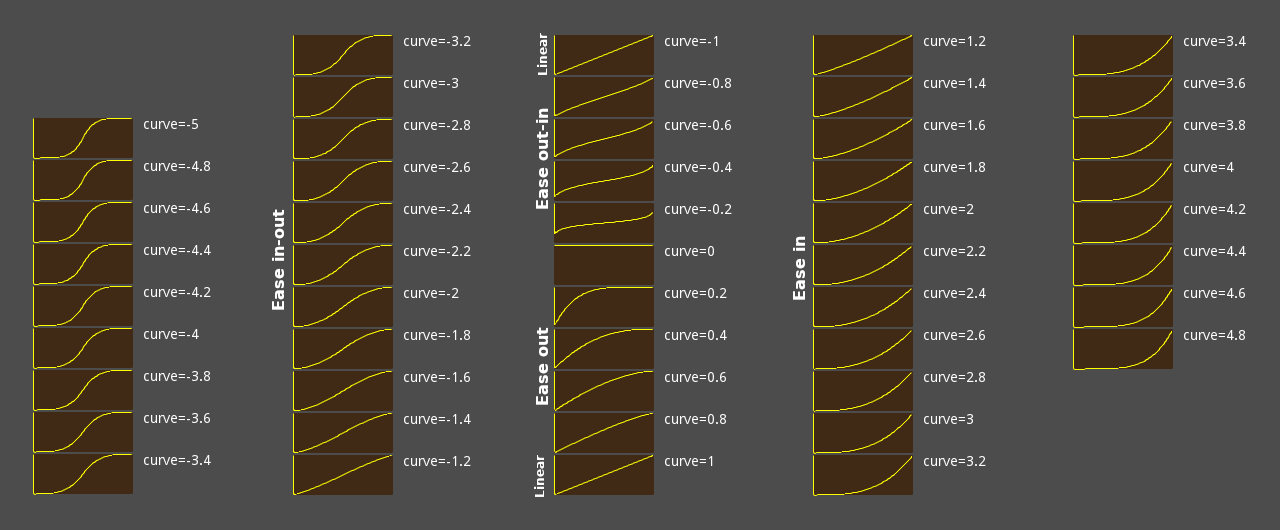
另見 smoothstep()。若需更進階的轉場,請使用 Tween.interpolate_value()。
String error_string(error: int) 🔗
回傳指定 Error 錯誤碼的可讀名稱。
print(OK)                              # 輸出 0
print(error_string(OK))                # 輸出 "OK"
print(error_string(ERR_BUSY))          # 輸出 "Busy"
print(error_string(ERR_OUT_OF_MEMORY)) # 輸出 "Out of memory"
自然指數函式。計算數學常數 e 的 x 次方並返回它。
e 的近似值為 2.71828,可以使用 exp(1) 獲得。
求其他底數的指數應使用 pow() 方法。
var a = exp(2) # 大約是 7.39
將 x 向下取整(朝負無窮大),回傳不大於 x 的最大整數。
支援型別: int、float、Vector2、Vector2i、Vector3、Vector3i、Vector4、Vector4i。
var a = floor(2.99) # a 為 2.0
a = floor(-2.99)    # a 為 -3.0
另見 ceil()、round() 與 snapped()。
注意: 為獲得更佳的型別安全性,請使用 floorf()、floori()、Vector2.floor()、Vector3.floor() 或 Vector4.floor()。
將 x 向下四捨五入(向負無窮大),返回不超過 x 的最大整數。
一個型別安全的 floor() 版本,返回一個 float。
將 x 向下四捨五入(向負無窮大),返回不超過 x 的最大整數。
注意:這個函式與 int(x) 不 一樣,後者是向 0 取整。
float fmod(x: float, y: float) 🔗
返回 x 除以 y 的浮點型餘數,符號與 x一致。
var remainder = fmod(7, 5.5) # remainder 是 1.5
對於整數取餘運算,請使用 % 運算子。
float fposmod(x: float, y: float) 🔗
回傳 x 除以 y 的浮點餘數,對正負軸均勻包覆。
print(" (x)  (fmod(x, 1.5))   (fposmod(x, 1.5))")
for i in 7:
    var x = i * 0.5 - 1.5
    print("%4.1f           %4.1f  | %4.1f" % [x, fmod(x, 1.5), fposmod(x, 1.5)])
輸出:
 (x)  (fmod(x, 1.5))   (fposmod(x, 1.5))
-1.5           -0.0  |  0.0
-1.0           -1.0  |  0.5
-0.5           -0.5  |  1.0
 0.0            0.0  |  0.0
 0.5            0.5  |  0.5
 1.0            1.0  |  1.0
 1.5            0.0  |  0.0
返回傳入的 variable 的整數雜湊值。
print(hash("a")) # 輸出 177670
GD.Print(GD.Hash("a")); // 輸出 177670
Object instance_from_id(instance_id: int) 🔗
Returns the Object that corresponds to instance_id. All Objects have a unique instance ID. See also Object.get_instance_id().
var drink = "water"

func _ready():
    var id = get_instance_id()
    var instance = instance_from_id(id)
    print(instance.drink) # Prints "water"
public partial class MyNode : Node
{
    public string Drink { get; set; } = "water";

    public override void _Ready()
    {
        ulong id = GetInstanceId();
        var instance = (MyNode)InstanceFromId(Id);
        GD.Print(instance.Drink); // Prints "water"
    }
}
float inverse_lerp(from: float, to: float, weight: float) 🔗
返回插值或外推的因數。範圍用 from 和 to指定,插值後的值由 weight 指定。如果 weight 在 from 和 to 之間(包含),那麼返回的值在 0.0 和 1.0 之間。如果 weight 在該範圍之外,則返回的是外推因數(返回值小於 0.0 或大於 1.0)。如果不希望這樣,請對 inverse_lerp() 的結果使用 clamp()。
# 下面的 `lerp()` 呼叫時的插值比例是 0.75。
var middle = lerp(20, 30, 0.75)
# middle 現在是 27.5。

# 現在,我們假裝忘記了原來的比例,想要找到是多少。
var ratio = inverse_lerp(20, 30, 27.5)
# ratio 現在是 0.75。
另見 lerp(),它執行本操作的逆操作;以及 remap(),將一系列連續的值對應到另一個值。
bool is_equal_approx(a: float, b: float) 🔗
如果 a 和 b 彼此近似相等,則返回 true。
這裡,“近似相等”意味著 a 和 b 在彼此的一個小的內部 epsilon 內,該 epsilon 與數位的大小成比例。
相同符號的無窮大值被認為是相等的。
判斷 x 是否為有限值,也就是既非 @GDScript.NAN、亦非正或負無窮大。
若 x 為正無窮大或負無窮大則回傳 true。
另見 is_finite() 與 is_nan()。
bool is_instance_id_valid(id: int) 🔗
如果與 id 對應的 Object 是有效的物件(例如沒有從記憶體中刪除),則返回 true 。所有物件都有唯一的實例 ID。
bool is_instance_valid(instance: Variant) 🔗
如果 instance 是有效的 Object(例如,沒有從記憶體中刪除),則返回 true 。
若 x 為 NaN(「非數字」或無效值)則回傳 true。
由於 @GDScript.NAN 不等於自身,因此無法使用 x == NAN 來檢測 NaN,必須使用本方法。
bool is_same(a: Variant, b: Variant) 🔗
若為值型別,當 a 與 b 之值相同則回傳 true;
若為參考型別,當兩者引用為同一物件時回傳 true。
# Vector2 為值型別
var vec2_a = Vector2(0, 0)
var vec2_b = Vector2(0, 0)
var vec2_c = Vector2(1, 1)
is_same(vec2_a, vec2_a)  # true
is_same(vec2_a, vec2_b)  # true
is_same(vec2_a, vec2_c)  # false

# Array 為參考型別
var arr_a = []
var arr_b = []
is_same(arr_a, arr_a)  # true
is_same(arr_a, arr_b)  # false
Variant 值型別包含: null、bool、int、float、String、StringName、Vector2、Vector2i、Vector3、Vector3i、Vector4、Vector4i、Rect2、Rect2i、Transform2D、Transform3D、Plane、Quaternion、AABB、Basis、Projection、Color、NodePath、RID、Callable 及 Signal。
Variant 參考型別包含: Object、Dictionary、Array、PackedByteArray、PackedInt32Array、PackedInt64Array、PackedFloat32Array、PackedFloat64Array、PackedStringArray、PackedVector2Array、PackedVector3Array、PackedVector4Array 與 PackedColorArray。
bool is_zero_approx(x: float) 🔗
如果 x 為零或幾乎為零,則返回 true。比較是使用具有小內部 epsilon 的公差計算的。
該函式比使用一個值為零的 is_equal_approx() 更快。
Variant lerp(from: Variant, to: Variant, weight: Variant) 🔗
依 weight 線性插值 from 與 to。
weight 應介於 0.0~1.0(含)之間;若超出則為 外推。如不需外推,可先對 weight 使用 clampf() 限制。
from 與 to 必須為相同型別。支援型別: int、float、Vector2、Vector3、Vector4、Color、Quaternion、Basis、Transform2D、Transform3D。
lerp(0, 4, 0.75) # 回傳 3.0
反向操作請參考 inverse_lerp()。
若要進行緩動插值,可將 lerp() 與 ease() 或 smoothstep() 結合使用。
若要映射連續值區間,請參考 remap()。
注意: 為確保型別安全,可使用 lerpf()、Vector2.lerp()、Vector3.lerp()、Vector4.lerp()、Color.lerp()、Quaternion.slerp()、Basis.slerp()、Transform2D.interpolate_with() 或 Transform3D.interpolate_with()。
float lerp_angle(from: float, to: float, weight: float) 🔗
通過 0.0 和 1.0 之間的 weight 值,在兩個角度(以弧度為單位)之間進行線性插值。
類似於 lerp(),但當角度環繞 @GDScript.TAU 時會正確插值。要使用 lerp_angle() 執行緩動插值,請將其與 ease() 或 smoothstep() 結合使用。
extends Sprite
var elapsed = 0.0
func _process(delta):
    var min_angle = deg_to_rad(0.0)
    var max_angle = deg_to_rad(90.0)
    rotation = lerp_angle(min_angle, max_angle, elapsed)
    elapsed += delta
注意:該函式通過 from 和 to 之間的最短路徑進行插值。然而,當這兩個角度相距大致 PI + k * TAU 其中 k 為任意整數時,由於浮點數精度誤差的緣故,要對插值的方向進行判斷是很難的。例如,lerp_angle(0, PI, weight) 會逆時針插值,而 lerp_angle(0, PI + 5 * TAU, weight) 則會順時針插值。
float lerpf(from: float, to: float, weight: float) 🔗
通過 weight 中定義的因數在兩個值之間進行線性插值。要執行插值,weight 應介於 0.0 和 1.0 之間(包含)。但是,超出此範圍的值是允許的,並可用於執行 外推。如果不需要,請對此函式的結果使用 clampf()。
lerpf(0, 4, 0.75) # 返回 3.0
另請參閱執行本操作的逆運算的 inverse_lerp()。要使用 lerp() 執行緩動插值,請將其與 ease() 或 smoothstep() 結合使用。
float linear_to_db(lin: float) 🔗
將線性能量轉換為分貝(音訊)。由於音量通常不是線性的,可利用此函式實作預期的音量滑桿。
範例: 透過 Slider 節點(取值範圍 0.0~1.0)調整主匯流排音量:
AudioServer.set_bus_volume_db(AudioServer.get_bus_index("Master"), linear_to_db($Slider.value))
Returns the natural logarithm of x (base e, with e being approximately 2.71828). This is the amount of time needed to reach a certain level of continuous growth.
Note: This is not the same as the "log" function on most calculators, which uses a base 10 logarithm. To use base 10 logarithm, use log(x) / log(10).
log(10) # Returns 2.302585
Note: The logarithm of 0 returns -inf, while negative values return -nan.
返回給定數值中的最大值。此函數可以接受任意數量的參數。
max(1, 7, 3, -6, 5) # Returns 7
注意:當對向量使用此函數時,它不會執行分量級的最大值計算,而是使用 x < y 比較來選擇最大值。要執行分量級的最大值計算,請使用 Vector2.max()、Vector2i.max()、Vector3.max()、Vector3i.max()、Vector4.max() 和 Vector4i.max()。
float maxf(a: float, b: float) 🔗
返回兩個 float 值中的最大值。
maxf(3.6, 24)   # 返回 24.0
maxf(-3.99, -4) # 返回 -3.99
返回兩個 int 值中的最大值。
maxi(1, 2)   # 返回 2
maxi(-3, -4) # 返回 -3
回傳所給多個數值中的最小值,參數個數不限。
min(1, 7, 3, -6, 5) # 回傳 -6
注意: 用於向量時並非逐分量比較,而是直接以 x < y 比較整體大小;若需逐分量最小值,請使用 Vector2.min()、Vector2i.min()、Vector3.min()、Vector3i.min()、Vector4.min() 或 Vector4i.min()。
float minf(a: float, b: float) 🔗
返回兩個 float 值中的最小值。
minf(3.6, 24)   # 返回 3.6
minf(-3.99, -4) # 返回 -4.0
返回兩個 int 值中的最小值。
mini(1, 2)   # 返回 1
mini(-3, -4) # 返回 -4
float move_toward(from: float, to: float, delta: float) 🔗
將 from 向 to 移動,移動的長度是 delta。不會超過 to。
使用負的 delta 值則向遠離的方向移動。
move_toward(5, 10, 4)    # Returns 9
move_toward(10, 5, 4)    # Returns 6
move_toward(5, 10, 9)    # Returns 10
move_toward(10, 5, -1.5) # Returns 11.5
返回大於等於整數 value 的最小整數冪 2。
nearest_po2(3) # 返回 4
nearest_po2(4) # 返回 4
nearest_po2(5) # 返回 8

nearest_po2(0)  # 返回 0(可能出乎意料)
nearest_po2(-1) # 返回 0(可能出乎意料)
警告:由於其實現,此方法返回0而不是1對於小於或等於的值0,但 value 是最小的負 64 位整數除外 (-9223372036854775808),在這種情況下,返回 value 不變。
float pingpong(value: float, length: float) 🔗
將 value 包裹在 0 和 length 之間。如果達到限制,函式返回的下一個值將減少到 0 側或增加到 length 側(像三角波)。如果 length 小於零,則變為正數。
pingpong(-3.0, 3.0) # 返回 3.0
pingpong(-2.0, 3.0) # 返回 2.0
pingpong(-1.0, 3.0) # 返回 1.0
pingpong(0.0, 3.0)  # 返回 0.0
pingpong(1.0, 3.0)  # 返回 1.0
pingpong(2.0, 3.0)  # 返回 2.0
pingpong(3.0, 3.0)  # 返回 3.0
pingpong(4.0, 3.0)  # 返回 2.0
pingpong(5.0, 3.0)  # 返回 1.0
pingpong(6.0, 3.0)  # 返回 0.0
回傳 x ÷ y 的整數餘數,正負方向對稱包覆。
print("#(i)  (i % 3)   (posmod(i, 3))")
for i in range(-3, 4):
    print("%2d       %2d  | %2d" % [i, i % 3, posmod(i, 3)])
輸出:
(i)  (i % 3)   (posmod(i, 3))
-3        0  |  0
-2       -2  |  1
-1       -1  |  2
 0        0  |  0
 1        1  |  1
 2        2  |  2
 3        0  |  0
float pow(base: float, exp: float) 🔗
返回 base 的 exp 次冪的結果。
在 GDScript 中,這相當於 ** 運算子。
pow(2, 5)   # 返回 32.0
pow(4, 1.5) # 返回 8.0
void print(...) vararg 🔗
將任意型別的參數最佳化轉為字串後輸出至主控台。
var a = [1, 2, 3]
print("a", "b", a) # 輸出 "ab[1, 2, 3]"
Godot.Collections.Array a = [1, 2, 3];
GD.Print("a", "b", a); // 輸出 "ab[1, 2, 3]"
注意: 建議使用 push_error() 與 push_warning() 來輸出錯誤與警告訊息,以區分除錯列印,並在輸出時附帶堆疊追蹤。
另見 Engine.print_to_stdout 與 ProjectSettings.application/run/disable_stdout。
void print_rich(...) vararg 🔗
將任意型別的參數最佳化轉為字串並以 BBCode 呈現後輸出至主控台。
支援的 BBCode 標籤: b、i、u、s、indent、code、url、center、right、color、bgcolor、fgcolor。
URL 標籤僅支援形如 [url]https://example.com[/url] 的格式。
輸出至標準輸出時,可支援的 BBCode 會轉為 ANSI 控制碼;實際效果依終端機模擬器而異(特別是斜體與刪除線)。code 會以淡色顯示但不改字型。
print_rich("[color=green][b]Hello world![/b][/color]") # 以綠色粗體輸出
GD.PrintRich("[color=green][b]Hello world![/b][/color]"); // 以綠色粗體輸出
注意: 建議使用 push_error() 與 push_warning() 來輸出錯誤與警告訊息,以保留堆疊追蹤並區分除錯輸出。
注意: 編輯器輸出支援可點擊的 [url=網址]文字[/url],點擊後會透過 OS.shell_open() 開啟網址。
void print_verbose(...) vararg 🔗
如果啟用了詳細模式(OS.is_stdout_verbose() 返回 true),則盡可能以最佳方式將一個或多個任意型別的參數轉換為字串,並將它們列印到控制台。
void printerr(...) vararg 🔗
以盡可能最佳的方式將一個或多個參數作為字串輸出到標準錯誤行。
printerr("prints to stderr")
GD.PrintErr("prints to stderr");
void printraw(...) vararg 🔗
將一個或多個參數以最佳方式轉為字串直接輸出到作業系統終端機。與 print() 不同,結尾不會自動加換行符號。
注意:OS 終端機 不是 編輯器的輸出分頁,需從命令列啟動 Godot 才能看到,Windows 則需用 console.exe。
printraw("A")
printraw("B")
printraw("C")
# 輸出 "ABC" 至終端機
GD.PrintRaw("A");
GD.PrintRaw("B");
GD.PrintRaw("C");
// 輸出 "ABC" 至終端機
void prints(...) vararg 🔗
將一個或多個參數輸出至主控台,參數間以空格分隔。
prints("A", "B", "C") # 輸出 "A B C"
GD.PrintS("A", "B", "C"); // 輸出 "A B C"
void printt(...) vararg 🔗
將一個或多個參數輸出至主控台,參數間以定位字元(Tab)分隔。
printt("A", "B", "C") # 輸出 "A B C"
GD.PrintT("A", "B", "C"); // 輸出 "A B C"
void push_error(...) vararg 🔗
將錯誤訊息推送至 Godot 內建除錯器並同時輸出至作業系統終端機。
push_error("test error") # 以錯誤形式輸出 "test error"
GD.PushError("test error"); // 以錯誤形式輸出 "test error"
注意: 此函式不會暫停專案執行。若需在除錯組建時同時停下執行,請改用 assert(false, "test error")。
void push_warning(...) vararg 🔗
將警告訊息推送至 Godot 內建除錯器並同時輸出至作業系統終端機。
push_warning("test warning") # 以警告形式輸出 "test warning"
GD.PushWarning("test warning"); // 以警告形式輸出 "test warning"
float rad_to_deg(rad: float) 🔗
將以弧度表示的角度轉換為度。
rad_to_deg(0.523599) # 返回 30
rad_to_deg(PI)       # 返回 180
rad_to_deg(PI * 2)   # 返回 360
PackedInt64Array rand_from_seed(seed: int) 🔗
給定 seed,回傳一個長度為 2 的 PackedInt64Array。
第一個元素為隨機化後的 int 值,第二個元素與傳入的 seed 相同。
相同的 seed 會穩定回傳相同陣列。
注意: 這裡的「種子」指偽亂數產生器的內部 64 位元整數狀態。
var a = rand_from_seed(4)
print(a[0]) # 輸出 2879024997
print(a[1]) # 輸出 4
回傳一個介於 0.0 與 1.0(含)之間的隨機浮點數。
randf() # 例如回傳 0.375671
GD.Randf(); // 例如回傳 0.375671
float randf_range(from: float, to: float) 🔗
回傳位於 from 與 to(含)之間的隨機浮點數。
randf_range(0, 20.5) # 例如回傳 7.45315
randf_range(-10, 10) # 例如回傳 -3.844535
GD.RandRange(0.0, 20.5);   // 例如回傳 7.45315
GD.RandRange(-10.0, 10.0); // 例如回傳 -3.844535
float randfn(mean: float, deviation: float) 🔗
從指定的 mean 與標準 deviation 產生一個常態分布、偽隨機的浮點數值。這也被稱為高斯分布。
注意: 此方法使用 Box-Muller 轉換 演算法。
返回一個隨機的無符號 32 位元整數。使用餘數獲得區間 [0, N - 1] (其中 N 小於 2^32)的隨機值。
randi()           # 返回介於 0 到 2^32 - 1 之間的隨機整數
randi() % 20      # 返回介於 0 到 19之間的隨機整數
randi() % 100     # 返回介於 0 到 99 之間的隨機整數
randi() % 100 + 1 # 返回介於 1 到 100 之間的隨機整數
GD.Randi();           // 返回介於 0 到 2^32 - 1 之間的隨機整數
GD.Randi() % 20;      // 返回介於 0 到 19之間的隨機整數
GD.Randi() % 100;     // 返回介於 0 到 99 之間的隨機整數
GD.Randi() % 100 + 1; // 返回介於 1 到 100 之間的隨機整數
int randi_range(from: int, to: int) 🔗
返回介於 from 和 to(包含)之間的一個隨機有符號 32 位元整數。如果 to 小於 from,則它們將被交換。
randi_range(0, 1)      # 返回 0 或 1
randi_range(-10, 1000) # 返回介於 -10 和 1000 之間的隨機整數
GD.RandRange(0, 1);      // 返回 0 或 1
GD.RandRange(-10, 1000); // 返回介於 -10 和 1000 之間的隨機整數
void randomize() 🔗
隨機化亂數產生器的種子(或內部狀態)。目前的實作使用一個基於裝置時間的數字。
注意:該函式在專案運作時自動被呼叫。如果需要修復種子以獲得一致、可重現的結果,請使用 seed() 來初始化亂數產生器。
float remap(value: float, istart: float, istop: float, ostart: float, ostop: float) 🔗
將 value 從區間 [istart, istop] 映射到 [ostart, ostop]。另請參閱 lerp() 與 inverse_lerp()。如果 value 超出 [istart, istop],則結果也會超出 [ostart, ostop]。若不希望發生這種情況,請對此函式的結果使用 clamp()。
remap(75, 0, 100, -1, 1) # 回傳 0.5
若需多個區間的複雜應用,建議改用 Curve 或 Gradient。
注意: 若 istart == istop,回傳值會是未定義(很可能為 NaN、INF 或 -INF)。
分配一個唯一 ID 以供實作端組成 RID;主要供原生擴充用於實作伺服器。
RID rid_from_int64(base: int) 🔗
依 base 建立 RID;主要供原生擴充用於建構伺服器。
float rotate_toward(from: float, to: float, delta: float) 🔗
將 from 向 to 旋轉 delta 量。不會超過 to。
與 move_toward() 類似,但當角環繞 @GDScript.TAU 時正確內插。
如果 delta 為負數,則此函式將從 to 旋轉到相反的角度,並且不會超過相反的角度。
將 x 四捨五入至最接近整數,0.5 以上朝遠離 0 方向取整。
支援型別: int、float、Vector2、Vector2i、Vector3、Vector3i、Vector4、Vector4i。
round(2.4) # 回傳 2
round(2.5) # 回傳 3
round(2.6) # 回傳 3
另見 floor()、ceil() 與 snapped()。
注意: 為確保型別安全,請使用 roundf()、roundi()、Vector2.round()、Vector3.round() 或 Vector4.round()。
將 x 四捨五入到最接近的整數,中間情況遠離 0 四捨五入。
將 x 四捨五入到最接近的整數,中間情況遠離 0 四捨五入。
將亂數產生器的種子設定為 base。手動設定種子可以確保大多數隨機函式的結果一致、可重複。
var my_seed = "Godot Rocks".hash()
seed(my_seed)
var a = randf() + randi()
seed(my_seed)
var b = randf() + randi()
# a 和 b 現在是一樣的
ulong mySeed = (ulong)GD.Hash("Godot Rocks");
GD.Seed(mySeed);
var a = GD.Randf() + GD.Randi();
GD.Seed(mySeed);
var b = GD.Randf() + GD.Randi();
// a 和 b 現在是一樣的
回傳與 x 相同型別的 Variant;負值為 -1,正值為 1,零為 0,遇 nan 則回傳 0。
支援型別:int、float、Vector2、Vector2i、Vector3、Vector3i、Vector4、Vector4i。
sign(-6.0) # 返回 -1
sign(0.0)  # 返回 0
sign(6.0)  # 返回 1
sign(NAN)  # 返回 0

sign(Vector3(-6.0, 0.0, 6.0)) # 返回 (-1, 0, 1)
注意:為提升型別安全性,請使用 signf()、signi()、Vector2.sign()、Vector2i.sign()、Vector3.sign()、Vector3i.sign()、Vector4.sign() 或 Vector4i.sign()。
若 x 為負則回傳 -1.0,為正則回傳 1.0,為零則回傳 0.0,遇 nan 則回傳 0.0。
signf(-6.5) # 返回 -1.0
signf(0.0)  # 返回 0.0
signf(6.5)  # 返回 1.0
signf(NAN)  # 返回 0.0
若 x 為負則回傳 -1;為正則回傳 1;為 0 則回傳 0。
signi(-6) # 回傳 -1
signi(0)  # 回傳 0
signi(6)  # 回傳 1
返回弧度角 angle_rad 的正弦值。
sin(0.523599)       # 返回 0.5
sin(deg_to_rad(90)) # 返回 1.0
返回 x 的雙曲正弦值。
var a = log(2.0) # 返回 0.693147
sinh(a) # 返回 0.75
float smoothstep(from: float, to: float, x: float) 🔗
回傳 0 與 1 之間的平滑三次 Hermite 插值。
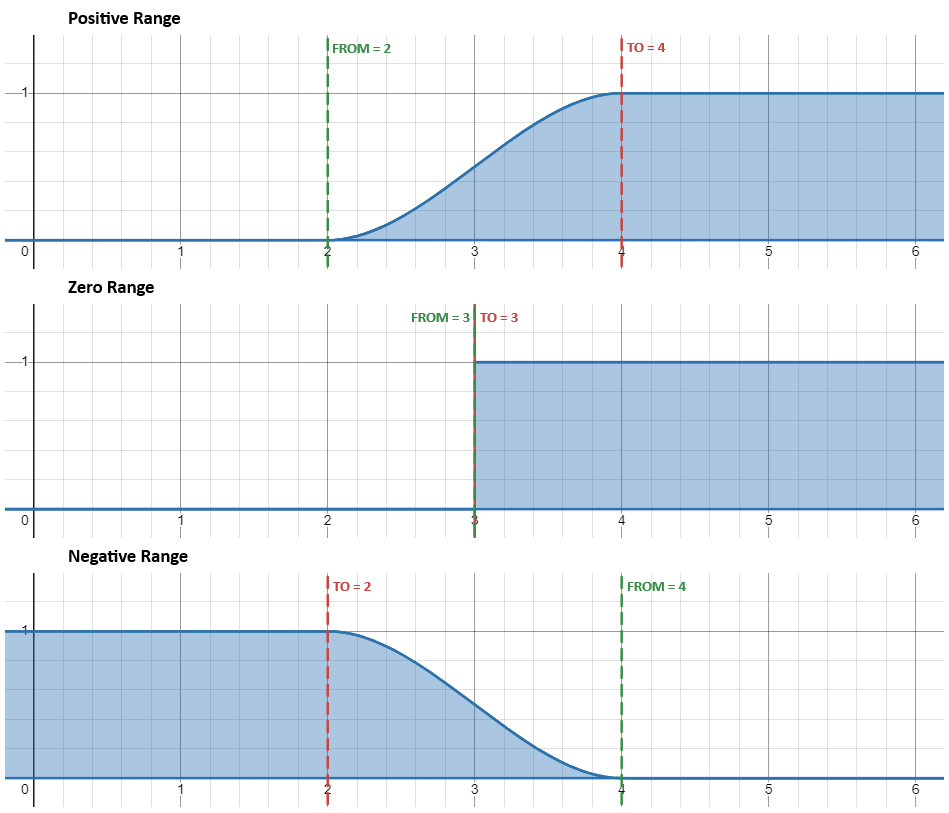
若為正向區間(from <= to),當 x <= from 時回傳 0,當 x >= to 時回傳 1。若 x 介於 from 與 to 之間,則回傳值會依 S 形曲線平滑地由 0 過渡至 1。
若為反向區間(from > to),則函式行為會鏡像:當 x <= to 時回傳 1,當 x >= from 時回傳 0。
這個 S 形曲線即為三次 Hermite 補間器,其公式為 f(y) = 3*y^2 - 2*y^3,其中 y = (x-from) / (to-from)。
smoothstep(0, 2, -5.0) # 回傳 0.0
smoothstep(0, 2, 0.5) # 回傳 0.15625
smoothstep(0, 2, 1.0) # 回傳 0.5
smoothstep(0, 2, 2.0) # 回傳 1.0
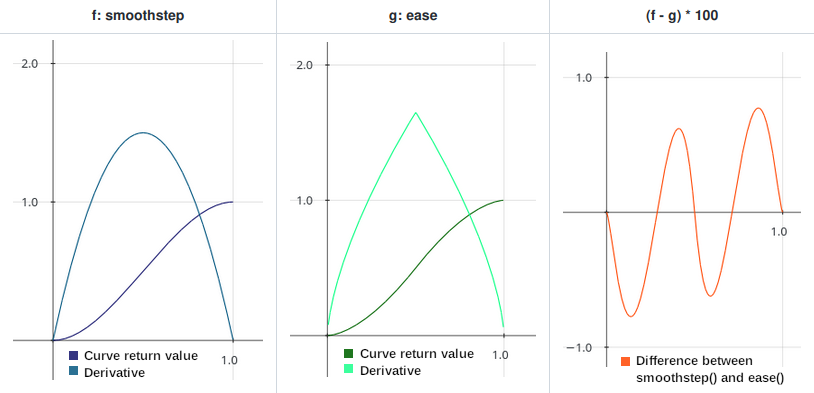
與 ease() 並給定曲線值 -1.6521 相比,smoothstep() 回傳的曲線最為平順,且導數不會有突變。若需要更進階的過渡,請使用 Tween 或 AnimationPlayer。
smoothstep() 與 ease(x, -1.6521) 回傳值比較
Variant snapped(x: Variant, step: Variant) 🔗
回傳最接近 x 的 step 倍數,可用於將浮點數取至任意小數位。
回傳值型別與 step 相同。支援型別: int、float、Vector2、Vector2i、Vector3、Vector3i、Vector4、Vector4i。
snapped(100, 32)                # 回傳 96
snapped(3.14159, 0.01)          # 回傳 3.14
snapped(Vector2(34, 70), Vector2(8, 8)) # 回傳 (32, 72)
注意: 如需型別安全版本,請使用 snappedf()、snappedi()、Vector2.snapped()、Vector2i.snapped()、Vector3.snapped()、Vector3i.snapped()、Vector4.snapped() 或 Vector4i.snapped()。
float snappedf(x: float, step: float) 🔗
回傳最接近 x 的 step 倍數,可用於將浮點數取至任意小數位。
此為型別安全版本,回傳 float。
snappedf(32.0, 2.5)       # 回傳 32.5
snappedf(3.14159, 0.01)   # 回傳 3.14
int snappedi(x: float, step: int) 🔗
返回最接近 x 的 step 的倍數。
snappedi(53, 16)  # 返回 48
snappedi(4096, 100)  # 返回 4100
回傳 x 的平方根,其中 x 為非負數。
sqrt(9)     # 回傳 3
sqrt(10.24) # 回傳 3.2
sqrt(-1)    # 回傳 NaN
注意: 若 x 為負則回傳 NaN(非數字)。在 C# 中如需處理負值,請使用 System.Numerics.Complex。
返回小數點後第一個非零數字的位置。注意最大返回值是 10,這是實作中的設計決定。
var n = step_decimals(5)       # n 為 0
n = step_decimals(1.0005)      # n 為 4
n = step_decimals(0.000000005) # n 為 9
盡可能以最佳方式將一個或多個任何 Variant 型別的參數轉換為一個 String。
var a = [10, 20, 30]
var b = str(a)
print(len(a)) # 輸出 3(陣列中元素的數量)。
print(len(b)) # 輸出 12(字串“[10, 20, 30]”的長度)。
Variant str_to_var(string: String) 🔗
將 var_to_str() 返回的已格式化的 string 轉換為原始 Variant。
var data = '{ "a": 1, "b": 2 }' # data 是一個 String
var dict = str_to_var(data)     # dict 是一個 Dictionary
print(dict["a"])                # 輸出 1
string data = "{ \"a\": 1, \"b\": 2 }";           // data 是一個 string
var dict = GD.StrToVar(data).AsGodotDictionary(); // dict 是一個 Dictionary
GD.Print(dict["a"]);                              // 輸出 1
返回弧度角 angle_rad 的正切值。
tan(deg_to_rad(45)) # 返回 1
返回 x 的雙曲正切值。
var a = log(2.0) # 返回 0.693147
tanh(a)          # 返回 0.6
Variant type_convert(variant: Variant, type: int) 🔗
將給定的 variant 以 Variant.Type 轉為指定 type。本函式支援多型態自動轉換,如陣列型態間轉換、數字字串轉整數、多數型態轉字串等。
若無法轉型則回傳該型別預設值,例如 Rect2 轉 Vector2 永遠回傳 Vector2.ZERO。只要 type 屬於有效 Variant 型態,不會產生錯誤訊息。
回傳值為 Variant,但內部資料型態等同你指定的目標型態。
type_convert("Hi!", TYPE_INT) # 返回 0
type_convert("123", TYPE_INT) # 返回 123
type_convert(123.4, TYPE_INT) # 返回 123
type_convert(5, TYPE_VECTOR2) # 返回 (0, 0)
type_convert("Hi!", TYPE_NIL) # 返回 null
String type_string(type: int) 🔗
依 Variant.Type 取得 type 的易讀名稱。
print(TYPE_INT)            # 輸出 2
print(type_string(TYPE_INT))    # 輸出 "int"
print(type_string(TYPE_STRING)) # 輸出 "String"
另見 typeof()。
int typeof(variable: Variant) 🔗
Returns the internal type of the given variable, using the Variant.Type values.
var json = JSON.new()
json.parse('["a", "b", "c"]')
var result = json.get_data()
if typeof(result) == TYPE_ARRAY:
    print(result[0]) # Prints "a"
else:
    print("Unexpected result!")
See also type_string().
PackedByteArray var_to_bytes(variable: Variant) 🔗
將 Variant 值編碼為位元組陣列,不包含物件。反序列化請用 bytes_to_var()。
注意:如需物件序列化,請參見 var_to_bytes_with_objects()。
注意:不支援 Callable 編碼,無論資料內容如何都會產生空值。
PackedByteArray var_to_bytes_with_objects(variable: Variant) 🔗
將 Variant 值編碼為位元組陣列,允許編碼物件(可能包含可執行程式碼)。反序列化請用 bytes_to_var_with_objects()。
注意:不支援 Callable 編碼,無論資料內容如何都會產生空值。
String var_to_str(variable: Variant) 🔗
將 Variant 變數 variable 轉為可由 str_to_var() 解析的格式化 String。
var a = { "a": 1, "b": 2 }
print(var_to_str(a))
var a = new Godot.Collections.Dictionary { ["a"] = 1, ["b"] = 2 };
GD.Print(GD.VarToStr(a));
輸出:
{
    "a": 1,
    "b": 2
}
注意: 不支援轉換 Signal 與 Callable;此兩類型即使有資料也會被轉為空值。
Variant weakref(obj: Variant) 🔗
回傳一個 WeakRef 實例,持有對 obj 的弱參考。若 obj 為 null,則回傳空的 WeakRef 實例。若 obj 既不是 Object 派生,也不是 null,則會列印錯誤並回傳 null。
弱參考無法確保物件存活:當只剩下弱參考時,垃圾回收器可以隨時銷毀該物件並釋放記憶體。然而,只要物件尚未被銷毀,即使已經沒有強參考,弱參考仍然可能取得該物件。
Variant wrap(value: Variant, min: Variant, max: Variant) 🔗
Wraps the Variant value between min and max. min is inclusive while max is exclusive. This can be used for creating loop-like behavior or infinite surfaces.
Variant types int and float are supported. If any of the arguments is float, this function returns a float, otherwise it returns an int.
var a = wrap(4, 5, 10)
# a is 9 (int)

var a = wrap(7, 5, 10)
# a is 7 (int)

var a = wrap(10.5, 5, 10)
# a is 5.5 (float)
float wrapf(value: float, min: float, max: float) 🔗
Wraps the float value between min and max. min is inclusive while max is exclusive. This can be used for creating loop-like behavior or infinite surfaces.
# Infinite loop between 5.0 and 9.9
value = wrapf(value + 0.1, 5.0, 10.0)
# Infinite rotation (in radians)
angle = wrapf(angle + 0.1, 0.0, TAU)
# Infinite rotation (in radians)
angle = wrapf(angle + 0.1, -PI, PI)
Note: If min is 0, this is equivalent to fposmod(), so prefer using that instead. wrapf() is more flexible than using the fposmod() approach by giving the user control over the minimum value.
int wrapi(value: int, min: int, max: int) 🔗
Wraps the integer value between min and max. min is inclusive while max is exclusive. This can be used for creating loop-like behavior or infinite surfaces.
# Infinite loop between 5 and 9
frame = wrapi(frame + 1, 5, 10)
# result is -2
var result = wrapi(-6, -5, -1)