Tween
Hereda: RefCounted < Object
Objeto ligero utilizado para animación de propósito general a través de script, utilizando Tweeners.
Descripción
Tweens are mostly useful for animations requiring a numerical property to be interpolated over a range of values. The name tween comes from in-betweening, an animation technique where you specify keyframes and the computer interpolates the frames that appear between them. Animating something with a Tween is called tweening.
Tween is more suited than AnimationPlayer for animations where you don't know the final values in advance. For example, interpolating a dynamically-chosen camera zoom value is best done with a Tween; it would be difficult to do the same thing with an AnimationPlayer node. Tweens are also more light-weight than AnimationPlayer, so they are very much suited for simple animations or general tasks that don't require visual tweaking provided by the editor. They can be used in a "fire-and-forget" manner for some logic that normally would be done by code. You can e.g. make something shoot periodically by using a looped CallbackTweener with a delay.
A Tween can be created by using either SceneTree.create_tween() or Node.create_tween(). Tweens created manually (i.e. by using Tween.new()) are invalid and can't be used for tweening values.
A tween animation is created by adding Tweeners to the Tween object, using tween_property(), tween_interval(), tween_callback() or tween_method():
var tween = get_tree().create_tween()
tween.tween_property($Sprite, "modulate", Color.RED, 1.0)
tween.tween_property($Sprite, "scale", Vector2(), 1.0)
tween.tween_callback($Sprite.queue_free)
Tween tween = GetTree().CreateTween();
tween.TweenProperty(GetNode("Sprite"), "modulate", Colors.Red, 1.0f);
tween.TweenProperty(GetNode("Sprite"), "scale", Vector2.Zero, 1.0f);
tween.TweenCallback(Callable.From(GetNode("Sprite").QueueFree));
This sequence will make the $Sprite node turn red, then shrink, before finally calling Node.queue_free() to free the sprite. Tweeners are executed one after another by default. This behavior can be changed using parallel() and set_parallel().
When a Tweener is created with one of the tween_* methods, a chained method call can be used to tweak the properties of this Tweener. For example, if you want to set a different transition type in the above example, you can use set_trans():
var tween = get_tree().create_tween()
tween.tween_property($Sprite, "modulate", Color.RED, 1.0).set_trans(Tween.TRANS_SINE)
tween.tween_property($Sprite, "scale", Vector2(), 1.0).set_trans(Tween.TRANS_BOUNCE)
tween.tween_callback($Sprite.queue_free)
Tween tween = GetTree().CreateTween();
tween.TweenProperty(GetNode("Sprite"), "modulate", Colors.Red, 1.0f).SetTrans(Tween.TransitionType.Sine);
tween.TweenProperty(GetNode("Sprite"), "scale", Vector2.Zero, 1.0f).SetTrans(Tween.TransitionType.Bounce);
tween.TweenCallback(Callable.From(GetNode("Sprite").QueueFree));
Most of the Tween methods can be chained this way too. In the following example the Tween is bound to the running script's node and a default transition is set for its Tweeners:
var tween = get_tree().create_tween().bind_node(self).set_trans(Tween.TRANS_ELASTIC)
tween.tween_property($Sprite, "modulate", Color.RED, 1.0)
tween.tween_property($Sprite, "scale", Vector2(), 1.0)
tween.tween_callback($Sprite.queue_free)
var tween = GetTree().CreateTween().BindNode(this).SetTrans(Tween.TransitionType.Elastic);
tween.TweenProperty(GetNode("Sprite"), "modulate", Colors.Red, 1.0f);
tween.TweenProperty(GetNode("Sprite"), "scale", Vector2.Zero, 1.0f);
tween.TweenCallback(Callable.From(GetNode("Sprite").QueueFree));
Another interesting use for Tweens is animating arbitrary sets of objects:
var tween = create_tween()
for sprite in get_children():
    tween.tween_property(sprite, "position", Vector2(0, 0), 1.0)
Tween tween = CreateTween();
foreach (Node sprite in GetChildren())
    tween.TweenProperty(sprite, "position", Vector2.Zero, 1.0f);
In the example above, all children of a node are moved one after another to position (0, 0).
You should avoid using more than one Tween per object's property. If two or more tweens animate one property at the same time, the last one created will take priority and assign the final value. If you want to interrupt and restart an animation, consider assigning the Tween to a variable:
var tween
func animate():
    if tween:
        tween.kill() # Abort the previous animation.
    tween = create_tween()
private Tween _tween;

public void Animate()
{
    if (_tween != null)
        _tween.Kill(); // Abort the previous animation
    _tween = CreateTween();
}
Some Tweeners use transitions and eases. The first accepts a TransitionType constant, and refers to the way the timing of the animation is handled (see easings.net for some examples). The second accepts an EaseType constant, and controls where the trans_type is applied to the interpolation (in the beginning, the end, or both). If you don't know which transition and easing to pick, you can try different TransitionType constants with EASE_IN_OUT, and use the one that looks best.
Tween easing and transition types cheatsheet
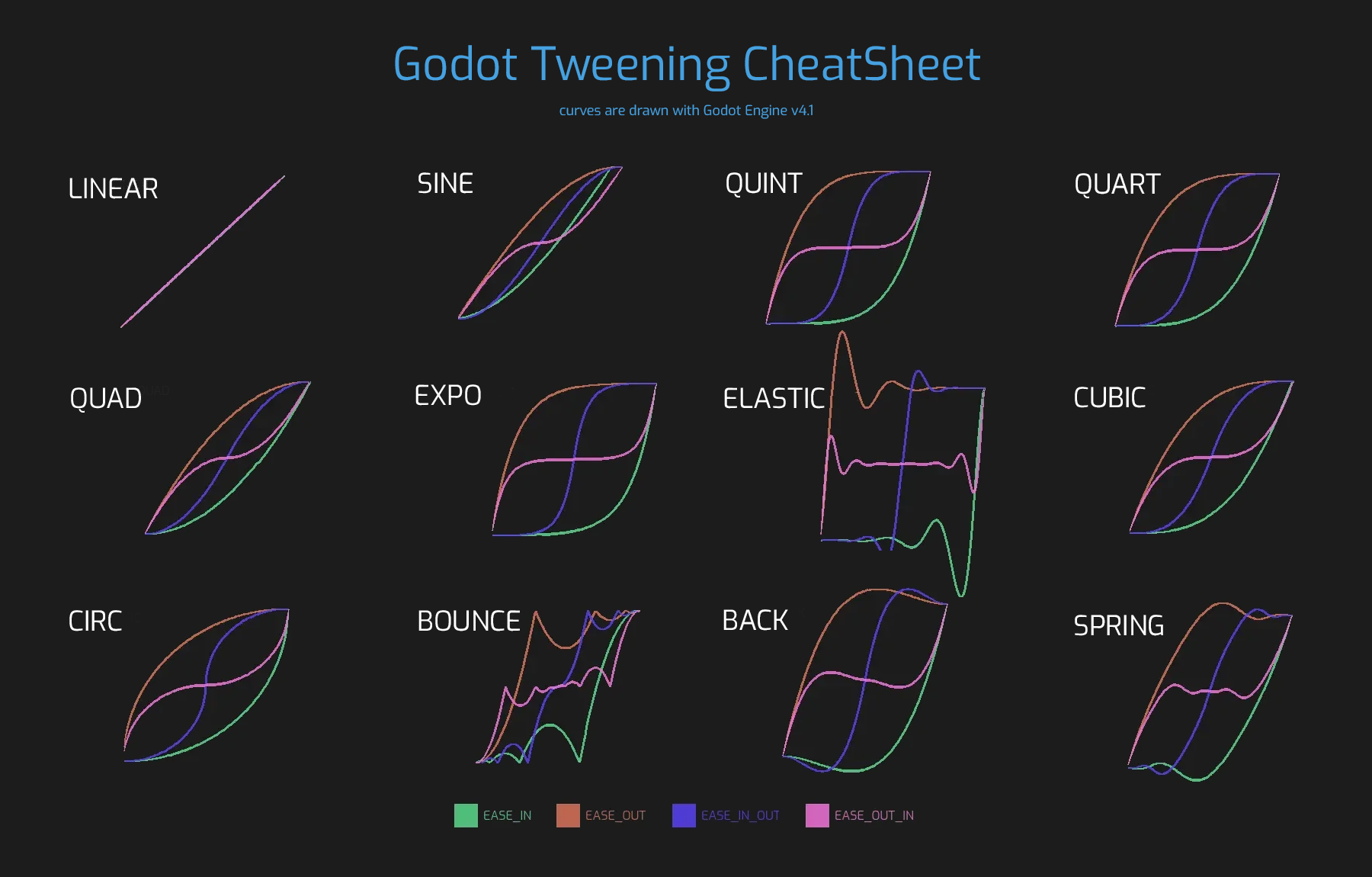
Note: Tweens are not designed to be reused and trying to do so results in an undefined behavior. Create a new Tween for each animation and every time you replay an animation from start. Keep in mind that Tweens start immediately, so only create a Tween when you want to start animating.
Note: The tween is processed after all of the nodes in the current frame, i.e. node's Node._process() method would be called before the tween (or Node._physics_process() depending on the value passed to set_process_mode()).
Métodos
chain() |
|
custom_step(delta: float) |
|
get_loops_left() const |
|
get_total_elapsed_time() const |
|
interpolate_value(initial_value: Variant, delta_value: Variant, elapsed_time: float, duration: float, trans_type: TransitionType, ease_type: EaseType) static |
|
is_valid() |
|
void |
kill() |
parallel() |
|
void |
pause() |
void |
play() |
set_ignore_time_scale(ignore: bool = true) |
|
set_parallel(parallel: bool = true) |
|
set_pause_mode(mode: TweenPauseMode) |
|
set_process_mode(mode: TweenProcessMode) |
|
set_speed_scale(speed: float) |
|
set_trans(trans: TransitionType) |
|
void |
stop() |
tween_callback(callback: Callable) |
|
tween_interval(time: float) |
|
tween_method(method: Callable, from: Variant, to: Variant, duration: float) |
|
tween_property(object: Object, property: NodePath, final_val: Variant, duration: float) |
|
tween_subtween(subtween: Tween) |
Señales
finished() 🔗
Emitida cuando el Tween ha terminado todo el tweening. Nunca se emite cuando el Tween está configurado para bucles infinitos (véase set_loops()).
loop_finished(loop_count: int) 🔗
Emitida cuando se completa un bucle completo (véase set_loops()), proporcionando el índice del bucle. Esta señal no se emite después del bucle final, usa finished en su lugar para este caso.
Emitida cuando se completa un paso del Tween, proporcionando el índice del paso. Un paso es un solo Tweener o un grupo de Tweeners que se ejecutan en paralelo.
Enumeraciones
enum TweenProcessMode: 🔗
TweenProcessMode TWEEN_PROCESS_PHYSICS = 0
El Tween se actualiza después de cada frame de física (véase Node._physics_process()).
TweenProcessMode TWEEN_PROCESS_IDLE = 1
El Tween se actualiza después de cada frame de proceso (véase Node._process()).
enum TweenPauseMode: 🔗
TweenPauseMode TWEEN_PAUSE_BOUND = 0
Si el Tween tiene un nodo vinculado, se procesará cuando ese nodo pueda procesarse (véase Node.process_mode). De lo contrario, es lo mismo que TWEEN_PAUSE_STOP.
TweenPauseMode TWEEN_PAUSE_STOP = 1
Si SceneTree está en pausa, el Tween también se pausará.
TweenPauseMode TWEEN_PAUSE_PROCESS = 2
El Tween se procesará independientemente de si SceneTree está en pausa.
enum TransitionType: 🔗
TransitionType TRANS_LINEAR = 0
La animación se interpola linealmente.
TransitionType TRANS_SINE = 1
La animación se interpola usando una función senoidal.
TransitionType TRANS_QUINT = 2
La animación se interpola con una función a la quinta (a la potencia de 5).
TransitionType TRANS_QUART = 3
La animación se interpola con una función a la cuarta (a la potencia de 4).
TransitionType TRANS_QUAD = 4
La animación se interpola con una función cuadrática (a la potencia de 2).
TransitionType TRANS_EXPO = 5
La animación se interpola con una función exponencial (a la potencia de x).
TransitionType TRANS_ELASTIC = 6
La animación se interpola con elasticidad, moviéndose alrededor de los bordes.
TransitionType TRANS_CUBIC = 7
La animación se interpola con una función cúbica (a la potencia de 3).
TransitionType TRANS_CIRC = 8
La animación se interpola con una función que utiliza raíces cuadradas.
TransitionType TRANS_BOUNCE = 9
La animación se interpola al rebotar al final.
TransitionType TRANS_BACK = 10
La animación es interpolada retrocediendo en los extremos.
TransitionType TRANS_SPRING = 11
La animación se interpola como un resorte hacia el final.
enum EaseType: 🔗
EaseType EASE_IN = 0
La interpolación comienza lentamente y se acelera hacia el final.
EaseType EASE_OUT = 1
La interpolación comienza rápidamente y se ralentiza hacia el final.
EaseType EASE_IN_OUT = 2
Una combinación de EASE_IN y EASE_OUT. La interpolación es más lenta en ambos extremos.
EaseType EASE_OUT_IN = 3
Una combinación de EASE_IN y EASE_OUT. La interpolación es más rápida en ambos extremos.
Descripciones de Métodos
Enlaza este Tween con el node dado. Los Tweens son procesados directamente por el SceneTree, por lo que se ejecutan independientemente de los nodos animados. Cuando enlazas un Node con el Tween, el Tween detendrá la animación cuando el objeto no esté dentro del árbol y el Tween se eliminará automáticamente cuando se libere el objeto enlazado. Además, TWEEN_PAUSE_BOUND hará que el comportamiento de pausa dependa del nodo enlazado.
Para una forma más corta de crear y enlazar un Tween, puedes usar Node.create_tween().
Se utiliza para encadenar dos Tweeners después de que se llame a set_parallel() con true.
var tween = create_tween().set_parallel(true)
tween.tween_property(...)
tween.tween_property(...) # Se ejecutará en paralelo con lo anterior.
tween.chain().tween_property(...) # Se ejecutará después de que terminen los dos anteriores.
Tween tween = CreateTween().SetParallel(true);
tween.TweenProperty(...);
tween.TweenProperty(...); // Se ejecutará en paralelo con lo anterior.
tween.Chain().TweenProperty(...); // Se ejecutará después de que terminen los dos anteriores.
bool custom_step(delta: float) 🔗
Procesa el Tween por el valor delta dado, en segundos. Esto es mayormente útil para el control manual cuando el Tween está en pausa. También puede ser usado para terminar la animación Tween inmediatamente, estableciendo delta más largo que la duración completa de la animación Tween.
Devuelve true si el Tween todavía tiene Tweeners que no han terminado.
Devuelve el número de bucles restantes para este Tween (véase set_loops()). Un valor de retorno de -1 indica un Tween en bucle infinito, y un valor de retorno de 0 indica que el Tween ya ha terminado.
float get_total_elapsed_time() const 🔗
Devuelve el tiempo total en segundos que el Tween ha estado animando (es decir, el tiempo desde que comenzó, sin contar las pausas, etc.). El tiempo se ve afectado por set_speed_scale(), y stop() lo restablecerá a 0.
Nota: Como resultado de la acumulación de deltas de frame, el tiempo devuelto después de que el Tween haya terminado de animarse será ligeramente mayor que la duración real del Tween.
Variant interpolate_value(initial_value: Variant, delta_value: Variant, elapsed_time: float, duration: float, trans_type: TransitionType, ease_type: EaseType) static 🔗
Este método se puede utilizar para la interpolación manual de un valor, cuando no quieres que Tween haga la animación por ti. Es similar a @GlobalScope.lerp(), pero con soporte para la transición y el suavizado personalizados.
initial_value es el valor inicial de la interpolación.
delta_value es el cambio del valor en la interpolación, es decir, es igual a final_value - initial_value.
elapsed_time es el tiempo en segundos que ha pasado después de que comenzó la interpolación y se usa para controlar la posición de la interpolación. Por ejemplo, cuando es igual a la mitad de la duration, el valor interpolado estará a medio camino entre los valores inicial y final. Este valor también puede ser mayor que duration o menor que 0, lo que extrapolará el valor.
duration es el tiempo total de la interpolación.
Nota: Si duration es igual a 0, el método siempre devolverá el valor final, independientemente del elapsed_time proporcionado.
Devuelve si el Tween se está ejecutando actualmente, es decir, no se ha pausado y no ha terminado.
Devuelve si el Tween es válido. Un Tween válido es un Tween contenido por el árbol de escena (es decir, el array de SceneTree.get_processed_tweens() contendrá este Tween). Un Tween puede volverse inválido cuando ha terminado de interpolar, se elimina o cuando se crea con Tween.new(). Los Tween inválidos no pueden tener Tweeners añadidos.
void kill() 🔗
Anula todas las operaciones de interpolación e invalida el Tween.
Hace que el siguiente Tweener se ejecute en paralelo al anterior.
var tween = create_tween()
tween.tween_property(...)
tween.parallel().tween_property(...)
tween.parallel().tween_property(...)
Tween tween = CreateTween();
tween.TweenProperty(...);
tween.Parallel().TweenProperty(...);
tween.Parallel().TweenProperty(...);
Todos los Tweener en el ejemplo se ejecutarán al mismo tiempo.
Puedes hacer que el Tween sea paralelo por defecto usando set_parallel().
void pause() 🔗
Pausa el tweening. La animación puede ser reanudada usando play().
Nota: Si un Tween está pausado y no está enlazado a ningún nodo, existirá indefinidamente hasta que se inicie o invalide manualmente. Si pierdes una referencia a tal Tween, puedes recuperarla usando SceneTree.get_processed_tweens().
void play() 🔗
Reanuda un Tween pausado o detenido.
Tween set_ease(ease: EaseType) 🔗
Establece el tipo de suavizado predeterminado para PropertyTweeners y MethodTweeners añadidos después de este método.
Antes de llamar a este método, el tipo de suavizado predeterminado es EASE_IN_OUT.
var tween = create_tween()
tween.tween_property(self, "position", Vector2(300, 0), 0.5) # Usa EASE_IN_OUT.
tween.set_ease(Tween.EASE_IN)
tween.tween_property(self, "rotation_degrees", 45.0, 0.5) # Usa EASE_IN.
Tween set_ignore_time_scale(ignore: bool = true) 🔗
Si ignore es true, el tween ignorará Engine.time_scale y se actualizará con el tiempo real transcurrido. Esto afecta a todos los Tweeners y sus retardos. El valor por defecto es false.
Tween set_loops(loops: int = 0) 🔗
Establece el número de veces que se repetirá la secuencia de interpolación, es decir, set_loops(2) ejecutará la animación dos veces.
Llamar a este método sin argumentos hará que el Tween se ejecute infinitamente, hasta que se detenga con kill(), el nodo enlazado del Tween se libere o todos los objetos animados se hayan liberado (lo que hace que la animación adicional sea imposible).
Advertencia: Asegúrate de añadir siempre alguna duración/retardo cuando uses bucles infinitos. Para evitar que el juego se congele, las animaciones en bucle de duración 0 (por ejemplo, un solo CallbackTweener sin retardo) se detienen después de un pequeño número de bucles, lo que puede producir resultados inesperados. Si la vida útil de un Tween depende de algún nodo, usa siempre bind_node().
Tween set_parallel(parallel: bool = true) 🔗
Si parallel es true, los Tweeners añadidos después de este método se ejecutarán por defecto simultáneamente, en lugar de secuencialmente.
Nota: Al igual que con parallel(), el tweener añadido justo antes de este método también formará parte del paso paralelo.
tween.tween_property(self, "position", Vector2(300, 0), 0.5)
tween.set_parallel()
tween.tween_property(self, "modulate", Color.GREEN, 0.5) # Se ejecuta junto con el interpolador de posición.
Tween set_pause_mode(mode: TweenPauseMode) 🔗
Determina el comportamiento del Tween cuando el SceneTree está en pausa.
El valor por defecto es TWEEN_PAUSE_BOUND.
Tween set_process_mode(mode: TweenProcessMode) 🔗
Determina si el Tween debe ejecutarse después de los frames de proceso (ver Node._process()) o los frames de física (véase Node._physics_process()).
El valor por defecto es TWEEN_PROCESS_IDLE.
Tween set_speed_scale(speed: float) 🔗
Escala la velocidad del tweening. Esto afecta a todos los Tweeners y sus retardos.
Tween set_trans(trans: TransitionType) 🔗
Establece el tipo de transición predeterminado para PropertyTweeners y MethodTweeners añadidos después de este método.
Antes de llamar a este método, el tipo de transición predeterminado es TRANS_LINEAR.
var tween = create_tween()
tween.tween_property(self, "position", Vector2(300, 0), 0.5) # Usa TRANS_LINEAR.
tween.set_trans(Tween.TRANS_SINE)
tween.tween_property(self, "rotation_degrees", 45.0, 0.5) # Usa TRANS_SINE.
void stop() 🔗
Detiene el tweening y restablece el Tween a su estado inicial. Esto no eliminará ningún Tweener añadido.
Nota: Esto no restablece los objetivos de PropertyTweeners a sus valores cuando el Tween comenzó por primera vez.
var tween = create_tween()

# Se moverá de 0 a 500 durante 1 segundo.
position.x = 0.0
tween.tween_property(self, "position:x", 500, 1.0)

# Estará en (aproximadamente) 250 cuando el temporizador termine.
await get_tree().create_timer(0.5).timeout

# Ahora se moverá de (aproximadamente) 250 a 500 durante 1 segundo,
# por lo tanto a la mitad de la velocidad que antes.
tween.stop()
tween.play()
Nota: Si un Tween se detiene y no está ligado a ningún nodo, existirá indefinidamente hasta que se inicie o invalide manualmente. Si pierdes una referencia a tal Tween, puedes recuperarla usando SceneTree.get_processed_tweens().
CallbackTweener tween_callback(callback: Callable) 🔗
Crea y añade un CallbackTweener. Este método puede ser usado para llamar a un método arbitrario en cualquier objeto. Utiliza Callable.bind() para enlazar argumentos adicionales para la llamada.
Ejemplo: Objeto que sigue disparando cada 1 segundo:
var tween = get_tree().create_tween().set_loops()
tween.tween_callback(shoot).set_delay(1.0)
Tween tween = GetTree().CreateTween().SetLoops();
tween.TweenCallback(Callable.From(Shoot)).SetDelay(1.0f);
Ejemplo: Cambiar un sprite de rojo a azul, con un retardo de 2 segundos:
var tween = get_tree().create_tween()
tween.tween_callback($Sprite.set_modulate.bind(Color.RED)).set_delay(2)
tween.tween_callback($Sprite.set_modulate.bind(Color.BLUE)).set_delay(2)
Tween tween = GetTree().CreateTween();
Sprite2D sprite = GetNode<Sprite2D>("Sprite");
tween.TweenCallback(Callable.From(() => sprite.Modulate = Colors.Red)).SetDelay(2.0f);
tween.TweenCallback(Callable.From(() => sprite.Modulate = Colors.Blue)).SetDelay(2.0f);
IntervalTweener tween_interval(time: float) 🔗
Crea y añade un IntervalTweener. Este método puede ser usado para crear retrasos en la animación tween, como una alternativa a usar el retardo en otros Tweeners, o cuando no hay animación (en cuyo caso el Tween actúa como un temporizador). time es la duración del intervalo, en segundos.
Ejemplo: Crear un intervalo en la ejecución del código:
# ... algo de código
await create_tween().tween_interval(2).finished
# ... más código
// ... algo de código
await ToSignal(CreateTween().TweenInterval(2.0f), Tween.SignalName.Finished);
// ... más código
Ejemplo: Crear un objeto que se mueve de un lado a otro y salta cada pocos segundos:
var tween = create_tween().set_loops()
tween.tween_property($Sprite, "position:x", 200.0, 1.0).as_relative()
tween.tween_callback(jump)
tween.tween_interval(2)
tween.tween_property($Sprite, "position:x", -200.0, 1.0).as_relative()
tween.tween_callback(jump)
tween.tween_interval(2)
Tween tween = CreateTween().SetLoops();
tween.TweenProperty(GetNode("Sprite"), "position:x", 200.0f, 1.0f).AsRelative();
tween.TweenCallback(Callable.From(Jump));
tween.TweenInterval(2.0f);
tween.TweenProperty(GetNode("Sprite"), "position:x", -200.0f, 1.0f).AsRelative();
tween.TweenCallback(Callable.From(Jump));
tween.TweenInterval(2.0f);
MethodTweener tween_method(method: Callable, from: Variant, to: Variant, duration: float) 🔗
Creates and appends a MethodTweener. This method is similar to a combination of tween_callback() and tween_property(). It calls a method over time with a tweened value provided as an argument. The value is tweened between from and to over the time specified by duration, in seconds. Use Callable.bind() to bind additional arguments for the call. You can use MethodTweener.set_ease() and MethodTweener.set_trans() to tweak the easing and transition of the value or MethodTweener.set_delay() to delay the tweening.
Example: Making a 3D object look from one point to another point:
var tween = create_tween()
tween.tween_method(look_at.bind(Vector3.UP), Vector3(-1, 0, -1), Vector3(1, 0, -1), 1.0) # The look_at() method takes up vector as second argument.
Tween tween = CreateTween();
tween.TweenMethod(Callable.From((Vector3 target) => LookAt(target, Vector3.Up)), new Vector3(-1.0f, 0.0f, -1.0f), new Vector3(1.0f, 0.0f, -1.0f), 1.0f); // Use lambdas to bind additional arguments for the call.
Example: Setting the text of a Label, using an intermediate method and after a delay:
func _ready():
    var tween = create_tween()
    tween.tween_method(set_label_text, 0, 10, 1.0).set_delay(1.0)

func set_label_text(value: int):
    $Label.text = "Counting " + str(value)
public override void _Ready()
{
    base._Ready();

    Tween tween = CreateTween();
    tween.TweenMethod(Callable.From<int>(SetLabelText), 0.0f, 10.0f, 1.0f).SetDelay(1.0f);
}

private void SetLabelText(int value)
{
    GetNode<Label>("Label").Text = $"Counting {value}";
}
PropertyTweener tween_property(object: Object, property: NodePath, final_val: Variant, duration: float) 🔗
Creates and appends a PropertyTweener. This method tweens a property of an object between an initial value and final_val in a span of time equal to duration, in seconds. The initial value by default is the property's value at the time the tweening of the PropertyTweener starts.
var tween = create_tween()
tween.tween_property($Sprite, "position", Vector2(100, 200), 1.0)
tween.tween_property($Sprite, "position", Vector2(200, 300), 1.0)
Tween tween = CreateTween();
tween.TweenProperty(GetNode("Sprite"), "position", new Vector2(100.0f, 200.0f), 1.0f);
tween.TweenProperty(GetNode("Sprite"), "position", new Vector2(200.0f, 300.0f), 1.0f);
will move the sprite to position (100, 200) and then to (200, 300). If you use PropertyTweener.from() or PropertyTweener.from_current(), the starting position will be overwritten by the given value instead. See other methods in PropertyTweener to see how the tweening can be tweaked further.
Note: You can find the correct property name by hovering over the property in the Inspector. You can also provide the components of a property directly by using "property:component" (eg. position:x), where it would only apply to that particular component.
Example: Moving an object twice from the same position, with different transition types:
var tween = create_tween()
tween.tween_property($Sprite, "position", Vector2.RIGHT * 300, 1.0).as_relative().set_trans(Tween.TRANS_SINE)
tween.tween_property($Sprite, "position", Vector2.RIGHT * 300, 1.0).as_relative().from_current().set_trans(Tween.TRANS_EXPO)
Tween tween = CreateTween();
tween.TweenProperty(GetNode("Sprite"), "position", Vector2.Right * 300.0f, 1.0f).AsRelative().SetTrans(Tween.TransitionType.Sine);
tween.TweenProperty(GetNode("Sprite"), "position", Vector2.Right * 300.0f, 1.0f).AsRelative().FromCurrent().SetTrans(Tween.TransitionType.Expo);
SubtweenTweener tween_subtween(subtween: Tween) 🔗
Crea y añade un SubtweenTweener. Este método puede ser usado para anidar subtween dentro de este Tween, permitiendo la creación de secuencias más complejas y componibles.
# El subtween rotará el objeto.
var subtween = create_tween()
subtween.tween_property(self, "rotation_degrees", 45.0, 1.0)
subtween.tween_property(self, "rotation_degrees", 0.0, 1.0)

# El tween padre ejecutará el subtween como uno de sus pasos.
var tween = create_tween()
tween.tween_property(self, "position:x", 500, 3.0)
tween.tween_subtween(subtween)
tween.tween_property(self, "position:x", 300, 2.0)
Nota: Los métodos pause(), stop(), y set_loops() pueden causar que el Tween padre se atasque en el paso del subtween; mira la documentación de esos métodos para más información.
Nota: Los modos de pausa y proceso establecidos por set_pause_mode() y set_process_mode() en subtween serán sobrescritos por la configuración del Tween padre.