Sistemas de partículas (3D)
This section of the tutorial covers (3D) GPU-accelerated particle systems. Most of the things discussed here apply to CPU particles as well.
Introducción
You can use particle systems to simulate complex physical effects like fire, sparks, smoke, magical effects, and many more. They are very well suited for creating dynamic and organic behavior and adding "life" to your scenes.
The idea is that a particle is emitted at a fixed interval and with a fixed lifetime. During its lifetime, every particle will have the same base behavior. What makes each particle different from the others and creates the organic look is the randomness that you can add to most of its parameters and behaviors.
Every particle system you create in Godot consists of two main parts: particles and emitters.
Partículas
Una partícula es la parte visible de un sistema de partículas. Es lo que se ve en la pantalla cuando un sistema de partículas está activo: las diminutas motas de polvo, las llamas de un incendio, los orbes brillantes de un efecto mágico. Se puede tener entre un par de cientos y decenas de miles de partículas en un solo sistema. Se puede aleatorizar el tamaño de una partícula, su velocidad y dirección de movimiento, y cambiar su color a lo largo de su vida. Cuando se piensa en un incendio, se puede pensar en todas las pequeñas brasas que salen volando de él como partículas individuales.
Emisores
An emitter is what's creating the particles. Emitters are usually not visible, but they can have a shape. That shape controls where and how particles are spawned, for example whether they should fill a room like dust or shoot away from a single point like a fountain. Going back to the fire example, an emitter would be the heat at the center of the fire that creates the embers and the flames.
Vista previa de los nodos
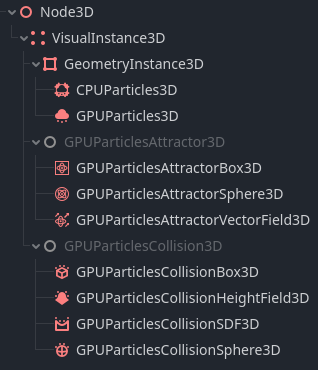
All 3D particle nodes available in Godot
There are two types of 3D particle systems in Godot: GPUParticles3D, which are processed on the GPU, and CPUParticles3D, which are processed on the CPU.
CPU particle systems are less flexible than their GPU counterpart, but they work on a wider range of hardware and provide better support for older devices and mobile phones. Because they are processed on the CPU, they are not as performant as GPU particle systems and can't render as many individual particles. In addition they currently do not have all the available options GPU particles have for control.
GPU particle systems run on the GPU and can render hundreds of thousands of particles on modern hardware. You can write custom particle shaders for them, which makes them very flexible. You can also make them interact with the environment by using attractor and collision nodes.
There are three particle attractor nodes: GPUParticlesAttractorBox3D, GPUParticlesAttractorSphere3D, and GPUParticlesAttractorVectorField3D. An attractor node applies a force to all particles in its reach and pulls them closer or pushes them away based on the direction of that force.
Hay varios nodos de colisión de partículas. GPUParticlesCollisionBox3D y GPUParticlesCollisionSphere3D son los más simples. Puedes usarlos para crear formas básicas como cajas, un piso o una pared con las que colisionen las partículas. Los otros dos nodos proporcionan un comportamiento de colisión más complejo. GPUParticlesCollisionSDF3D es útil cuando quieres que las escenas interiores colisionen con partículas sin tener que crear todos los colisionadores de cajas y esferas individuales a mano. Si quieres que las partículas colisionen con escenas exteriores grandes, usarías el nodo GPUParticlesCollisionHeightField3D. Crea un mapa de alturas de tu mundo y los objetos que contiene y lo usa para colisiones de partículas a gran escala.