Haciendo solicitudes HTTP
Why use HTTP?
HTTP requests are useful to communicate with web servers and other non-Godot programs.
En comparación con otras funciones de red de Godot (como Multijugador de alto nivel), las solicitudes HTTP tienen más sobrecarga y tardan más tiempo en iniciarse, por lo que no son adecuadas para la comunicación en tiempo real y no son ideales para enviar muchas actualizaciones pequeñas como es común en el juego multijugador.
HTTP, however, offers interoperability with external web resources and is great at sending and receiving large amounts of data, for example to transfer files like game assets. These assets can then be loaded using runtime file loading and saving.
So HTTP may be useful for your game's login system, lobby browser, to retrieve some information from the web or to download game assets.
HTTP requests in Godot
El nodo HTTPRequest es la forma más fácil de realizar solicitudes HTTP en Godot. Está respaldado por el HTTPClient de más bajo nivel, para el cual hay un tutorial disponible aquí.
For this example, we will make an HTTP request to GitHub to retrieve the name of the latest Godot release.
Advertencia
When exporting to Android, make sure to enable the Internet permission in the Android export preset before exporting the project or using one-click deploy. Otherwise, network communication of any kind will be blocked by the Android OS.
Preparing the scene
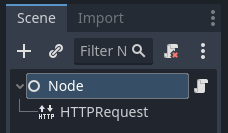
Create a new empty scene, add a root Node and add a script to it. Then add an HTTPRequest node as a child.
Scripting the request
When the project is started (so in _ready()), we're going to send an HTTP request
to Github using our HTTPRequest node,
and once the request completes, we're going to parse the returned JSON data,
look for the name field and print that to console.
extends Node

func _ready():
    $HTTPRequest.request_completed.connect(_on_request_completed)
    $HTTPRequest.request("https://api.github.com/repos/godotengine/godot/releases/latest")

func _on_request_completed(result, response_code, headers, body):
    var json = JSON.parse_string(body.get_string_from_utf8())
    print(json["name"])
using Godot;
using System.Text;

public partial class MyNode : Node
{
    public override void _Ready()
    {
        HttpRequest httpRequest = GetNode<HttpRequest>("HTTPRequest");
        httpRequest.RequestCompleted += OnRequestCompleted;
        httpRequest.Request("https://api.github.com/repos/godotengine/godot/releases/latest");
    }

    private void OnRequestCompleted(long result, long responseCode, string[] headers, byte[] body)
    {
        Godot.Collections.Dictionary json = Json.ParseString(Encoding.UTF8.GetString(body)).AsGodotDictionary();
        GD.Print(json["name"]);
    }
}
Save the script and the scene, and run the project. The name of the most recent Godot release on Github should be printed to the output log. For more information on parsing JSON, see the class references for JSON.
Nota que es posible que quieras comprobar si el resultado es igual a RESULT_SUCCESS y si se produjo un error de análisis JSON, mira la referencia de clase de JSON y HTTPRequest para obtener más información.
You have to wait for a request to finish before sending another one. Making multiple request at once requires you to have one node per request. A common strategy is to create and delete HTTPRequest nodes at runtime as necessary.
Sending data to the server
Hasta ahora nos hemos limitado a solicitar datos de un servidor. Pero, ¿Qué si necesitas enviar datos al servidor? Aquí hay una forma común de hacerlo:
var json = JSON.stringify(data_to_send)
var headers = ["Content-Type: application/json"]
$HTTPRequest.request(url, headers, HTTPClient.METHOD_POST, json)
string json = Json.Stringify(dataToSend);
string[] headers = ["Content-Type: application/json"];
HttpRequest httpRequest = GetNode<HttpRequest>("HTTPRequest");
httpRequest.Request(url, headers, HttpClient.Method.Post, json);
Setting custom HTTP headers
Of course, you can also set custom HTTP headers. These are given as a string array,
with each string containing a header in the format "header: value".
For example, to set a custom user agent (the HTTP User-Agent header) you could use the following:
$HTTPRequest.request("https://api.github.com/repos/godotengine/godot/releases/latest", ["User-Agent: YourCustomUserAgent"])
HttpRequest httpRequest = GetNode<HttpRequest>("HTTPRequest");
httpRequest.Request("https://api.github.com/repos/godotengine/godot/releases/latest", ["User-Agent: YourCustomUserAgent"]);
Peligro
Be aware that someone might analyse and decompile your released application and thus may gain access to any embedded authorization information like tokens, usernames or passwords. That means it is usually not a good idea to embed things such as database access credentials inside your game. Avoid providing information useful to an attacker whenever possible.