Exportando paquetes, parches y mods
Casos de uso
Oftentimes, one would like to add functionality to one's game after it has been deployed.
Ejemplos de esto incluyen ...
Contenido descargable: la capacidad de agregar características y contenido a su juego.
Parches: la capacidad de corregir un error que está presente en un producto enviado.
Mods: otorga a otras personas la capacidad de crear contenido para el juego.
Estas herramientas ayudan a los desarrolladores a ampliar su desarrollo más allá de la versión inicial.
Overview of PCK/ZIP files
Godot enables this via a feature called resource packs (PCK files,
with the .pck extension, or ZIP files).
Ventajas:
actualizaciones / parches incrementales
ofrecer DLCs
ofrecer soporte para mods
No es necesario revelar el código fuente para los mods
estructura del proyecto más modular
los usuarios no tienen que reemplazar todo el juego
The first part of using them involves exporting and delivering the project to players. Then, when one wants to add functionality or content later on, they just deliver the updates via PCK/ZIP files to the users.
PCK/ZIP files usually contain, but are not limited to:
scripts
escenas
shaders
modelos
texturas
efectos de sonido
música
Cualquier otro recurso adecuado para importar en el juego
The PCK/ZIP files can even be an entirely different Godot project, which the original game loads in at runtime.
It is possible to load both PCK and ZIP files as additional packs at the same time. See PCK contra formatos de archivo ZIP for a comparison of the two formats.
Ver también
If you want to load loose files at runtime (not packed in a PCK or ZIP by Godot), consider using Carga y guardado de archivos en tiempo de ejecución instead. This is useful for loading user-generated content that is not made with Godot, without requiring users to pack their mods into a specific file format.
The downside of this approach is that it's less transparent to the game logic, as it will not benefit from the same resource management as PCK/ZIP files.
Generando archivos PCK
In order to pack all resources of a project into a PCK file, open the project and go to Project > Export and click on Export PCK/ZIP. Also, make sure to have an export preset selected while doing so.
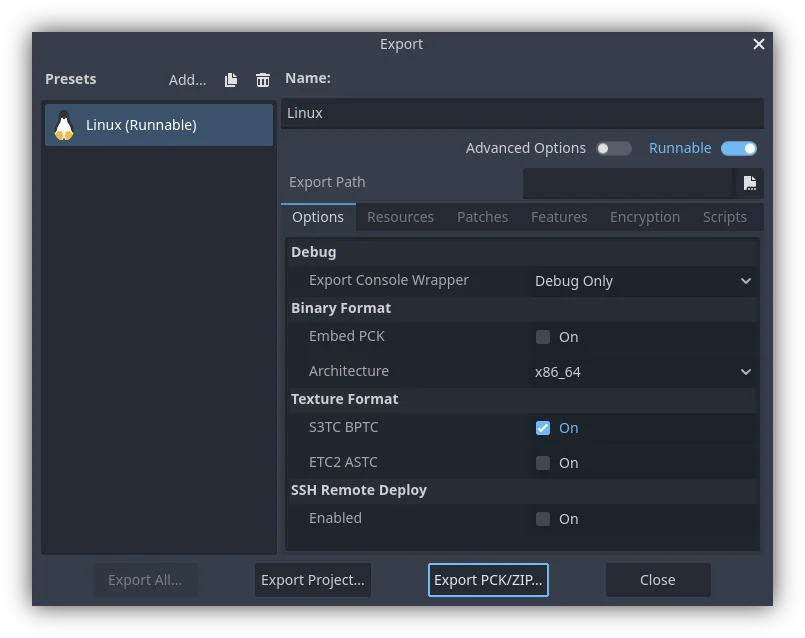
Another method would be to export from the command line
with --export-pack. The output file must with a .pck or .zip
file extension. The export process will build that type of file for the
chosen platform.
Nota
Si uno desea admitir mods para su juego, necesitarán que sus usuarios creen archivos exportados de manera similar. Asumiendo que el juego original espera una cierta estructura para los recursos del PCK y / o una cierta interfaz para sus scripts, entonces ...
El desarrollador debe publicar la documentación de estas estructuras / interfaces esperadas, esperar que los modders instalen el motor de Godot, y luego esperar que esos modders se ajusten a la API definida de la documentación al crear contenido de mod para el juego (para que funcione). Los usuarios luego usarían las herramientas de exportación integradas de Godot para crear un archivo PCK, como se detalla arriba.
El desarrollador usa Godot para construir una herramienta GUI para agregar su contenido API exacto a un proyecto. Esta herramienta de Godot debe ejecutarse en una versión del motor habilitada para herramientas o tener acceso a una (distribuida junto con o quizás en los archivos del juego original). Luego, la herramienta puede usar el ejecutable Godot para exportar un archivo PCK desde la línea de comandos con OS.execute(). Tiene mucho sentido que el juego no use una construcción de herramientas (por seguridad) y que las herramientas de modding do usen una construcción del motor habilitada para herramientas.
Opening PCK or ZIP files at runtime
To load a PCK or ZIP file, one uses the ProjectSettings singleton. The following
example expects a mod.pck file in the directory of the game's executable.
The PCK or ZIP file contains a mod_scene.tscn test scene in its root.
func _your_function():
    # This could fail if, for example, mod.pck cannot be found.
    var success = ProjectSettings.load_resource_pack(OS.get_executable_path().get_base_dir().path_join("mod.pck"))

    if success:
        # Now one can use the assets as if they had them in the project from the start.
        var imported_scene = load("res://mod_scene.tscn")
private void YourFunction()
{
    // This could fail if, for example, mod.pck cannot be found.
    var success = ProjectSettings.LoadResourcePack(OS.get_executable_path().get_base_dir().path_join("mod.pck));

    if (success)
    {
        // Now one can use the assets as if they had them in the project from the start.
        var importedScene = (PackedScene)ResourceLoader.Load("res://mod_scene.tscn");
    }
}
Advertencia
By default, if you import a file with the same file path/name as one you already have in your project, the imported one will replace it. This is something to watch out for when creating DLC or mods. You can solve this problem by using a tool that isolates mods to a specific mods subfolder.
However, it is also a way of creating patches for one's own game. A PCK/ZIP file of this kind can fix the content of a previously loaded PCK/ZIP (therefore, the order in which packs are loaded matters).
Para no utilizar este comportamiento, pasa false como segundo argumento del ProjectSettings.load_resource_pack().
Nota
Para un proyecto C#, necesitas compilar la DLL y ubicarla primero en el directorio de proyecto. Después, antes de cargar el resource pack, necesitarás cargar la DLL de este modo: Assembly.LoadFile("mod.dll")
Solución De Problemas
If you are loading a resource pack and are not noticing any changes, it may be due to the pack being loaded too late. This is particularly the case with menu scenes that may preload other scenes using preload(). This means that loading a pack in the menu will not affect the other scene that was already preloaded.
To avoid this, you need to load the pack as early as possible.
To do so, create a new autoload script and
call ProjectSettings.load_resource_pack()
in the autoload script's _init() function, rather than _enter_tree()
or _ready().
Sumario
This tutorial explains how to add mods, patches, or DLC to a game. The most important thing is to identify how one plans to distribute future content for their game and develop a workflow that is customized for that purpose. Godot should make that process smooth regardless of which route a developer pursues.