Attention: Here be dragons
This is the latest
(unstable) version of this documentation, which may document features
not available in or compatible with released stable versions of Godot.
Checking the stable version of the documentation...
Compiling with PCK encryption key
The export dialog gives you the option to encrypt your PCK file with a 256-bit AES key when releasing your project. This will make sure your scenes, scripts and other resources are not stored in plain text and can not easily be ripped by some script kiddie.
Por supuesto, la clave necesita ser almacenada en el binario, pero si se compila, optimiza y se eliminan los símbolos, requeriría cierto esfuerzo encontrarla.
Para que esto funcione, necesitas compilar las plantillas de exportación desde el código fuente, utilizando la misma clave.
Advertencia
Esto no funcionará si utilizas plantillas de exportación oficiales precompiladas. Es absolutamente necesario compilar tus propias plantillas de exportación para usar el cifrado PCK.
Paso a paso
Genera una clave AES de 256 bits en formato hexadecimal. Puedes utilizar la variante aes-256-cbc de este servicio.
Alternativamente, puedes generarla tú mismo utilizando las herramientas de línea de comandos de OpenSSL:
openssl rand -hex 32 > godot.gdkey
La salida en
godot.gdkeydebería ser similar a:# NOTE: Do not use the key below! Generate your own key instead. aeb1bc56aaf580cc31784e9c41551e9ed976ecba10d315db591e749f3f64890fPuedes generar la clave sin redirigir la salida a un archivo, pero de esta manera puedes minimizar el riesgo de exponer la clave.
Establece esta clave como una variable de entorno en la consola que utilizarás para compilar Godot, de la siguiente manera:
export SCRIPT_AES256_ENCRYPTION_KEY="your_generated_key"
set SCRIPT_AES256_ENCRYPTION_KEY=your_generated_key
$env:SCRIPT_AES256_ENCRYPTION_KEY="your_generated_key"Note that the commands suggested above do not persist the variables across terminal sessions.
Compile las plantillas de exportación de Godot y selecciónelas como plantillas de exportación personalizadas en las opciones del ajuste preestablecido de exportación. Si la variable de entorno está configurada correctamente, aparecerá el siguiente mensaje al inicio de la compilación:
*** IMPORTANT: Compiling Godot with custom `SCRIPT_AES256_ENCRYPTION_KEY` set as environment variable.
*** Make sure to use templates compiled with this key when exporting a project with encryption.
Set the encryption key in the Encryption tab of the export preset:
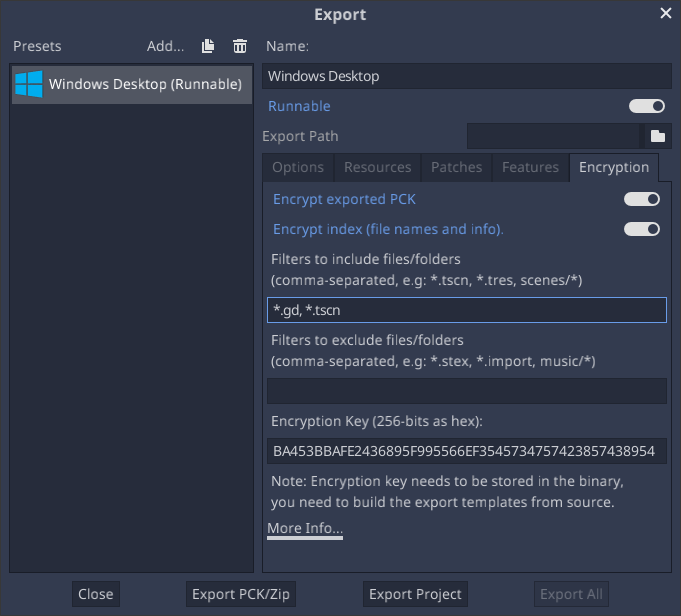
Agregue filtros para los archivos o carpetas que desea cifrar. Por defecto, los filtros de inclusión están vacíos y no se cifrará nada.
Exporta el proyecto. El proyecto ahora debería ejecutarse con los archivos cifrados.
Solución De Problemas
If you get an error like below, it means the key wasn't properly included in your Godot build. Godot is encrypting PCK file during export, but can't read it at runtime.
ERROR: open_and_parse: Condition "String::md5(md5.digest) != String::md5(md5d)" is true. Returning: ERR_FILE_CORRUPT
   At: core/io/file_access_encrypted.cpp:103