Attention: Here be dragons
This is the latest
(unstable) version of this documentation, which may document features
not available in or compatible with released stable versions of Godot.
Checking the stable version of the documentation...
Reducción de trastabilleo (stutter) por compilaciones de shader (pipeline)
Advertencia
This page only applies to the Forward+ and Mobile renderers, not Compatibility. Ubershaders and pipeline precompilation rely on functionality only available in modern low-level graphics APIs (Vulkan, Direct3D 12, Metal). The Compatibility renderer uses OpenGL 3.3, OpenGL ES 3.0, or WebGL 2.0 depending on the platform. These versions lack the functionality to effectively implement ubershaders and pipeline precompilation.
To avoid shader stutters in Compatibility, you need to use the legacy approach of preloading materials, shaders, and particles by displaying them for at least one frame in the view frustum when the level is loading.
Pipeline compilation, also commonly known as shader compilation, is an expensive operation required by the engine to be able to draw any kind of content with the GPU.

Shaders and materials in Godot go through several steps before they can be run by the GPU.
In more precise terms, shader compilation involves the translation of the GLSL code that Godot generates into an intermediate format that can be shared across systems (such as SPIR-V when using Vulkan). However, this format can't be used by the GPU directly.
Pipeline compilation is the step where the GPU driver converts the intermediate shader format (the result from shader compilation) to something the GPU can actually use for rendering. Drivers usually keep a cache of pipelines stored somewhere in the system to avoid repeating the process every time a game is run. This cache is usually deleted when the driver is updated.
Pipelines contain more information than just the shader code, which means that for each shader, there can be dozens of pipelines or more! This makes it difficult for an engine to compile them ahead of time, both because it would be very slow, and because it would take up a lot of memory. On top of that, this step can only be performed on the user's system and it is very tough to share the result between users unless they have the exact same hardware and driver version.
Antes de Godot 4.4, no había solución al pipeline de compilación excepto generarlos cuando un objeto aparece en la vista de la cámara, lo que llevó al infame trastabilleo de shader o trabas que sólo ocurren la primera vez que se juega.**Con Godot 4.4, se introdujeron nuevos mecanismos para mitigar trastabilleos por compilación de pipeline**
Ubershaders: Godot makes use of specialization constants, a feature that allows the driver to optimize a pipeline's code around a set of parameters such as lighting, shadow quality, etc. Specialization constants are used to optimize a shader by limiting unnecessary features. Changing a specialization constant requires recompiling the pipeline. Ubershaders are a special version of the shader that are able to change these constants while rendering, which means Godot can precompile just one pipeline ahead of time and compile the more optimized versions on the background during gameplay. This reduces the amount of pipelines that need to be created significantly.
Pipeline precompilation: By using ubershaders, the engine can precompile pipelines ahead of time in multiple places such as when meshes are loaded or when nodes are added to the scene. By being part of the resource loading process, pipelines can even be precompiled in multiple background threads if possible during loading screens or even gameplay.
Starting in Godot 4.4, Godot will detect which pipelines are needed and precompile them at load-time. This detection system is mostly automatic, but it relies on the RenderingServer seeing evidence of all shaders, meshes, or rendering features at load-time. For example, if you load a mesh and shader while the game is running, the pipeline for that mesh/shader combination won't be compiled until the mesh/shader is loaded. Similarly, things like enabling MSAA, or instancing a VoxelGI node while the game is running will trigger pipeline recompilations.
Pipeline precompilation monitors
Compilar pipelines por adelantado es el mecanismo principal que Godot usa para mitigar el trastabilleo de shader, pero no es una solución perfecta. Estar al tanto de las situaciones que pueden llevar al trastabilleo de pipeline puede ser muy útil, y las soluciones alternativas son bastante directas comparadas con versiones previas. Estas soluciones pueden ser menos necesarias con el tiempo en futuras versiones de Godot, conforme se implementen más técnicas de detección.
El depurador de Godot ofrece monitores para registrar la cantidad de pipelines creadas por el juego y el paso que disparó su compilación. Puedes observar estos monitores mientras corre el juego para identificar fuentes potenciales de trastabilleo de shader sin tener que vaciar la caché del controlador cada vez que quieras hacer una prueva. Los incrementos repentinos de estos valores fuera de las pantallas de carga pueden aparecer como trabas durante el juego la primera vez que alguien lo juega en su sistema. Se recomienda que vigiles estos monitores para indentificar posibles fuentes de trastabilleo para tus jugadores, ya que puede que no los experimentes personalmente sin vaciar la caché del controlador o probar en un sistema más débil.
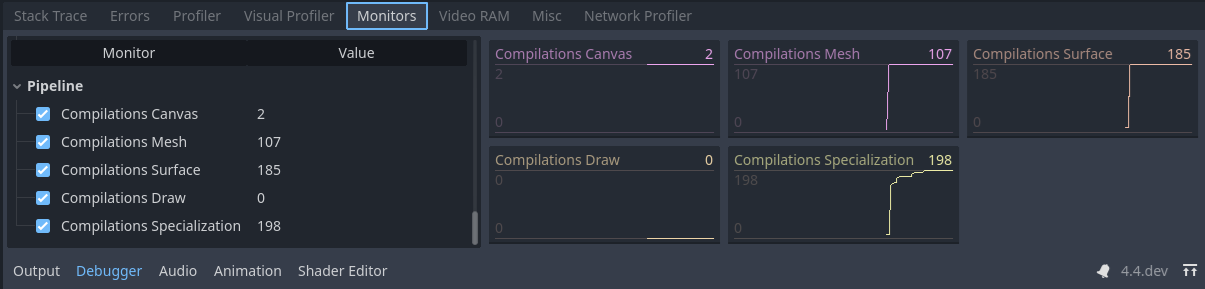
Pipeline compilations of one of the demo projects.
Nota
We can see the pipelines compiled during gameplay and verify which steps could possibly cause stuttters. Note that these values will only increase and never go down, as deleted pipelines are not tracked by these monitors and pipelines may be erased and recreated during gameplay.
Lienzo: Compilado al dibujar un nodo 2D. El motor actualmente no cuenta con precompilación de elementos 2D y trastabillea cuando el nodo 2D se dibuja por primera vez.
Mesh: Compilado como parte de cargar una malla 3D e identificar qué pipelines se pueden precompilar de sus propiedades. Estas pueden llevar a trastabilleos si una malla se carga durante el juego, pero se pueden mitigar si la malla se carga usando un hilo de fondo. Los modificadores que son parte de nodos como sobreescrituras de materiales no se pueden compilar en este paso.
Surface: Compilado cuando un fotograma está a punto de dibujarse y los objetos 3D fueron instanciados en el árbol de escenas por primera vez. Esto también puede incluir compilación para los nodos que no son visibles en el árbol de escenas. El trastabilleo ocurrirá solamente en el primer fotograma que el nodo sea añadido a la escena, lo que no resultará en un trastabilleo obvio si pasa justo después de una pantala de carga.
Draw: Compiled on demand when a 3D object needs to be drawn and an ubershader was not precompiled ahead of time. The engine is unable to precompile this pipeline due to triggering a case that hasn't been covered yet or a modification that was done to the engine's code. Leads to stutters during gameplay. This is identical to Godot versions before 4.4. If you see compilations here, please let the developers know as this should never happen with the Ubershader system. Make sure to attach a minimal reproduction project when doing so.
Specialization: Compilado al fondo durante el juego para optimizar la frecuencia de fotogramas. No puede causar trastabilleos, pero podría resultar en frecuencias de fotogramas reducidas si hay demasiados por fotograma.
Pipeline precompilation features
Godot offers a lot of rendering features that are not necessarily used by every game. Unfortunately, pipeline precompilation can't know ahead of time if a particular feature is used by a project. Some of these features can only be detected when a user adds a node to the scene or toggles a particular setting in the project or the environment. The pipeline precompilation system will keep track of these features as they're encountered for the first time and enable precompilation of them for any meshes or surfaces that are created afterwards.
If your game makes use of these features, make sure to have a scene that uses them as early as possible before loading the majority of the assets. This scene can be very simple and will do the job as long as it uses the features the game plans to use. It can even be rendered off-screen for at least one frame if necessary, e.g. by covering it with a ColorRect node or using a SubViewport located outside the window bounds.
También debes tener en cuenta que cambiar cualquiera de estas características durante el juego resultará en trastabilleos inmediatos. Asegúrate de sólo cambiar estas características de las pantallas de configuración si es necesario e inserta pantallas y mensajes de carga al aplicar los cambios.
MSAA Level: Se activa cuando el nivel de MSAA 3D se cambia en la Configuración del Proyecto. Desafortunadamente, si se usan distintos niveles de MSAA en distintas ventanas de visualización causará trastabilleos, ya que el motor sólo lleva la cuenta de un nivel a la vez para realizar la precompilación.
Reflection Probes: Enabled when a ReflectionProbe node is placed on the scene.
Separate Specular: Enabled when using effects like sub-surface scattering or a compositor effect that relies on sampling the specularity directly off the screen.
Motion Vectors: Enabled when using effects such as TAA, FSR2 or a compositor effect that requires motion vectors (such as motion blur).
Normal and Roughness: Enabled when using SDFGI, VoxelGI, screen-space reflections, SSAO, SSIL, or using the
normal_roughness_bufferin a custom shader or CompositorEffect.Lightmaps: Enabled when a LightmapGI node is placed on the scene and a node uses a baked lightmap.
VoxelGI: Enabled when a VoxelGI node is placed on the scene.
SDFGI: Enabled when the WorldEnvironment enables SDFGI.
Multiview: Enabled for XR projects.
16/32-bit Shadows: Enabled when the configuration of the depth precision of shadowmaps is changed on the project settings.
Omni Shadow Dual Paraboloid: Enabled when an omni light casts shadows and uses the dual paraboloid mode.
Omni Shadow Cubemap: Enabled when an omni light casts shadows and uses the cubemap mode (which is the default).
Si presencias trastabilleos durante el juego y los monitores reportan un incremento repentino en compilaciones durante el paso Surface, es muy probable que una característica no haya sido activada antes de tiempo. Asegurarte de que este efecto esté activado mientras carga tu juego podría mitigar el problema.
Pipeline precompilation instancing
Una fuente común de trastabilleos en los juegos es que algunos efectos sólo se instancian en la escena con interacciones que sólo suceden durante el juego. Por ejemplo, si tienes un efecto de partículas que sólo se agrega a la escena a través de un script cuando un jugador hace una acción. Incluso si una escena está precargada, puede que el motor no sea capaz de precompilar las pipelines hasta que el efecto se agregue a la escena al menos una vez.
Luckily, it's possible for Godot 4.4 and later to precompile these pipelines as long as the scene is instantiated at least once on the scene, even if it's completely invisible or outside of the camera's view.
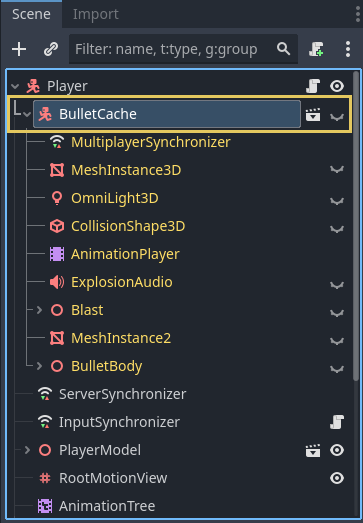
Hidden bullet node attached to the player in one of the demo projects. This helps the engine precompile the effect's pipelines ahead of time.
If you're aware of any effects that are added to the scene dynamically during gameplay and are seeing sudden increases on the compilations monitor when these effects show up, a workaround is to attach a hidden version of the effect somewhere that is guaranteed to show up.
For example, if the player character is able to cause some sort of explosion, you can attach the effect as a child of the player as an invisible node. Make sure to disable the script attached to the hidden node or to hide any other nodes that could cause issues, which can be done by enabling Editable Children on the node.
Shader baker
A partir de Godot 4.5, tienes la opción de incrustar shaders al exportar para mejorar el tiempo de inicio. Esto generalmente no resolverá trastabilleos existentes, pero reducirá el tiempo que tome cargar el juego por primera vez. Esto es especialmente cierto cuando se usa Direct3D 12 o Metal, que tienen tiempos iniciales de compilación de shader significativamente más lentos que Vulkan debido al paso de conversión requerico. Los shaders propios de Godot usan GLSL and SPIR-V, pero Direct3D 12 y Metal usan formatos distintos.
Nota
The shader baker can only bake the source into the intermediate format (SPIR-V for Vulkan, DXIL for Direct3D 12, MIL for Metal). It cannot bake the intermediate format into the final pipeline, as this is dependent on the GPU driver and the hardware.
The shader baker is not a replacement for pipeline precompilation, but it aims to complement it.
When enabled, the shader baker will bundle compiled shader code into the PCK, which results in the shader compilation step being skipped entirely. The downside is that exporting will take slightly longer. The PCK file will be larger by a few megabytes.
The shader baker is disabled by default, but you can enable it in each export preset in the Export dialog by ticking the Shader Baker > Enabled export option.
Note that shader baking will only be able to export shaders for drivers supported by the platform the editor is currently running on:
The editor running on Windows can export shaders for Vulkan and Direct3D 12.
The editor running on macOS can export shaders for Vulkan and Metal.
The editor running on Linux can export shaders for Vulkan only.
The editor running on Android can export shaders for Vulkan only.
The shader baker will only export shaders that match the
rendering/rendering_device/driver project setting for the target platform.
Nota
The shader baker is only supported for the Forward+ and Mobile renderers. It will have no effect if the project uses the Compatibility renderer, or for users who make use of the Compatibility fallback due to their hardware not supporting the Forward+ or Mobile renderer.
This also means the shader baker is not supported on the web platform, as the web platform only supports the Compatibility renderer.
Additionally, the shader baker is not supported when exporting a project
using the --headless command line argument,
as Godot cannot access the GPU when running in headless mode.