Attention: Here be dragons
This is the latest
(unstable) version of this documentation, which may document features
not available in or compatible with released stable versions of Godot.
Checking the stable version of the documentation...
Utilizzo di ArrayMesh
Questo tutorial presenterà le basi dell'utilizzo di un ArrayMesh.
Per farlo, useremo la funzione add_surface_from_arrays(), che accetta fino a cinque parametri. I primi due sono obbligatori, mentre gli ultimi tre sono facoltativi.
Il primo parametro è PrimitiveType, un concetto OpenGL che indica alla GPU come disporre la primitiva in base ai vertici forniti, ovvero se rappresentano triangoli, linee, punti, ecc. Consultare Mesh.PrimitiveType per le opzioni disponibili.
Il secondo parametro, arrays, è l'array vero e proprio che memorizza le informazioni sulla mesh. L'array è un tipico array di Godot costruito con parentesi quadre vuote []. Memorizza un Packed**Array (ad esempio PackedVector3Array, PackedInt32Array, ecc.) per ogni tipo di informazione che servirà per costruire la superficie.
Di seguito sono elencati gli elementi comuni di array, insieme alla posizione che devono avere all'interno di array. Consulta Mesh.ArrayType per un elenco completo.
Indice |
Enum Mesh.ArrayType |
Tipo di array |
|---|---|---|
0 |
|
|
1 |
|
|
2 |
|
PackedFloat32Array o PackedFloat64Array in gruppi di 4 float. I primi 3 float determinano la tangente, mentre l'ultimo float determina la direzione binormale, come -1 o 1. |
3 |
|
|
4 |
|
|
5 |
|
|
10 |
|
PackedFloat32Array in gruppi di 4 float o PackedInt32Array in gruppi di 4 int. Ogni gruppo elenca gli indici di 4 ossa che influenzano un determinato vertice. |
11 |
|
PackedFloat32Array o PackedFloat64Array in gruppi di 4 float. Ogni float elenca la quantità di peso che l'osso corrispondente in |
12 |
|
Nella maggior parte dei casi, quando si crea una mesh, la si definisce tramite le posizioni dei suoi vertici. Quindi, solitamente, l'array dei vertici (all'indice 0) è obbligatorio, mentre l'array degli indici (all'indice 12) è facoltativo e verrà utilizzato solo se incluso. È anche possibile creare una mesh tramite solo l'array degli indici e senza l'array dei vertici, ma questo è fuori dallo scopo di questo tutorial.
Tutti gli altri array contengono informazioni sui vertici. Sono facoltativi e verranno utilizzati solo se inclusi. Alcuni di questi array (ad esempio ARRAY_COLOR) utilizzano una voce per vertice per fornire informazioni in più sui vertici. Devono avere le stesse dimensioni dell'array dei vertici. Altri array (ad esempio ARRAY_TANGENT) utilizzano quattro voci per descrivere un singolo vertice. Questi devono essere esattamente quattro volte più grandi dell'array dei vertici.
Per un utilizzo comune, gli ultimi tre parametri in add_surface_from_arrays() sono in genere lasciati vuoti.
Preparazione dell'ArrayMesh
Nell'editor, crea un MeshInstance3D e aggiungi un ArrayMesh ad esso nell'Ispettore. Normalmente, aggiungere un ArrayMesh nell'editor non è utile, ma in questo caso ci permette di accedere all'ArrayMesh da codice senza doverlo creare.
Successivamente, aggiungi uno script al MeshInstance3D.
Sotto _ready(), crea un nuovo Array.
var surface_array = []
Godot.Collections.Array surfaceArray = [];
Questo sarà l'array in cui memorizzeremo le informazioni sulla superficie: conterrà tutti gli array di dati necessari alla superficie. Godot si aspetta che abbia una dimensione di Mesh.ARRAY_MAX, quindi ridimensionalo appropriatamente.
var surface_array = []
surface_array.resize(Mesh.ARRAY_MAX)
Godot.Collections.Array surfaceArray = [];
surfaceArray.Resize((int)Mesh.ArrayType.Max);
Poi crea gli array per ogni tipo di dati che utilizzerai.
var verts = PackedVector3Array()
var uvs = PackedVector2Array()
var normals = PackedVector3Array()
var indices = PackedInt32Array()
List<Vector3> verts = [];
List<Vector2> uvs = [];
List<Vector3> normals = [];
List<int> indices = [];
Una volta riempiti gli array di dati con la tua geometria, puoi creare una mesh aggiungendo ciascun array a surface_array e poi confermando la mesh.
surface_array[Mesh.ARRAY_VERTEX] = verts
surface_array[Mesh.ARRAY_TEX_UV] = uvs
surface_array[Mesh.ARRAY_NORMAL] = normals
surface_array[Mesh.ARRAY_INDEX] = indices

# No blendshapes, lods, or compression used.
mesh.add_surface_from_arrays(Mesh.PRIMITIVE_TRIANGLES, surface_array)
surfaceArray[(int)Mesh.ArrayType.Vertex] = verts.ToArray();
surfaceArray[(int)Mesh.ArrayType.TexUV] = uvs.ToArray();
surfaceArray[(int)Mesh.ArrayType.Normal] = normals.ToArray();
surfaceArray[(int)Mesh.ArrayType.Index] = indices.ToArray();

var arrMesh = Mesh as ArrayMesh;
if (arrMesh != null)
{
    // No blendshapes, lods, or compression used.
    arrMesh.AddSurfaceFromArrays(Mesh.PrimitiveType.Triangles, surfaceArray);
}
Nota
In questo esempio, abbiamo utilizzato Mesh.PRIMITIVE_TRIANGLES, ma è possibile utilizzare qualsiasi tipo di primitiva disponibile da mesh.
Messo assieme, il codice complete apparirà così:
extends MeshInstance3D

func _ready():
    var surface_array = []
    surface_array.resize(Mesh.ARRAY_MAX)

    # PackedVector**Arrays for mesh construction.
    var verts = PackedVector3Array()
    var uvs = PackedVector2Array()
    var normals = PackedVector3Array()
    var indices = PackedInt32Array()

    #######################################
    ## Insert code here to generate mesh ##
    #######################################

    # Assign arrays to surface array.
    surface_array[Mesh.ARRAY_VERTEX] = verts
    surface_array[Mesh.ARRAY_TEX_UV] = uvs
    surface_array[Mesh.ARRAY_NORMAL] = normals
    surface_array[Mesh.ARRAY_INDEX] = indices

    # Create mesh surface from mesh array.
    # No blendshapes, lods, or compression used.
    mesh.add_surface_from_arrays(Mesh.PRIMITIVE_TRIANGLES, surface_array)
public partial class MyMeshInstance3D : MeshInstance3D
{
    public override void _Ready()
    {
        Godot.Collections.Array surfaceArray = [];
        surfaceArray.Resize((int)Mesh.ArrayType.Max);

        // C# arrays cannot be resized or expanded, so use Lists to create geometry.
        List<Vector3> verts = [];
        List<Vector2> uvs = [];
        List<Vector3> normals = [];
        List<int> indices = [];

        /***********************************
        * Insert code here to generate mesh.
        * *********************************/

        // Convert Lists to arrays and assign to surface array
        surfaceArray[(int)Mesh.ArrayType.Vertex] = verts.ToArray();
        surfaceArray[(int)Mesh.ArrayType.TexUV] = uvs.ToArray();
        surfaceArray[(int)Mesh.ArrayType.Normal] = normals.ToArray();
        surfaceArray[(int)Mesh.ArrayType.Index] = indices.ToArray();

        var arrMesh = Mesh as ArrayMesh;
        if (arrMesh != null)
        {
            // Create mesh surface from mesh array
            // No blendshapes, lods, or compression used.
            arrMesh.AddSurfaceFromArrays(Mesh.PrimitiveType.Triangles, surfaceArray);
        }
    }
}
Il codice che va inserito in mezzo può essere qualsiasi cosa tu voglia. Di seguito presenteremo alcuni esempi di codice per generare forme, partendo da un rettangolo.
Generare un rettangolo
Poiché utilizziamo Mesh.PRIMITIVE_TRIANGLES per renderizzare, costruiremo un rettangolo con dei triangoli.
Un rettangolo è formato da due triangoli che condividono quattro vertici. Nel nostro esempio, creeremo un rettangolo con il suo vertice superiore sinistro in (0, 0, 0) e con una larghezza e lunghezza di uno, come mostrato di seguito:
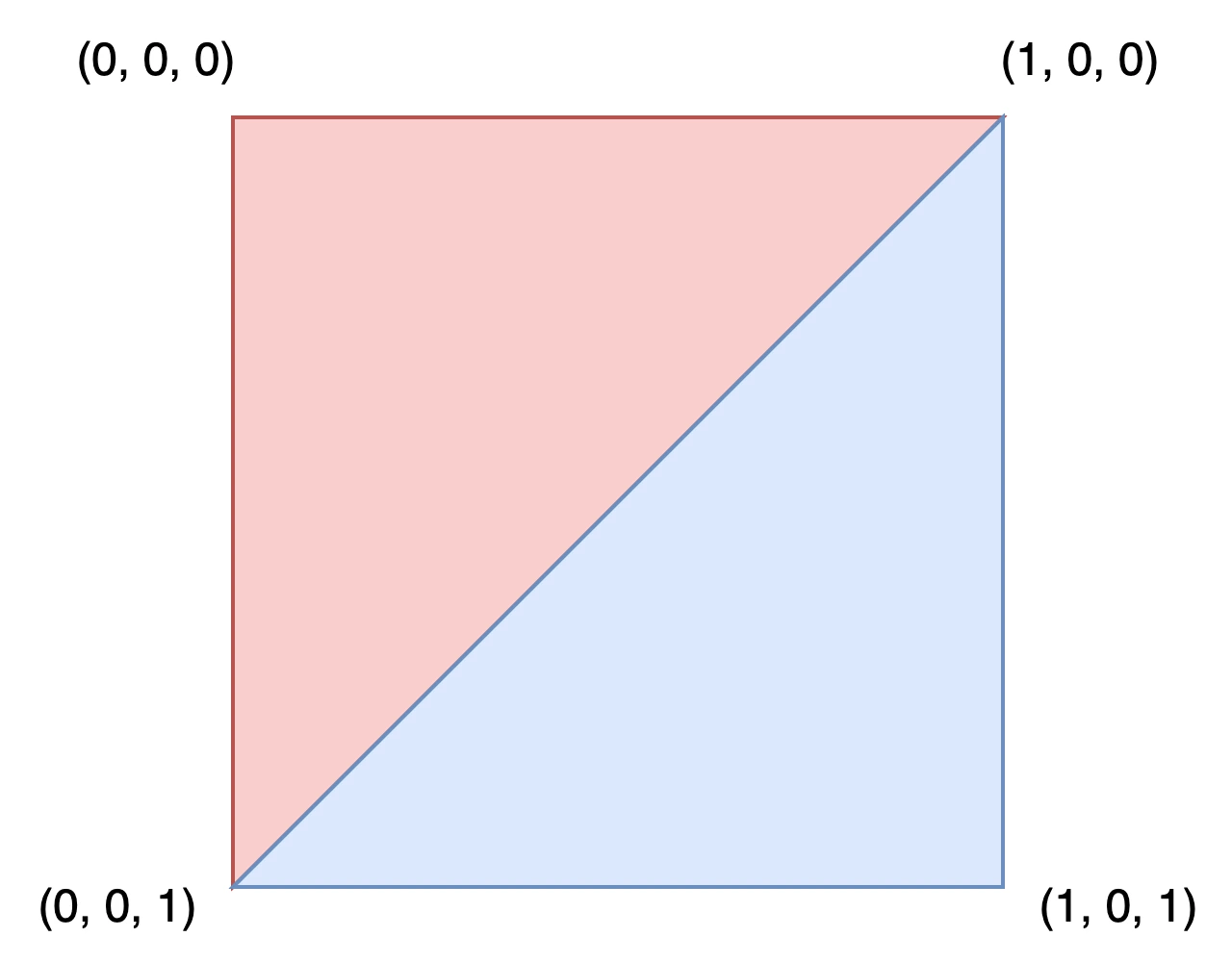
Per disegnare questo rettangolo, definisci le coordinate di ciascun vertice nell'array verts.
verts = PackedVector3Array([
        Vector3(0, 0, 0),
        Vector3(0, 0, 1),
        Vector3(1, 0, 0),
        Vector3(1, 0, 1),
    ])
verts.AddRange(new Vector3[]
{
    new Vector3(0, 0, 0),
    new Vector3(0, 0, 1),
    new Vector3(1, 0, 0),
    new Vector3(1, 0, 1),
});
L'array uvs aiuta a descrivere dove le parti di una texture devono andare sulla mesh. I valori vanno da 0 a 1. A seconda della texture, potrebbe essere desiderato modificare questi valori.
uvs = PackedVector2Array([
        Vector2(0, 0),
        Vector2(1, 0),
        Vector2(0, 1),
        Vector2(1, 1),
    ])
uvs.AddRange(new Vector2[]
{
    new Vector2(0, 0),
    new Vector2(1, 0),
    new Vector2(0, 1),
    new Vector2(1, 1),
});
L'array normals serve per descrivere la direzione verso cui puntano i vertici ed è utilizzato nei calcoli di illuminazione. Per questo esempio, lasceremo la direzione al valore predefinito di Vector3.UP.
normals = PackedVector3Array([
        Vector3.UP,
        Vector3.UP,
        Vector3.UP,
        Vector3.UP,
    ])
normals.AddRange(new Vector3[]
{
    Vector3.Up,
    Vector3.Up,
    Vector3.Up,
    Vector3.Up,
});
L'array indices definisce l'ordine in cui sono disegnati i vertici. Godot renderizza in senso orario, il che significa che dobbiamo specificare i vertici di un triangolo che vogliamo disegnare in senso orario.
Ad esempio, per disegnare il primo triangolo, dovremo disegnare i vertici (0, 0, 0), (1, 0, 0) e (0, 0, 1) in quest'ordine. Questo equivale a disegnare vert[0], vert[2] e vert[1], ovvero gli indici 0, 2 e 1 nell'array verts. Questi sono i valori di indice definiti dall'array indices.
Indice |
|
|
|
|---|---|---|---|
0 |
(0, 0, 0) |
(0, 0) |
Vector3.UP |
1 |
(0, 0, 1) |
(1, 0) |
Vector3.UP |
2 |
(1, 0, 0) |
(0, 1) |
Vector3.UP |
3 |
(1, 0, 1) |
(1, 1) |
Vector3.UP |
indices = PackedInt32Array([
        0, 2, 1, # Draw the first triangle.
        2, 3, 1, # Draw the second triangle.
    ])
indices.AddRange(new int[]
{
    0, 2, 1, // Draw the first triangle.
    2, 3, 1, // Draw the second triangle.
});
Messo assieme, il codice per la generazione del rettangolo appare così:
extends MeshInstance3D

func _ready():

  # Insert setting up the PackedVector**Arrays here.

  verts = PackedVector3Array([
          Vector3(0, 0, 0),
          Vector3(0, 0, 1),
          Vector3(1, 0, 0),
          Vector3(1, 0, 1),
      ])

  uvs = PackedVector2Array([
          Vector2(0, 0),
          Vector2(1, 0),
          Vector2(0, 1),
          Vector2(1, 1),
      ])

  normals = PackedVector3Array([
          Vector3.UP,
          Vector3.UP,
          Vector3.UP,
          Vector3.UP,
      ])

  indices = PackedInt32Array([
          0, 2, 1,
          2, 3, 1,
      ])

  # Insert committing to the ArrayMesh here.
using System.Collections.Generic;

public partial class MeshInstance3d : MeshInstance3D
{
  public override void _Ready()
  {
      // Insert setting up the surface array and lists here.

      verts.AddRange(new Vector3[]
      {
          new Vector3(0, 0, 0),
          new Vector3(0, 0, 1),
          new Vector3(1, 0, 0),
          new Vector3(1, 0, 1),
      });

      uvs.AddRange(new Vector2[]
      {
          new Vector2(0, 0),
          new Vector2(1, 0),
          new Vector2(0, 1),
          new Vector2(1, 1),
      });

      normals.AddRange(new Vector3[]
      {
          Vector3.Up,
          Vector3.Up,
          Vector3.Up,
          Vector3.Up,
      });

      indices.AddRange(new int[]
      {
          0, 2, 1,
          2, 3, 1,
      });

      // Insert committing to the ArrayMesh here.
  }
}
Per un esempio più complesso, consulta la sezione sulla generazione di una sfera riportata di seguito.
Generare una sfera
Ecco un esempio di codice per generare una sfera. Sebbene il codice sia presentato in GDScript, non c'è nulla di specifico di Godot su come è stato generato. Questa implementazione non ha nulla a che fare in particolare con gli ArrayMesh ed è semplicemente un approccio generico per generare una sfera. Se hai difficoltà a comprenderlo o vuoi saperne di più sulla geometria procedurale in generale, potresti consultare qualsiasi tutorial che trovi online.
extends MeshInstance3D

var rings = 50
var radial_segments = 50
var radius = 1

func _ready():

    # Insert setting up the PackedVector**Arrays here.

    # Vertex indices.
    var thisrow = 0
    var prevrow = 0
    var point = 0

    # Loop over rings.
    for i in range(rings + 1):
        var v = float(i) / rings
        var w = sin(PI * v)
        var y = cos(PI * v)

        # Loop over segments in ring.
        for j in range(radial_segments + 1):
            var u = float(j) / radial_segments
            var x = sin(u * PI * 2.0)
            var z = cos(u * PI * 2.0)
            var vert = Vector3(x * radius * w, y * radius, z * radius * w)
            verts.append(vert)
            normals.append(vert.normalized())
            uvs.append(Vector2(u, v))
            point += 1

            # Create triangles in ring using indices.
            if i > 0 and j > 0:
                indices.append(prevrow + j - 1)
                indices.append(prevrow + j)
                indices.append(thisrow + j - 1)

                indices.append(prevrow + j)
                indices.append(thisrow + j)
                indices.append(thisrow + j - 1)

        prevrow = thisrow
        thisrow = point

  # Insert committing to the ArrayMesh here.
public partial class MyMeshInstance3D : MeshInstance3D
{
    private int _rings = 50;
    private int _radialSegments = 50;
    private float _radius = 1;

    public override void _Ready()
    {
        // Insert setting up the surface array and lists here.

        // Vertex indices.
        var thisRow = 0;
        var prevRow = 0;
        var point = 0;

        // Loop over rings.
        for (var i = 0; i < _rings + 1; i++)
        {
            var v = ((float)i) / _rings;
            var w = Mathf.Sin(Mathf.Pi * v);
            var y = Mathf.Cos(Mathf.Pi * v);

            // Loop over segments in ring.
            for (var j = 0; j < _radialSegments + 1; j++)
            {
                var u = ((float)j) / _radialSegments;
                var x = Mathf.Sin(u * Mathf.Pi * 2);
                var z = Mathf.Cos(u * Mathf.Pi * 2);
                var vert = new Vector3(x * _radius * w, y * _radius, z * _radius * w);
                verts.Add(vert);
                normals.Add(vert.Normalized());
                uvs.Add(new Vector2(u, v));
                point += 1;

                // Create triangles in ring using indices.
                if (i > 0 && j > 0)
                {
                    indices.Add(prevRow + j - 1);
                    indices.Add(prevRow + j);
                    indices.Add(thisRow + j - 1);

                    indices.Add(prevRow + j);
                    indices.Add(thisRow + j);
                    indices.Add(thisRow + j - 1);
                }
            }

            prevRow = thisRow;
            thisRow = point;
        }

        // Insert committing to the ArrayMesh here.
    }
}
Salvare
Infine, possiamo utilizzare la classe ResourceSaver per salvare l'ArrayMesh. Questo è utile quando si desidera generare una mesh e poi utilizzarla in seguito senza doverla rigenerare.
# Saves mesh to a .tres file with compression enabled.
ResourceSaver.save(mesh, "res://sphere.tres", ResourceSaver.FLAG_COMPRESS)
// Saves mesh to a .tres file with compression enabled.
ResourceSaver.Save(Mesh, "res://sphere.tres", ResourceSaver.SaverFlags.Compress);