This is the latest
(unstable) version of this documentation, which may document features
not available in or compatible with released stable versions of Godot.
Checking the stable version of the documentation...
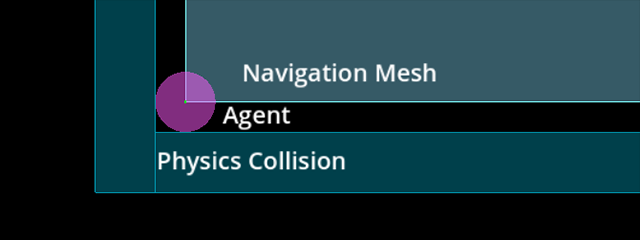
Una mesh di navigazione descrive soltanto un'area percorribile per la posizione centrale di un agente. Qualsiasi valore di raggio che un agente possa avere è ignorato. Se vuoi che la ricerca del percorso tenga conto delle dimensioni (e delle collisioni) di un agente, bisogna rimpicciolire adeguatamente la mesh di navigazione.
La navigazione funziona indipendentemente dalle altre parti del motore, come il rendering o la fisica. Le mesh di navigazione sono le uniche cose considerate durante la ricerca del percorso; ad esempio, gli elementi visivi e le forme di collisione sono completamente ignorati dal sistema di navigazione. Se vuoi tenere conto di altri dati (come ad esempio gli elementi visivi) durante la ricerca del percorso, bisogna adattare adeguatamente le mesh di navigazione. La procedura per tenere conto delle restrizioni nelle mesh di navigazione è comunemente detto "navigation mesh baking".
Una mesh di navigazione descrive una superficie su cui un agente può posizionarsi in sicurezza, con il suo centro confrontato con le forme fisiche che descrivono i limiti esterni di collisione.
Se riscontri problemi di clipping o collisione mentre si seguono i percorsi di navigazione, ricorda sempre che devi dire cosa vuoi fare al sistema di navigazione tramite un'apposita mesh di navigazione. Il sistema di navigazione, di per sé, non saprà mai "questa è una forma o una mesh visiva di collisione per alberi/rocce/muri" perché sa solo che "qui mi è stato detto che posso percorrere il percorso in sicurezza perché si trova su una mesh di navigazione".
Preparazione di una mesh di navigazione con una NavigationRegion
Baking a navigation mesh with agent radius offset from geometry.
La preparazione delle mesh di navigazione è reso più accessibile grazie al nodo NavigationRegion. Quando si utilizza un nodo NavigationRegion per la preparazione, le singole fasi di analisi, preparazione e aggiornamento della regione vengono combinate in un'unica funzione.
The navigation mesh source_geometry_mode can be switched to parse specific node group names so nodes that should be baked can be placed anywhere in the scene.
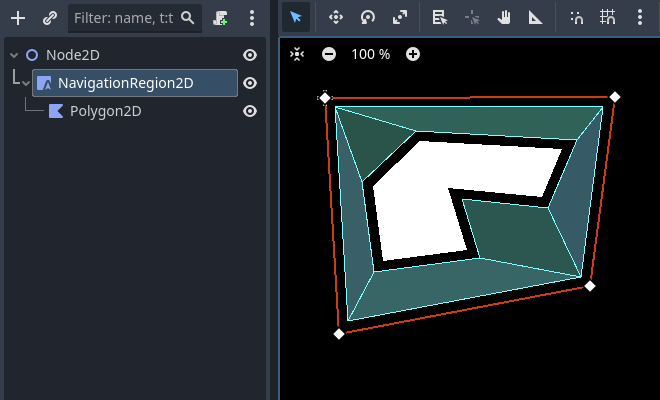
When a NavigationRegion2D node is selected in the Editor, bake options as well as polygon draw tools appear in the top bar of the Editor.
Affinché la regione funzioni, è necessario aggiungere una risorsa NavigationPolygon.
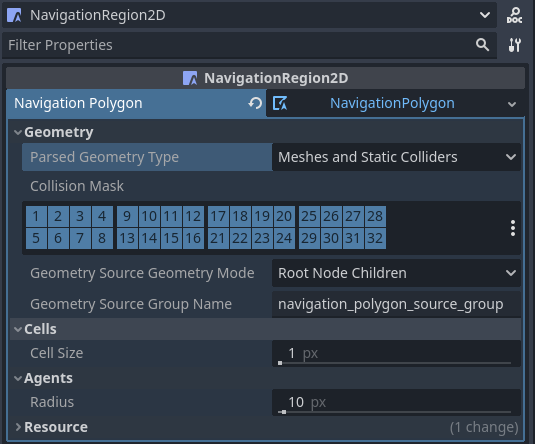
The properties to parse and bake a navigation mesh are then part of the used resource and can be found in the resource Inspector.
Il risultato dell'analisi della geometria sorgente può essere influenzato dalle seguenti proprietà.
The parsed_geometry_type that filters if visual objects or physics objects or both should be parsed from the SceneTree.
For more details on what objects are parsed and how, see the section about parsing source geometry below.
The collision_mask filters which physics collision objects are included when the parsed_geometry_type includes static colliders.
The source_geometry_mode that defines on which node(s) to start the parsing, and how to traverse the SceneTree.
The source_geometry_group_name is used when only a certain node group should be parsed. Depends on the selected source_geometry_mode.
Aggiunta la geometria della sorgente, il risultato della preparazione può essere controllato con le seguenti proprietà.
The cell_size sets the rasterization grid size and should match the navigation map size.
The agent_radius shrinks the baked navigation mesh to have enough margin for the agent (collision) size.
The NavigationRegion2D baking can also be used at runtime with scripts.
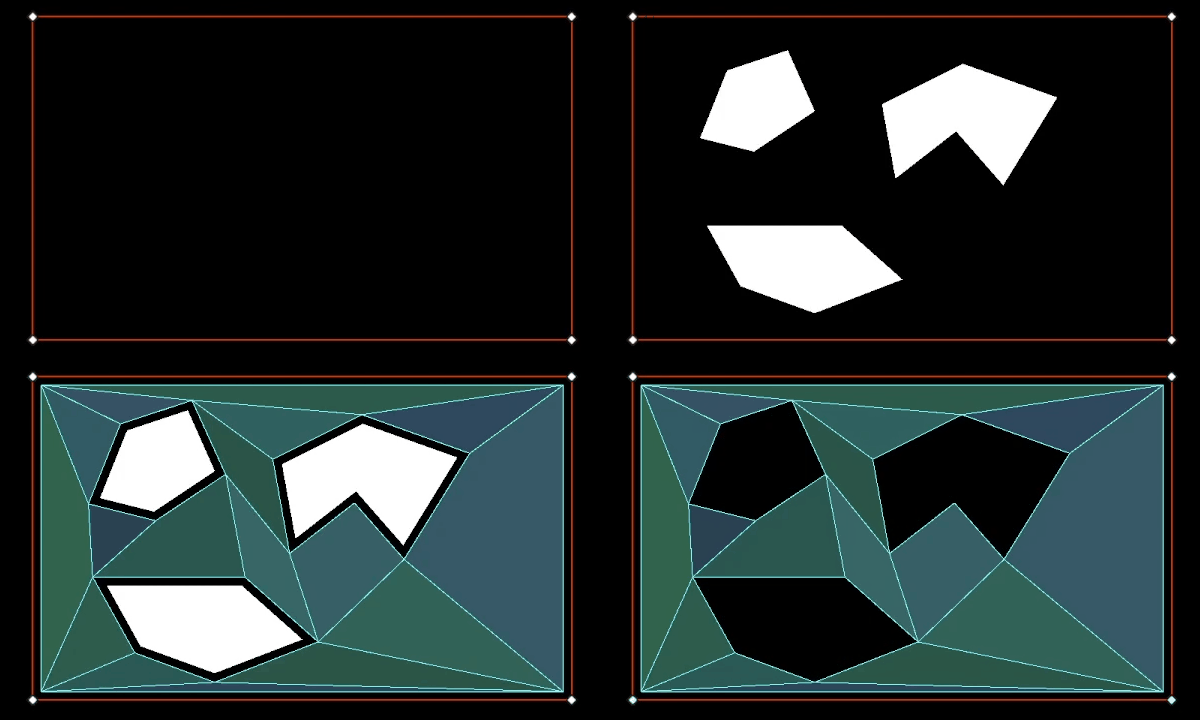
Draw 1 NavigationPolygon outline with the selected NavigationRegion2D draw tool.
Draw 1 Polygon2D outline inside the NavigationPolygon outline with the selected Polygon2D draw tool.
Hit the Editor bake button and a navigation mesh should appear.
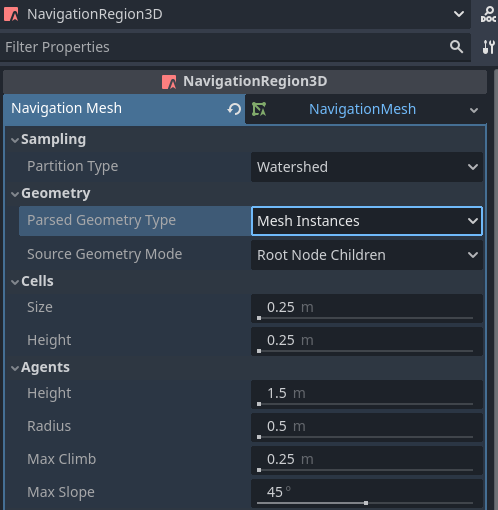
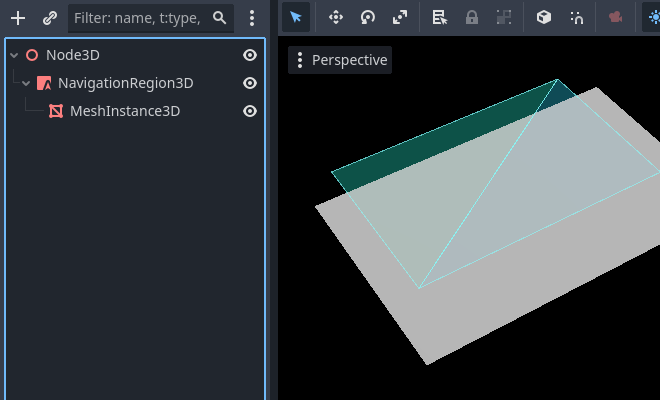
When a NavigationRegion3D node is selected in the Editor, bake options appear in the top bar of the Editor.
Affinché la regione funzioni, è necessario aggiungere una risorsa NavigationMesh.
The properties to parse and bake a navigation mesh are then part of the used resource and can be found in the resource Inspector.
Il risultato dell'analisi della geometria sorgente può essere influenzato dalle seguenti proprietà.
The parsed_geometry_type that filters if visual objects or physics objects or both should be parsed from the SceneTree.
For more details on what objects are parsed and how, see the section about parsing source geometry below.
The collision_mask filters which physics collision objects are included when the parsed_geometry_type includes static colliders.
The source_geometry_mode that defines on which node(s) to start the parsing, and how to traverse the SceneTree.
The source_geometry_group_name is used when only a certain node group should be parsed. Depends on the selected source_geometry_mode.
Aggiunta la geometria della sorgente, il risultato della preparazione può essere controllato con le seguenti proprietà.
The cell_size and cell_height sets the rasterization voxel grid size and should match the navigation map size.
The agent_radius shrinks the baked navigation mesh to have enough margin for the agent (collision) size.
The agent_height excludes areas from the navigation mesh where the agent is too tall to fit in.
The agent_max_climb and agent_max_slope removes areas where the height difference between neighboring voxels is too large, or where their surface is too steep.
Avvertimento
A too small cell_size or cell_height can create so many voxels that it has the potential to freeze the game or even crash.
The NavigationRegion3D baking can also be used at runtime with scripts.
parse_source_geometry_data() can be used to parse source geometry to a reusable and serializable resource.
bake_from_source_geometry_data() can be used to bake a navigation mesh from already parsed data e.g. to avoid runtime performance issues with (redundant) parsing.
bake_from_source_geometry_data_async() is the same but bakes the navigation mesh deferred with threads, not blocking the main thread.
Compared to a NavigationRegion, the NavigationServer offers finer control over the navigation mesh baking process.
In turn it is more complex to use but also provides more advanced options.
Some other advantages of the NavigationServer over a NavigationRegion are:
The server can parse source geometry without baking, e.g. to cache it for later use.
The server allows selecting the root node at which to start the source geometry parsing manually.
The server can accept and bake from procedurally generated source geometry data.
The server can bake multiple navigation meshes in sequence while (re)using the same source geometry data.
To bake navigation meshes with the NavigationServer, source geometry is required.
Source geometry is geometry data that should be considered in a navigation mesh baking process.
Both navigation meshes for 2D and 3D are created by baking them from source geometry.
Source geometry can be geometry parsed from visual meshes, from physics collision,
or procedural created arrays of data, like outlines (2D) and triangle faces (3D).
For convenience, source geometry is commonly parsed directly from node setups in the SceneTree.
For runtime navigation mesh (re)bakes, be aware that the geometry parsing always happens on the main thread.
Nota
The SceneTree is not thread-safe. Parsing source geometry from the SceneTree can only be done on the main thread.
Avvertimento
I dati provenienti da mesh e poligoni visivi devono essere ricevuti dalla GPU, di conseguenza bloccando il RenderingServer. Per la (ri)preparazione in fase di esecuzione, è preferibile utilizzare forme fisiche come geometria sorgente analizzata.
La geometria sorgente è memorizzata all'interno delle risorse, così che la geometria creata si possa riutilizzare per più preparazioni. Ad esempio, per preparare più mesh di navigazione per diverse dimensioni di agenti partendo dalla stessa geometria sorgente. Ciò consente anche di salvare la geometria sorgente su disco, così da poterla caricare in seguito, ad esempio per evitare l'impatto di doverla rianalizzare in fase di esecuzione.
The geometry data should be in general kept very simple. As many edges as are required but as few as possible.
Especially in 2D duplicated and nested geometry should be avoided as it forces polygon hole calculation that can result in flipped polygons.
An example for nested geometry would be a smaller StaticBody2D shape placed completely inside the bounds of another StaticBody2D shape.
Preparare blocchi di mesh di navigazione per grandi mondi
Creazione e aggiornamento dei singoli blocchi della mesh di navigazione in fase di esecuzione.
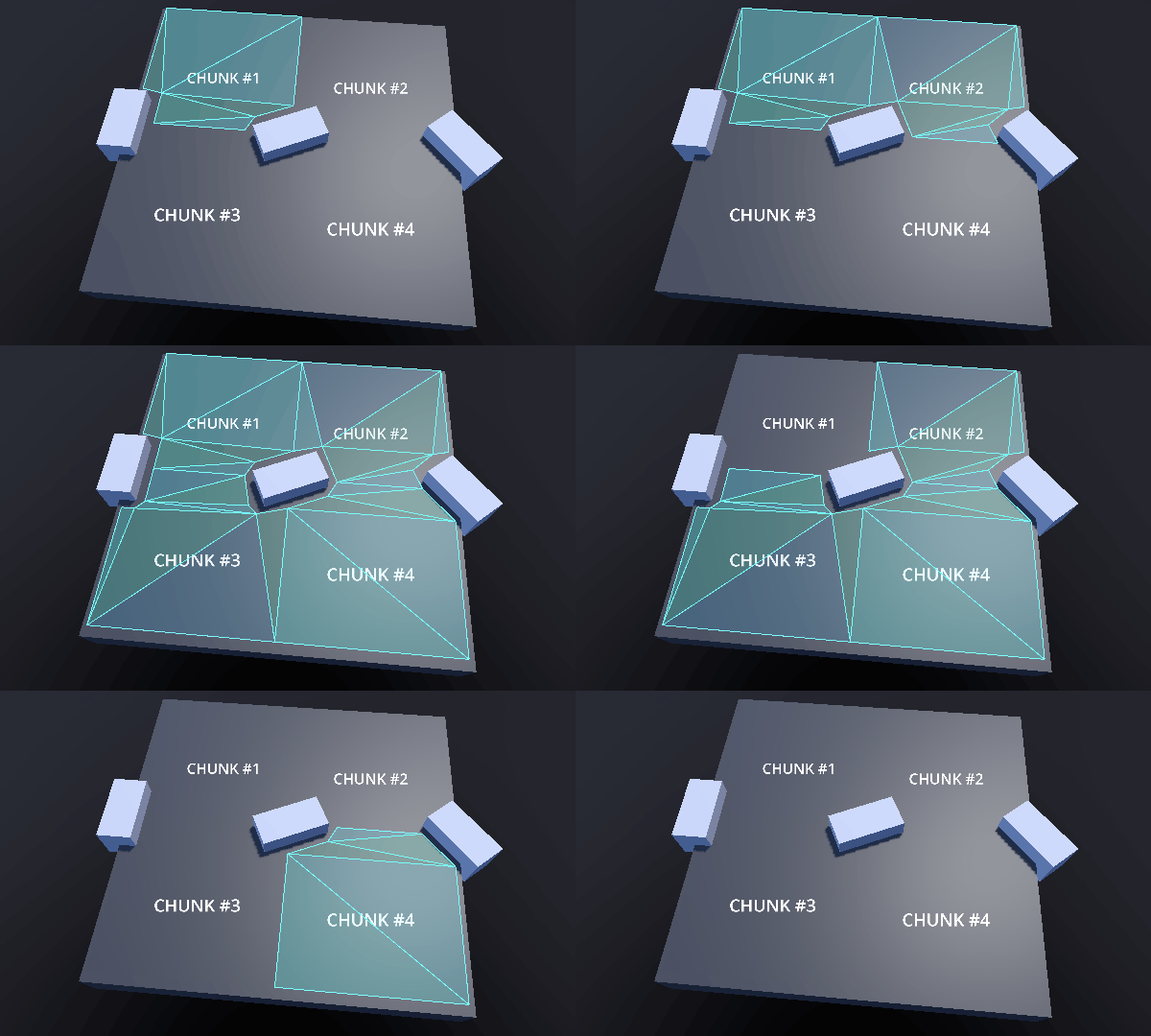
To avoid misaligned edges between different region chunks the navigation meshes have two important properties
for the navigation mesh baking process. The baking bound and the border size.
Together they can be used to ensure perfectly aligned edges between region chunks.
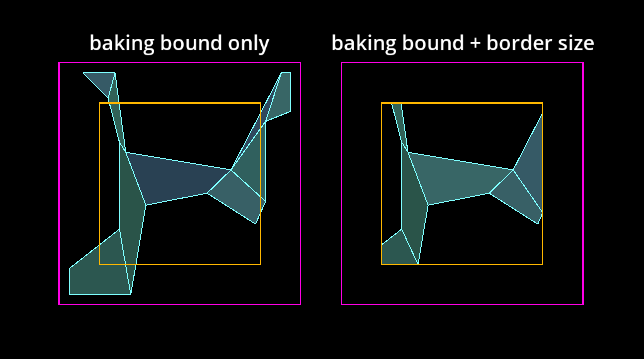
Navigation mesh chunk baked with bake bound or baked with additional border size.
Il confine di preparazione, che è un Rect2 allineato agli assi per il 2D e un AABB per il 3D, limita la geometria sorgente utilizzata, scartando tutta la geometria che si trova fuori dai limiti.
Le proprietà baking_rect e baking_rect_offset del NavigationPolygon si possono usare per creare e posizionare il confine di preparazione 2D.
Le proprietà filter_baking_aabb e filter_baking_aabb_offset del NavigationMesh si possono usare per creare e posizionare il confine di preparazione 3D.
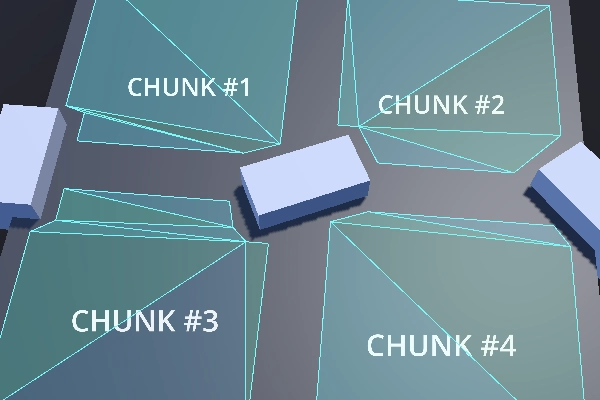
Anche impostando solo il confine di preparazione, esiste ancora un altro problema. La mesh di navigazione risultante sarà inevitabilmente influenzata da offset necessari come agent_radius, che non fanno allineare correttamente i bordi.
Navigation mesh chunks with noticeable gaps due to baked agent radius offset.
È qui che entra in gioco la proprietà border_size per la mesh di navigazione. La dimensione del bordo è un margine interno rispetto al confine di preparazione. La caratteristica importante della dimensione del bordo è che non è influenzata dalla maggior parte degli offset e delle post-elaborazioni, come agent_radius.
Instead of discarding source geometry, the border size discards parts of the final surface of the baked navigation mesh.
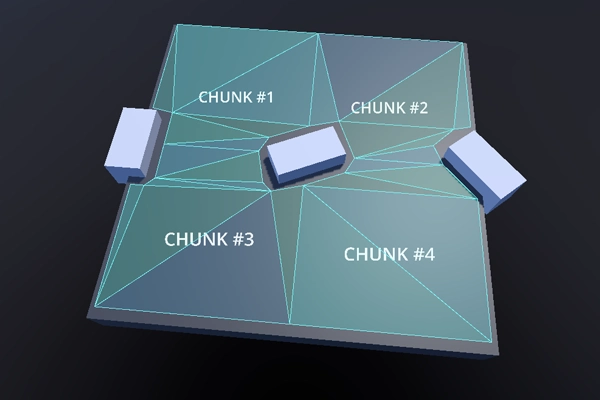
If the baking bound is large enough the border size can remove the problematic surface
parts so that only the intended chunk size is left.
Navigation mesh chunks with aligned edges and without gaps.
Nota
The baking bounds need to be large enough to include a reasonable amount of source geometry from all the neighboring chunks.
Avvertimento
In 3D the functionality of the border size is limited to the xz-axis.
Problemi comuni preparando le mesh di navigazione
Esistono alcuni problemi comuni riscontrati dagli utenti e importanti avvertenze da considerare quando si creano o si generano mesh di navigazione.
La preparazione delle mesh di navigazione crea problemi di frame rate in fase di esecuzione
La preparazione della mesh di navigazione è eseguita normalmente su un thread in background, quindi, fin quando la piattaforma supporti i thread, la preparazione vera e propria raramente è la causa di problemi di prestazioni (supponendo una geometria di dimensioni e complessità ragionevoli per nuove preparazioni in fase di esecuzione).
La causa più comune dei problemi di prestazioni in fase di esecuzione è la fase di analisi della geometria sorgente, che coinvolge i nodi e lo SceneTree. Lo SceneTree non è thread-safe, quindi tutti i nodi si devono analizzare sul thread principale. Alcuni nodi con molti dati possono essere molto pesanti e lenti da analizzare in fase di esecuzione. Ad esempio, una TileMap ha uno o più poligoni per ogni singola cella utilizzata e TileMapLayer da analizzare. I nodi che contengono mesh devono richiedere dati dal RenderingServer, bloccando il rendering nel processo.
Per migliorare le prestazioni, utilizza forme più ottimizzate, ad esempio forme di collisione al posto di mesh visive dettagliate, e unisci e semplifica quanta più geometria possibile in anticipo. Se nulla aiuta, non analizzare lo SceneTree e aggiungi la geometria sorgente proceduralmente con script. Se come geometria sorgente sono utilizzati solo array di dati puri, l'intero processo di preparazione può essere eseguito su un thread in background.
La mesh di navigazione crea fori indesiderati in 2D.
La preparazione della mesh di navigazione in 2D avviene tramite operazioni di ritaglio dei poligoni basate su percorsi di contorno. I poligoni con "buchi" sono un male necessario per creare poligoni 2D più complessi, ma possono risultare imprevedibili per gli utenti che utilizzano molte forme complesse.
Per evitare problemi imprevisti con i calcoli dei fori nei poligoni, è bene evitare di annidare contorni all'interno di altri contorni dello stesso tipo (percorribili/ostacoli). Questo vale anche per le forme estratte dai nodi. Ad esempio, inserire una forma StaticBody2D più piccola all'interno di una forma StaticBody2D più grande potrebbe capovolgere il poligono risultante.
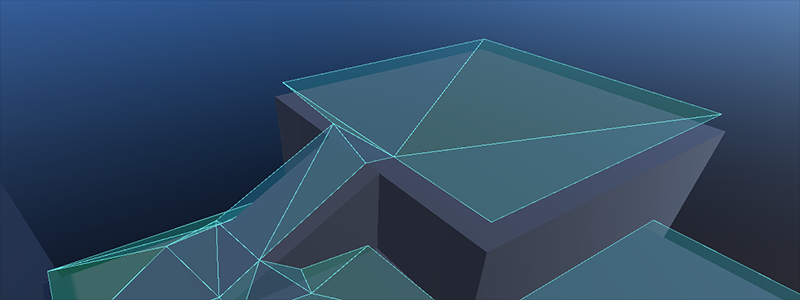
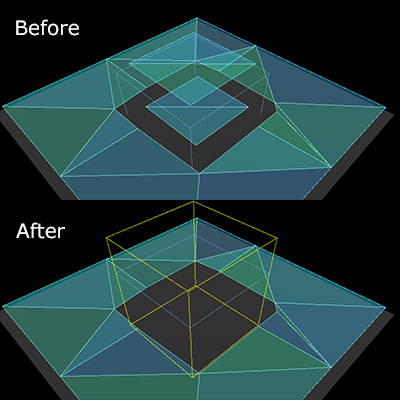
Navigation mesh appears inside geometry in 3D.
La preparazione della mesh di navigazione in 3D non ha un concetto di "interno". Le celle voxel utilizzate per rasterizzare la geometria sono o occupate o vuote. Rimuovi la geometria che sta sul terreno all'interno dell'altra geometria. Se ciò non è possibile, aggiungi una geometria "fittizia" più piccola all'interno, con il minor numero possibile di triangoli, affinché le celle siano occupate da qualcosa.
Una forma NavigationObstacle3D impostata per la preparazione con una mesh di navigazione può anche essere utilizzata per scartare la geometria.
È possibile utilizzare una forma NavigationObstacle3D per scartare le parti indesiderate di una mesh di navigazione.
Lo script seguente utilizza il NavigationServer per analizzare la geometria sorgente dall'albero di scene, prepara una mesh di navigazione e aggiorna una regione di navigazione con la mesh di navigazione aggiornata.
extendsNode2Dvarnavigation_mesh:NavigationPolygonvarsource_geometry:NavigationMeshSourceGeometryData2Dvarcallback_parsing:Callablevarcallback_baking:Callablevarregion_rid:RIDfunc_ready()->void:navigation_mesh=NavigationPolygon.new()navigation_mesh.agent_radius=10.0source_geometry=NavigationMeshSourceGeometryData2D.new()callback_parsing=on_parsing_donecallback_baking=on_baking_doneregion_rid=NavigationServer2D.region_create()# Enable the region and set it to the default navigation map.NavigationServer2D.region_set_enabled(region_rid,true)NavigationServer2D.region_set_map(region_rid,get_world_2d().get_navigation_map())# Some mega-nodes like TileMap are often not ready on the first frame.# Also the parsing needs to happen on the main-thread.# So do a deferred call to avoid common parsing issues.parse_source_geometry.call_deferred()funcparse_source_geometry()->void:source_geometry.clear()varroot_node:Node2D=self# Parse the obstruction outlines from all child nodes of the root node by default.NavigationServer2D.parse_source_geometry_data(navigation_mesh,source_geometry,root_node,callback_parsing)funcon_parsing_done()->void:# If we did not parse a TileMap with navigation mesh cells we may now only# have obstruction outlines so add at least one traversable outline# so the obstructions outlines have something to "cut" into.source_geometry.add_traversable_outline(PackedVector2Array([Vector2(0.0,0.0),Vector2(500.0,0.0),Vector2(500.0,500.0),Vector2(0.0,500.0)]))# Bake the navigation mesh on a thread with the source geometry data.NavigationServer2D.bake_from_source_geometry_data_async(navigation_mesh,source_geometry,callback_baking)funcon_baking_done()->void:# Update the region with the updated navigation mesh.NavigationServer2D.region_set_navigation_polygon(region_rid,navigation_mesh)
usingGodot;publicpartialclassMyNode2D:Node2D{privateNavigationPolygon_navigationMesh;privateNavigationMeshSourceGeometryData2D_sourceGeometry;privateCallable_callbackParsing;privateCallable_callbackBaking;privateRid_regionRid;publicoverridevoid_Ready(){_navigationMesh=newNavigationPolygon();_navigationMesh.AgentRadius=10.0f;_sourceGeometry=newNavigationMeshSourceGeometryData2D();_callbackParsing=Callable.From(OnParsingDone);_callbackBaking=Callable.From(OnBakingDone);_regionRid=NavigationServer2D.RegionCreate();// Enable the region and set it to the default navigation map.NavigationServer2D.RegionSetEnabled(_regionRid,true);NavigationServer2D.RegionSetMap(_regionRid,GetWorld2D().NavigationMap);// Some mega-nodes like TileMap are often not ready on the first frame.// Also the parsing needs to happen on the main-thread.// So do a deferred call to avoid common parsing issues.CallDeferred(MethodName.ParseSourceGeometry);}privatevoidParseSourceGeometry(){_sourceGeometry.Clear();Node2DrootNode=this;// Parse the obstruction outlines from all child nodes of the root node by default.NavigationServer2D.ParseSourceGeometryData(_navigationMesh,_sourceGeometry,rootNode,_callbackParsing);}privatevoidOnParsingDone(){// If we did not parse a TileMap with navigation mesh cells we may now only// have obstruction outlines so add at least one traversable outline// so the obstructions outlines have something to "cut" into._sourceGeometry.AddTraversableOutline([ new Vector2(0.0f, 0.0f), new Vector2(500.0f, 0.0f), new Vector2(500.0f, 500.0f), new Vector2(0.0f, 500.0f), ]);// Bake the navigation mesh on a thread with the source geometry data.NavigationServer2D.BakeFromSourceGeometryDataAsync(_navigationMesh,_sourceGeometry,_callbackBaking);}privatevoidOnBakingDone(){// Update the region with the updated navigation mesh.NavigationServer2D.RegionSetNavigationPolygon(_regionRid,_navigationMesh);}}
extendsNode3Dvarnavigation_mesh:NavigationMeshvarsource_geometry:NavigationMeshSourceGeometryData3Dvarcallback_parsing:Callablevarcallback_baking:Callablevarregion_rid:RIDfunc_ready()->void:navigation_mesh=NavigationMesh.new()navigation_mesh.agent_radius=0.5source_geometry=NavigationMeshSourceGeometryData3D.new()callback_parsing=on_parsing_donecallback_baking=on_baking_doneregion_rid=NavigationServer3D.region_create()# Enable the region and set it to the default navigation map.NavigationServer3D.region_set_enabled(region_rid,true)NavigationServer3D.region_set_map(region_rid,get_world_3d().get_navigation_map())# Some mega-nodes like GridMap are often not ready on the first frame.# Also the parsing needs to happen on the main-thread.# So do a deferred call to avoid common parsing issues.parse_source_geometry.call_deferred()funcparse_source_geometry()->void:source_geometry.clear()varroot_node:Node3D=self# Parse the geometry from all mesh child nodes of the root node by default.NavigationServer3D.parse_source_geometry_data(navigation_mesh,source_geometry,root_node,callback_parsing)funcon_parsing_done()->void:# Bake the navigation mesh on a thread with the source geometry data.NavigationServer3D.bake_from_source_geometry_data_async(navigation_mesh,source_geometry,callback_baking)funcon_baking_done()->void:# Update the region with the updated navigation mesh.NavigationServer3D.region_set_navigation_mesh(region_rid,navigation_mesh)
usingGodot;publicpartialclassMyNode3D:Node3D{privateNavigationMesh_navigationMesh;privateNavigationMeshSourceGeometryData3D_sourceGeometry;privateCallable_callbackParsing;privateCallable_callbackBaking;privateRid_regionRid;publicoverridevoid_Ready(){_navigationMesh=newNavigationMesh();_navigationMesh.AgentRadius=0.5f;_sourceGeometry=newNavigationMeshSourceGeometryData3D();_callbackParsing=Callable.From(OnParsingDone);_callbackBaking=Callable.From(OnBakingDone);_regionRid=NavigationServer3D.RegionCreate();// Enable the region and set it to the default navigation map.NavigationServer3D.RegionSetEnabled(_regionRid,true);NavigationServer3D.RegionSetMap(_regionRid,GetWorld3D().NavigationMap);// Some mega-nodes like GridMap are often not ready on the first frame.// Also the parsing needs to happen on the main-thread.// So do a deferred call to avoid common parsing issues.CallDeferred(MethodName.ParseSourceGeometry);}privatevoidParseSourceGeometry(){_sourceGeometry.Clear();Node3DrootNode=this;// Parse the geometry from all mesh child nodes of the root node by default.NavigationServer3D.ParseSourceGeometryData(_navigationMesh,_sourceGeometry,rootNode,_callbackParsing);}privatevoidOnParsingDone(){// Bake the navigation mesh on a thread with the source geometry data.NavigationServer3D.BakeFromSourceGeometryDataAsync(_navigationMesh,_sourceGeometry,_callbackBaking);}privatevoidOnBakingDone(){// Update the region with the updated navigation mesh.NavigationServer3D.RegionSetNavigationMesh(_regionRid,_navigationMesh);}}
Lo script seguente utilizza il NavigationServer per aggiornare una regione di navigazione con dati di mesh di navigazione generati proceduralmente.
extendsNode2Dvarnavigation_mesh:NavigationPolygonvarregion_rid:RIDfunc_ready()->void:navigation_mesh=NavigationPolygon.new()region_rid=NavigationServer2D.region_create()# Enable the region and set it to the default navigation map.NavigationServer2D.region_set_enabled(region_rid,true)NavigationServer2D.region_set_map(region_rid,get_world_2d().get_navigation_map())# Add vertices for a convex polygon.navigation_mesh.vertices=PackedVector2Array([Vector2(0.0,0.0),Vector2(100.0,0.0),Vector2(100.0,100.0),Vector2(0.0,100.0),])# Add indices for the polygon.navigation_mesh.add_polygon(PackedInt32Array([0,1,2,3]))NavigationServer2D.region_set_navigation_polygon(region_rid,navigation_mesh)
usingGodot;publicpartialclassMyNode2D:Node2D{privateNavigationPolygon_navigationMesh;privateRid_regionRid;publicoverridevoid_Ready(){_navigationMesh=newNavigationPolygon();_regionRid=NavigationServer2D.RegionCreate();// Enable the region and set it to the default navigation map.NavigationServer2D.RegionSetEnabled(_regionRid,true);NavigationServer2D.RegionSetMap(_regionRid,GetWorld2D().NavigationMap);// Add vertices for a convex polygon._navigationMesh.Vertices=[ new Vector2(0, 0), new Vector2(100.0f, 0), new Vector2(100.0f, 100.0f), new Vector2(0, 100.0f), ];// Add indices for the polygon._navigationMesh.AddPolygon([0,1,2,3]);NavigationServer2D.RegionSetNavigationPolygon(_regionRid,_navigationMesh);}}
extendsNode3Dvarnavigation_mesh:NavigationMeshvarregion_rid:RIDfunc_ready()->void:navigation_mesh=NavigationMesh.new()region_rid=NavigationServer3D.region_create()# Enable the region and set it to the default navigation map.NavigationServer3D.region_set_enabled(region_rid,true)NavigationServer3D.region_set_map(region_rid,get_world_3d().get_navigation_map())# Add vertices for a convex polygon.navigation_mesh.vertices=PackedVector3Array([Vector3(-1.0,0.0,1.0),Vector3(1.0,0.0,1.0),Vector3(1.0,0.0,-1.0),Vector3(-1.0,0.0,-1.0),])# Add indices for the polygon.navigation_mesh.add_polygon(PackedInt32Array([0,1,2,3]))NavigationServer3D.region_set_navigation_mesh(region_rid,navigation_mesh)
usingGodot;publicpartialclassMyNode3D:Node3D{privateNavigationMesh_navigationMesh;privateRid_regionRid;publicoverridevoid_Ready(){_navigationMesh=newNavigationMesh();_regionRid=NavigationServer3D.RegionCreate();// Enable the region and set it to the default navigation map.NavigationServer3D.RegionSetEnabled(_regionRid,true);NavigationServer3D.RegionSetMap(_regionRid,GetWorld3D().NavigationMap);// Add vertices for a convex polygon._navigationMesh.Vertices=[ new Vector3(-1.0f, 0.0f, 1.0f), new Vector3(1.0f, 0.0f, 1.0f), new Vector3(1.0f, 0.0f, -1.0f), new Vector3(-1.0f, 0.0f, -1.0f), ];// Add indices for the polygon._navigationMesh.AddPolygon([0,1,2,3]);NavigationServer3D.RegionSetNavigationMesh(_regionRid,_navigationMesh);}}