Attention: Here be dragons
This is the latest
(unstable) version of this documentation, which may document features
not available in or compatible with released stable versions of Godot.
Checking the stable version of the documentation...
Reindirizzare gli scheletri 3D
Opzioni per il reindirizzamento
Bone Map
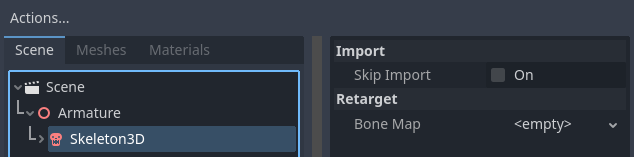
When you select the Skeleton3D node in the advanced scene import menu, a menu will appear
on the right-hand side containing the "Retarget" section. The Retarget section has a single
property bone_map.
With the Skeleton node selected, first set up a new BoneMap and SkeletonProfile. Godot has a preset called SkeletonProfileHumanoid for humanoid models. This tutorial proceeds with the assumption that you are using SkeletonProfileHumanoid.
Nota
If you need a profile that is different from SkeletonProfileHumanoid, you can export a SkeletonProfile from the editor by selecting a Skeleton3D and using the Skeleton3D menu in the 3D viewport's toolbar.
When you use SkeletonProfileHumanoid, auto-mapping will be performed when the SkeletonProfile is set. If the auto-mapping does not work well, you can map bones manually.
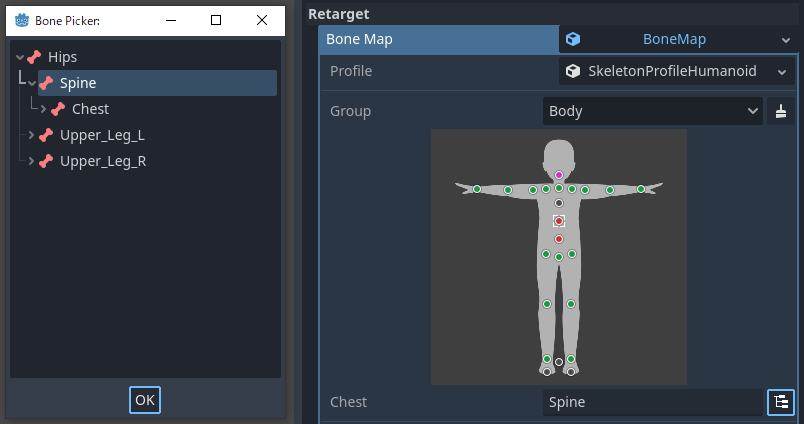
Any missing, duplicate or incorrect parent-child relationship mappings will be indicated by a magenta / red button (depending on the editor setting). It does not block the import process, but it warns that animations may not be shared correctly.
Nota
The auto-mapping uses pattern matching for the bone names. So we recommend to use common English names for bones.
After you set up the bone_map, several options are available in the sections below.
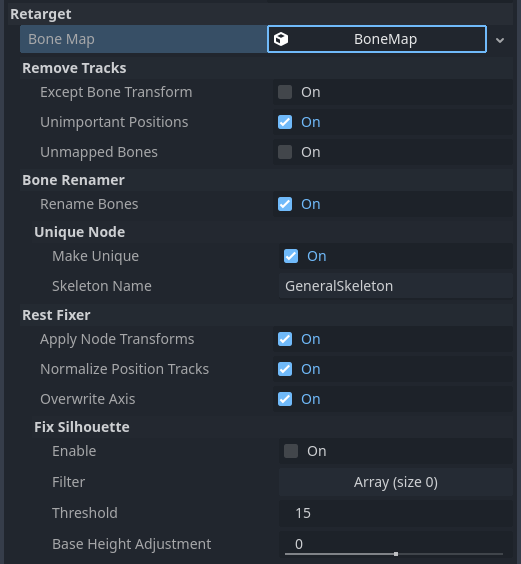
Rimuovi tracce
If you import resources as an AnimationLibrary that will be shared, we recommend to enable these options. However, if you import resources as scenes, these should be disabled in some cases. For example, if you import a character with animated accessories, these options may cause the accessories to not animate.
Tranne trasformazione d'ossa
Removes any tracks except the bone Transform track from the animations.
Posizioni non importanti
Removes Position tracks other than root_bone and scale_base_bone
defined in SkeletonProfile from the animations. In SkeletonProfileHumanoid,
this means that to remove Position tracks other than "Root" and "Hips".
Since Godot 4, animations include Bone Rest in the Transform value. If you disable this option,
the animation may change the body shape unpredictably.
Unmapped Bones
Removes unmapped bone Transform tracks from the animations.
Rinominatore di ossa
Rinomina ossa
Rename the mapped bones.
Nodo univoco
Makes Skeleton a unique node with the name specified in the skeleton_name.
This allows the animation track paths to be unified independent of the scene hierarchy.
Rest Fixer
Le pose di riferimento definite in SkeletonProfileHumanoid hanno le seguenti regole:
L'umanoide è in T-pose
L'umanoide è rivolto verso +Z nel sistema di coordinate Y-su destrorso
L'umanoide non dovrebbe avere una trasformazione, come Node
Dirige l'asse +Y dall'articolazione padre all'articolazione figlia
La rotazione +X piega l'articolazione come un muscolo che si contrae
Queste regole sono definizioni pratiche per la fusione di animazioni e la cinematica inversa (IK). Se il modello non corrisponde a questa definizione, è necessario correggerlo con queste opzioni.
Applica trasformazione del nodo
If the asset is not exported correctly for sharing, the imported Skeleton may have a Transform as a Node. For example, a glTF exported from Blender with no "Apply Transform" executed is one such case. It looks like the model matches the definition, but the internal Transforms are different from the definition. This option fixes such models by applying Transforms on import.
Nota
If the imported scene contains objects other than Skeletons, this option may have a negative effect.
Normalizza le tracce di posizione
Position track is used mostly for model movement, but sharing the moving animation
between models with different heights may cause the appearance of slipping
due to the difference in stride length. This option normalizes the Position track values
based on the scale_base_bone height. The scale_base_bone height is stored
in the Skeleton as the motion_scale, and the normalized Position track values is
multiplied by that value on playback. If this option is disabled, the Position tracks
is not normalized and the Skeleton's motion_scale is always imported as 1.0.
With SkeletonProfileHumanoid, scale_base_bone is "Hips", therefore the Hips' height is used as the motion_scale.
Overwrite Axis
Unifies the models' Bone Rests by overwriting it to match the reference poses defined in the SkeletonProfile.
Nota
This is the most important option for sharing animations in Godot 4, but be aware that this option can produce horrible results if the original Bone Rest set externally is important. If you want to share animations with keeping the original Bone Rest, consider to use the Realtime Retarget Module.
Fix Silhouette
Tenta di far corrispondere la silhouette del modello a quella delle pose di riferimento definite nello SkeletonProfile, come ad esempio la posa a T. Questo metodo non è in grado di correggere silhouette troppo diverse e potrebbe non funzionare per correggere il rollio delle ossa.
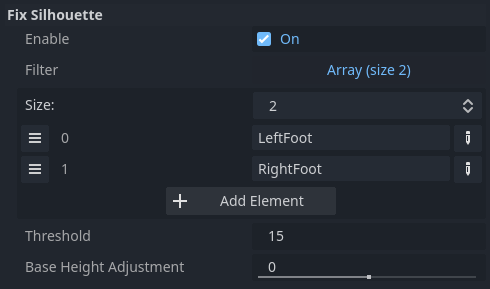
With SkeletonProfileHumanoid, this option does not need to be enabled for T-pose models,
but should be enabled for A-pose models. However in that case, the fixed foot results
may be bad depending on the heel height of the model, so it may be necessary to add
the SkeletonProfile bone names you do not want fixed in the filter array, as in the below example.
Inoltre, per i modelli con ginocchia o piedi piegati, potrebbe essere necessario regolare l'altezza di scale_base_bone. A tale scopo, è possibile usare l'opzione base_height_adjustment.