Attention: Here be dragons
This is the latest
(unstable) version of this documentation, which may document features
not available in or compatible with released stable versions of Godot.
Checking the stable version of the documentation...
Modelli di rendering OpenXR
A cornerstone of OpenXR's API design is being as platform agnostic as possible. A great example of this is OpenXR's action map system where XR runtimes have to support core interaction profiles to fall back on, if no interaction profile exists for the hardware being used. This ensures that OpenXR applications keep functioning even when used on hardware that didn't exist when the application was released, or that the developers of the application did not have access too.
A consequence of this is that the application developer doesn't know with any certainty what hardware is being used, as the XR runtime could be mimicking other hardware. The application developer thus can't show anything in relation to the actual hardware used, the most common use case being showing the controllers the user is currently holding.
Showing the correct controller models and having these models correctly positioned is important to a proper sense of immersion.
This is where OpenXR's render models API comes in. This API allows us to query the XR runtime for 3D assets that are correct for the physical hardware being used. The API also allows us to query the position of this hardware within the tracking volume and the correct positioning of subcomponents of this hardware.
For instance, we can correctly position and animate the trigger or show buttons being pressed.
Per quei runtime che supportano la sorgente dati del controller per il tracciamento delle mani, possiamo anche posizionare correttamente le dita e la mano dell'utente in base alla forma del controller. Si noti che questo funziona in combinazione con l'estensione della portata di movimento delle articolazioni delle mani per evitare il clipping delle dita.
Nodo di modelli di rendering OpenXR
The OpenXRRenderModelManager node can be used to automate most of the render models functionality. This node keeps track of the active render models currently made available by the XR runtime.
It will create child nodes for each active render model resulting in that render model being displayed.
Questo nodo deve avere un nodo XROrigin3D come antenato.
If tracker is set to Any our node will show all render models
currently being tracked. In this scenario this node must be a direct
child of our XROrigin3D node.
If tracker is set to None set our node will only show render
models for which no tracker has been identified. In this scenario this
node must also be a direct child of our
XROrigin3D node.
If tracker is set to Left Hand or Right Hand our node will
only show render models related to our left or right hand respectively.
In this scenario, our node can be placed deeper in the scene tree.
Avvertimento
For most XR runtimes this means the render model represents a controller that is actually being held by the user but this is not a guarantee. Some XR runtimes will always set the tracker to either the left or right hand even if the controller is not currently held but is being tracked. You should always test this as this will lead to unwanted behavior.
In this scenario we can also specify an action for a pose in the action map
by setting the make_local_to_pose property to the pose action.
Use this in combination with an XRController3D
node that is using the same pose and you can now add a layer that allows
you to deviate from the tracked position of both your controller and the
related render model (see example below).
Nota
Combining the above with hand tracking does introduce the problem that hand tracking is completely independent from the action map system. You will need to combine the hand tracking and controller tracking poses to properly offset the render models.
Ciò va oltre lo scopo di questa documentazione.
Render model manager example
Puoi scaricare la nostra demo dei modelli di rendering che implementa la configurazione descritta di seguito.
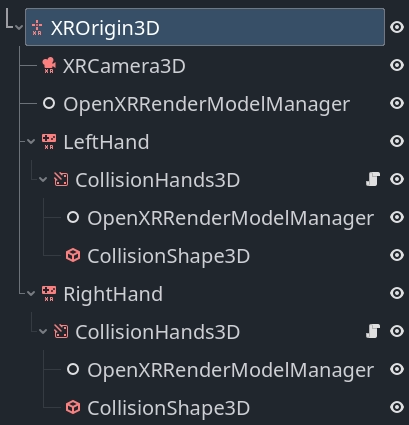
In this setup we find an OpenXRRenderModelManager
node directly underneath our XROrigin3D node.
On this node our target property is set to None set and will handle
showing all render models that are currently not related to our left or
right hand controllers.
We then see the same setup for our left and right hand so we'll focus on just the left hand.
Abbiamo un XRController3D che traccerà la posizione della nostra mano.
Nota
We are using the grip pose in this example. The palm pose is
arguably more suitable and predictable however it is not supported
by all XR runtimes. See the hand tracking demo project for a
solution to switching between these poses based on what is supported.
As a child of the node we have an AnimatableBody3D node that follows the tracked location of the hand but will interact with physics objects to stop the player's hand from going through walls etc. This node has a collision shape that encapsulates the hand.
Nota
It is important to set the physics priority so that this logic runs after any physics logic that moves the XROrigin3D node or the hand will lag a frame behind.
The script below shows a basic implementation for this that you can build upon.
class_name CollisionHands3D
extends AnimatableBody3D

func _ready():
    # Make sure these are set correctly.
    top_level = true
    sync_to_physics = false
    process_physics_priority = -90

func _physics_process(_delta):
    # Follow our parent node around.
    var dest_transform = get_parent().global_transform

    # We just apply rotation for this example.
    global_basis = dest_transform.basis

    # Attempt to move to where our tracked hand is.
    move_and_collide(dest_transform.origin - global_position)
Infine, vediamo un altro nodo OpenXRRenderModelManager, questo con target impostato sulla mano appropriata e make_local_to_pose impostato sulla posa corretta. Ciò garantirà che i modelli di rendering relativi a questa mano siano visualizzati e spostati correttamente se il nostro gestore di collisioni ha alterato la posizione.
Nodo di modello di rendering
Il nodo OpenXRRenderModel implementa tutta la logica per visualizzare e posizionare un determinato modello di rendering fornito dall'API dei modelli di rendering.
Le istanze di questo nodo vengono aggiunte dal nodo di gestione del modello di rendering che abbiamo utilizzato prima, ma è possibile interagire con esse direttamente, se vuoi.
Ogni volta che Godot ottiene informazioni su un nuovo modello di rendering, viene creato un RID per fare riferimento a tale modello.
Assegnando tale RID alla proprietà render_model su questo nodo, il nodo inizierà a visualizzare il modello di rendering e gestirà sia la trasformazione che posiziona il modello di rendering nel posto corretto, sia l'animazione di tutti i sotto-oggetti.
La funzione get_top_level_path restituirà il percorso di livello superiore associato a questo modello di rendering. Punterà alla mano sinistra o destra. Poiché il percorso di livello superiore può essere impostato o cancellato a seconda che l'utente prenda in mano, o appoggi, il controller, è possibile connettersi al segnale render_model_top_level_path_changes e reagire a questi cambiamenti.
A seconda della configurazione dei nodi OpenXRRenderModelManager, i modelli di rendering verranno rimossi o aggiunti quando cambia il loro percorso di livello superiore.
Accesso al backend
I nodi che abbiamo descritto prima gestiscono tutta la logica di visualizzazione, ma è possibile interagire direttamente con i dati che la controllano e creare una propria implementazione.
A tale scopo è possibile accedere al singleton OpenXRRenderModelExtension.
Questo oggetto consente inoltre di verificare se i modelli di rendering sono supportati e abilitati sul dispositivo attualmente in uso, chiamando la funzione is_active su questo oggetto.
La logica integrata implementa l'API interaction render model che elenca tutti i modelli di rendering relativi ai controller e dispositivi simili presenti nella mappa di azioni. Creerà e rimuoverà automaticamente le entità dei modelli di rendering esposte tramite questa API.
Man mano che saranno disponibili altre estensioni, queste si potranno implementare in un'estensione GDExtension. Tale estensione potrà richiamare le funzioni render_model_create e render_model_destroy per creare l'oggetto che consentirà l'accesso al proprio modello di rendering tramite l'API principale dei modelli di rendering.
Non dovresti distruggere un modello di rendering fuori da questa logica.
È possibile connettersi ai segnali render_model_added e render_model_removed per sapere quando vengono aggiunti o rimossi nuovi modelli di rendering.
Sono elencati i metodi principali per lavorare con questa API di seguito:
Funzione |
Descrizione |
|---|---|
render_model_get_all |
Fornisce un'array di RID per tutti i modelli di rendering tracciati. |
render_model_new_scene_instance |
Fornisce una nuova scena che contiene tutte le mesh necessarie per visualizzare il modello di rendering. |
render_model_get_subaction_paths |
Provides a list of subaction paths from your action map related to this render mode. |
render_model_get_top_level_path |
Restituisce il percorso di livello superiore associato a questo modello di rendering (se presente). Utilizzare il segnale |
render_model_get_confidence |
Restituisce la confidenza di tracciamento per i dati di tracciamento per questo modello di rendering. |
render_model_get_root_transform |
Returns the root transform for this render model within our current reference space. This can be used to place the render model in space. |
render_model_get_animatable_node_count |
Restituisce il numero di nodi nella scena del nostro modello di rendering che sono animabili |
render_model_get_animatable_node_name |
Restituisce il nome del nodo che possiamo animare. Nota che questo nodo può trovarsi a qualsiasi livello di profondità nella scena. |
render_model_is_animatable_node_visible |
Restituisce true se questo nodo animabile deve essere visibile |
render_model_get_animatable_node_transform |
Restituisce la trasformazione per questo nodo animabile. Questa è una trasformazione locale che si può applicare direttamente. |