Attention: Here be dragons
This is the latest
(unstable) version of this documentation, which may document features
not available in or compatible with released stable versions of Godot.
Checking the stable version of the documentation...
Аудіо ефекти
Godot includes several audio effects that can be added to an audio bus to alter every sound that goes through that bus.
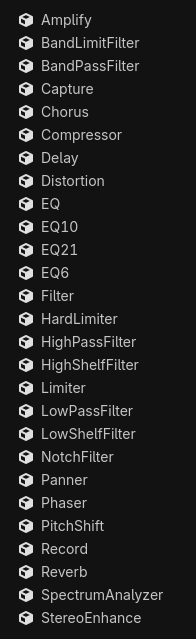
Understanding how each effect works can be difficult, so don't feel discouraged if you have to look things up! If you are new to audio, an understanding of the essential effects can help you in most cases! Those are:
Equalizer & Filter
Обмежувач
Delay & Reverb
Try every effect out to get a sense of how they alter sound.
Примітка
AudioSample does not support these effects.
Here follows short descriptions of the available effects:
Підсилення сигналу
Changes the volume of the sound. Some care needs to be taken, though: setting the volume level too high can digitally clip the sound, which can produce unpleasant crackles and pops. Consider using a hard limiter or a compressor to prevent clipping, or distortion on clip mode if clipping at or below 0 dB is desired.
BandLimitFilter
A "band-limit" filter attenuates the frequencies at the cutoff point, and allows frequencies outside of that point to pass unchanged. It is similar to the notch filter, but weaker. It is the opposite of the band-pass filter. This filter can be used to give more room for other sounds to play at the cutoff point.
BandPassFilter
A "band-pass" filter allow frequencies at the cutoff point to pass unchanged, and attenuates frequencies outside of that point. It is the opposite of the band-limit filter and notch filter. This filter can be used to simulate sounds passing through an old telephone line or megaphone. Modulating the cutoff point can simulate the sound of a wah-wah guitar pedal, think of the guitar in Jimi Hendrix's Voodoo Child (Slight Return).
Захоплення
Copies the audio samples of the audio bus that this effect is attached to into an internal ring buffer. This can be used to capture data from the microphone or to transmit audio over the network in real-time. In general, it can be used to store real-time audio data for playback, and even to create real-time audio visualization, like an oscilloscope. This effect does not alter the audio.
Хорова
A "chorus" effect duplicates a signal and very slightly alters the timing and pitch of each duplicate, and modulates them over time via an LFO (low-frequency oscillator). The duplicates (also called "voices") are then mixed back together with the original signal, giving the impression that the sound comes from multiple sources. In the real world, this kind of effect is found in pianos, choirs, and instrument ensembles. This effect can also be used to widen mono audio and make digital sounds have a more natural or analog quality.
Компресор
A "compressor" automatically attenuates (or "ducks") the volume of the input signal when its amplitude exceeds a certain volume threshold. The amount of attenuation applied is proportional to how far the input audio exceeds the threshold. The compressor's Ratio parameter controls the degree of attenuation. One of the main uses of a compressor is to reduce the dynamic range of signals with very loud and quiet parts. Reducing the dynamic range of a signal can make it fit more comfortably in a mix.
Компресор має багато застосувань. Наприклад:
It can be used in the Master bus to compress the whole output before it hits a limiter's ceiling, which makes the effect of the limiter much more subtle.
It can be used in voice clips to ensure they sound as even as possible.
It can be sidechained by another sound source. This means it can reduce the volume of one signal by using the volume of another audio bus for threshold detection. This technique is very common in video game mixing to "duck" the volume of music or sound effects when in-game or multiplayer voices need to be fully audible.
It can accentuate transients by using a slower attack, which lets louder parts go through before they are compressed. This can emphasize the "punchiness" of sound effects.
Примітка
If your goal is solely to prevent a signal from exceeding a given amplitude altogether, a hard limiter is likely a better choice than a compressor for this purpose. However, applying compression before a limiter is still good practice.
Затримка
A "delay" effect duplicates a signal and repeats it multiple times, with a short period of time between each repetition (also called "tap"). Taps decay in volume over time. All of this creates an echo effect. Delay is great to simulate the acoustic space of a canyon or large room, where sound bounces off of surfaces and arrives at the listener after some delay. This is similar to reverb, which has a more natural and blurred sound to it. Using delay in conjunction with reverb can create very natural sounding environments.
Викривлення
A "distortion" effect modifies the volume of the sound in a way that changes its waveform, which can result in a "harsh" and "bright" sound.
Here are some of the distortion types that Godot offers:
Clip: clamps the volume of the sound, which makes it sound harsh.
Overdrive: sounds like a guitar distortion pedal or megaphone.
Lo-fi: reduces the bit depth of the signal, emulating old speakers.
All types of distortion can add higher frequencies to the original sound, which helps it stand out better in a mix.
Попередження
Be careful with the amount of distortion added, as it can create very harsh and loud sounds.
EQ
An "equalizer" gives you control over the gain of frequencies in the entire spectrum, through the use of "bands" which represent different regions of the spectrum. Equalizers can be essential to achieve a cleaner mix, allowing multiple sounds to play together without frequencies competing with each other. An equalizer on the Master bus can be useful to attenuate low and high frequencies that the device's speakers can't reproduce well. For example, phone and tablet speakers usually don't reproduce low frequency sounds well, and could make a limiter or compressor attenuate the Master volume more than necessary. This effect can be disabled when headphones are plugged in, which gives the user the best of both worlds.
Примітка
This audio effect is what all other equalizers inherit from. It can be extended with custom scripts to create an equalizer with a custom number of bands.
EQ6, EQ10, EQ21
Godot provides three equalizers with different numbers of bands, which are represented in the title (6, 10, and 21 bands, respectively).
Фільтр
A "filter" controls the gain of frequencies, through the use of a cutoff as a frequency threshold. It differs from an equalizer in that it uses different "shapes" to control frequencies; meaning frequencies will have their gain adjusted whether they are lower, higher, at, or outside the cutoff point, depending on the filter type. Filters can help give room to each sound and create interesting effects.
Примітка
This audio effect is what all other filters inherit from. It should not be used directly.
Жорсткий обмежувач
A "limiter" disallows audio signals from exceeding a given volume threshold level. Hard limiters predict volume peaks, and will smoothly apply gain reduction when the volume crosses the ceiling threshold level. It works similarly to a compressor, but is designed to not let the volume cross a certain volume level at all. Adding a limiter as the last effect of the Master bus is good practice, as it offers an easy safeguard against clipping. If clipping is desired, consider using the distortion effect on clip mode.
Фільтр високих частот
A "high-pass" filter attenuates frequencies lower than the cutoff point and allows higher frequencies to pass unchanged. This filter can be used to remove the bass content of a signal, making it sound "thinner".
Фільтр Hig hShelf
A "high-shelf" filter controls the gain of all frequencies above the cutoff point. This filter can be used to increase or decrease clarity of a sound.
Обмежувач
Примітка
This is the old limiter effect, and it is recommended to use the new hard limiter effect instead. This effect is kept to preserve compatibility, however it should be considered deprecated.
Here is an example of how this effect works: if the ceiling is set to -12 dB, and the threshold is 0 dB, all samples going through get reduced by 12 dB. This changes the waveform of the sound and introduces distortion.
Фільтр низьких частот
A "low-pass" filter attenuates frequencies higher than the cutoff point and allows lower frequencies to pass unchanged. Low pass filters can be used to simulate "muffled" sounds. For instance, underwater sounds, sounds blocked by walls, or distant sounds.
Фільтр низької полиці
A "low-shelf" filter controls the gain of all frequencies below the cutoff point. This filter can be used to adjust the "strength" of a sound, by increasing or decreasing the gain of the bass range.
Notch фільтр
A "notch" filter attenuates the frequencies at the cutoff point, and allows frequencies outside of that point to pass unchanged. It is the opposite of the band-pass filter. This filter can be used to give more room for other sounds to play at the cutoff point. Because of how much it attenuates frequencies, it can also be used to completely remove very specific and undesired frequencies.
Каструлі
Moves the sound to the left or right. Headphones are recommended when configuring this effect.
Примітка
This effect may not be necessary with AudioStreamPlayer2D and AudioStreamPlayer3D, since they handle panning automatically.
Фазер
A "phaser" effect creates a copy that is out-of-phase and mixes back together with the original. The copy is then modulated by an LFO (low-frequency oscillator), which makes some frequencies cancel each other out in interesting ways. The result of that is a series of peaks and troughs that sweep across the spectrum. This effect can be used to create sci-fi effects or Darth Vader-like voices.
PitchShift (Зсув висоти тону)
Allows the adjustment of the signal's pitch independently of its speed. All frequencies can be raised or lowered with minimal effect on transients. This effect can be useful to create unusually high or deep voices. Do note that altering pitch can sound unnatural when pushed outside of a narrow window.
Запис
Stores audio data into an AudioStreamWAV. One usage example of this effect is to record microphone input and save as a WAV file.
Відлуння
A "reverb" effect plays a copy of the input audio back continuously, which decays over a period of time, and creates a blurry echo effect (or "reverberation"). Reverb is great to simulate sounds in different kinds of spaces, which can range from small rooms to big caverns. This is similar to delay, which has a less blurry sound to it. Using reverb in conjunction with delay can create very natural sounding environments.
Reverb is commonly outputted from Area3Ds (see Reverb buses).
СпектроАналізатор
Plots the amplitude of the audio signal within specified frequency ranges. This would typically be used for real-time audio visualization, like a spectrogram. Visualizing voices can be a great way to draw attention to them without increasing their volume. This effect does not alter audio.
Примітка
Accessing AudioEffectSpectrumAnalyzerInstance is necessary to make use of this effect. A demo project using this can be found here.
Покращення стерео
Adjusts the gain of the left and right channels, and makes mono sounds stereo through phase shift. This can be used to widen or narrow a sound. Headphones are recommended when configuring this effect.