Attention: Here be dragons
This is the latest
(unstable) version of this documentation, which may document features
not available in or compatible with released stable versions of Godot.
Checking the stable version of the documentation...
Estensioni dell'Ispettore
Il pannello dell'ispettore consente di creare widget personalizzati per modificare le proprietà tramite estensioni. Ciò può essere utile quando si lavora con tipi di dati e risorse personalizzati, sebbene sia possibile utilizzare la funzionalità per modificare i widget per i tipi predefiniti. È possibile progettare controlli personalizzati per proprietà specifiche, interi oggetti e addirittura controlli separati associati a tipi specifici di dati.
Questa guida spiega come utilizzare le classi EditorInspectorPlugin e EditorProperty per creare un'interfaccia personalizzata per i numeri interi, sostituendo il comportamento predefinito con un pulsante che genera valori casuali compresi tra 0 e 99.
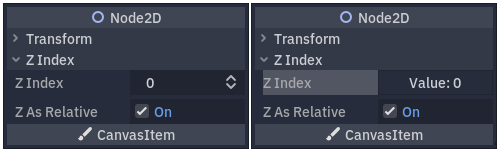
Il comportamento predefinito a sinistra e il risultato finale a destra.
Configurazione della propria estensione
Creare un nuovo plugin vuoto per cominciare.
Vedi anche
Consultare la guida Creare estenzioni per configurare la propria nuova estensione.
Supponiamo che il nome della cartella delle proprie estensioni sia my_inspector_plugin. In tal caso, si dovrebbe creare una nuova cartella addons/my_inspector_plugin che contiene due file: plugin.cfg e plugin.gd.
Come in precedenza, plugin.gd è uno script che estende EditorPlugin ed è necessario introdurre nuovo codice per i suoi metodi _enter_tree e _exit_tree. Per configurare l'estensione dell'ispettore, è necessario caricare il suo script, quindi creare e aggiungere l'istanza chiamando add_inspector_plugin(). Se l'estensione è disabilitata, è necessario rimuovere l'istanza aggiunta chiamando remove_inspector_plugin().
Nota
Qui, si sta caricando uno script e non una scena compressa. Pertanto, si consiglia di usare new() invece di instantiate().
# plugin.gd
@tool
extends EditorPlugin

var plugin


func _enter_tree():
    plugin = preload("res://addons/my_inspector_plugin/my_inspector_plugin.gd").new()
    add_inspector_plugin(plugin)


func _exit_tree():
    remove_inspector_plugin(plugin)
// Plugin.cs
#if TOOLS
using Godot;

[Tool]
public partial class Plugin : EditorPlugin
{
    private MyInspectorPlugin _plugin;

    public override void _EnterTree()
    {
        _plugin = new MyInspectorPlugin();
        AddInspectorPlugin(_plugin);
    }

    public override void _ExitTree()
    {
        RemoveInspectorPlugin(_plugin);
    }
}
#endif
Interagire con l'ispettore
Per interagire con il pannello dell'ispettore, lo script my_inspector_plugin.gd deve estendere la classe EditorInspectorPlugin. Questa classe fornisce diversi metodi virtuali che influenzano il modo in cui l'ispettore gestisce le proprietà.
Per avere effetto, lo script deve implementare il metodo _can_handle(). Questa funzione viene chiamata per ogni Object modificato e deve restituire true se questa estensione deve gestire l'oggetto o le sue proprietà.
Nota
Ciò include qualsiasi Resource associata all'oggetto.
È possibile implementare altri quattro metodi per aggiungere controlli all'ispettore in posizioni specifiche. I metodi _parse_begin() e _parse_end() vengono chiamati una sola volta, rispettivamente all'inizio e alla fine dell'analisi di ciascun oggetto. Possono aggiungere controlli in cima o in fondo al layout dell'ispettore chiamando add_custom_control().
Mentre l'editor analizza l'oggetto, richiama i metodi _parse_category() e _parse_property(). Oltre a add_custom_control(), è possibile richiamare anche add_property_editor() e add_property_editor_for_multiple_properties(). Questi ultimi due metodi si utilizzano per aggiungere specificamente controlli basati su EditorProperty.
# my_inspector_plugin.gd
extends EditorInspectorPlugin

var RandomIntEditor = preload("res://addons/my_inspector_plugin/random_int_editor.gd")


func _can_handle(object):
    # We support all objects in this example.
    return true


func _parse_property(object, type, name, hint_type, hint_string, usage_flags, wide):
    # We handle properties of type integer.
    if type == TYPE_INT:
        # Create an instance of the custom property editor and register
        # it to a specific property path.
        add_property_editor(name, RandomIntEditor.new())
        # Inform the editor to remove the default property editor for
        # this property type.
        return true
    else:
        return false
// MyInspectorPlugin.cs
#if TOOLS
using Godot;

public partial class MyInspectorPlugin : EditorInspectorPlugin
{
    public override bool _CanHandle(GodotObject @object)
    {
        // We support all objects in this example.
        return true;
    }

    public override bool _ParseProperty(GodotObject @object, Variant.Type type,
        string name, PropertyHint hintType, string hintString,
        PropertyUsageFlags usageFlags, bool wide)
    {
        // We handle properties of type integer.
        if (type == Variant.Type.Int)
        {
            // Create an instance of the custom property editor and register
            // it to a specific property path.
            AddPropertyEditor(name, new RandomIntEditor());
            // Inform the editor to remove the default property editor for
            // this property type.
            return true;
        }

        return false;
    }
}
#endif
Aggiungere un interfaccia per modifiche le proprietà
La classe EditorProperty è un tipo speciale di Control che può interagire con gli oggetti in fase di modifica nel pannello Ispettore. Non visualizza nulla, ma può ospitare qualsiasi altro nodo di controllo, incluse scene complesse.
Ci sono tre parti essenziali nello script che estende EditorProperty:
È necessario definire il metodo
_init()per impostare la struttura dei nodi di controllo.Si dovrebbe implementare
_update_property()per gestire le modifiche ai dati provenienti da fuori.A un certo punto si deve emettere un segnale per informare l'ispettore che il controllo ha modificato la proprietà utilizzando
emit_changed.
È possibile visualizzare il widget personalizzato in due modi. Usare solo il metodo predefinito add_child() per visualizzarlo a destra del nome della proprietà e usare add_child() seguito da set_bottom_editor() per posizionarlo sotto il nome.
# random_int_editor.gd
extends EditorProperty


# The main control for editing the property.
var property_control = Button.new()
# An internal value of the property.
var current_value = 0
# A guard against internal changes when the property is updated.
var updating = false


func _init():
    # Add the control as a direct child of EditorProperty node.
    add_child(property_control)
    # Make sure the control is able to retain the focus.
    add_focusable(property_control)
    # Setup the initial state and connect to the signal to track changes.
    refresh_control_text()
    property_control.pressed.connect(_on_button_pressed)


func _on_button_pressed():
    # Ignore the signal if the property is currently being updated.
    if (updating):
        return

    # Generate a new random integer between 0 and 99.
    current_value = randi() % 100
    refresh_control_text()
    emit_changed(get_edited_property(), current_value)


func _update_property():
    # Read the current value from the property.
    var new_value = get_edited_object()[get_edited_property()]
    if (new_value == current_value):
        return

    # Update the control with the new value.
    updating = true
    current_value = new_value
    refresh_control_text()
    updating = false

func refresh_control_text():
    property_control.text = "Value: " + str(current_value)
// RandomIntEditor.cs
#if TOOLS
using Godot;

public partial class RandomIntEditor : EditorProperty
{
    // The main control for editing the property.
    private Button _propertyControl = new Button();
    // An internal value of the property.
    private int _currentValue = 0;
    // A guard against internal changes when the property is updated.
    private bool _updating = false;

    public RandomIntEditor()
    {
        // Add the control as a direct child of EditorProperty node.
        AddChild(_propertyControl);
        // Make sure the control is able to retain the focus.
        AddFocusable(_propertyControl);
        // Setup the initial state and connect to the signal to track changes.
        RefreshControlText();
        _propertyControl.Pressed += OnButtonPressed;
    }

    private void OnButtonPressed()
    {
        // Ignore the signal if the property is currently being updated.
        if (_updating)
        {
            return;
        }

        // Generate a new random integer between 0 and 99.
        _currentValue = (int)GD.Randi() % 100;
        RefreshControlText();
        EmitChanged(GetEditedProperty(), _currentValue);
    }

    public override void _UpdateProperty()
    {
        // Read the current value from the property.
        var newValue = (int)GetEditedObject().Get(GetEditedProperty());
        if (newValue == _currentValue)
        {
            return;
        }

        // Update the control with the new value.
        _updating = true;
        _currentValue = newValue;
        RefreshControlText();
        _updating = false;
    }

    private void RefreshControlText()
    {
        _propertyControl.Text = $"Value: {_currentValue}";
    }
}
#endif
Utilizzando il codice di esempio precedente dovrebbe essere possibile creare un widget personalizzato che sostituisce il controllo SpinBox predefinito per gli interi, con un Button che genera valori casuali.