Attention: Here be dragons
This is the latest
(unstable) version of this documentation, which may document features
not available in or compatible with released stable versions of Godot.
Checking the stable version of the documentation...
Reindirizzare gli scheletri 3D
Opzioni per il reindirizzamento
Mappa d'ossa
Selezionando il nodo Skeleton3D nel menu avanzato di importazione della scena, sul lato destro apparirà un menu contenente la sezione "Retarget". La sezione Retarget ha una singola proprietà chiamata bone_map.
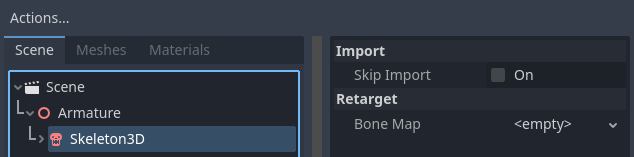
Dopo aver selezionato il nodo Skeleton, configura innanzitutto un nuovo BoneMap e un SkeletonProfile. Godot include una predisposizione chiamata SkeletonProfileHumanoid per i modelli umanoidi. Questo tutorial presuppone che stia utilizzando SkeletonProfileHumanoid.
Nota
Se hai bisogno di un profilo diverso da SkeletonProfileHumanoid, puoi esportare un SkeletonProfile dall'editor selezionando uno Skeleton3D e utilizzando il menu Skeleton3D nella barra degli strumenti della viewport 3D.
Utilizzando SkeletonProfileHumanoid, una mappatura automatica verrà effettuata quando SkeletonProfile è impostato. Se la mappatura automatica non funziona correttamente, le ossa si possono mappare manualmente.
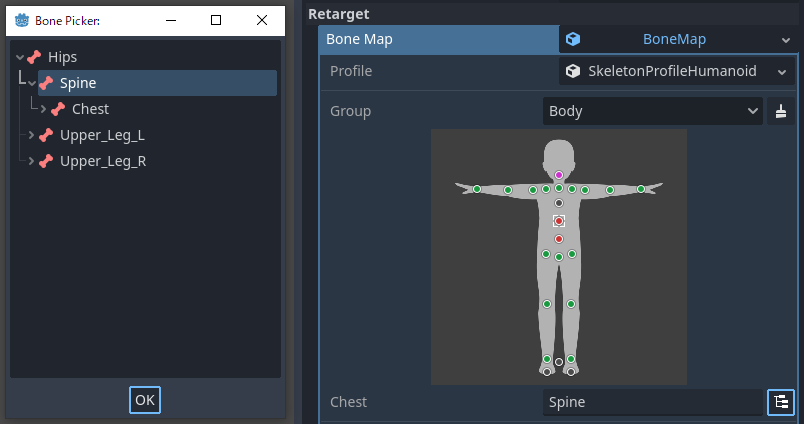
Eventuali mappature mancanti di relazioni padre-figlio, duplicate o errate saranno indicate da un pulsante magenta/rosso (a seconda delle impostazioni dell'editor). Ciò non blocca il processo di importazione, ma avverte che le animazioni potrebbero non essere condivise correttamente.
Nota
La mappatura automatica riconosce schemi per i nomi delle ossa. Pertanto, consigliamo di usare nomi comuni in inglese per le ossa.
Dopo aver configurato la bone_map, sono disponibili diverse opzioni nelle sezioni seguenti.
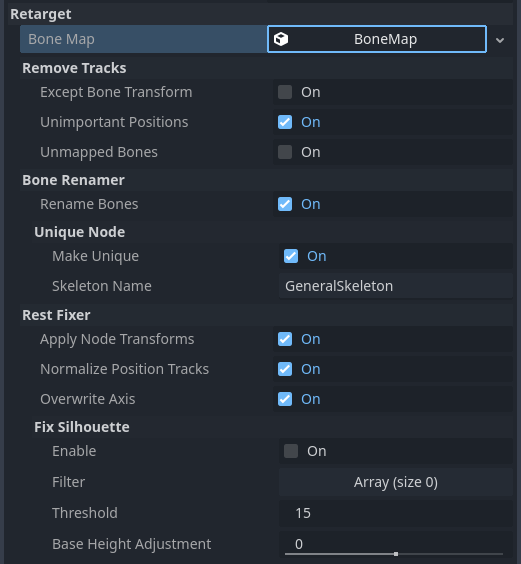
Rimuovi tracce
Se importi risorse come AnimationLibrary che saranno condivise, consigliamo di abilitare queste opzioni. Tuttavia, se importi risorse come scene, queste opzioni si dovrebbero disabilitare in alcuni casi. Ad esempio, se importi un personaggio con accessori animati, queste opzioni potrebbero non far animare gli accessori.
Tranne trasformazione d'ossa
Rimuove tutte le tracce tranne la traccia di trasformazione delle ossa dalle animazioni.
Posizioni non importanti
Rimuove le tracce di posizione diverse da root_bone e scale_base_bone definite in SkeletonProfile dalle animazioni. In SkeletonProfileHumanoid, ciò significa rimuovere le tracce di posizione diverse da "Root" e "Hips". A partire da Godot 4, le animazioni includono Bone Rest nel valore Transform. Se si disabilita questa opzione, l'animazione potrebbe modificare la forma del corpo in modo imprevedibile.
Ossa non mappate
Rimuove le tracce di trasformazione delle ossa non mappate dalle animazioni.
Rinominatore di ossa
Rinomina ossa
Rinomina le ossa mappate.
Nodo univoco
Rende lo scheletro un nodo univoco con il nome specificato in skeleton_name. Ciò consente di unificare i percorsi delle tracce di animazione indipendentemente dalla gerarchia della scena.
Rest Fixer
Le pose di riferimento definite in SkeletonProfileHumanoid hanno le seguenti regole:
L'umanoide è in T-pose
L'umanoide è rivolto verso +Z nel sistema di coordinate Y-su destrorso
L'umanoide non dovrebbe avere una trasformazione, come Node
Dirige l'asse +Y dall'articolazione padre all'articolazione figlia
La rotazione +X piega l'articolazione come un muscolo che si contrae
Queste regole sono definizioni pratiche per la fusione di animazioni e la cinematica inversa (IK). Se il modello non corrisponde a questa definizione, è necessario correggerlo con queste opzioni.
Applica trasformazione del nodo
Se la risorsa non viene esportata correttamente per essere condivisa, lo scheletro importato potrebbe avere una trasformazione come nodo. Ad esempio, un file glTF esportato da Blender senza l'opzione "Apply Transform" è un caso tipico. Il modello sembra corrispondere alla definizione, ma le trasformazioni interne sono diverse dalla definizione. Questa opzione corregge tali modelli applicando le trasformazioni durante l'importazione.
Nota
Se la scena importata contiene oggetti diversi dagli scheletri, questa opzione potrebbe avere un effetto negativo.
Normalizza le tracce di posizione
La traccia di posizione serve principalmente per il movimento del modello, ma condividere l'animazione di movimento tra modelli con altezze diverse può far apparire uno slittamento, dovuto alla differenza nella lunghezza del passo. Questa opzione normalizza i valori della traccia di posizione in base all'altezza di scale_base_bone. L'altezza di scale_base_bone è memorizzata nello scheletro come motion_scale e i valori normalizzati della traccia di posizione sono moltiplicati per tale valore durante la riproduzione. Se questa opzione è disabilitata, la traccia di posizione non è normalizzata e il valore di motion_scale dello scheletro è sempre importato come 1.0.
Con SkeletonProfileHumanoid, scale_base_bone è "Hips", quindi l'altezza di Hips (i fianchi) è utilizzata come motion_scale.
Sovrascrivi asse
Unifica i riposi delle ossa dei modelli sovrascrivendoli per farli corrispondere alle pose di riferimento definite nel file SkeletonProfile.
Nota
This is the most important option for sharing animations in Godot 4, but be aware that this option can produce horrible results if the original Bone Rest set externally is important. If you want to share animations with keeping the original Bone Rest, consider to use the Realtime Retarget Module.
Correggi silhouette
Tenta di far corrispondere la silhouette del modello a quella delle pose di riferimento definite nello SkeletonProfile, come ad esempio la posa a T. Questo metodo non è in grado di correggere silhouette troppo diverse e potrebbe non funzionare per correggere il rollio delle ossa.
Con SkeletonProfileHumanoid, questa opzione non deve essere abilitata per i modelli in posa a T, ma dovrebbe esserlo per i modelli in posa ad A. Tuttavia, in tal caso, i risultati corregendo i piedi potrebbero essere imprecisi a seconda dell'altezza del tallone del modello, quindi potrebbe essere necessario aggiungere i nomi delle ossa del SkeletonProfile che non si desidera correggere nell'array filter, come nell'esempio seguente.
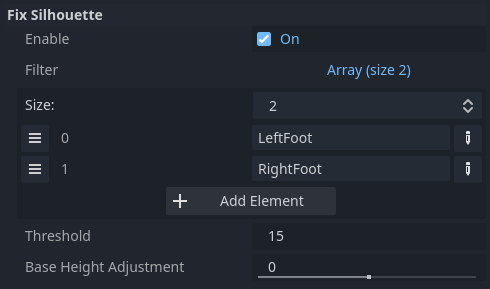
Inoltre, per i modelli con ginocchia o piedi piegati, potrebbe essere necessario regolare l'altezza di scale_base_bone. A tale scopo, è possibile usare l'opzione base_height_adjustment.