Attention: Here be dragons
This is the latest
(unstable) version of this documentation, which may document features
not available in or compatible with released stable versions of Godot.
Checking the stable version of the documentation...
Tracciamento delle mani in OpenXR
Introduzione
Nota
Questa pagina si concentra specificamente sulle funzionalità esposte attraverso OpenXR. Alcune delle funzionalità qui presentate si applicano anche a WebXR e possono essere fornite da altre interfacce XR.
Quando si parla di tracciamento delle mani, è importante sapere che ci sono diverse opinioni su dove limitarsi. La conseguenza pratica è che ci sono differenze di implementazione tra i vari runtime OpenXR. Potrebbe capitare che l'hardware scelto non supporti un pezzo del puzzle o che funzioni in modo diverso abbastanza dalle altre piattaforme da richiedere un lavoro in più.
Detto questo, i recenti miglioramenti alla specifica OpenXR stanno colmando queste lacune e, man mano che le piattaforme implementano questi miglioramenti, ci avviciniamo a un futuro in cui avremo una portabilità completa tra le piattaforme o, quantomeno, un modo chiaro per rilevare le capacità di una piattaforma.
Analizzando i primi giorni della realtà virtuale, le principali piattaforme si concentravano sul tracciamento degli input basati su controller. Qui si tracciava un dispositivo fisico dotato di pulsanti per ulteriori input. Dai dati di tracciamento si poteva dedurre la posizione delle mani del giocatore, ma non si avevano altre informazioni. Tradizionalmente, era compito del gioco implementare un meccanismo per visualizzare la mano del giocatore e animare le dita in base agli input provenienti dal controller, che sia tramite la pressione dei pulsanti o tramite sensori di prossimità. Spesso, il posizionamento delle dita dipendeva anche dal contesto, da cosa l'utente stava tenendo in mano e dall'azione che stava eseguendo.
Più recentemente, il tracciamento ottico delle mani è diventato una soluzione popolare, in cui certe telecamere tracciano le mani dell'utente e rendono disponibili dati completi sulla posizione di mani e dita. Molti produttori hanno considerato questa tecnologia completamente separata dal tracciamento del controller e hanno introdotto API indipendenti per accedere ai dati relativi alla posizione e all'orientamento di mani e dita. Nella gestione degli input, spettava allo sviluppatore del gioco implementare un meccanismo per rilevare i gesti.
Questa distinzione esiste anche in OpenXR, dove il tracciamento del controller è gestito principalmente dal sistema di mappa di azioni, mentre il tracciamento ottico delle mani è gestito principalmente dall'estensione API di tracciamento delle mani.
Tuttavia, il mondo non è così bianco o nero e stiamo assistendo a una serie di scenari in cui oltrepassiamo i limiti imposti:
Dispositivi che rientrano in entrambe le categorie, come i guanti tracciati e i controller come l'Index, che tracciano anche le dita.
Runtime XR che implementano il tracciamento delle mani inferito dai dati del controller come mezzo per risolvere il problema del corretto posizionamento delle dita per più controller.
Applicazioni XR che desiderano passare, senza intoppi, tra il tracciamento del controller e quello delle mani, offrendo la stessa esperienza utente a prescindere dall'approccio utilizzato.
OpenXR sta rispondendo a questa esigenza introducendo ulteriori estensioni che ci consentono di interrogare le capacità del runtime/hardware XR o che aggiungono ulteriori funzionalità per superare questa distinzione. Il problema che attualmente rimane è la mancata adozione di queste estensioni, per cui alcune piattaforme non ne segnalano appieno le capacità. Pertanto, potrebbe essere necessario testare le funzionalità disponibili su hardware specifici e adattare adeguatamente il proprio approccio.
Progetto di dimostrazione
Le informazioni presentate in questa pagina sono state utilizzate per creare un progetto di dimostrazione che si trova qui.
L'API di tracciamento delle mani
Come accennato nell'introduzione, l'API di tracciamento delle mani è utilizzata principalmente con il tracciamento ottico e su molte piattaforme funziona solo quando l'utente non sta impugnando un controller. Alcune piattaforme supportano il tracciamento delle mani inferito dal controller, il che significa che si otterranno dati di tracciamento delle mani anche se l'utente sta impugnando un controller. Tra queste sono incluse SteamVR, MetaQuest (attualmente solo nativo, ma è probabile che il supporto per MetaLink arrivi presto) e, si spera, anche altre.
L'implementazione del tracciamento delle mani in Godot è stata standardizzata attorno allo scheletro umanoide di Godot e funziona sia in OpenXR sia in WebXR. Le istruzioni seguenti saranno quindi valide in entrambi gli ambienti.
Per utilizzare l'API di tracciamento delle mani con OpenXR, bisogna prima abilitarla. Lo si può fare nelle impostazioni del progetto:
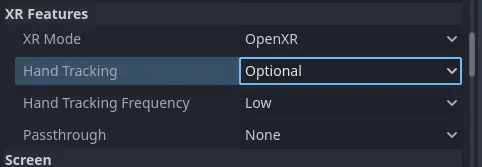
Per alcuni dispositivi XR autonomi bisognerà inoltre configurare l'estensione di tracciamento delle mani nelle impostazioni di esportazione, ad esempio per Meta Quest:

Ora devi aggiungere 3 componenti alla tua scena, uno per ogni mano:
Un nodo tracciato per posizionare la mano.
Una mesh di mano, con una skin adeguatamente applicata e con uno scheletro.
Un modificatore dello scheletro che applica i dati di tracciamento delle dita allo scheletro.

Nodo di tracciamento delle mani
Il sistema di tracciamento delle mani utilizza sensori separati per monitorare la posizione delle mani del giocatore dentro il nostro spazio di tracciamento.
Queste informazioni sono state separate per i seguenti casi d'uso:
Tracking happens in the local space of the XROrigin3D node. This node must be a child of the
XROrigin3Dnode in order to be correctly placed.This node can be used as an IK target when an upper body mesh with arms is used instead of separate hand meshes.
Il posizionamento effettivo delle mani potrebbe essere vagamente associato al tracciamento in scenari come interfacce per la creazione di avatar, specchi fittizi o situazioni simili, portando a localizzare la mesh della mano e il tracciamento delle dita da qualche altra parte.
Ci concentreremo solo sul primo caso d'uso.
Per questo bisogna aggiungere un nodo XRNode3D al nodo XROrigin3D.
Su questo nodo il
trackersi dovrebbe impostare su/user/hand_tracker/lefto/user/hand_tracker/rightrispettivamente per la mano sinistra o destra.
posedovrebbe rimanere impostato sudefault; nessun'altra opzione funzionerà qui.La casella di spunta
Show When Trackednasconderà automaticamente questo nodo se non sono disponibili dati di tracciamento, oppure lo renderà visibile se sono disponibili dati di tracciamento.
Mesh di mano con rig
Per mostrare la nostra mano, abbiamo bisogno di una mesh della mano correttamente animata e con skinning. A tale scopo, Godot usa la struttura ossea delle mani definita per l'oggetto Godot Humanoid, supportando opzionalmente un osso in più sulla punta di ogni dito.
La demo di tracciamento delle mani di OpenXR contiene file glTF di esempio di mani con rigging correttamente applicato.
Li useremo qui e li aggiungeremo come figli al nostro nodo XRNode3D. Dobbiamo anche abilitare "figli modificabili" (editable children) per accedere al nostro nodo Skeleton3D.
Il modificatore di scheletro di mani
Infine, dobbiamo aggiungere un nodo XRHandModifier3D come figlio del nostro nodo Skeleton3D. Questo nodo otterrà i dati di tracciamento delle dita da OpenXR e li applicherà al modello della mano.
Bisogna impostare la proprietà Hand Tracker su /user/hand_tracker/left oppure su /user/hand_tracker/right a seconda che si stiano applicando i dati di tracciamento rispettivamente alla mano sinistra o alla mano destra.
È anche possibile impostare la modalità Bone Update su questo nodo.
Fullapplica interamente i dati di tracciamento della mano. Significa che il posizionamento dello scheletro potrebbe riflettere le dimensioni reali della mano dell'utente. Questo potrebbe portare ad accartocciare le mesh se non sono state progettate per tenerne conto. Assicurati di testare il tuo gioco con giocatori di tutte le taglie quando utilizzi il tracciamento ottico delle mani!
Rotation Onlyapplica solo la rotazione alle ossa delle mani, mantenendo la loro lunghezza invariata. In questa modalità, le dimensioni della mesh della mano non cambiano.
Con questa aggiunta, quando eseguiamo il progetto dovremmo vedere la mano mostrata correttamente se il tracciamento delle mani è supportato.
La sorgente dei dati di tracciamento delle mani
Questa è un'estensione di OpenXR che fornisce informazioni sulla sorgente dei dati di tracciamento delle mani. Al momento solo pochi runtime la implementano, ma se disponibile, Godot la attiverà.
Se questa estensione non è supportata e viene quindi restituito "sconosciuto", è possibile fare le seguenti supposizioni:
Se stai usando SteamVR (incluso Steam Link), è supportato solo il tracciamento delle mani basato sui controller.
Per qualsiasi altro runtime, se è supportato il tracciamento delle mani, è supportato solo il tracciamento ottico delle mani (nota: Meta Link attualmente rientra in questa categoria).
In tutti gli altri casi, il tracciamento delle mani non è supportato.
È possibile accedere a queste informazioni tramite codice:
var hand_tracker : XRHandTracker = XRServer.get_tracker('/user/hand_tracker/left')
if hand_tracker:
    if hand_tracker.has_tracking_data:
        if hand_tracker.hand_tracking_source == XRHandTracker.HAND_TRACKING_SOURCE_UNKNOWN:
            print("Hand tracking source unknown")
        elif hand_tracker.hand_tracking_source == XRHandTracker.HAND_TRACKING_SOURCE_UNOBSTRUCTED:
            print("Hand tracking source is optical hand tracking")
        elif hand_tracker.hand_tracking_source == XRHandTracker.HAND_TRACKING_SOURCE_CONTROLLER:
            print("Hand tracking data is inferred from controller data")
        else:
            print("Unknown hand tracking source ", hand_tracker.hand_tracking_source)
    else:
        print("Hand is currently not being tracked")
else:
    print("No hand tracker registered")
Questo esempio registra lo stato della mano sinistra.
Se in questo esempio get_tracker non restituisce alcun tracker della mano, significa che l'API di tracciamento delle mani non è supportata affatto nel runtime XR.
If there is a tracker but has_tracking_data is false, the user's hand is currently not being tracked.
This is likely caused by one of the following reasons:
La mano del giocatore non è visibile da nessuna delle telecamere di tracciamento sul visore
Il giocatore sta attualmente usando un controller e il visore supporta solo il tracciamento ottico delle mani
Il controller è spento ed è supportato solo il tracciamento delle mani basato sui controller.
Gestione degli input dell'utente
La reazione alle azioni effettuate dall'utente è gestita attraverso La mappa di azioni XR se si usano controller. Nella mappa delle azioni è possibile associare vari input, come il grilletto o il joystick del controller, a un'azione. Questo può poi guidare la logica nel gioco.
Usando il tracciamento delle mani, inizialmente non avevamo previsto input di questo genere; gli input erano gestiti da gesti effettuati dall'utente, come stringere un pugno per afferrare o unire pollice e indice per selezionare qualcosa. Implementare questa funzionalità era il compito dello sviluppatore del gioco.
Riconoscendo la crescente domanda di applicazioni in grado di passare senza interruzioni da controller a tracciamento delle mani, e il bisogno di una sorta di capacità basilare di input, sono state aggiunte alla specifica diverse estensioni che forniscono un riconoscimento gestuale basilare e si possono usare con la mappa delle azioni.
Il profilo di interazione della mano
The hand interaction profile extension is a new core extension which supports pinch, grasp, and poke gestures and related poses. There is still limited support for this extension but it should become available in more runtimes in the near future.

Il gesto di pizzicamento si attiva unendo pollice e indice. Serve spesso come gesto di selezione nei sistemi di menu, in modo simile a quando si punta un oggetto con un controller e si preme un grilletto per selezionarlo, ed è quindi spesso mappato come tale.
La
pinch poseè una posa collocata a metà strada tra la punta del pollice e la punta dell'indice, orientata così da permettere di usare un ray cast per identificare un obiettivo.L'input float
pinchè un valore compreso tra 0.0 (la punta del pollice e dell'indice sono separate) e 1.0 (la punta del pollice e dell'indice si toccano).L'input
pinch readyè true quando le punte delle dita sono si toccano (quasi).
Il gesto di presa si attiva stringendo il pugno e serve spesso per raccogliere oggetti, in modo simile all'input di pressione sui controller.
Il valore di input
graspè un valore float compreso tra 0.0 (mano aperta) e 1.0 (pugno).L'input
grasp readyè true quando l'utente stringe il pugno.
Il gesto di tocco (poke) si attiva estendendo l'indice; questo è un po' un'eccezione, poiché la posa sulla punta dell'indice serve spesso per toccare un oggetto interattivo. La poke pose è una posa collocata sulla punta dell'indice.
Infine, l'input aim activate (ready) è definito come un input che è 1.0/true quando il dito indice è esteso e punta verso un obiettivo attivabile. Come i runtime interpretino questo valore, non è chiaro.
Con questa configurazione si usano i normali tracker left_hand e right_hand e si può quindi passare senza interruzioni dall'input tramite controller a all'input tramite tracciamento delle mani.
Nota
You need to enable the hand interaction profile extension in the OpenXR project settings.
Microsoft hand interaction profile
The Microsoft hand interaction profile extension was introduced by Microsoft and loosely mimics the simple controller profile. Meta has also added support for this extension but only on their native OpenXR client, it is currently not available over Meta Link.

Il supporto per il pizzico è esposta tramite l'input select, il cui valore è 0.0 quando la punta del pollice e dell'indice sono separate e 1.0 quando sono unite.
Si noti che in questo profilo la aim pose è ridefinita come una posa tra il pollice e l'indice, orientata così che sia possibile usare un ray cast per identificare un obiettivo.
Il supporto per la presa è esposto tramite l'input squeeze, il cui valore è 0.0 quando la mano è aperta e 1.0 quando è chiusa a pugno.
Con questa configurazione si usano i normali tracker left_hand e right_hand e si può quindi passare senza interruzioni dall'input tramite controller a all'input tramite tracciamento delle mani.
Profilo di interazione della mano HTC
L'estensione di HTC per il profilo di interazione delle mani è stata introdotta da HTC ed è definita in modo simile all'estensione di Microsoft. È supportata da HTC solo per i visori Focus 3 ed Elite XR.

Consultare il profilo di interazione delle mani di Microsoft per il supporto dei gesti.
La differenza sostanziale è che questa estensione introduce due nuovi tracker, /user/hand_htc/left e /user/hand_htc/right. Significa che è necessario implementare una logica in più per passare dai tracker predefiniti a quelli specifici di HTC quando l'utente appoggia, o riprende in mano, il controller.
Profilo di controller semplice
Il profilo di controller semplice è un profilo standard, definito come profilo di riserva quando si utilizza un controller per il quale non esiste un profilo specifico.
Ci sono un numero di runtime OpenXR che emulano i controller tramite il profilo di controller semplice quando si utilizza il tracciamento delle mani.
Purtroppo non esiste un metodo affidabile per determinare se si utilizza un controller sconosciuto o se il tracciamento delle mani sta emulando un controller tramite questo profilo.

Gli ambienti di runtime XR sono liberi di definire come funziona il profilo di controller semplice, quindi non vi è alcuna certezza su come questo profilo sia mappato ai gesti.
La mappatura più comune sembra essere che select click sia true quando la punta del pollice e dell'indice si toccano mentre il palmo dell'utente è rivolto lontano da sé, e che menu click sia true quando la punta del pollice e dell'indice si toccano mentre il palmo dell'utente è rivolto verso di sé.
Con questa configurazione si usano i normali tracker left_hand e right_hand e si può quindi passare senza interruzioni dall'input tramite controller a all'input tramite tracciamento delle mani.
Nota
Poiché alcuni di questi profili di interazione si sovrappongono, è importante sapere che è possibile aggiungere ciascun profilo alla mappa di azioni e il runtime XR sceglierà il profilo più adatto.
Ad esempio, un Meta Quest supporta sia il profilo di interazione delle mani di Microsoft, sia il profilo di controller semplice. Se entrambi sono specificati, il profilo di interazione delle mani di Microsoft avrà la precedenza e sarà utilizzato.
Ci si aspetta che, una volta che Meta supporterà l'estensione base del profilo di interazione delle mani, tale profilo avrà la precedenza sia sul profilo Microsoft sia sul profilo di controller semplice.
Input basato sui gesti
Se la piattaforma non supporta alcun profilo di interazione quando si utilizza il tracciamento delle mani, o se stai sviluppando un'applicazione che richiede un supporto per gesti più complessi, sarà necessario creare un proprio sistema di riconoscimento dei gesti.
È possibile ottenere i dati completi di tracciamento delle mani tramite la risorsa XRHandTracker per ciascuna mano. È possibile ottenere il tracker della mano chiamando XRServer.get_tracker e utilizzando /user/hand_tracker/left o /user/hand_tracker/left come tracker. Questa risorsa fornisce l'accesso a tutte le informazioni sulle articolazioni per la mano specificata.
Descrivere in dettaglio un algoritmo completo per il riconoscimento dei gesti va oltre lo scopo di questo manuale, tuttavia esistono diversi progetti della comunità a cui puoi dare un'occhiata: