Attention: Here be dragons
This is the latest
(unstable) version of this documentation, which may document features
not available in or compatible with released stable versions of Godot.
Checking the stable version of the documentation...
Color
Un colore rappresentato in formato RGBA.
Descrizione
Un colore rappresentato in formato RGBA da un componente rosso (r), verde (g), blu (b) e alfa (a). Ogni componente è un valore in virgola mobile a 32 bit, solitamente compreso tra 0.0 e 1.0. Alcune proprietà (come CanvasItem.modulate) possono supportare valori maggiori di 1.0, per colori sovra-luminosi o ad alta gamma dinamica (High Dynamic Range o HDR).
I colori possono essere creati in vari modi: tramite i vari costruttori Color, tramite metodi statici come from_hsv() e usando un nome dall'insieme di colori standardizzati basato sui nomi di colore X11 con l'aggiunta di TRANSPARENT.
Foglio riassuntivo delle costanti di colore
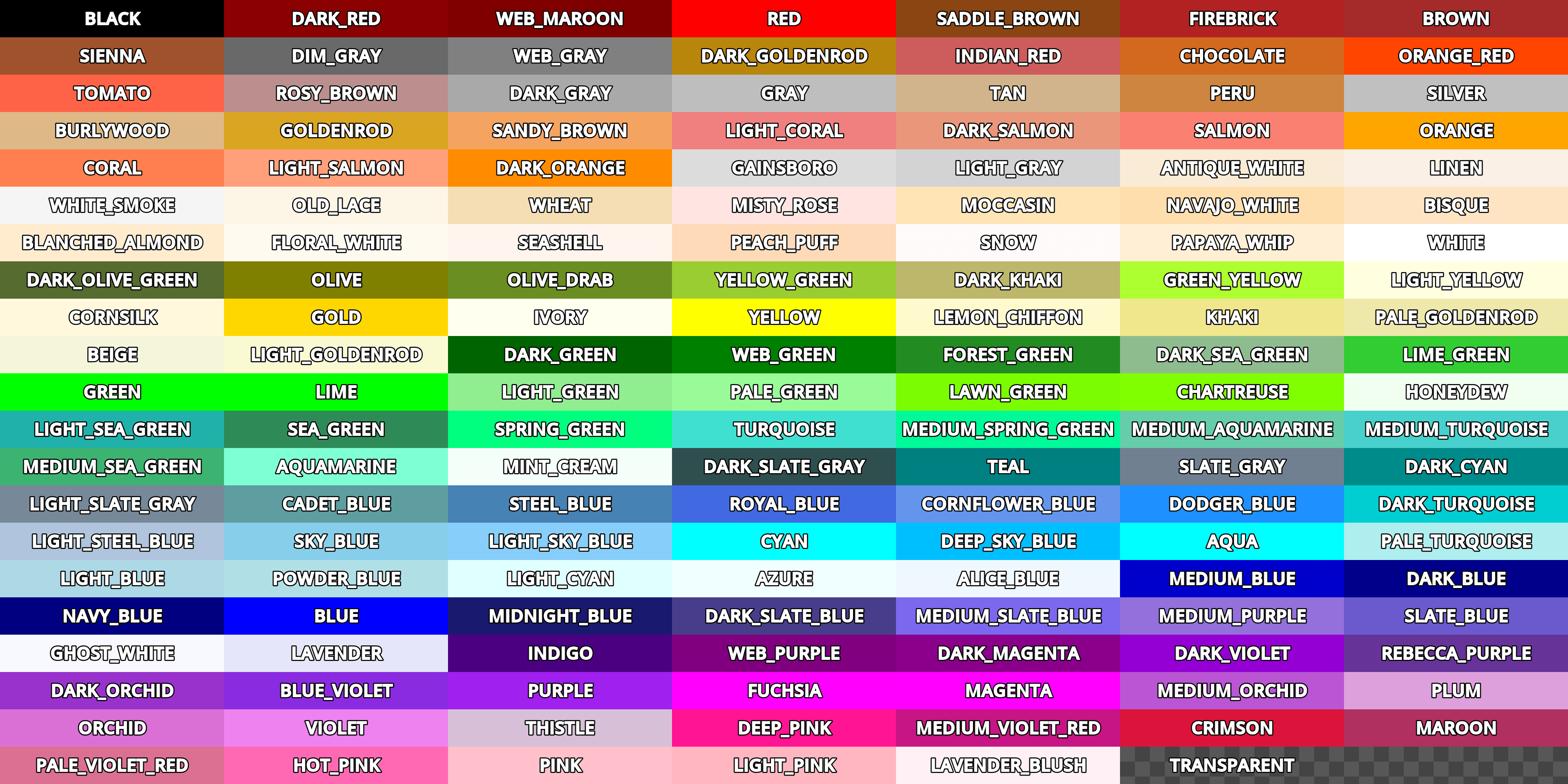
Sebbene sia possibile utilizzare Color per memorizzare valori di qualsiasi codifica, Godot si aspetta che le proprietà rosso (r), verde (g) e blu (b) di Color siano codificate attraverso la funzione di trasferimento sRGB non lineare, salvo diversa indicazione. Questa codifica dei colori è utilizzata da molti strumenti tradizionali per la grafica e il web, il che aiuta a far corrispondere i colori tra Godot e questi strumenti. Godot utilizza i colori primari Rec. ITU-R BT.709, utilizzati dallo standard sRGB.
Tutte le simulazioni fisiche, come i calcoli di illuminazione, e le trasformazioni colorimetriche, come get_luminance(), si devono effettuare su valori codificati linearmente per produrre risultati corretti. Quando si effettuano questi calcoli, converti Color dalla codifica lineare, e viceversa, tramite srgb_to_linear() e linear_to_srgb().
Nota: In un contesto booleano, un colore sarà valutato come false se è uguale a Color(0, 0, 0, 1) (nero opaco). Altrimenti, un colore sarà sempre valutato come true.
Nota: In C#, le costanti di colore sono definite nella classe statica Colors invece che in Color. Inoltre, i colori denominati usano la sintassi PascalCase invece di UPPER_SNAKE_CASE. Ad esempio, Color.ALICE_BLUE in GDScript è Colors.AliceBlue in C#.
Nota
Ci sono differenze sostanziali quando si usa questa API con C#. Vedi Differenze dell'API C# rispetto a GDScript per maggiori informazioni.
Tutorial
Proprietà
|
||
|
||
|
||
|
||
|
||
|
||
|
||
|
||
|
||
|
||
|
||
|
||
|
||
|
Costruttori
Color() |
|
Metodi
clamp(min: Color = Color(0, 0, 0, 0), max: Color = Color(1, 1, 1, 1)) const |
|
from_hsv(h: float, s: float, v: float, alpha: float = 1.0) static |
|
from_ok_hsl(h: float, s: float, l: float, alpha: float = 1.0) static |
|
from_rgba8(r8: int, g8: int, b8: int, a8: int = 255) static |
|
from_rgbe9995(rgbe: int) static |
|
from_string(str: String, default: Color) static |
|
get_luminance() const |
|
html_is_valid(color: String) static |
|
inverted() const |
|
is_equal_approx(to: Color) const |
|
linear_to_srgb() const |
|
srgb_to_linear() const |
|
to_abgr32() const |
|
to_abgr64() const |
|
to_argb32() const |
|
to_argb64() const |
|
to_rgba32() const |
|
to_rgba64() const |
Operatori
operator !=(right: Color) |
|
operator *(right: Color) |
|
operator *(right: float) |
|
operator *(right: int) |
|
operator +(right: Color) |
|
operator -(right: Color) |
|
operator /(right: Color) |
|
operator /(right: float) |
|
operator /(right: int) |
|
operator ==(right: Color) |
|
operator [](index: int) |
|
Costanti
ALICE_BLUE = Color(0.9411765, 0.972549, 1, 1) 🔗
Colore blu alice.
ANTIQUE_WHITE = Color(0.98039216, 0.92156863, 0.84313726, 1) 🔗
Colore bianco antico.
AQUA = Color(0, 1, 1, 1) 🔗
Colore acqua.
AQUAMARINE = Color(0.49803922, 1, 0.83137256, 1) 🔗
Colore acquamarina.
AZURE = Color(0.9411765, 1, 1, 1) 🔗
Colore azzurro.
BEIGE = Color(0.9607843, 0.9607843, 0.8627451, 1) 🔗
Colore beige.
BISQUE = Color(1, 0.89411765, 0.76862746, 1) 🔗
Colore biscotto.
BLACK = Color(0, 0, 0, 1) 🔗
Colore nero. In GDScript, questo è il valore predefinito di qualsiasi colore.
BLANCHED_ALMOND = Color(1, 0.92156863, 0.8039216, 1) 🔗
Colore bianco mandorla.
BLUE = Color(0, 0, 1, 1) 🔗
Colore blu.
BLUE_VIOLET = Color(0.5411765, 0.16862746, 0.8862745, 1) 🔗
Colore blu-violetto.
BROWN = Color(0.64705884, 0.16470589, 0.16470589, 1) 🔗
Colore marrone.
BURLYWOOD = Color(0.87058824, 0.72156864, 0.5294118, 1) 🔗
Colore burlywood.
CADET_BLUE = Color(0.37254903, 0.61960787, 0.627451, 1) 🔗
Colore blu cadetto.
CHARTREUSE = Color(0.49803922, 1, 0, 1) 🔗
Colore chartreuse.
CHOCOLATE = Color(0.8235294, 0.4117647, 0.11764706, 1) 🔗
Colore cioccolato.
CORAL = Color(1, 0.49803922, 0.3137255, 1) 🔗
Colore corallo.
CORNFLOWER_BLUE = Color(0.39215687, 0.58431375, 0.92941177, 1) 🔗
Colore blu fiordaliso.
CORNSILK = Color(1, 0.972549, 0.8627451, 1) 🔗
Colore seta di mais.
CRIMSON = Color(0.8627451, 0.078431375, 0.23529412, 1) 🔗
Colore cremisi.
CYAN = Color(0, 1, 1, 1) 🔗
Colore ciano.
DARK_BLUE = Color(0, 0, 0.54509807, 1) 🔗
Colore blu scuro.
DARK_CYAN = Color(0, 0.54509807, 0.54509807, 1) 🔗
Colore ciano scuro.
DARK_GOLDENROD = Color(0.72156864, 0.5254902, 0.043137256, 1) 🔗
Colore verga d'oro scuro.
DARK_GRAY = Color(0.6627451, 0.6627451, 0.6627451, 1) 🔗
Colore grigio scuro.
DARK_GREEN = Color(0, 0.39215687, 0, 1) 🔗
Colore verde scuro.
DARK_KHAKI = Color(0.7411765, 0.7176471, 0.41960785, 1) 🔗
Colore cachi scuro.
DARK_MAGENTA = Color(0.54509807, 0, 0.54509807, 1) 🔗
Colore magenta scuro.
DARK_OLIVE_GREEN = Color(0.33333334, 0.41960785, 0.18431373, 1) 🔗
Colore verde oliva scuro.
DARK_ORANGE = Color(1, 0.54901963, 0, 1) 🔗
Colore arancione scuro.
DARK_ORCHID = Color(0.6, 0.19607843, 0.8, 1) 🔗
Colore orchidea scuro.
DARK_RED = Color(0.54509807, 0, 0, 1) 🔗
Colore rosso scuro.
DARK_SALMON = Color(0.9137255, 0.5882353, 0.47843137, 1) 🔗
Colore salmone scuro.
DARK_SEA_GREEN = Color(0.56078434, 0.7372549, 0.56078434, 1) 🔗
Colore verde mare scuro.
DARK_SLATE_BLUE = Color(0.28235295, 0.23921569, 0.54509807, 1) 🔗
Colore blu ardesia scuro.
DARK_SLATE_GRAY = Color(0.18431373, 0.30980393, 0.30980393, 1) 🔗
Colore grigio ardesia scuro.
DARK_TURQUOISE = Color(0, 0.80784315, 0.81960785, 1) 🔗
Colore turchese scuro.
DARK_VIOLET = Color(0.5803922, 0, 0.827451, 1) 🔗
Colore violetto scuro.
DEEP_PINK = Color(1, 0.078431375, 0.5764706, 1) 🔗
Colore rosa intenso.
DEEP_SKY_BLUE = Color(0, 0.7490196, 1, 1) 🔗
Colore blu cielo intenso.
DIM_GRAY = Color(0.4117647, 0.4117647, 0.4117647, 1) 🔗
Colore grigio tenue.
DODGER_BLUE = Color(0.11764706, 0.5647059, 1, 1) 🔗
Colore blu Dodger.
FIREBRICK = Color(0.69803923, 0.13333334, 0.13333334, 1) 🔗
Colore rosso mattone.
FLORAL_WHITE = Color(1, 0.98039216, 0.9411765, 1) 🔗
Colore bianco floreale.
FOREST_GREEN = Color(0.13333334, 0.54509807, 0.13333334, 1) 🔗
Colore verde foresta.
FUCHSIA = Color(1, 0, 1, 1) 🔗
Colore fucsia.
GAINSBORO = Color(0.8627451, 0.8627451, 0.8627451, 1) 🔗
Colore Gainsboro.
GHOST_WHITE = Color(0.972549, 0.972549, 1, 1) 🔗
Colore bianco fantasma.
GOLD = Color(1, 0.84313726, 0, 1) 🔗
Colore oro.
GOLDENROD = Color(0.85490197, 0.64705884, 0.1254902, 1) 🔗
Colore verga d'oro.
GRAY = Color(0.74509805, 0.74509805, 0.74509805, 1) 🔗
Colore grigio.
GREEN = Color(0, 1, 0, 1) 🔗
Colore verde.
GREEN_YELLOW = Color(0.6784314, 1, 0.18431373, 1) 🔗
Colore giallo verde.
HONEYDEW = Color(0.9411765, 1, 0.9411765, 1) 🔗
Colore melata.
HOT_PINK = Color(1, 0.4117647, 0.7058824, 1) 🔗
Colore rosa acceso.
INDIAN_RED = Color(0.8039216, 0.36078432, 0.36078432, 1) 🔗
Colore rosso indiano.
INDIGO = Color(0.29411766, 0, 0.50980395, 1) 🔗
Colore indaco.
IVORY = Color(1, 1, 0.9411765, 1) 🔗
Colore avorio.
KHAKI = Color(0.9411765, 0.9019608, 0.54901963, 1) 🔗
Colore cachi.
LAVENDER = Color(0.9019608, 0.9019608, 0.98039216, 1) 🔗
Colore lavanda.
LAVENDER_BLUSH = Color(1, 0.9411765, 0.9607843, 1) 🔗
Colore lavanda rosata.
LAWN_GREEN = Color(0.4862745, 0.9882353, 0, 1) 🔗
Colore verde prato.
LEMON_CHIFFON = Color(1, 0.98039216, 0.8039216, 1) 🔗
Color limone chiffon.
LIGHT_BLUE = Color(0.6784314, 0.84705883, 0.9019608, 1) 🔗
Colore azzurro.
LIGHT_CORAL = Color(0.9411765, 0.5019608, 0.5019608, 1) 🔗
Colore corallo chiaro.
LIGHT_CYAN = Color(0.8784314, 1, 1, 1) 🔗
Colore ciano chiaro.
LIGHT_GOLDENROD = Color(0.98039216, 0.98039216, 0.8235294, 1) 🔗
Colore verga d'oro chiaro.
LIGHT_GRAY = Color(0.827451, 0.827451, 0.827451, 1) 🔗
Colore grigio chiaro.
LIGHT_GREEN = Color(0.5647059, 0.93333334, 0.5647059, 1) 🔗
Colore verde chiaro.
LIGHT_PINK = Color(1, 0.7137255, 0.75686276, 1) 🔗
Colore rosa chiaro.
LIGHT_SALMON = Color(1, 0.627451, 0.47843137, 1) 🔗
Colore salmone chiaro.
LIGHT_SEA_GREEN = Color(0.1254902, 0.69803923, 0.6666667, 1) 🔗
Colore verde mare chiaro.
LIGHT_SKY_BLUE = Color(0.5294118, 0.80784315, 0.98039216, 1) 🔗
Colore azzurro cielo chiaro.
LIGHT_SLATE_GRAY = Color(0.46666667, 0.53333336, 0.6, 1) 🔗
Colore grigio ardesia chiaro.
LIGHT_STEEL_BLUE = Color(0.6901961, 0.76862746, 0.87058824, 1) 🔗
Colore blu acciaio chiaro.
LIGHT_YELLOW = Color(1, 1, 0.8784314, 1) 🔗
Colore giallo chiaro.
LIME = Color(0, 1, 0, 1) 🔗
Colore lime.
LIME_GREEN = Color(0.19607843, 0.8039216, 0.19607843, 1) 🔗
Colore verde lime.
LINEN = Color(0.98039216, 0.9411765, 0.9019608, 1) 🔗
Colore lino.
MAGENTA = Color(1, 0, 1, 1) 🔗
Colore magenta.
MAROON = Color(0.6901961, 0.1882353, 0.3764706, 1) 🔗
Colore marrone rossiccio.
MEDIUM_AQUAMARINE = Color(0.4, 0.8039216, 0.6666667, 1) 🔗
Colore acquamarina medio.
MEDIUM_BLUE = Color(0, 0, 0.8039216, 1) 🔗
Colore blu medio.
MEDIUM_ORCHID = Color(0.7294118, 0.33333334, 0.827451, 1) 🔗
Colore orchidea medio.
MEDIUM_PURPLE = Color(0.5764706, 0.4392157, 0.85882354, 1) 🔗
Colore viola medio.
MEDIUM_SEA_GREEN = Color(0.23529412, 0.7019608, 0.44313726, 1) 🔗
Colore verde mare medio.
MEDIUM_SLATE_BLUE = Color(0.48235294, 0.40784314, 0.93333334, 1) 🔗
Colore blu ardesia medio.
MEDIUM_SPRING_GREEN = Color(0, 0.98039216, 0.6039216, 1) 🔗
Colore verde primaverile medio.
MEDIUM_TURQUOISE = Color(0.28235295, 0.81960785, 0.8, 1) 🔗
Colore turchese medio.
MEDIUM_VIOLET_RED = Color(0.78039217, 0.08235294, 0.52156866, 1) 🔗
Colore rosso violaceo medio.
MIDNIGHT_BLUE = Color(0.09803922, 0.09803922, 0.4392157, 1) 🔗
Colore blu notte.
MINT_CREAM = Color(0.9607843, 1, 0.98039216, 1) 🔗
Color crema menta.
MISTY_ROSE = Color(1, 0.89411765, 0.88235295, 1) 🔗
Colore rosa nebbia.
MOCCASIN = Color(1, 0.89411765, 0.70980394, 1) 🔗
Colore mocassino.
Colore bianco Navajo.
Colore blu marino.
OLD_LACE = Color(0.99215686, 0.9607843, 0.9019608, 1) 🔗
Colore pizzo antico.
OLIVE = Color(0.5019608, 0.5019608, 0, 1) 🔗
Colore oliva.
OLIVE_DRAB = Color(0.41960785, 0.5568628, 0.13725491, 1) 🔗
Colore verde oliva.
ORANGE = Color(1, 0.64705884, 0, 1) 🔗
Colore arancione.
ORANGE_RED = Color(1, 0.27058825, 0, 1) 🔗
Colore rosso arancione.
ORCHID = Color(0.85490197, 0.4392157, 0.8392157, 1) 🔗
Colore orchidea.
PALE_GOLDENROD = Color(0.93333334, 0.9098039, 0.6666667, 1) 🔗
Colore verga d'oro pallido.
PALE_GREEN = Color(0.59607846, 0.9843137, 0.59607846, 1) 🔗
Colore verde pallido.
PALE_TURQUOISE = Color(0.6862745, 0.93333334, 0.93333334, 1) 🔗
Colore turchese pallido.
PALE_VIOLET_RED = Color(0.85882354, 0.4392157, 0.5764706, 1) 🔗
Colore rosso violaceo pallido.
PAPAYA_WHIP = Color(1, 0.9372549, 0.8352941, 1) 🔗
Colore frusta di papaya.
PEACH_PUFF = Color(1, 0.85490197, 0.7254902, 1) 🔗
Color pesca.
PERU = Color(0.8039216, 0.52156866, 0.24705882, 1) 🔗
Colore marrone chiaro.
PINK = Color(1, 0.7529412, 0.79607844, 1) 🔗
Colore rosa.
PLUM = Color(0.8666667, 0.627451, 0.8666667, 1) 🔗
Colore prugna.
POWDER_BLUE = Color(0.6901961, 0.8784314, 0.9019608, 1) 🔗
Colore blu polvere.
PURPLE = Color(0.627451, 0.1254902, 0.9411765, 1) 🔗
Colore viola.
REBECCA_PURPLE = Color(0.4, 0.2, 0.6, 1) 🔗
Colore viola Rebecca.
RED = Color(1, 0, 0, 1) 🔗
Colore rosso.
ROSY_BROWN = Color(0.7372549, 0.56078434, 0.56078434, 1) 🔗
Colore marrone rosato.
ROYAL_BLUE = Color(0.25490198, 0.4117647, 0.88235295, 1) 🔗
Colore blu reale.
SADDLE_BROWN = Color(0.54509807, 0.27058825, 0.07450981, 1) 🔗
Colore marrone sella.
SALMON = Color(0.98039216, 0.5019608, 0.44705883, 1) 🔗
Colore salmone.
SANDY_BROWN = Color(0.95686275, 0.6431373, 0.3764706, 1) 🔗
Colore marrone sabbia.
SEA_GREEN = Color(0.18039216, 0.54509807, 0.34117648, 1) 🔗
Colore verde mare.
SEASHELL = Color(1, 0.9607843, 0.93333334, 1) 🔗
Colore conchiglia.
SIENNA = Color(0.627451, 0.32156864, 0.1764706, 1) 🔗
Colore terra di Siena.
SILVER = Color(0.7529412, 0.7529412, 0.7529412, 1) 🔗
Colore argento.
SKY_BLUE = Color(0.5294118, 0.80784315, 0.92156863, 1) 🔗
Colore azzurro cielo.
SLATE_BLUE = Color(0.41568628, 0.3529412, 0.8039216, 1) 🔗
Colore blu ardesia.
SLATE_GRAY = Color(0.4392157, 0.5019608, 0.5647059, 1) 🔗
Colore grigio ardesia.
SNOW = Color(1, 0.98039216, 0.98039216, 1) 🔗
Colore neve.
SPRING_GREEN = Color(0, 1, 0.49803922, 1) 🔗
Colore verde primaverile.
STEEL_BLUE = Color(0.27450982, 0.50980395, 0.7058824, 1) 🔗
Colore blu acciaio.
TAN = Color(0.8235294, 0.7058824, 0.54901963, 1) 🔗
Colore tanno.
TEAL = Color(0, 0.5019608, 0.5019608, 1) 🔗
Color verde acqua.
THISTLE = Color(0.84705883, 0.7490196, 0.84705883, 1) 🔗
Colore cardo.
TOMATO = Color(1, 0.3882353, 0.2784314, 1) 🔗
Colore pomodoro.
TRANSPARENT = Color(1, 1, 1, 0) 🔗
Colore trasparente (bianco con zero alfa).
TURQUOISE = Color(0.2509804, 0.8784314, 0.8156863, 1) 🔗
Colore turchese.
VIOLET = Color(0.93333334, 0.50980395, 0.93333334, 1) 🔗
Colore violetto.
WEB_GRAY = Color(0.5019608, 0.5019608, 0.5019608, 1) 🔗
Colore grigio web.
WEB_GREEN = Color(0, 0.5019608, 0, 1) 🔗
Colore verde web.
WEB_MAROON = Color(0.5019608, 0, 0, 1) 🔗
Colore marrone web.
WEB_PURPLE = Color(0.5019608, 0, 0.5019608, 1) 🔗
Colore viola web.
WHEAT = Color(0.9607843, 0.87058824, 0.7019608, 1) 🔗
Colore grano.
WHITE = Color(1, 1, 1, 1) 🔗
Colore bianco.
WHITE_SMOKE = Color(0.9607843, 0.9607843, 0.9607843, 1) 🔗
Colore fumo bianco.
YELLOW = Color(1, 1, 0, 1) 🔗
Colore giallo.
YELLOW_GREEN = Color(0.6039216, 0.8039216, 0.19607843, 1) 🔗
Colore giallo-verde.
Descrizioni delle proprietà
Il componente alfa del colore, in genere compresa tra 0 e 1. Un valore pari a 0 indica che il colore è completamente trasparente. Un valore pari a 1 indica che il colore è completamente opaco.
Nota: Il canale alfa è sempre memorizzato con codifica lineare, a prescindere dalla codifica degli altri canali. I metodi linear_to_srgb() e srgb_to_linear() non influiscono sul canale alfa.
Wrapper per a che utilizza l'intervallo da 0 a 255, invece che da 0 a 1.
Il componente blu del colore, solitamente nell'intervallo da 0 a 1.
Wrapper per b che utilizza l'intervallo da 0 a 255, invece che da 0 a 1.
Il componente verde del colore, solitamente nell'intervallo da 0 a 1.
Wrapper per g che utilizza l'intervallo da 0 a 255, invece che da 0 a 1.
Tonalità HSV di questo colore, nell'intervallo da 0 a 1.
La tonalità OKHSL di questo colore, nell'intervallo da 0 a 1.
La luminosità OKHSL di questo colore, nell'intervallo da 0 a 1.
La saturazione OKHSL di questo colore, nell'intervallo da 0 a 1.
Il componente rosso del colore, solitamente nell'intervallo da 0 a 1.
Wrapper per r che utilizza l'intervallo da 0 a 255, invece che da 0 a 1.
La saturazione HSV di questo colore, nell'intervallo da 0 a 1.
Il valore HSV (luminosità) di questo colore, nell'intervallo da 0 a 1.
Descrizioni dei costruttori
Costruisce un Color predefinito dal nero opaco. È lo stesso di BLACK.
Nota: In C#, costruisce un Color con tutti i suoi componenti impostati su 0.0 (nero trasparente).
Color Color(from: Color, alpha: float)
Costruisce un Color dal colore esistente, con a impostato sul valore alpha specificato.
var red = Color(Color.RED, 0.2) # Rosso 20% opaco.
var red = new Color(Colors.Red, 0.2f); // Rosso 20% opaco.
Costruisce un Color come copia del Color specificato.
Costruisce un Color da un codice colore HTML o dal nome di un colore standardizzato. I nomi dei colori supportati sono gli stessi delle costanti.
Color Color(code: String, alpha: float)
Costruisce un Color sia da un codice colore HTML o dal nome di un colore standardizzato, con alpha sulla gamma di 0.0 a 1.0. I nomi dei colori supportati sono gli stessi delle costanti.
Color Color(r: float, g: float, b: float)
Costruisce un Color da valori RGB, in genere compresi tra 0.0 e 1.0. a è impostato su 1.0.
var color = Color(0.2, 1.0, 0.7) # Simile a `Color.from_rgba8(51, 255, 178, 255)`
var color = new Color(0.2f, 1.0f, 0.7f); // Simile a `Color.Color8(51, 255, 178, 255)`
Color Color(r: float, g: float, b: float, a: float)
Costruisce un Color da valori RGBA, in genere compresi tra 0,. e 1.0.
var color = Color(0.2, 1.0, 0.7, 0.8) # Simile a `Color.from_rgba8(51, 255, 178, 204)`
var color = new Color(0.2f, 1.0f, 0.7f, 0.8f); // Simile a `Color.Color8(51, 255, 178, 255, 204)`
Descrizioni dei metodi
Color blend(over: Color) const 🔗
Restituisce un nuovo colore risultante dalla sovrapposizione di questo colore sul colore specificato. In un programma di pittura, puoi immaginarlo come il colore over dipinto su questo colore (incluso alfa).
var bg = Color(0.0, 1.0, 0.0, 0.5) # Verde con alfa del 50%
var fg = Color(1.0, 0.0, 0.0, 0.5) # Rosso con alfa del 50%
var blended_color = bg.blend(fg) # Marrone con alfa del 75%
var bg = new Color(0.0f, 1.0f, 0.0f, 0.5f); // Verde con alfa del 50%
var fg = new Color(1.0f, 0.0f, 0.0f, 0.5f); // Rosso con alfa del 50%
Color blendedColor = bg.Blend(fg); // Marrone con alfa del 75%
Color clamp(min: Color = Color(0, 0, 0, 0), max: Color = Color(1, 1, 1, 1)) const 🔗
Restituisce un nuovo colore con tutti i componenti limitati tra i componenti di min e max, eseguendo @GlobalScope.clamp() su ciascun componente.
Color darkened(amount: float) const 🔗
Restituisce un nuovo colore che è il risultato di scurire questo colore per la quantità specificata amount (rapporto da 0,0 a 1,0). Vedi anche lightened().
var green = Color(0.0, 1.0, 0.0)
var darkgreen = green.darkened(0.2) # 20% più scuro del verde normale
var green = new Color(0.0f, 1.0f, 0-0f);
Color darkgreen = green.Darkened(0.2f); // 20% più scuro del verde normale
Color from_hsv(h: float, s: float, v: float, alpha: float = 1.0) static 🔗
Costruisce un colore da un profilo HSV. La tonalità (h), la saturazione (s) e il valore (v) sono in genere compresi tra 0,0 e 1,0.
var color = Color.from_hsv(0.58, 0.5, 0.79, 0.8)
var color = Color.FromHsv(0.58f, 0.5f, 0.79f, 0.8f);
Color from_ok_hsl(h: float, s: float, l: float, alpha: float = 1.0) static 🔗
Costruisce un colore da un profilo HSL OK. La tonalità (h), la saturazione (s) e la luminosità (l) sono in genere comprese tra 0,0 e 1,0.
var color = Color.from_ok_hsl(0.58, 0.5, 0.79, 0.8)
var color = Color.FromOkHsl(0.58f, 0.5f, 0.79f, 0.8f);
Color from_rgba8(r8: int, g8: int, b8: int, a8: int = 255) static 🔗
Restituisce un Color costruito da rosso (r8), verde (g8), blu (b8), e facoltativamente alfa (a8) canali interi, ciascuno diviso da 255.0 per il loro valore finale.
var red = Color8(255, 0, 0)             # Uguale a Color(1, 0, 0).
var dark_blue = Color8(0, 0, 51)        # Uguale a Color(0, 0, 0.2).
var my_color = Color8(306, 255, 0, 102) # Uguale a Color(1.2, 1, 0, 0.4).
Nota: A causa della minore precisione di from_rgba8() rispetto al costruttore standard di Color, un colore creato con from_rgba8() generalmente non sarà uguale allo stesso colore creato con il costruttore standard di Color. Utilizza is_equal_approx() per i confronti per evitare problemi d'errori di precisione in virgola mobile.
Color from_rgbe9995(rgbe: int) static 🔗
Decodifica un Color da un intero in formato RGBE9995. Vedi Image.FORMAT_RGBE9995.
Color from_string(str: String, default: Color) static 🔗
Crea un Color dalla stringa specificata, che può essere un codice colore HTML o un colore con nome (senza distinzione tra maiuscole e minuscole). Restituisce default se il colore non può essere dedotto dalla stringa.
Se desideri creare un colore da stringa in un'espressione costante, utilizza invece il costruttore equivalente (ad esempio Color("color string")).
Restituisce l'intensità luminosa del colore, come valore compreso tra 0.0 e 1.0 (inclusi). È utile quando si determina un colore chiaro o scuro. I colori con una luminanza inferiore a 0.5 possono essere generalmente considerati scuri.
Nota: get_luminance() richiede che il colore sia in codifica lineare per restituire un valore accurato di luminanza relativa. Se il colore è in codifica sRGB non lineare, usa srgb_to_linear() per convertirlo prima in codifica lineare.
Restituisce il Color associato all'intero hex fornito in formato RGBA a 32 bit (8 bit per canale). Questo metodo è l'inverso di to_rgba32().
In GDScript e C#, l'int è meglio visualizzato con la notazione esadecimale (prefisso "0x", che lo rende "0xRRGGBBAA").
var red = Color.hex(0xff0000ff)
var dark_cyan = Color.hex(0x008b8bff)
var my_color = Color.hex(0xbbefd2a4)
var red = new Color(0xff0000ff);
var dark_cyan = new Color(0x008b8bff);
var my_color = new Color(0xbbefd2a4);
Se si desidera utilizzare la notazione esadecimale in un'espressione costante, utilizza invece il costruttore equivalente (ad esempio Color(0xRRGGBBAA)).
Color hex64(hex: int) static 🔗
Restituisce il Color associato all'intero hex fornito in formato RGBA a 64 bit (16 bit per canale). Questo metodo è l'inverso di to_rgba64().
In GDScript e C#, l'int è meglio visualizzato con la notazione esadecimale ("0x" prefisso, che lo rende "0xRRRRGGGGBBBBAAAA").
Color html(rgba: String) static 🔗
Restituisce un nuovo colore da rgba, una stringa di colore esadecimale HTML. rgba non è sensibile alle maiuscole e minuscole e può essere preceduto da un cancelletto (#).
rgba deve essere una stringa di colore esadecimale valida a tre o sei cifre e può contenere un valore di canale alfa. Se rgba non contiene un valore di canale alfa, è applicato un valore di canale alfa di 1,0. Se rgba non è valido, restituisce un colore vuoto.
var blue = Color.html("#0000ff") # blue è Color(0.0, 0.0, 1.0, 1.0)
var green = Color.html("#0F0")   # green è Color(0.0, 1.0, 0.0, 1.0)
var col = Color.html("663399cc") # col è Color(0.4, 0.2, 0.6, 0.8)
var blue = Color.FromHtml("#0000ff"); // blue è Color(0.0, 0.0, 1.0, 1.0)
var green = Color.FromHtml("#0F0");   // green è Color(0.0, 1.0, 0.0, 1.0)
var col = Color.FromHtml("663399cc"); // col è Color(0.4, 0.2, 0.6, 0.8)
bool html_is_valid(color: String) static 🔗
Restituisce true se color è una stringa di colore esadecimale HTML valida. La stringa deve essere un valore esadecimale (senza distinzione tra maiuscole e minuscole) di 3, 4, 6 o 8 cifre e può essere preceduta da un cancelletto (#). Questo metodo è identico a String.is_valid_html_color().
Color.html_is_valid("#55aaFF")   # Restituisce true
Color.html_is_valid("#55AAFF20") # Restituisce true
Color.html_is_valid("55AAFF")    # Restituisce true
Color.html_is_valid("#F2C")      # Restituisce true

Color.html_is_valid("#AABBC")    # Restituisce false
Color.html_is_valid("#55aaFF5")  # Restituisce false
Color.HtmlIsValid("#55AAFF");   // Restituisce true
Color.HtmlIsValid("#55AAFF20"); // Restituisce true
Color.HtmlIsValid("55AAFF");    // Restituisce true
Color.HtmlIsValid("#F2C");      // Restituisce true

Color.HtmlIsValid("#AABBC");    // Restituisce false
Color.HtmlIsValid("#55aaFF5");  // Restituisce false
Restituisce il colore con i suoi componenti r, g e b invertiti ((1 - r, 1 - g, 1 - b, a)).
var black = Color.WHITE.inverted()
var color = Color(0.3, 0.4, 0.9)
var inverted_color = color.inverted() # Equivalente a `Color(0.7, 0.6, 0.1)`
var black = Colors.White.Inverted();
var color = new Color(0.3f, 0.4f, 0.9f);
Color invertedColor = color.Inverted(); // Equivalente a `new Color(0.7f, 0.6f, 0.1f)`
bool is_equal_approx(to: Color) const 🔗
Restituisce true se questo colore e to sono approssimativamente eguali, chiamando @GlobalScope.is_equal_approx() su ogni componente.
Color lerp(to: Color, weight: float) const 🔗
Restituisce l'interpolazione lineare tra i componenti di questo colore e i componenti di to. Il fattore di interpolazione weight dovrebbe essere compreso tra 0,0 e 1,0 (inclusi). Vedi anche @GlobalScope.lerp().
var red = Color(1.0, 0.0, 0.0)
var aqua = Color(0.0, 1.0, 0.8)

red.lerp(aqua, 0.2) # Restituisce Color(0.8, 0.2, 0.16)
red.lerp(aqua, 0.5) # Restituisce Color(0.5, 0.5, 0.4)
red.lerp(aqua, 1.0) # Restituisce Color(0.0, 1.0, 0.8)
var red = new Color(1.0f, 0.0f, 0.0f);
var aqua = new Color(0.0f, 1.0f, 0.8f);

red.Lerp(aqua, 0.2f); // Restituisce Color(0.8f, 0.2f, 0.16f)
red.Lerp(aqua, 0.5f); // Restituisce Color(0.5f, 0.5f, 0.4f)
red.Lerp(aqua, 1.0f); // Restituisce Color(0.0f, 1.0f, 0.8f)
Color lightened(amount: float) const 🔗
Restituisce un nuovo colore che è il risultato di schiarire questo colore per la quantità specificata amount (rapporto da 0,0 a 1,0). Vedi anche darkened().
var green = Color(0.0, 1.0, 0.0)
var light_green = green.lightened(0.2) # 20% più chiaro del verde normale
var green = new Color(0.0f, 1.0f, 0.0f);
Color lightGreen = green.Lightened(0.2f); // 20% più chiaro del verde normale
Color linear_to_srgb() const 🔗
Restituisce una copia del colore codificato tramite la funzione di trasferimento sRGB non lineare. Questo metodo richiede che il colore originale sia in codifica lineare. Vedi anche srgb_to_linear() che effettua l'operazione opposta.
Nota: il canale alfa (a) del colore non è influenzato. Il canale alfa è sempre memorizzato con codifica lineare, a prescindere dallo spazio colore degli altri canali.
Color srgb_to_linear() const 🔗
Restituisce una copia del colore in codifica lineare. Questo metodo richiede che il colore originale sia già codificato attraverso la funzione di trasferimento sRGB non lineare. Vedi anche linear_to_srgb() che effettua l'operazione opposta.
Nota: il canale alfa (a) del colore non è influenzato. Il canale alfa è sempre memorizzato con codifica lineare, a prescindere dallo spazio colore degli altri canali.
Restituisce il colore convertito in un intero a 32 bit in formato ABGR (ogni componente è di 8 bit). ABGR è la versione invertita del formato RGBA predefinito.
var color = Color(1, 0.5, 0.2)
print(color.to_abgr32()) # Stampa 4281565439
var color = new Color(1.0f, 0.5f, 0.2f);
GD.Print(color.ToAbgr32()); // Stampa 4281565439
Restituisce il colore convertito in un intero a 64 bit in formato ABGR (ogni componente è di 16 bit). ABGR è la versione invertita del formato RGBA predefinito.
var color = Color(1, 0.5, 0.2)
print(color.to_abgr64()) # Stampa -225178692812801
var color = new Color(1.0f, 0.5f, 0.2f);
GD.Print(color.ToAbgr64()); // Stampa -225178692812801
Restituisce il colore convertito in un intero a 32 bit in formato ARGB (ogni componente è di 8 bit). ARGB è più compatibile con DirectX.
var color = Color(1, 0.5, 0.2)
print(color.to_argb32()) # Stampa 4294934323
var color = new Color(1.0f, 0.5f, 0.2f);
GD.Print(color.ToArgb32()); // Stampa 4294934323
Restituisce il colore convertito in un intero a 64 bit in formato ARGB (ogni componente è di 16 bit). ARGB è più compatibile con DirectX.
var color = Color(1, 0.5, 0.2)
print(color.to_argb64()) # Stampa -2147470541
var color = new Color(1.0f, 0.5f, 0.2f);
GD.Print(color.ToArgb64()); // Stampa -2147470541
String to_html(with_alpha: bool = true) const 🔗
Restituisce il colore convertito in un String di colore esadecimale HTML in formato RGBA, senza il prefisso cancelletto (#).
Impostando with_alpha su false, si esclude l'alfa dalla stringa esadecimale, utilizzando il formato RGB anziché il formato RGBA.
var white = Color(1, 1, 1, 0.5)
var with_alpha = white.to_html() # Restituisce "ffffff7f"
var without_alpha = white.to_html(false) # Restituisce "ffffff"
var white = new Color(1, 1, 1, 0.5f);
string withAlpha = white.ToHtml(); // Restituisce "ffffff7f"
string withoutAlpha = white.ToHtml(false); // Restituisce "ffffff"
Restituisce il colore convertito in un intero a 32 bit in formato RGBA (ogni componente è di 8 bit). RGBA è il formato predefinito di Godot. Questo metodo è l'inverso di hex().
var color = Color(1, 0.5, 0.2)
print(color.to_rgba32()) # Stampa 4286526463
var color = new Color(1, 0.5f, 0.2f);
GD.Print(color.ToRgba32()); // Stampa 4286526463
Restituisce il colore convertito in un intero a 64 bit in formato RGBA (ogni componente è di 16 bit). RGBA è il formato predefinito di Godot. Questo metodo è l'inverso di hex64().
var color = Color(1, 0.5, 0.2)
print(color.to_rgba64()) # Stampa -140736629309441
var color = new Color(1, 0.5f, 0.2f);
GD.Print(color.ToRgba64()); // Stampa -140736629309441
Descrizioni degli operatori
bool operator !=(right: Color) 🔗
Restituisce true se i colori non sono esattamente eguali.
Note: A causa di errori di precisione per virgola mobile, considera invece utilizzare is_equal_approx(), che è più affidabile.
Color operator *(right: Color) 🔗
Moltiplica ogni componente del Color dai componenti del Color specificato.
Color operator *(right: float) 🔗
Moltiplica ogni componente del Color dal float specificato.
Color operator *(right: int) 🔗
Moltiplica ogni componente del Color dal int specificato.
Color operator +(right: Color) 🔗
Aggiunge ogni componente del Color ai componenti del Color specificato.
Color operator -(right: Color) 🔗
Sottrae ogni componente del Color ai componenti del Color specificato.
Color operator /(right: Color) 🔗
Divide ogni componente del Color dai componenti del Color specificato.
Color operator /(right: float) 🔗
Divide ogni componente del Color dal float specificato.
Color operator /(right: int) 🔗
Divide ogni componente del Color dal int specificato.
bool operator ==(right: Color) 🔗
Restituisce true se i colori sono esattamente eguali.
Note: A causa di errori di precisione per virgola mobile, considera invece utilizzare is_equal_approx(), che è più affidabile.
float operator [](index: int) 🔗
Accede ai componenti del colore utilizzando il loro indice. [0] è equivalente a r, [1] è equivalente a g, [2] è equivalente a b, e [3] è equivalente a a.
Restituisce lo stesso valore come se + non ci fosse. Il + unario non fa nulla, ma a volte può rendere il tuo codice più leggibile.
Inverte il colore specificato. Ciò equivale a Color.WHITE - c o Color(1 - c.r, 1 - c.g, 1 - c.b, 1 - c.a). A differenza di inverted(), anche il componente a è invertito.