Attention: Here be dragons
This is the latest
(unstable) version of this documentation, which may document features
not available in or compatible with released stable versions of Godot.
Checking the stable version of the documentation...
Fare richieste HTTP
Perché utilizzare HTTP?
Le richieste HTTP sono utili per comunicare con i server web e altri programmi non Godot.
Rispetto alle altre funzionalità di rete in Godot (come Multigiocatore di alto livello), le richieste HTTP hanno un sovraccarico maggiore e richiedono più tempo per inviarle, quindi non sono adatte alla comunicazione in tempo reale e non sono ideali per inviare molti piccoli aggiornamenti, come spesso accade durante un gioco multigiocatore.
HTTP, tuttavia, offre interoperabilità con risorse web esterne ed è ottimo per inviare e ricevere grandi quantità di dati, ad esempio per trasferire file come risorse di gioco. Queste risorse si possono poi caricare attraverso un caricamento e salvataggio di file in fase di esecuzione.
Quindi HTTP può essere utile per il sistema di login del tuo gioco, per il browser delle lobby, per recuperare alcune informazioni dal web o per scaricare risorse di gioco.
Richieste HTTP in Godot
Il nodo HTTPRequest è il modo più semplice per effettuare richieste HTTP in Godot. È supportato dal nodo di livello inferiore HTTPClient, per il quale è disponibile un tutorial qui.
In questo esempio, effettueremo una richiesta HTTP a GitHub per recuperare il nome dell'ultima versione di Godot.
Avvertimento
Quando si esporta per Android, assicurarsi di abilitare l'autorizzazione Internet nella preimpostazione di esportazione Android prima di esportare il progetto o utilizzare la distribuzione con un clic. Altrimenti, qualsiasi tipo di comunicazione di rete verrà bloccata dal sistema operativo Android.
Preparare la scena
Crea una nuova scena vuota, aggiungi un nodo radice Node e allegagli uno script. Quindi aggiungi un nodo HTTPRequest come figlio.
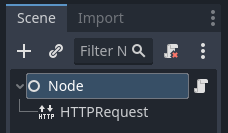
Programmare la richiesta
Quando il progetto viene avviato (quindi in _ready()), invieremo una richiesta HTTP a GitHub usando il nostro nodo HTTPRequest, e una volta completata la richiesta, analizzeremo i dati restituiti in JSON, cercheremo il campo name e lo stamperemo nella console.
extends Node

func _ready():
    $HTTPRequest.request_completed.connect(_on_request_completed)
    $HTTPRequest.request("https://api.github.com/repos/godotengine/godot/releases/latest")

func _on_request_completed(result, response_code, headers, body):
    var json = JSON.parse_string(body.get_string_from_utf8())
    print(json["name"])
using Godot;
using System.Text;

public partial class MyNode : Node
{
    public override void _Ready()
    {
        HttpRequest httpRequest = GetNode<HttpRequest>("HTTPRequest");
        httpRequest.RequestCompleted += OnRequestCompleted;
        httpRequest.Request("https://api.github.com/repos/godotengine/godot/releases/latest");
    }

    private void OnRequestCompleted(long result, long responseCode, string[] headers, byte[] body)
    {
        Godot.Collections.Dictionary json = Json.ParseString(Encoding.UTF8.GetString(body)).AsGodotDictionary();
        GD.Print(json["name"]);
    }
}
Salva lo script e la scena, poi esegui il progetto. Il nome della versione più recente di Godot su GitHub dovrebbe essere stampato nel log di output. Per ulteriori informazioni sull'analisi JSON, consulta i riferimenti alle classi per JSON.
Tieni presente che potresti voler verificare se result è uguale a RESULT_SUCCESS e se avviene un errore di analisi JSON; consulta il riferimento alla classe JSON e HTTPRequest per saperne di più.
Bisogna attendere il termine di una richiesta prima di poterne inviare un'altra. Inviare più richieste alla volta richiede un nodo per ogni richiesta. Una strategia comune consiste nel creare ed eliminare nodi HTTPRequest in fase di esecuzione, a seconda delle necessità.
Inviare dati al server
Finora ci siamo limitati a richiedere dati da un server. Ma cosa succede se bisogna inviare dati al server? Ecco una maniera comune per farlo:
var json = JSON.stringify(data_to_send)
var headers = ["Content-Type: application/json"]
$HTTPRequest.request(url, headers, HTTPClient.METHOD_POST, json)
string json = Json.Stringify(dataToSend);
string[] headers = ["Content-Type: application/json"];
HttpRequest httpRequest = GetNode<HttpRequest>("HTTPRequest");
httpRequest.Request(url, headers, HttpClient.Method.Post, json);
Impostare intestazioni HTTP personalizzate
Naturalmente, è anche possibile impostare intestazioni HTTP personalizzate. Queste sono fornite come array di stringhe, ciascuna contenente un'intestazione nel formato "intestazione: valore". Ad esempio, per impostare un user agent personalizzato (l'intestazione HTTP User-Agent), è possibile utilizzare quanto segue:
$HTTPRequest.request("https://api.github.com/repos/godotengine/godot/releases/latest", ["User-Agent: YourCustomUserAgent"])
HttpRequest httpRequest = GetNode<HttpRequest>("HTTPRequest");
httpRequest.Request("https://api.github.com/repos/godotengine/godot/releases/latest", ["User-Agent: YourCustomUserAgent"]);
Pericolo
Be aware that someone might analyze and decompile your released application and thus may gain access to any embedded authorization information like tokens, usernames, or passwords. That means it is usually not a good idea to embed things such as database access credentials inside your game. Avoid providing information useful to an attacker whenever possible.