Attention: Here be dragons
This is the latest
(unstable) version of this documentation, which may document features
not available in or compatible with released stable versions of Godot.
Checking the stable version of the documentation...
Illuminazione ad alta gamma dinamica
Introduzione
Di solito, un artista si occupa di tutta la modellazione 3D, poi di tutte le texture, guarda il suo fantastico modello nel software di modellazione 3D e dice "sembra fantastico, pronto per l'integrazione!", quindi passa al gioco, illuminazione preparata e il gioco è avviato.
Quindi, a che punto entra in gioco tutta questa storia dell'"HDR"? Per capire la risposta, dobbiamo esaminare come si comportano gli schermi.
Your display outputs linear light ratios from some maximum to some minimum intensity. Modern game engines perform complex math on linear light values in their respective scenes. So what's the problem?
The display has a limited range of intensity, depending on the display type. The game engine renders to an unlimited range of intensity values, however. While "maximum intensity" means something to an sRGB display, it has no bearing in the game engine; there is only a potentially infinitely wide range of intensity values generated per frame of rendering.
This means that some transformation of the scene light intensity, also known as scene-referred light ratios, need to be transformed and mapped to fit within the particular output range of the chosen display. This can be most easily understood if we consider virtually photographing our game engine scene through a virtual camera. Here, our virtual camera would apply a particular camera rendering transform to the scene data, and the output would be ready for display on a particular display type.
Nota
Godot supporta l'output ad alta gamma dinamica (HDR). Puoi trovare maggiori informazioni a riguardo nella pagina Output HDR.
Per gli utenti avanzati, è possibile ottenere un'immagine della viewport, senza toni mappati, con i dati HDR completi, che poi si può salvare in un file OpenEXR.
Display dei computer
Quasi tutti i display richiedono una codifica non lineare per i valori di codice inviati. Il display, a sua volta, attraverso la sua caratteristica unica di trasferimento, "decodifica" il valore di codice in rapporti lineari di luce in uscita e proietta tali rapporti dalle luci di colore univoco in ciascun sito di emissione rossastro, verdastro e bluastro.
Per la maggiorità dei display per computer, le specifiche sono definite in conformità alla norma IEC 61966-2-1, nota anche come specifica sRGB del 1996. Questa specifica definisce il comportamento di un display sRGB, inclusi il colore delle luci nei pixel LED e le caratteristiche di trasferimento dell'ingresso (OETF) e dell'uscita (EOTF).
Non tutti i display utilizzano gli stessi OETF ed EOTF dei display per computer. Ad esempio, i display per le trasmissioni televisive utilizzano l'EOTF BT.1886. Tuttavia, Godot supporta soltanto i display sRGB e HDR.
Lo standard sRGB si basa sulla relazione non lineare tra la corrente e l'emissione luminosa dei display CRT comuni dei computer desktop.
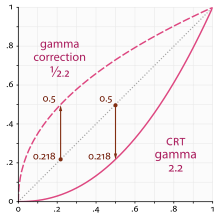
The mathematics of a scene-referred model require that we multiply the scene by different values to adjust the intensities and exposure to different light ranges. The transfer function of the display can't appropriately render the wider dynamic range of the game engine's scene output using the simple transfer function of the display. A more complex approach to encoding is required.
Scene linear & asset pipelines
Lavorare in sRGB lineare è più complesso che premere un singolo interruttore. Innanzitutto, è necessario convertire le risorse immagine in rapporti di luce lineari al momento della loro importazione. Anche se linearizzate, tali risorse potrebbero non essere perfettamente adatte all'uso come texture, a seconda di come sono state generate.
Ci sono due modi per farlo:
Funzione di trasferimento sRGB per visualizzare i rapporti lineari nell'importazione delle immagini
Questo è il metodo più facile per utilizzare risorse sRGB, ma non è il più ideale. Un problema è la perdita di qualità. Utilizzare 8 bit per canale per rappresentare rapporti lineari di luminosità non basta per quantizzare correttamente i valori. Queste texture potrebbero anche essere compresse in seguito, il che può aggravare il problema.
Hardware sRGB transfer function to display linear conversion
La GPU effettuerà la conversione dopo aver letto il texel in virgola mobile. Questo funziona correttamente su PC e console, ma la maggior parte dei dispositivi mobili non lo supporta, oppure non lo supporta con formati di texture compresse (iOS, ad esempio).
Scene linear to display-referred nonlinear
After all the rendering is done, the scene linear render requires transforming to a suitable output such as an sRGB display. To do this, enable sRGB conversion in the current Environment (more on that below).
Tieni presente che le conversioni sRGB -> Display Linear e Display Linear -> sRGB devono essere sempre entrambe abilitate. Non abilitandone una, si otterranno immagini di pessima qualità, adatte solo a giochi indie sperimentali d'avanguardia.
Parametri di HDR
Le impostazioni HDR si trovano nella risorsa Environment. Il più delle volte, si trovano all'interno di un nodo WorldEnvironment o sono impostate in un nodo Camera. Per ulteriori informazioni, consulta Environment and post-processing.