Attention: Here be dragons
This is the latest
(unstable) version of this documentation, which may document features
not available in or compatible with released stable versions of Godot.
Checking the stable version of the documentation...
Monitor personalizzati delle prestazioni
Introduzione
Come spiegato nella documentazione Pannello di debug, Godot include un pannello inferiore Debugger > Monitor che consente di tenere traccia di vari valori tramite grafici che ne mostrano l'evoluzione nel tempo. I dati per questi grafici provengono dal singleton Performance del motore.
Godot consente di dichiarare valori personalizzati da visualizzare nella scheda Monitor. Esempi di uso per i monitor di prestazioni personalizzati includono:
Visualizzare metriche di prestazioni specifiche per un progetto. Ad esempio, in un gioco voxel, si potrebbe creare un monitor di prestazioni per tenere traccia del numero di chunk caricati ogni secondo.
Visualizzare metriche di gioco non strettamente correlate alle prestazioni, ma comunque utili da rappresentare graficamente a scopo di debug. Ad esempio, si potrebbe tenere traccia del numero di nemici presenti nel gioco per assicurarsi che il meccanismo di generazione funzioni come previsto.
Creare un monitor di prestazioni personalizzato
In questo esempio, creeremo un monitor di prestazioni personalizzato per tenere traccia del numero di nemici presenti nel progetto attualmente in esecuzione.
La scena principale presenta un nodo Timer con il seguente script allegato:
extends Timer


func _ready():
    # The slash delimiter is used to determine the category of the monitor.
    # If there is no slash in the monitor name, a generic "Custom" category
    # will be used instead.
    Performance.add_custom_monitor("game/enemies", get_enemy_count)
    timeout.connect(_on_timeout)
    # Spawn 20 enemies per second.
    wait_time = 0.05
    start()


func _on_timeout():
    var enemy = preload("res://enemy.tscn").instantiate()
    get_parent().add_child(enemy)


# This function is called every time the performance monitor is queried
# (this occurs once per second in the editor, more if called manually).
# The function must return a number greater than or equal to 0 (int or float).
func get_enemy_count():
    return get_tree().get_nodes_in_group("enemies").size()
Il secondo parametro di Performance.add_custom_monitor è un Callable.
enemy.tscn è una scena con un nodo radice Node2D e un nodo figlio Timer. Il Node2D ha il seguente script allegato:
extends Node2D


func _ready():
    add_to_group("enemies")
    $Timer.timeout.connect(_on_timer_timeout)
    # Despawn enemies 2.5 seconds after they spawn.
    $Timer.wait_time = 2.5
    $Timer.start()


func _on_timer_timeout():
    queue_free()
In questo esempio, poiché generiamo 20 nemici al secondo e ogni nemico scompare 2,5 secondi dopo essere stati generati, ci aspettiamo che il numero di nemici presenti nella scena si stabilizzi a 50. Possiamo esserne sicuri osservando il grafico.
Per visualizzare il grafico creato da questo monitor di prestazioni personalizzato, eseguire il progetto, passare all'editor mentre il progetto è in esecuzione e aprire Debugger > Monitor in basso alla finestra dell'editor. Scorri verso il basso fino alla nuova sezione Game e seleziona Enemies. Dovrebbe esserci un grafico come questo:
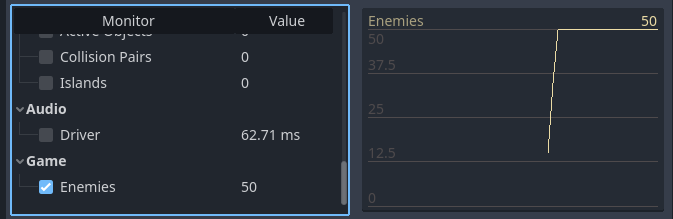
Esempio di grafico dell'editor da un monitor delle prestazioni personalizzato
Nota
Il codice di gestione del monitor di prestazioni non deve necessariamente risiedere nello stesso script dei nodi stessi. È possibile scegliere di spostare la registrazione del monitor di prestazioni e la funzione getter in un autoload.
Consultare un monitor delle prestazioni in un progetto
Se si desidera visualizzare il valore del monitor delle prestazioni nella finestra del progetto in esecuzione (anziché nell'editor), usare Performance.get_custom_monitor("category/name") per recuperare il valore del monitor personalizzato. È possibile visualizzare il valore usando un Label, RichTextLabel, Disegno personalizzato in 2D, Testo 3D, ecc.
Questo metodo può servire anche nei progetti esportati (in modalità debug e rilascio), consentendo di creare visualizzazioni al di fuori dell'editor.