Attention: Here be dragons
This is the latest
(unstable) version of this documentation, which may document features
not available in or compatible with released stable versions of Godot.
Checking the stable version of the documentation...
Testo 3D
Introduzione
In un progetto, può capitare che ci sia bisogno di creare del testo come parte di una scena 3D e non solo nell'HUD. Godot offre due metodi per farlo: il nodo Label3D e la risorsa TextMesh per un nodo MeshInstance3D.
Inoltre, Godot permette di posizionare i nodi Control in base alla posizione di un punto 3D sulla telecamera. Questo può servire da alternativa al testo 3D "vero" in situazioni in cui Label3D e TextMesh non sono flessibili abbastanza.
Vedi anche
È possibile vedere il testo 3D in azione attraverso il progetto demo 3D Labels and Texts.
Questa pagina non spiega come visualizzare una scena per GUI in un ambiente 3D. Per informazioni su come fare ciò, consulta il progetto demo GUI in 3D.
Label3D
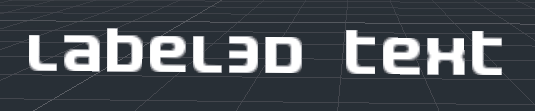
Label3D si comporta come un nodo Label, ma nello spazio 3D. A differenza del nodo Label, questo nodo Label3D non eredita le proprietà di un tema di GUI. Tuttavia, il suo aspetto rimane personalizzabile e utilizza la stessa sotto-risorsa font dei nodi Control (e include supporto per renderizzare i font MSDF).
Vantaggi
Label3D è più veloce da generare rispetto a TextMesh. Sebbene entrambi utilizzino un meccanismo di caching per renderizzare i nuovi glifi una sola volta, Label3D sarà comunque più veloce da (ri)generare, soprattutto per testi lunghi. Questo può evitare scatti durante il gioco sulle CPU di fascia bassa o sui dispositivi mobili.
Label3D può utilizzare font bitmap e font dinamici (con e senza MSDF o mipmap). Sotto questo aspetto, ciò lo rende più flessibile rispetto a TextMesh, soprattutto per renderizzare font con contorni auto-intersecanti o font colorati (emoji).
Vedi anche
Consulta Utilizzare i font per le linee guida su come configurare l'importazione dei font.
Limitazioni
Normalmente, Label3D ha un'interazione limitata con un ambiente 3D. Può essere occluso dalla geometria e illuminato da sorgenti luminose se il flag Shaded è abilitato. Tuttavia, non proietterà ombre nemmeno se Cast Shadow è impostato su On nelle proprietà del Label3D. Questo perché il nodo genera internamente una mesh quadrangolare (un glifo per ogni quad) con texture trasparenti e ha le stesse limitazioni di Sprite3D. Possono inoltre apparire problemi di ordinamento della trasparenza quando più Label3D si sovrappongono, soprattutto se hanno contorni.
Lo si può mitigare impostando la modalità di trasparenza del Label3D su Alpha Cut, a scapito di una resa del testo meno fluida. La modalità di trasparenza Opaque Pre-Pass può preservare la fluidità del testo, anche consentendo al Label3D di proiettare ombre, ma persisteranno alcuni problemi di ordinamento della trasparenza.
Consulta la sezione Ordinamento della trasparenza nella pagina di limitazioni del rendering 3D per ulteriori informazioni.
La qualità di resa del testo può risentirne anche quando Label3D si vede da lontano. Per migliorare la qualità di resa del testo, abilita i mipmap sul font oppure modifica il font per utilizzare il rendering MSDF.
TextMesh

La risorsa TextMesh ha similitudini con Label3D. Entrambe visualizzano testo in una scena 3D, e utilizzano la stessa sotto-risorsa font. Tuttavia, anziché generare quadrangoli trasparenti, TextMesh genera una geometria 3D che rappresenta i contorni dei glifi e possiede le proprietà di una mesh. Pertanto, come predefinito, un oggetto TextMesh è ombreggiato e proietta automaticamente ombre sull'ambiente. A un oggetto TextMesh si può anche applicare un materiale (inclusi shader personalizzati).
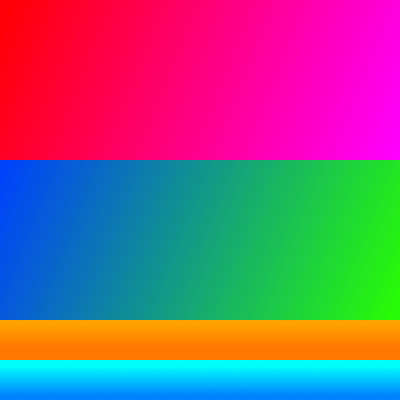
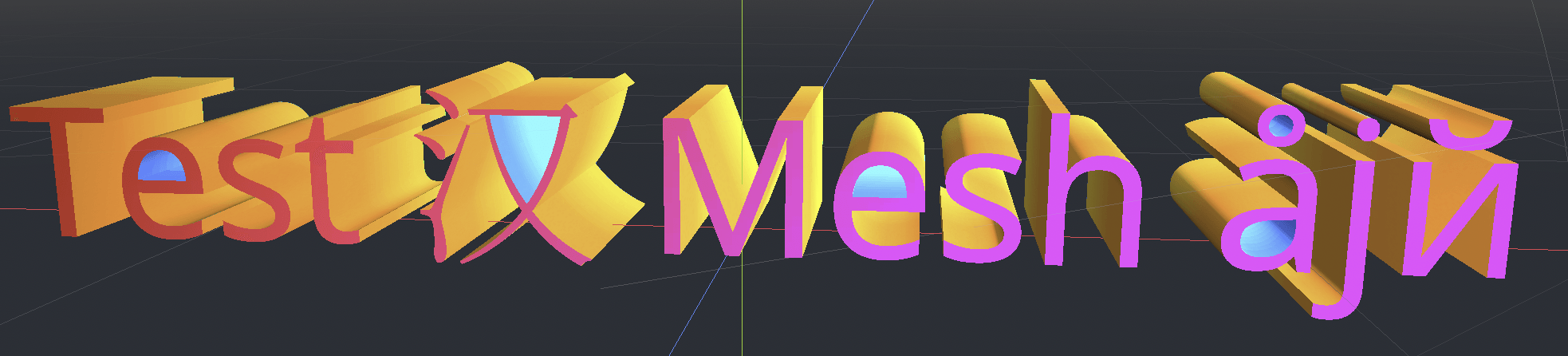
Ecco un esempio di texture e di come viene applicata alla mesh. Puoi usare la texture qui sotto come riferimento per la mappa delle coordinate UV nella mesh generata:
Vantaggi
TextMesh ha alcuni vantaggi rispetto a Label3D:
TextMesh può usare una texture per modificare il colore del testo per ogni bordo.
La geometria di TextMesh può avere una profondità vera e propria, dando ai glifi un aspetto 3D.
TextMesh può usare shader personalizzati, a differenza di Label3D.
Limitazioni
Ci sono alcune limitazioni per TextMesh:
Nessun supporto integrato per i contorni, a differenza di Label3D. Però lo si può simulare tramite uno shader personalizzato.
Sono supportati solo i font dinamici (
.ttf,.otf,.woff,.woff2). I font bitmap nei formati.fnto.fontnon sono supportati.I font con contorni che si intersecano tra loro non appariranno correttamente. Se si riscontrano problemi di rendering con font scaricati da siti web come Google Fonts, provare a scaricare il font dal sito web ufficiale dell'autore.
L'antialiasing nel rendering di testo richiede di abilitare un metodo di antialiasing sull'intera scena, come l'MSAA, l'FXAA e antialiasing temporale (TAA). Se nessun metodo di antialiasing è abilitato, il testo apparirà granuloso, soprattutto da lontano. Consultare Antialiasing 3D per ulteriori informazioni.
Nodo Label proiettato (o qualsiasi altro Control)
Esiste un'ultima soluzione, più complessa da configurare, ma che offre la massima flessibilità: proiettare un nodo 2D nello spazio 3D. Ciò si può ottenere utilizzando il valore restituito dal metodo unproject_position su un nodo Camera3D nella funzione _process() di uno script. Questo valore restituito si dovrebbe poi utilizzare per impostare la proprietà position di un nodo Control.
Consultare la demo waypoint 3D per un esempio di questo.
Vantaggi
È possibile utilizzare qualsiasi nodo di controllo, inclusi Label, RichTextLabel o persino nodi come Button. Ciò consente una formattazione potente e un'interazione con l'interfaccia grafica.
L'approccio basato su script consente la massima libertà di posizionamento. Ad esempio, rende molto più facile fissare i nodi di controllo ai bordi dello schermo quando questi escono dallo schermo (per i marcatori 3D nel gioco).
La tematizzazione dei controlli è rispettata. Ciò consente una personalizzazione più facile che si applica globalmente all'intero progetto.
Limitazioni
I controlli proiettati non possono essere occlusi in alcun modo dalla geometria 3D. È possibile utilizzare un RayCast per nascondere completamente il controllo se la sua posizione di destinazione è occlusa da un collisore, ma ciò non consente di nascondere parzialmente il controllo dietro un muro.
È possibile cambiare le dimensioni del testo in base alla distanza regolando la proprietà
scaledel controllo, ma bisogna farlo manualmente. Label3D e TextMesh se ne prendono cura automaticamente, a scapito della flessibilità (non è possibile impostare una dimensione minima/massima del testo in pixel).Bisogna gestire i cambi di risoluzione e di proporzioni tramite codice, il che può risultare complesso.
Dovrei usare Label3D, TextMesh o un Control proiettato?
Nella maggior parte dei casi, Label3D è consigliato perché è più facile da configurare e offre una maggiore qualità di rendering (soprattutto se l'antialiasing 3D è disabilitato).
Per casi d'uso avanzati, TextMesh è più flessibile in quanto consente di stilizzare il testo con shader personalizzati. Gli shader personalizzati consentono di modificare la geometria finale, ad esempio curvando il testo lungo una superficie. Poiché il testo è una geometria 3D vera e propria, può facoltativamente avere profondità e contribuire anche all'illuminazione globale.
Se c'è bisogno di funzionalità come BBCode o supporto dei temi di Control, utilizzare un nodo RichTextLabel proiettato è l'unica opzione.