Attention: Here be dragons
This is the latest
(unstable) version of this documentation, which may document features
not available in or compatible with released stable versions of Godot.
Checking the stable version of the documentation...
Плагины инспектора
Панель инспектора позволяет создавать пользовательские виджеты для редактирования свойств с помощью плагинов. Это может быть полезно при работе с пользовательскими типами данных и ресурсами, хотя вы также можете использовать эту функцию для изменения виджетов инспектора для встроенных типов. Вы можете создавать пользовательские элементы управления для конкретных свойств, целых объектов и даже отдельные элементы управления, связанные с определёнными типами данных.
В этом руководстве объясняется, как использовать классы EditorInspectorPlugin и EditorProperty для создания пользовательского интерфейса для целых чисел, заменяя поведение по умолчанию кнопкой, которая генерирует случайные значения от 0 до 99.
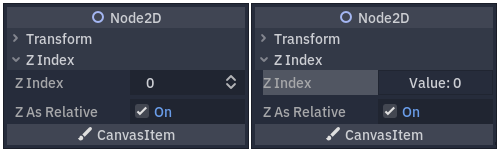
Поведение по умолчанию слева и конечный результат справа.
Настройка вашего плагина
Чтобы начать, создайте новый пустой плагин.
См. также
Инструкции по настройке нового плагина см. в руководстве Создание плагинов.
Предположим, вы назвали папку плагина my_inspector_plugin. В этом случае у вас должна появиться новая папка addons/my_inspector_plugin, содержащая два файла: plugin.cfg и plugin.gd.
Как и прежде, plugin.gd — это скрипт, расширяющий EditorPlugin, и вам необходимо добавить новый код для его методов _enter_tree и _exit_tree. Чтобы настроить плагин-инспектор, необходимо загрузить его скрипт, а затем создать и добавить экземпляр, вызвав add_inspector_plugin(). Если плагин отключён, необходимо удалить добавленный экземпляр, вызвав remove_inspector_plugin().
Примечание
Здесь вы загружаете скрипт, а не упакованную сцену. Поэтому следует использовать new() вместо instantiate().
# plugin.gd
@tool
extends EditorPlugin

var plugin


func _enter_tree():
    plugin = preload("res://addons/my_inspector_plugin/my_inspector_plugin.gd").new()
    add_inspector_plugin(plugin)


func _exit_tree():
    remove_inspector_plugin(plugin)
// Plugin.cs
#if TOOLS
using Godot;

[Tool]
public partial class Plugin : EditorPlugin
{
    private MyInspectorPlugin _plugin;

    public override void _EnterTree()
    {
        _plugin = new MyInspectorPlugin();
        AddInspectorPlugin(_plugin);
    }

    public override void _ExitTree()
    {
        RemoveInspectorPlugin(_plugin);
    }
}
#endif
Взаимодействие с инспектором
Для взаимодействия с панелью инспектора ваш скрипт my_inspector_plugin.gd должен расширять класс EditorInspectorPlugin. Этот класс предоставляет несколько виртуальных методов, влияющих на обработку свойств инспектором.
Чтобы скрипт хоть как-то действовал, он должен реализовывать метод _can_handle(). Эта функция вызывается для каждого отредактированного объекта Object и должна возвращать true, если плагин должен обрабатывать объект или его свойства.
Примечание
Это включает в себя любой Resource, прикрепленный к объекту.
Вы можете реализовать четыре других метода для добавления элементов управления в инспектор в определённых позициях. Методы _parse_begin() и _parse_end() вызываются только один раз в начале и в конце разбора каждого объекта соответственно. Они позволяют добавлять элементы управления в верхнюю или нижнюю часть макета инспектора, вызывая add_custom_control().
При разборе объекта редактор вызывает методы _parse_category() и _parse_property(). Помимо add_custom_control(), здесь можно вызывать add_property_editor() и add_property_editor_for_multiple_properties(). Используйте эти два последних метода для добавления элементов управления на основе EditorProperty.
# my_inspector_plugin.gd
@tool
extends EditorInspectorPlugin

var RandomIntEditor = preload("res://addons/my_inspector_plugin/random_int_editor.gd")


func _can_handle(object):
    # We support all objects in this example.
    return true


func _parse_property(object, type, name, hint_type, hint_string, usage_flags, wide):
    # We handle properties of type integer.
    if type == TYPE_INT:
        # Create an instance of the custom property editor and register
        # it to a specific property path.
        add_property_editor(name, RandomIntEditor.new())
        # Inform the editor to remove the default property editor for
        # this property type.
        return true
    else:
        return false
// MyInspectorPlugin.cs
#if TOOLS
using Godot;

[Tool]
public partial class MyInspectorPlugin : EditorInspectorPlugin
{
    public override bool _CanHandle(GodotObject @object)
    {
        // We support all objects in this example.
        return true;
    }

    public override bool _ParseProperty(GodotObject @object, Variant.Type type,
        string name, PropertyHint hintType, string hintString,
        PropertyUsageFlags usageFlags, bool wide)
    {
        // We handle properties of type integer.
        if (type == Variant.Type.Int)
        {
            // Create an instance of the custom property editor and register
            // it to a specific property path.
            AddPropertyEditor(name, new RandomIntEditor());
            // Inform the editor to remove the default property editor for
            // this property type.
            return true;
        }

        return false;
    }
}
#endif
Добавление интерфейса для редактирования свойств
Класс EditorProperty — это особый тип Control, который может взаимодействовать с редактируемыми объектами в доке инспектора. Он ничего не отображает, но может содержать любые другие элементы управления, включая сложные сцены.
Скрипт, расширяющий EditorProperty, состоит из трех основных частей:
Для настройки структуры узлов управления необходимо определить метод
_init().Вам следует реализовать
_update_property()для обработки изменений данных извне.В какой-то момент должен быть выдан сигнал, информирующий инспектора о том, что элемент управления изменил свойство с помощью
emit_changed.
Вы можете отобразить свой виджет двумя способами. Используйте только метод add_child() по умолчанию, чтобы отобразить его справа от имени свойства, и используйте add_child(), а затем set_bottom_editor(), чтобы разместить его под именем.
# random_int_editor.gd
@tool
extends EditorProperty


# The main control for editing the property.
var property_control = Button.new()
# An internal value of the property.
var current_value = 0
# A guard against internal changes when the property is updated.
var updating = false


func _init():
    # Add the control as a direct child of EditorProperty node.
    add_child(property_control)
    # Make sure the control is able to retain the focus.
    add_focusable(property_control)
    # Setup the initial state and connect to the signal to track changes.
    refresh_control_text()
    property_control.pressed.connect(_on_button_pressed)


func _on_button_pressed():
    # Ignore the signal if the property is currently being updated.
    if (updating):
        return

    # Generate a new random integer between 0 and 99.
    current_value = randi() % 100
    refresh_control_text()
    emit_changed(get_edited_property(), current_value)


func _update_property():
    # Read the current value from the property.
    var new_value = get_edited_object()[get_edited_property()]
    if (new_value == current_value):
        return

    # Update the control with the new value.
    updating = true
    current_value = new_value
    refresh_control_text()
    updating = false

func refresh_control_text():
    property_control.text = "Value: " + str(current_value)
// RandomIntEditor.cs
#if TOOLS
using Godot;

[Tool]
public partial class RandomIntEditor : EditorProperty
{
    // The main control for editing the property.
    private Button _propertyControl = new Button();
    // An internal value of the property.
    private int _currentValue = 0;
    // A guard against internal changes when the property is updated.
    private bool _updating = false;

    public RandomIntEditor()
    {
        // Add the control as a direct child of EditorProperty node.
        AddChild(_propertyControl);
        // Make sure the control is able to retain the focus.
        AddFocusable(_propertyControl);
        // Setup the initial state and connect to the signal to track changes.
        RefreshControlText();
        _propertyControl.Pressed += OnButtonPressed;
    }

    private void OnButtonPressed()
    {
        // Ignore the signal if the property is currently being updated.
        if (_updating)
        {
            return;
        }

        // Generate a new random integer between 0 and 99.
        _currentValue = (int)GD.Randi() % 100;
        RefreshControlText();
        EmitChanged(GetEditedProperty(), _currentValue);
    }

    public override void _UpdateProperty()
    {
        // Read the current value from the property.
        var newValue = (int)GetEditedObject().Get(GetEditedProperty());
        if (newValue == _currentValue)
        {
            return;
        }

        // Update the control with the new value.
        _updating = true;
        _currentValue = newValue;
        RefreshControlText();
        _updating = false;
    }

    private void RefreshControlText()
    {
        _propertyControl.Text = $"Value: {_currentValue}";
    }
}
#endif
Используя приведенный выше пример кода, вы сможете создать пользовательский виджет, который заменит элемент управления по умолчанию SpinBox для целых чисел на Button, который генерирует случайные значения.